
This page is not an official page of the app or its developer, but an independent editorial publication created for informational and commentary purposes. Unless expressly stated otherwise, neither the app nor its developer is affiliated with, endorsed by, sponsored by, authorized by, or otherwise officially connected with MWM, Apple, Google Play, the app publisher, or the app's developer, and nothing on this page implies that the app was developed using MWM's services. Any trademarks, logos, screenshots, and other content remain the property of their respective owners.


Canadia Bank App
Finally, a banking app that puts you in command. It transforms daily transactions into effortless control, giving users mastery over their money.
Downloads
100k+User Rating
Total Ratings
564Publisher
Category
FinanceLocales
3Latest Version
5.6.0Size
171.0 MBFirst Released
Apr 7, 2025An in-depth evaluation of the key features empowering secure, convenient, and comprehensive digital banking for its target audience.
Analytical Overview: Canadia Bank App 5.0 Core Capabilities
Seamless Fund Transfers & Cross-Border Payments
The app facilitates rapid fund transfers between personal accounts, to other local banks via Bakong, and enables convenient cross-border QR code payments using KHQR, Thai QR, and Viet QR, significantly simplifying regional financial transactions.
Robust Security & Transaction Control
This tool safeguards user accounts with multi-factor authentication options including PIN, biometrics, and device binding. It also provides real-time transaction notifications and customizable auto-logout for heightened security.
Comprehensive Multi-Currency Account Management
It allows users to view and manage all their accounts across multiple currencies (KHR, USD, THB, CNY), access detailed transaction histories with filters, and personalize their account display for a tailored banking experience.
Dynamic Card Management
The app enables users to instantly apply for virtual cards, monitor card balances and statements, set spending limits, and manage security functions such as activating, blocking, or resetting PINs for both debit and credit cards.
Streamlined Bill Payments
It allows users to quickly pay various bills, including mobile top-ups and services, manage templates for recurring payments, and speed up transactions by scanning invoices directly.
CanaPoints Loyalty Program
The app rewards user engagement by allowing them to earn CanaPoints on transactions, which can be redeemed for exclusive rewards, QR payments, or mobile top-ups, enhancing the overall banking value.
Frequently Asked Questions
Everything you need to know about Canadia Bank App
What is the Canadia Bank App 5.0?
The Canadia Bank App 5.0 is a redesigned mobile banking application providing a personalized financial hub. It offers powerful tools for managing finances, transactions, and money control securely anytime, anywhere.
What types of accounts can I view in the Canadia Bank App 5.0?
The Canadia Bank App 5.0 allows users to view savings, current, loans, and term deposit accounts. It also supports checking balances in KHR, USD, THB, and CNY.
How can I transfer funds using the Canadia Bank App 5.0?
The Canadia Bank App 5.0 facilitates fast transfers between Canadia Bank accounts, to other local banks via Bakong, and through QR code payments using KHQR, Thai QR, and Viet QR.
Can I pay bills and top-up mobile credit with the Canadia Bank App 5.0?
Yes, the Canadia Bank App 5.0 supports quick bill payments, including mobile top-ups and service payments. Users manage payment templates for recurring payments and scan invoices to speed up the process.
What security features does the Canadia Bank App 5.0 offer?
The Canadia Bank App 5.0 protects accounts with PIN, secret word, biometric authentication (Face ID/fingerprint), and device binding. It also sends real-time transaction notifications.
Can users personalize the interface of the Canadia Bank App 5.0?
Yes, the Canadia Bank App 5.0 allows users to personalize language, home screen background, font size, and choose between dark and light modes for a customized experience.
Does the Canadia Bank App 5.0 have a loyalty program?
Yes, the Canadia Bank App 5.0 includes the CanaPoints Loyalty Program. Users earn CanaPoints with every transaction and redeem them for rewards, QR payments, or mobile top-ups.
How does the Canadia Bank App 5.0 facilitate card management?
The Canadia Bank App 5.0 enables users to apply for virtual cards, view balances and history, set spending limits, and activate, block, or unblock cards. It also allows PIN resets.
The following screenshots and description are sourced directly from the app's official store listing and are the property of the app developer.
App Store
Screenshots

This screenshot highlights the personalized financial hub, showcasing the main account balance and recent transaction history for quick financial oversight.
Financial Hub Overview
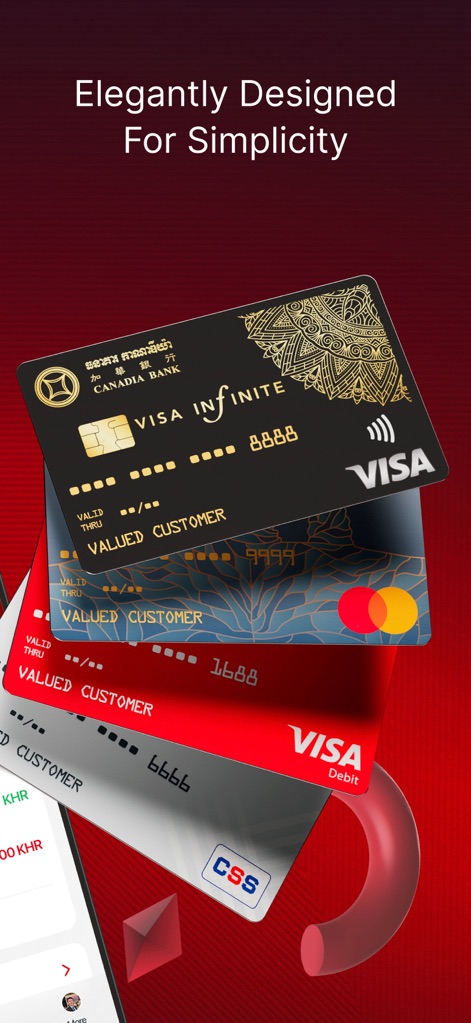
Observe the comprehensive card management system, featuring multiple card types and the elegant visual design that simplifies financial organization.
Sophisticated Card Portfolio

Explore the integrated CanaPoints Loyalty Program, demonstrating how users earn and redeem points for exclusive rewards and track their progress.
CanaPoints Program
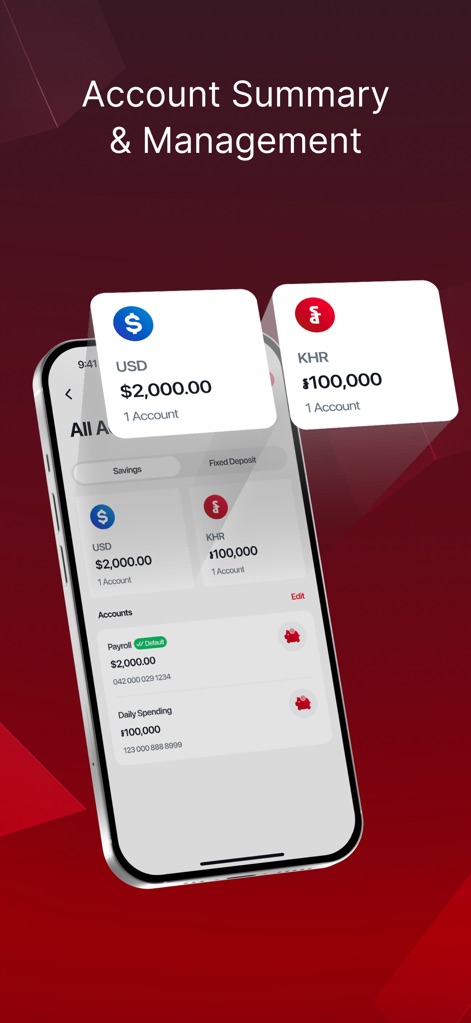
This screen illustrates the intuitive account summary, allowing users to view balances across multiple currencies and manage various account types efficiently.
Multi-Currency Management
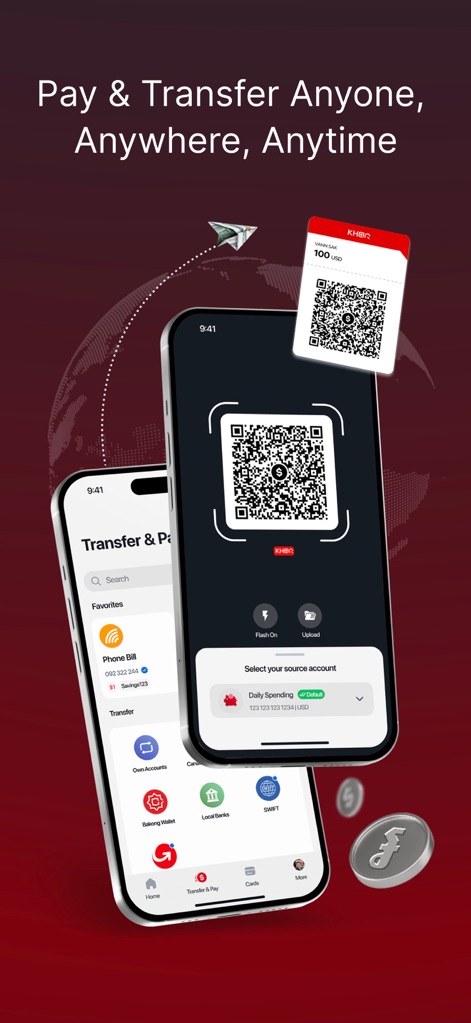
Witness the streamlined process for transfers and payments, featuring convenient QR code scanning and clear source account selection for quick transactions.
Effortless Payments & Transfers
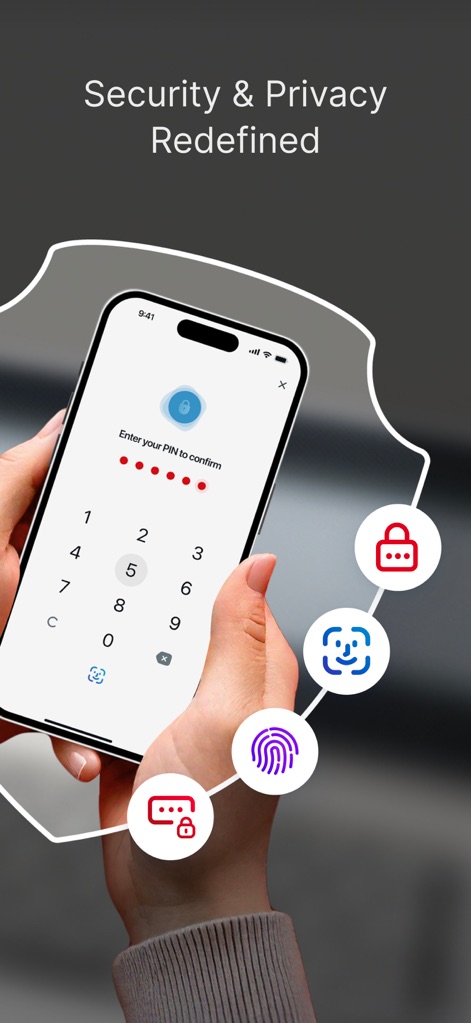
Discover the app's advanced security measures, incorporating PIN entry with biometric authentication options like fingerprint and facial recognition for user protection.
Robust Security Features
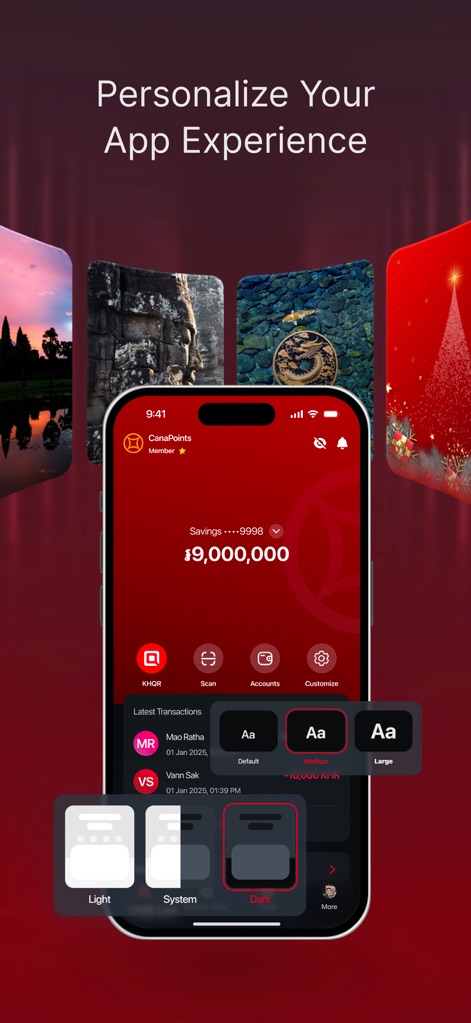
Explore the extensive customization options available, enabling users to personalize their app experience with adjustable font sizes and various home screen backgrounds.
Personalized Banking Experience

Observe the quick and easy bill payment functionality, allowing users to settle utility bills like electricity with detailed transaction summaries and a clear 'Pay' action.
Instant Utility Settlements
Description
Download
More Like This
Apps with similar features and user experience

Enpara Bank Cep Şube
Enpara Bank Anonim Sirketi

Alinma App - تطبيق الإنماء
Alinma Bank

Huntington Mobile Banking
The Huntington National Bank, Inc

國泰世華網路銀行CUBE
Cathay United Bank

中國信託行動銀行
CTBC Bank Co., Ltd.

FNB Banking App
FirstRand Bank Limited

Riyad Bank App
Riyad Bank

CIMB OCTO MY
CIMB Bank Berhad

Regions Mobile
Regions Financial
This page is not an official page of the app or its developer, but an independent editorial publication created for informational and commentary purposes. Unless expressly stated otherwise, neither the app nor its developer is affiliated with, endorsed by, sponsored by, authorized by, or otherwise officially connected with MWM, Apple, Google Play, the app publisher, or the app's developer, and nothing on this page implies that the app was developed using MWM's services. Any trademarks, logos, screenshots, and other content remain the property of their respective owners.