
This page is not an official page of the app or its developer, but an independent editorial publication created for informational and commentary purposes. Unless expressly stated otherwise, neither the app nor its developer is affiliated with, endorsed by, sponsored by, authorized by, or otherwise officially connected with MWM, Apple, Google Play, the app publisher, or the app's developer, and nothing on this page implies that the app was developed using MWM's services. Any trademarks, logos, screenshots, and other content remain the property of their respective owners.


Cecotec
Cecotec's creation hands users ultimate environmental command. Never manage your smart home; dominate it.
Downloads
500k+User Rating
Total Ratings
984Publisher
Category
UtilitiesLocales
32Latest Version
1.2.7Size
207.4 MBFirst Released
May 4, 2020An evaluation of key functionalities for modern smart home management.
Cecotec App: Core Features Analysis
Personalized Automation
It allows users to create personalized routines, enabling automation of daily tasks and preferences for enhanced convenience and efficiency in home management.
Remote Control & Scheduling
The app provides the capability to program and control Cecotec devices remotely, offering convenience and flexibility from any location.
Unified Smart Home Management
This tool features a single, intuitive platform for managing a comprehensive range of Cecotec smart home appliances, streamlining home automation.
Granular Device Customization
It enables users to precisely adjust modes, speeds, and temperatures of their devices, tailoring operations to specific needs and preferences.
Real-time Appliance Monitoring
The app provides real-time monitoring of appliance status, ensuring users are always informed about their devices' operation and performance.
Broad Cecotec Device Compatibility
It connects to an extensive array of Cecotec smart devices, including robot vacuums, air treatment products, and climate control systems, expanding smart home capabilities.
Frequently Asked Questions
Everything you need to know about Cecotec
What is the Cecotec app?
The Cecotec app is the official application for smart control of a wide range of Cecotec home devices. It allows users to manage their appliances remotely from a single platform.
Which Cecotec devices are compatible with the Cecotec app?
The Cecotec app supports Conga robot vacuums, Windroid window cleaners, fans, portable air conditioners, air treatment products, heaters, Cecofry air fryers, and Bongo electric scooters.
Can I control my Cecotec devices remotely using the Cecotec app?
Yes, the Cecotec app allows users to schedule and control their devices from any location. This functionality is listed as a main feature of the application.
How does the Cecotec app allow me to adjust device settings?
The Cecotec app enables users to adjust modes, speeds, and temperatures for their devices. Screenshots #2 and #3 display controls for temperature, mode, and speed settings.
Can I create custom routines in the Cecotec app?
Yes, the Cecotec app allows users to create personalized routines for their daily life. This feature automates device functions based on user preferences.
Does the Cecotec app provide real-time monitoring of appliances?
Yes, the Cecotec app monitors the status of your appliances in real time. Screenshots #2 and #3 show real-time data like ambient temperature, configured temperature, and air quality readings.
The following screenshots and description are sourced directly from the app's official store listing and are the property of the app developer.
App Store
Screenshots

This initial view prominently displays the Cecotec brand logo, signaling the gateway to intelligent home management and device integration.
Brand Introduction
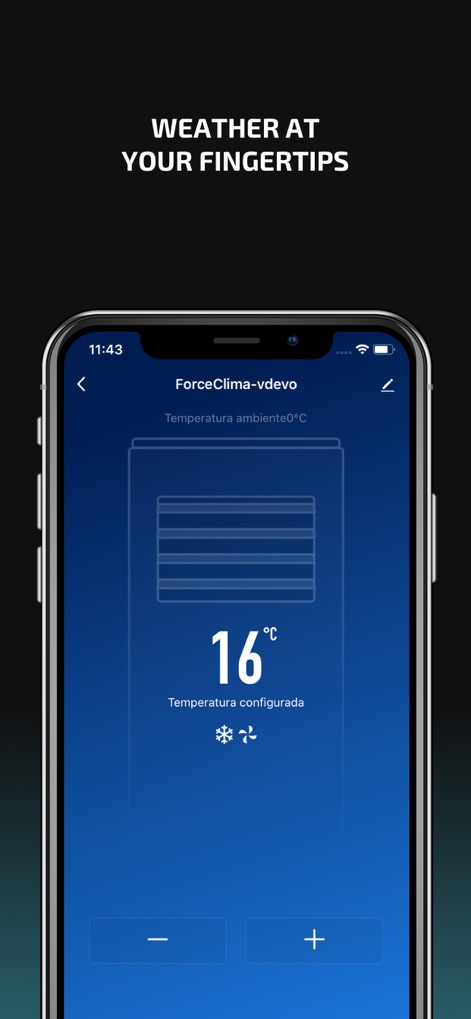
Users can precisely manage their home environment, observing the current temperature display and easily adjusting settings with intuitive control buttons.
Climate Command
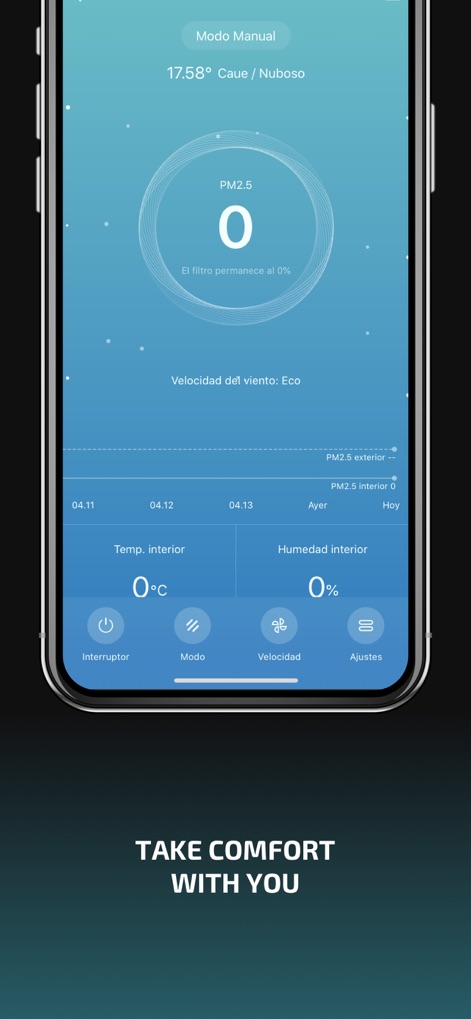
The app provides detailed environmental insights, showing PM2.5 levels and offering quick access to device settings like the power switch and mode selection.
Environmental Mastery
Description
Download
More Like This
Apps with similar features and user experience

Skylight App
Glimpse LLC.

Remote Control for Samsung TV・
Red Paket sp. z o.o.

BARDI Smart Home
nadi digital indonesia, pt

LG TV Remote Control Smart TVs
Aleh Piashkou

UPPAbaby Home
Thorley Industries LLC

Calex Smart
Electro Cirkel Retail BV

Remote Control for TV Stick
Pol Nadal Serra

Firestick・Fire TV Remote Stick
Jonathan Reed

Bravia Controller - Sony TV
YONGXING JIN
This page is not an official page of the app or its developer, but an independent editorial publication created for informational and commentary purposes. Unless expressly stated otherwise, neither the app nor its developer is affiliated with, endorsed by, sponsored by, authorized by, or otherwise officially connected with MWM, Apple, Google Play, the app publisher, or the app's developer, and nothing on this page implies that the app was developed using MWM's services. Any trademarks, logos, screenshots, and other content remain the property of their respective owners.