
This page is not an official page of the app or its developer, but an independent editorial publication created for informational and commentary purposes. Unless expressly stated otherwise, neither the app nor its developer is affiliated with, endorsed by, sponsored by, authorized by, or otherwise officially connected with MWM, Apple, Google Play, the app publisher, or the app's developer, and nothing on this page implies that the app was developed using MWM's services. Any trademarks, logos, screenshots, and other content remain the property of their respective owners.


Chat Backup Assistant: Textify
Protect your digital legacy with forensic message recovery, biometric-locked archives, and creative tools to turn your private memories into captivating stories.
Downloads
50K+User Rating
Total Ratings
7K+Publisher
Category
UtilitiesLocales
9Latest Version
1.3Size
49.9 MBFirst Released
Apr 16, 2025Complete Protection for Your Digital Conversations
Textify bridges the gap between secure data backup and creative preservation, ensuring your most precious chats are never lost and always private.
Recover Deleted Moments
Lost an important thread? Use deep forensic scanning to restore deleted messages and media from your favorite apps effortlessly.
Biometric Privacy Shield
Keep prying eyes away with FaceID and encryption. Your sensitive conversations stay locked in a secure, centralized vault.
Frequently Asked Questions
Everything you need to know about Chat Backup Assistant: Textify
Can Textify recover deleted messages?
Yes, Chat Backup Assistant: Textify can recover deleted chat history. Its advanced backup technology performs a deep forensic scan to restore lost messages, photos, and media from messaging apps.
How does Chat Backup Assistant: Textify organize messages?
Chat Backup Assistant: Textify automatically categorizes and organizes conversations into a neat, centralized archive. This intelligent organization allows users to quickly locate any message, reducing search time.
Does Textify offer message encryption for privacy?
Yes, Textify provides built-in encryption to safeguard sensitive messages. Users can protect their content behind a password, ensuring that confidential information is shielded from unauthorized access.
What security features does Textify include to protect chats?
Textify includes robust security features such as password protection, automatic locking, and biometric authentication options like face recognition or fingerprint scanning. These ensure personal conversations remain private.
Can I create stories using media backed up with Chat Backup Assistant: Textify?
Yes, Textify allows users to transform backed-up photos and videos into captivating stories. It offers powerful editing tools to add music, stickers, text, special effects, and customize content.
What editing tools are available in Textify for media files?
Textify provides easy-to-use editing tools including crop, trim, rotate, resize, and filters for media files. Users can create professional-quality content and share it across social networks.
How do I cancel my Chat Backup Assistant: Textify subscription?
Users can cancel their Textify subscription anytime through their iTunes account settings. This must be done 24 hours before the end of a free trial or subscription period to avoid being charged.
What happens to my free trial if I purchase a premium Textify subscription early?
Any unused portion of a free trial period will be forfeited when a user purchases a premium subscription during the free trial period for Chat Backup Assistant: Textify.
What is Chat Backup Assistant: Textify?
Chat Backup Assistant: Textify is a comprehensive backup and content management solution. It safeguards digital communications, protects privacy, and helps bring memories to life through secure chat history management and creative media editing.
Is Chat Backup Assistant: Textify secure for chat backups?
Yes, Textify ensures chat backup security through encryption, password protection, automatic locking, and biometric authentication options. It secures chat history and sensitive messages from unauthorized access.
The following screenshots and description are sourced directly from the app's official store listing and are the property of the app developer.
App Store
Screenshots

Surprised woman holding a smartphone under the heading Recover Deleted Messages
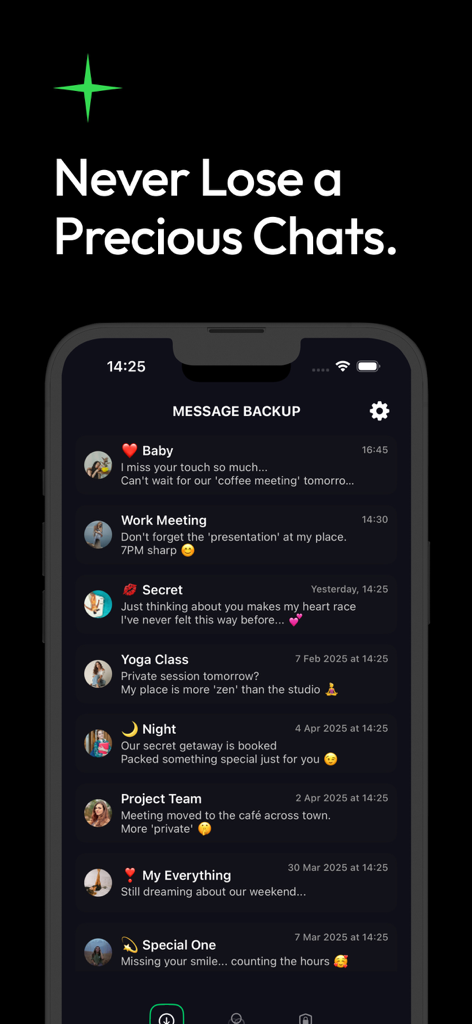
A mobile interface showing a list of backed up messages organized by categories such as Baby, Work Meeting, and Secret chats.
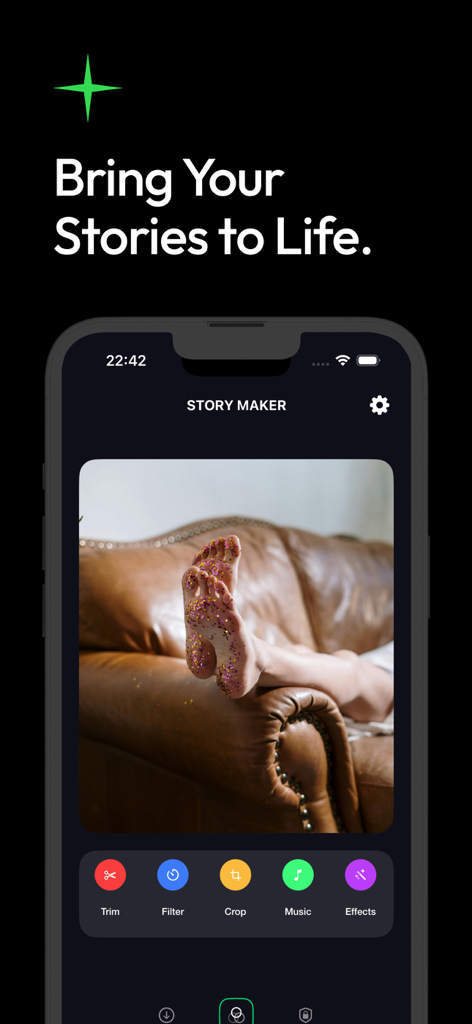
Textify app Story Maker interface with photo editing tools and media effects
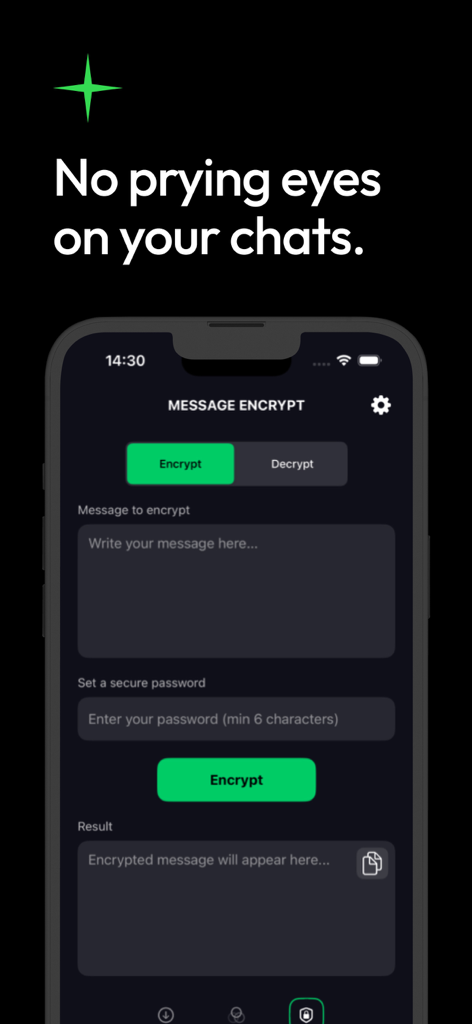
Textify app screen showing the message encryption tool with fields for entering text and setting a secure password
Description
Download
More Like This
Apps with similar features and user experience

Recover Deleted Messages: WARB
SERPINTY DIJITAL HIZMETLER LIMITED SIRKETI

REWA: Backup Messages Pro
Emre Boyabat

WT Chat Backup Restore Delete
Liger Infotech

WT Backup & Restore - StoryBox
Jayshri Pipaliya

Dual Messenger & Duo Web
菲 张

TextPort: Text Message Export
TSUBASA TECHNOLOGIES LIMITED LIABILITY COMPANY

Delox Recover Deleted Messages
Gizem Yildirim

AppToCloud - Copy My Data
Zipo Apps Ltd.

Backup my Chats & Photos
Arpana Singh
This page is not an official page of the app or its developer, but an independent editorial publication created for informational and commentary purposes. Unless expressly stated otherwise, neither the app nor its developer is affiliated with, endorsed by, sponsored by, authorized by, or otherwise officially connected with MWM, Apple, Google Play, the app publisher, or the app's developer, and nothing on this page implies that the app was developed using MWM's services. Any trademarks, logos, screenshots, and other content remain the property of their respective owners.