Cirrus SR22
Cirrus SR22
Download on App Store

This page is not an official page of the app or its developer, but an independent editorial publication created for informational and commentary purposes. Unless expressly stated otherwise, neither the app nor its developer is affiliated with, endorsed by, sponsored by, authorized by, or otherwise officially connected with MWM, Apple, Google Play, the app publisher, or the app's developer, and nothing on this page implies that the app was developed using MWM's services. Any trademarks, logos, screenshots, and other content remain the property of their respective owners.

Logo of Cirrus SR22
Download on App Store

Cirrus SR22

Eliminate guesswork with the ultimate iPad EFB. Calculate Mass & Balance, takeoff performance, and 'what-if' scenarios in seconds using actual POH data tailored specifically for your SR22 G1, G2, or G3.

Key Figures

Downloads

500

User Rating

1.0/5

Total Ratings

0

Publisher

Gyronimo, LLC

Category

Education

Locales

1

Latest Version

2.1

Size

16.9 MB

First Released

Apr 27, 2015
Features

Precision Flight Planning for the Cirrus Pilot

The ultimate EFB tool for SR22 Performance and Mass & Balance. Replace manual charts with high-resolution, interactive calculations based on actual POH data.

Interactive Mass & Balance

Set passenger and baggage weights in seconds using intuitive sliders. Instantly verify your CG envelope with high-resolution graphical displays.

Instant Performance Math

Get precise takeoff, climb, and landing data in seconds. Calculate ground roll and density altitude using real-time environment variables.

The following screenshots and description are sourced directly from the app's official store listing and are the property of the app developer.

App Store

Screenshots
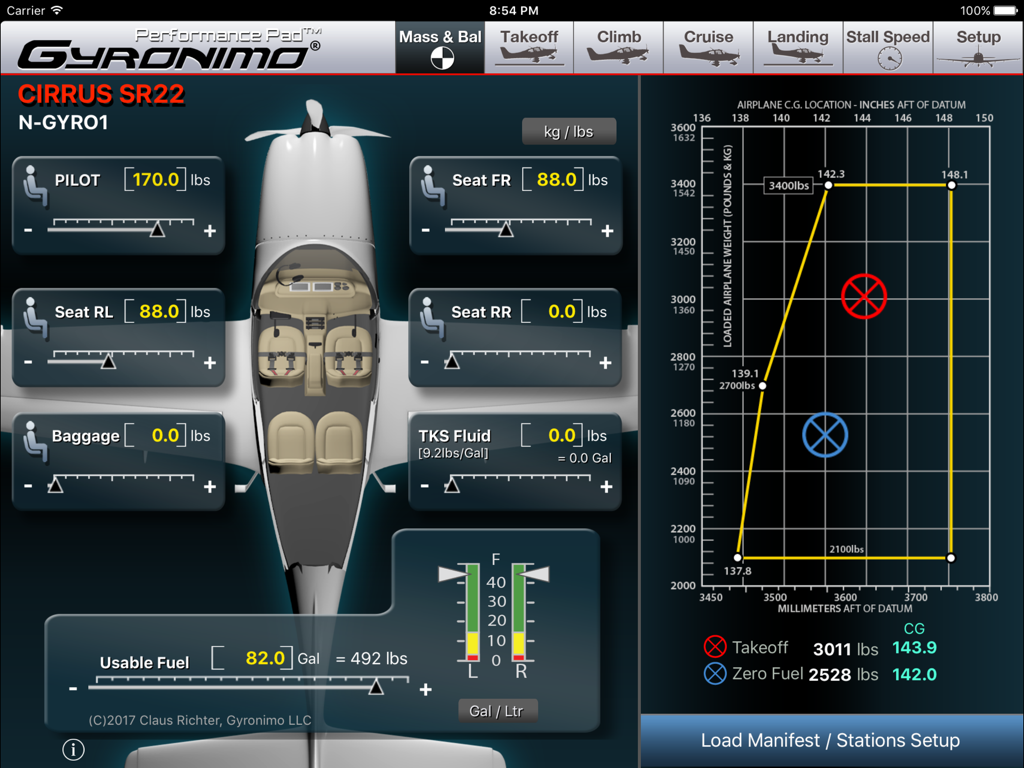
Cirrus SR22 - A screenshot of the Cirrus SR22 Performance Pad app showing weight and balance calculations with adjustable sliders and a center of gravity envelope graph.
A screenshot of the Cirrus SR22 Performance Pad app showing weight and balance calculations with adjustable sliders and a center of gravity envelope graph.

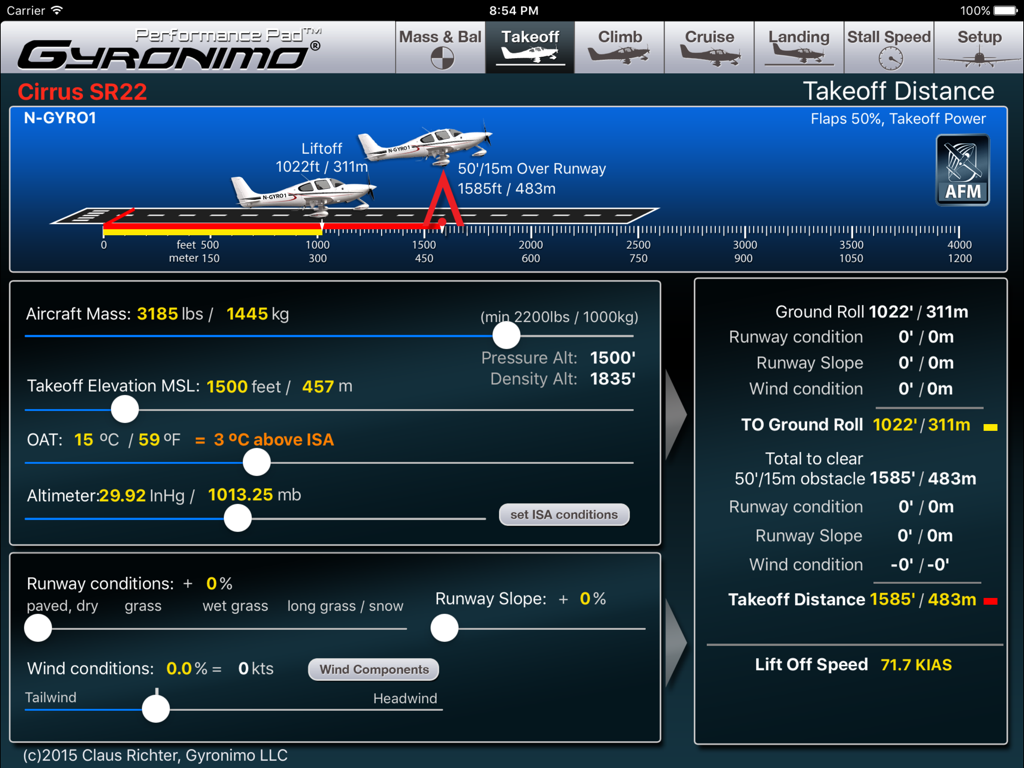
Cirrus SR22 - Takeoff distance and ground roll calculation screen for Cirrus SR22 aircraft with adjustable sliders for mass and environmental conditions.
Takeoff distance and ground roll calculation screen for Cirrus SR22 aircraft with adjustable sliders for mass and environmental conditions.

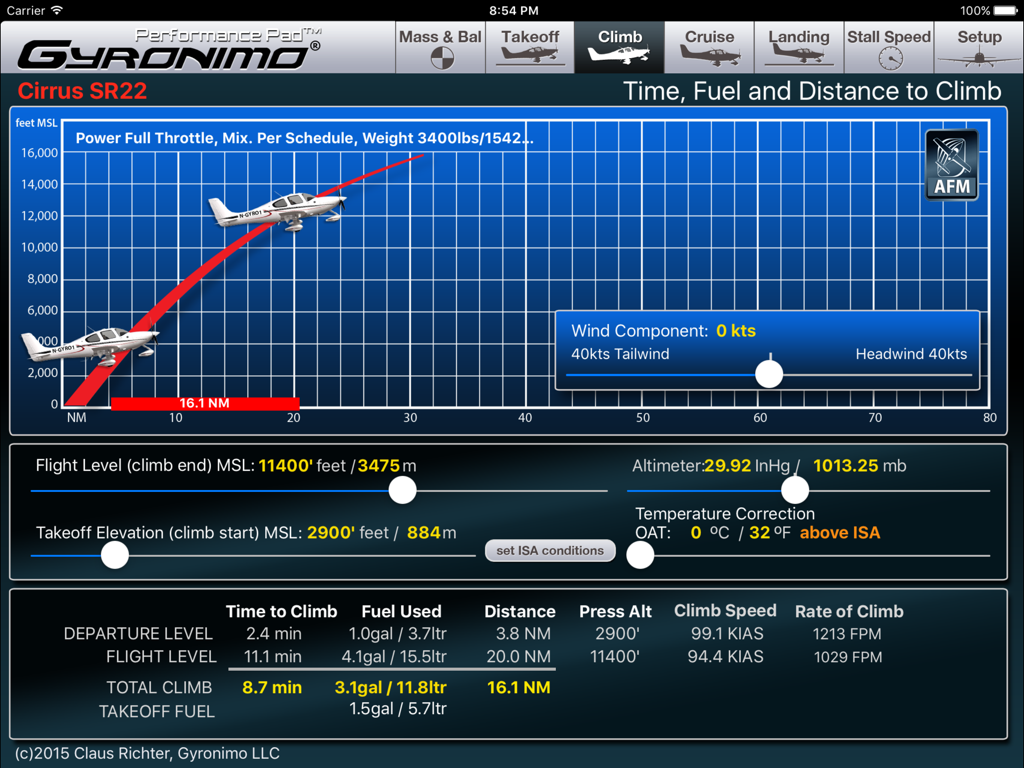
Cirrus SR22 - iPad interface showing climb performance calculations for the Cirrus SR22 including time fuel and distance to climb
iPad interface showing climb performance calculations for the Cirrus SR22 including time fuel and distance to climb

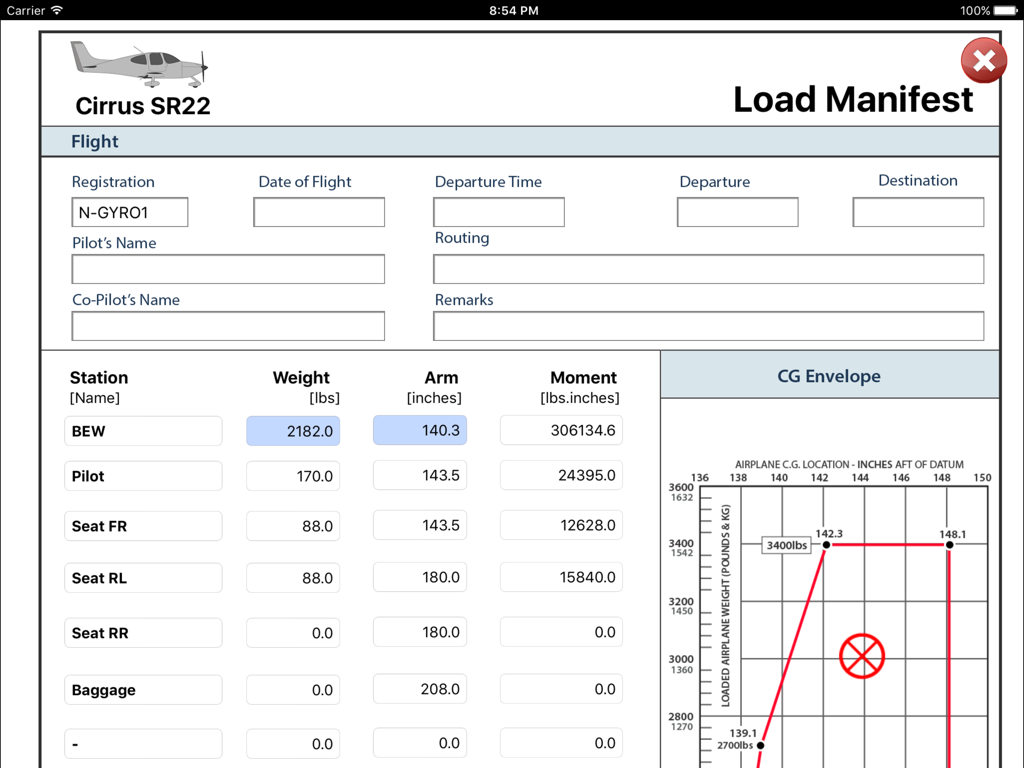
Cirrus SR22 - iPad screenshot of the Cirrus SR22 load manifest screen showing weight calculations and the center of gravity envelope graph
iPad screenshot of the Cirrus SR22 load manifest screen showing weight calculations and the center of gravity envelope graph

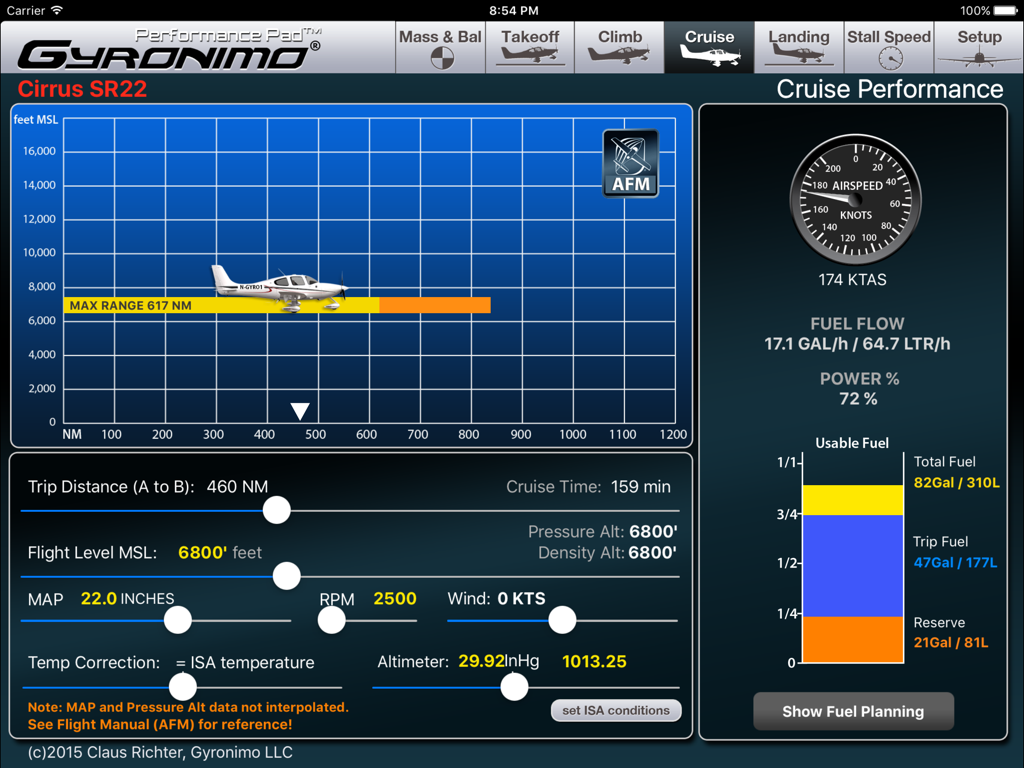
Cirrus SR22 - Cirrus SR22 cruise performance page with fuel planning and flight data

Cirrus SR22 cruise performance page with fuel planning and flight data

Description

Gyronimo Performance Pad -Cirrus SR22- The ultimate EFB computer for Mass & Balance and Performance. *** now with 81/92 US Gal Fuel Tank Option to accommodate SR22 G1, G2 and G3 models. *** For SR22 model with MTOW 3400 lbs with Cirrus Perspective Avionics System (based on flight manual revision Sept. 2011) The W&B and performance computations can be used for all SR22 serial numbers (0002-3026 and subsequent). ++ TKS Anti Icing Fluid option. **** NOW WITH PROFESSIONAL LOAD MANIFEST ***** Sign the manifest on the iPad and send it via email. Calculate and interpolate performance data using the actual values from the Pilot's Operating Handbook (POH). Finish your complete fight planning in just a few seconds. Performance planning has never been easier and quicker. Results are updated immediately and displayed in high resolution graphics, enhanced for the iPad 2/3 and iPad Mini. Change all important values using sliders. Experiment with the results and create "what if" scenarios in no time. Find your optimal cruise altitude, takeoff ground roll, landing distance, climb data and stall speeds. The Performance Pad has seven main pages: 1. The Mass & Balance (or Weight & Balance) Page Calculates Center of Gravity, Moments, Takeoff and Zero Fuel Mass. Set person and baggage weights in seconds using the convenient sliders. Check if the CG is within limits using three graphical displays - Moment Envelope - CG envelope - Aircraft axis 2. The Takeoff Page Using the actual data from the Operating Handbook the Performance Pad calculates and displays Ground Roll and Landing Distance based on: - Aircraft Mass - Takeoff Elevation in MSL (Pressure Altitude and Density Altitude will be computed) - Outside Air Temperature (OAT) - Altimeter Setting - Runway Conditions (i.e. paved dry to long grass or snow) - Runway Slope - Wind Conditions Wind Components Computer - Use the Wind Components page to determine your headwind or tailwind component. Rotate the wind dial to set wind direction, set windspeed and the results will be transferred to your takeoff computations automatically! 3. The Climb page Calculates time, fuel and distance based on - Difference between Takeoff Elevation and intended Flight Level - Altimeter Setting - Outside Air Temperature (OAT) - Altimeter Setting - Headwind or Tailwind Component Also the Rate of Climb and Climb Speed will be displayed. 4. The Cruise Page Using the actual data from the Pilot's Operating Handbook you can determine the optimal cruise altitude based on - Trip Distance - Flight Level - MAP / RPM - Temperature - Wind and Altimeter Setting 5. Landing Page Calculates Ground Roll and Landing Distance based on wind, elevation, altimeter setting etc. Like on the Takeoff Page you can use the Wind Components Computer to quickly determine head- or tailwind components 6. Stall Speed Page. Calculates The Stall Speed based on Bank Angle and Flap Settings. Stall Speed will be computed as KIAS and KCAS using the actual values from the POH. 7. Setup - Load and Save up to five Aircraft Settings and Scenarios. - Send a Mass & Balance Summary to your email address. - Visit our video channel and watch tutorials and video manuals. Mode Switch: The Performance Pad can be used in two Modes: "Individual Mode" All calculations can be done independently from each other. "Plan Mode" Calculated values will be forwarded to the next page and an additional "Flight Summary Page" is available. Gyronimo LLC is not affiliated with Cirrus Aircraft. All Gyronimo Performance Pads for Cirrus aircrafts are not sponsored or endorsed by Cirrus Aircraft. The author disclaims any liability for any direct, indirect, incidental, or consequential losses or damages in connection with your access to or use of this software. The information contained in this software is for general information purposes only.

Download

Download on App Store

This page is not an official page of the app or its developer, but an independent editorial publication created for informational and commentary purposes. Unless expressly stated otherwise, neither the app nor its developer is affiliated with, endorsed by, sponsored by, authorized by, or otherwise officially connected with MWM, Apple, Google Play, the app publisher, or the app's developer, and nothing on this page implies that the app was developed using MWM's services. Any trademarks, logos, screenshots, and other content remain the property of their respective owners.