
This page is not an official page of the app or its developer, but an independent editorial publication created for informational and commentary purposes. Unless expressly stated otherwise, neither the app nor its developer is affiliated with, endorsed by, sponsored by, authorized by, or otherwise officially connected with MWM, Apple, Google Play, the app publisher, or the app's developer, and nothing on this page implies that the app was developed using MWM's services. Any trademarks, logos, screenshots, and other content remain the property of their respective owners.


Clover Go - Dashboard & POS
Accept secure payments, track real-time sales, and manage your team directly from your phone. The professional, all-in-one POS built for the modern entrepreneur on the move.
Downloads
957K+User Rating
Total Ratings
63K+Publisher
Category
FinanceLocales
3Latest Version
5.8Size
163.6 MBFirst Released
Sep 24, 2015Everything You Need to Run and Grow
Turn your mobile device into a powerful command center. Process payments, track performance, and manage your team on the go with professional tools built for modern entrepreneurs.
Effortless Mobile Payments
Use Tap to Pay on iPhone to accept contactless payments instantly—no extra hardware or card reader required.
Real-Time Sales Tracking
Get instant visibility into your top-selling items and employee performance to make smarter business decisions.
Frequently Asked Questions
Everything you need to know about Clover Go - Dashboard & POS
What is Clover Go?
Clover Go extends the power of Clover by enabling merchants to accept payments, track sales, and manage their business directly from their mobile device from anywhere.
Can I accept payments with Clover Go without extra hardware?
Yes, Clover Go allows you to accept contactless payments using Tap to Pay on iPhone without any additional hardware. You can also record cash payments directly through the app.
Does Clover Go provide security for transactions?
Yes, Clover Go ensures built-in security for transactions. Every transaction is encrypted end-to-end to protect customer data and the business.
How can I get support for the Clover Go app?
You can contact Clover Go support by phone or email 24/7/365. The app also offers an option to request a call from within the app via More > Help > Call me.
Do I need a Clover merchant account to use Clover Go?
Yes, a Clover merchant account is required to use the Clover Go app. If you do not have an account, you must sign up for Clover at www.clover.com.
Can I track my sales performance with Clover Go?
Yes, Clover Go allows you to track sales in real-time, identify popular items, and view a sales overview. The app also provides sales reports and insights into net sales.
Does Clover Go support rooted or jailbroken devices?
No, Clover Go does not support rooted or jailbroken devices. This restriction is in place due to potential security risks associated with such devices.
How can Clover Go help me manage my business?
Clover Go helps manage your business by tracking sales, identifying popular items, viewing employee performance, and managing orders. It consolidates these functions on your mobile device for convenience.
Can I view employee performance with Clover Go?
Yes, the Clover Go app allows you to view employee performance. You can see transactions per employee and identify top employees by the amount collected, gaining insights into staff productivity.
Does Clover Go show open and closed orders?
Yes, Clover Go displays both open and closed orders in real time. Users can access a dedicated "Orders" section to monitor the status and details of all transactions.
The following screenshots and description are sourced directly from the app's official store listing and are the property of the app developer.
App Store
Screenshots
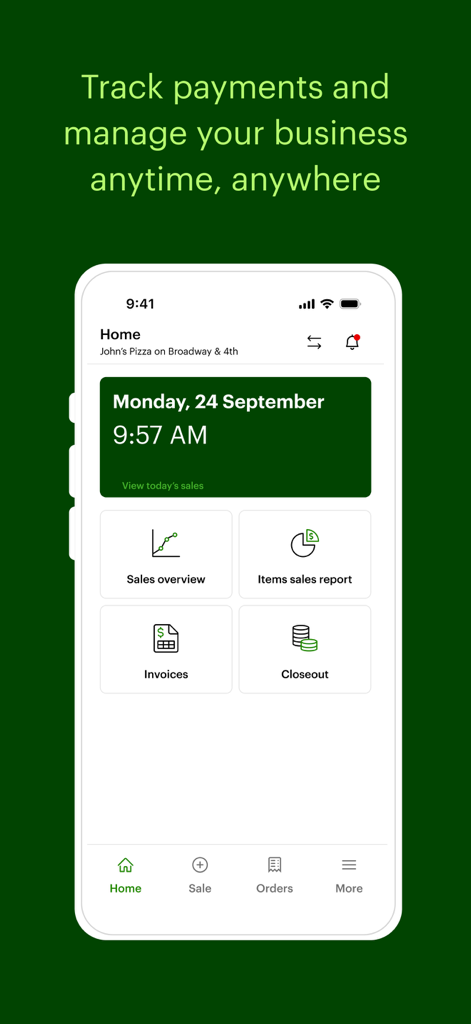
Clover Go mobile app home screen with business management dashboard tools
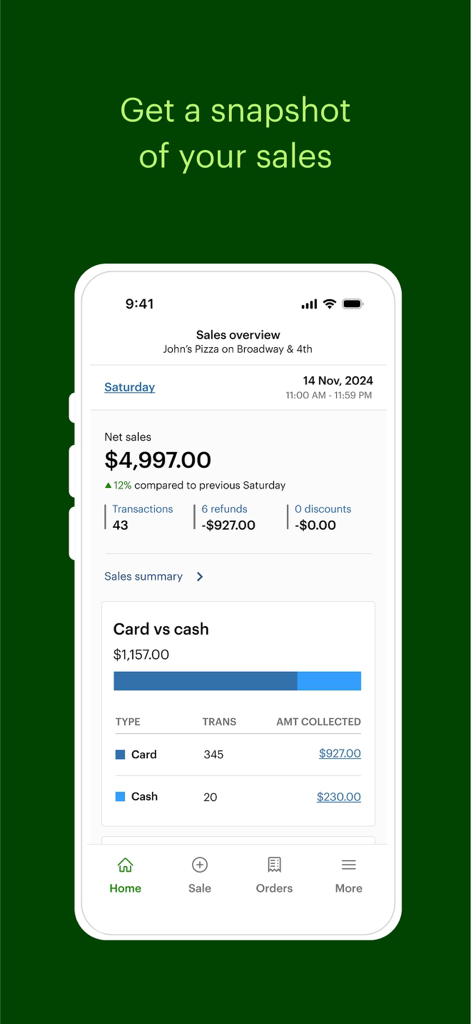
Clover Go mobile app dashboard displaying a sales overview with net sales and payment type breakdown
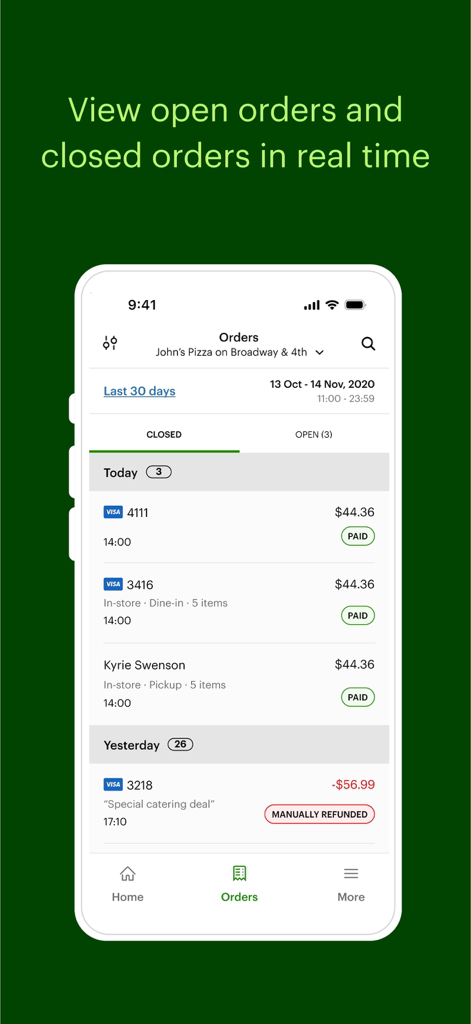
Clover Go app interface displaying real-time open and closed business orders
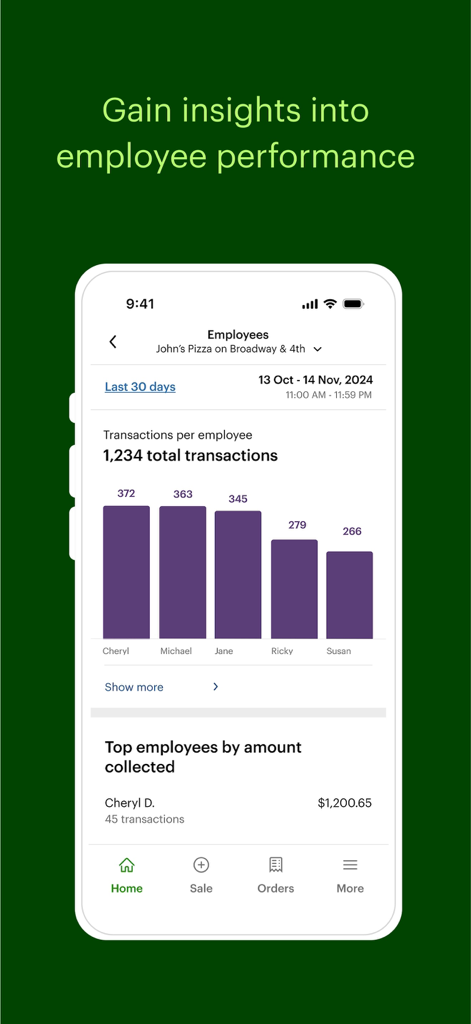
Clover Go app screen displaying a bar chart of transactions per employee and top performers by amount collected
Description
Download
More Like This
Apps with similar features and user experience

收钱吧-商家收款神器
Shanghai Shouqianba Internet Technology Co., Ltd.

Cielo Gestão: maquininha
Cielo S.A.

PagVendas NF-e, Vendas, Gestão
PagSeguro Internet S.A
Sổ Bán Hàng: Quản lý toàn diện
Finan Pte. Ltd.

智慧商贸进销存-库存、仓库管理进销存
Anhui QiSeMi Information Technology Co., Ltd.

МойСклад. Торговля, склад, CRM
Logneks OOO

TinyPOS:Make & Print Bills
志国 成

Jarbas: POS, Sales & Stock
Jarbas Software e Servicos LTDA

Alto’s POS & Inventory System
PromoTek, OSOO
This page is not an official page of the app or its developer, but an independent editorial publication created for informational and commentary purposes. Unless expressly stated otherwise, neither the app nor its developer is affiliated with, endorsed by, sponsored by, authorized by, or otherwise officially connected with MWM, Apple, Google Play, the app publisher, or the app's developer, and nothing on this page implies that the app was developed using MWM's services. Any trademarks, logos, screenshots, and other content remain the property of their respective owners.