
This page is not an official page of the app or its developer, but an independent editorial publication created for informational and commentary purposes. Unless expressly stated otherwise, neither the app nor its developer is affiliated with, endorsed by, sponsored by, authorized by, or otherwise officially connected with MWM, Apple, Google Play, the app publisher, or the app's developer, and nothing on this page implies that the app was developed using MWM's services. Any trademarks, logos, screenshots, and other content remain the property of their respective owners.


Collect by WeTransfer
Digital clutter no longer hinders; the app arms users with immediate command over their creative assets, transforming scattered input into visual clarity.
Downloads
12.5M+User Rating
Total Ratings
213.7KPublisher
Category
ProductivityLocales
12Latest Version
6.7.24Size
117.3 MBFirst Released
Mar 5, 2014Collect by WeTransfer: Key Features Analysis for Creative Professionals
An evaluation of core functionalities designed to streamline creative workflows and asset organization.
Visual Board Organization
It allows users to arrange all collected items into visually appealing boards, providing a clear overview and space for conceptualization.
Collaborative Workspaces
The app enables users to invite clients and colleagues to specific boards, fostering real-time collaboration and ensuring team alignment on projects.
Diverse Media Collection
The tool provides capabilities to save and organize a wide range of content, including images, videos, documents, and screenshots, from various sources.
Effortless Sharing
It facilitates the easy sharing of individual media assets or entire boards with external parties, streamlining communication and feedback loops.
Web Content Archiving
The app allows for the convenient storage of bookmarks, memes, and other interesting content found across various apps and the web.
Browser Extension Integration
This tool features a Chrome extension that allows users to swiftly save web content, such as links, images, and videos, directly into their boards without interrupting their workflow.
Frequently Asked Questions
Everything you need to know about Collect by WeTransfer
How do users save content with Collect by WeTransfer?
Users save content in Collect by WeTransfer by uploading images, videos, documents, and links, or directly capturing photos and notes within the app. Collect allows saving any inspiring digital item.
What types of content can Collect by WeTransfer save?
Collect by WeTransfer saves various content types, including photos, videos, songs, documents, screenshots, links, and notes. It supports capturing inspiration from across apps and web pages.
Can users organize saved items within Collect by WeTransfer?
Yes, users organize all their items in Collect by WeTransfer into visual boards. The app also uses AI-powered recommendations to help users find the right board for new photos.
Does Collect by WeTransfer support collaboration on boards?
Yes, Collect by WeTransfer supports collaboration. Users invite clients and colleagues to collaborate on boards, streamlining projects and ensuring everyone works from the same shared content.
Is Collect by WeTransfer available on iPad?
Yes, Collect by WeTransfer is available for iPad. It provides a native experience supporting both portrait and landscape modes, optimizing usability on the tablet device.
Does Collect by WeTransfer offer a Chrome extension?
Yes, Collect by WeTransfer offers a Chrome extension. This extension allows users to save links, photos, videos, and files directly from their browser for later use, enhancing workflow efficiency.
How does AI function within Collect by WeTransfer?
Collect by WeTransfer uses on-device AI to analyze photos and automatically sort them into themes. This AI also provides recommendations, helping users quickly find the correct board when adding new photos.
Is Collect by WeTransfer free to use?
Yes, Collect by WeTransfer is free for saving, organizing, and sharing inspiration. Users upgrade to Collect Pro to access backup and sync features for all boards and items across devices.
Who developed the Collect app?
Collect was developed by WeTransfer. WeTransfer has grown into a collection of tools designed for the creative process, with Collect being their app for saving and sharing inspiration.
The following screenshots and description are sourced directly from the app's official store listing and are the property of the app developer.
App Store
Screenshots

Seamless Collaboration
See how Collect by WeTransfer allows users to seamlessly collaborate with team members, indicated by the visible user avatars, and share boards easily with the dedicated share button.

Capture Inspiration
Observe how the app facilitates comprehensive content capture, showcasing a diverse grid of visual items and a prominent 'add' button for new additions.
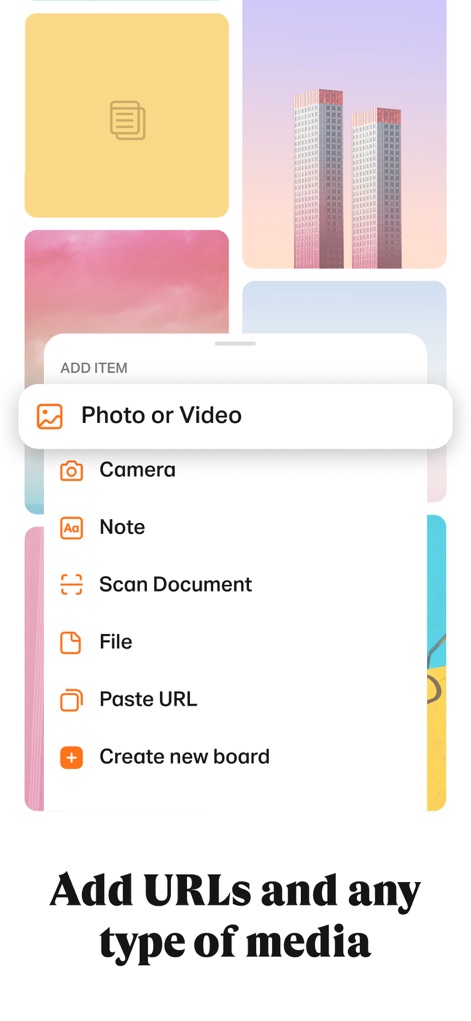
Versatile Content Input
Discover the tool's versatile input capabilities, featuring an expansive 'Add Item' menu with options like 'Photo or Video' and 'Paste URL' for diverse content capture.

Structured Boards
Explore how Collect organizes content into distinct boards like 'Inspiration' and 'Travel', presenting items within a clear, visual grid layout for intuitive organization.
Description
Download
More Like This
Apps with similar features and user experience

Hypelist: Create & Share Lists
Hypelist, Limited Liability Company

Pinterest, Inc.

InSave : Story, Reels, Video
Veselin Ilianov

Cosmos: Search & Discover
Cosmos Entity, INC.

Milanote
Milanote Pty Ltd

3D GO | 3D Printing Models
SimpleDev LLC

Albo: Save & Organize
Sortd:Do the thing Limited

Pearltrees
Broceliand

3Drop: 3D Printing Models STL
WU FU-HUNG
This page is not an official page of the app or its developer, but an independent editorial publication created for informational and commentary purposes. Unless expressly stated otherwise, neither the app nor its developer is affiliated with, endorsed by, sponsored by, authorized by, or otherwise officially connected with MWM, Apple, Google Play, the app publisher, or the app's developer, and nothing on this page implies that the app was developed using MWM's services. Any trademarks, logos, screenshots, and other content remain the property of their respective owners.