
This page is not an official page of the app or its developer, but an independent editorial publication created for informational and commentary purposes. Unless expressly stated otherwise, neither the app nor its developer is affiliated with, endorsed by, sponsored by, authorized by, or otherwise officially connected with MWM, Apple, Google Play, the app publisher, or the app's developer, and nothing on this page implies that the app was developed using MWM's services. Any trademarks, logos, screenshots, and other content remain the property of their respective owners.

Convert Image To PDF tools
Image-to-PDF conversion often comes with compromises. This app eliminates them, granting users seamless document creation on the fly.
Downloads
1M+User Rating
Total Ratings
44.5KPublisher
Category
ProductivityLocales
27Latest Version
1.3.79Size
4.0 MBFirst Released
Aug 16, 2020An analytical overview of capabilities supporting document conversion for diverse users.
Key Features of 'Convert Image To PDF tools'
Offline & Ad-Free Operation
The app functions completely offline and provides an ad-free environment, ensuring uninterrupted productivity and convenience for users regardless of internet availability.
Unlimited Conversions
This tool allows for an unlimited number of image-to-PDF conversions, catering to the needs of users who frequently handle large volumes of documents.
Intuitive User Interface
It offers an easy-to-use interface, enabling all users, from students to small business owners, to efficiently convert images to PDF without a steep learning curve.
Integrated Sharing Options
The app provides direct sharing capabilities, allowing users to quickly disseminate their converted PDF files via platforms like WhatsApp, email, and more, streamlining communication.
Custom File Renaming
It enables users to change file names post-conversion, which significantly aids in organizing documents and improving their discoverability within storage.
Direct PDF Printing
This feature allows for direct printing of converted PDF documents, offering a convenient way to obtain hard copies of important files without needing to export them first.
Frequently Asked Questions
Everything you need to know about Convert Image To PDF tools
What is the primary function of Convert Image To PDF tools?
Convert Image To PDF tools converts images to PDF format easily without losing image quality. It functions offline and is free of advertisements.
Does Convert Image To PDF tools work offline?
Yes, Convert Image To PDF tools functions completely offline. Users do not require an internet connection to convert images to PDF.
Does Convert Image To PDF tools contain advertisements?
No, Convert Image To PDF tools operates without any advertisements. Users experience an ad-free environment during image to PDF conversion.
What features are included with the Premium unlimited subscription in Convert Image To PDF tools?
The Premium unlimited subscription for Convert Image To PDF tools provides access to all features, including file sharing, renaming files, and unlimited image selection.
Is renaming converted PDF files a feature in Convert Image To PDF tools?
Yes, Convert Image To PDF tools allows users to rename converted PDF files. This functionality is accessible with an active Premium unlimited subscription.
How can users share converted PDF files from Convert Image To PDF tools?
Convert Image To PDF tools enables sharing of converted PDF files via platforms like WhatsApp or email. This specific sharing capability is available with a Premium unlimited subscription.
What are the billing options for the Premium unlimited subscription in Convert Image To PDF tools?
The Premium unlimited subscription for Convert Image To PDF tools offers billing options including weekly, monthly, or annually. The rate depends on the selected plan.
Does the Premium subscription in Convert Image To PDF tools automatically renew?
Yes, the Premium unlimited subscription in Convert Image To PDF tools automatically renews. Users must turn off auto-renew at least 24 hours before the current period ends to cancel.
Can users print documents directly from Convert Image To PDF tools?
Yes, Convert Image To PDF tools includes a printing capability. Users can print their converted PDF files directly from the application interface.
Does Convert Image To PDF tools offer unlimited image selection for conversion?
Yes, Convert Image To PDF tools offers unlimited image selection for conversion. This feature is exclusive to users with an active Premium unlimited subscription.
Does Convert Image To PDF tools support page numbering for PDF documents?
Yes, Convert Image To PDF tools supports page numbering. Users can add page numbers to their converted PDF files through the application's features.
Can users add borders to pages in Convert Image To PDF tools?
Yes, Convert Image To PDF tools provides the functionality to add borders to pages. This feature enhances the presentation of converted PDF documents.
How can users contact support for Convert Image To PDF tools?
Users can contact the developers of Convert Image To PDF tools via email at dev.abadi2015@gmail.com for problems or suggestions regarding the application.
The following screenshots and description are sourced directly from the app's official store listing and are the property of the app developer.
App Store
Screenshots

This tool provides a clear overview of converted PDF files, displaying both the unique file names and their exact file sizes for streamlined management.
Organized PDF Library
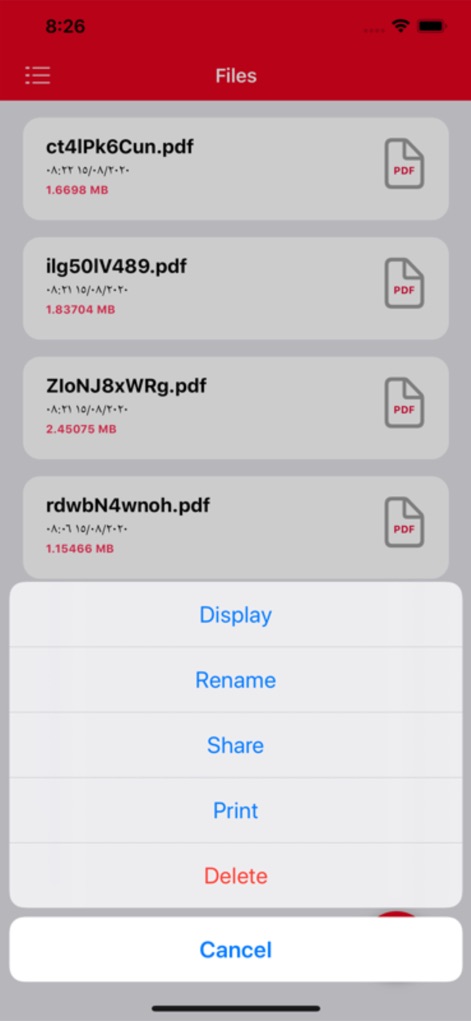
Users can efficiently manage their documents through the contextual action menu, offering quick options like renaming and sharing PDFs directly.
Streamlined File Actions

The app facilitates easy image import, allowing users to select multiple photos from their device's gallery or external storage options.
Intuitive Photo Selection

Before conversion, the tool presents a visual preview of all selected images, enabling users to confirm their choices and proceed with the PDF creation.
Conversion Preview Ready
Description
Download
More Like This
Apps with similar features and user experience

Photo to PDF Converter Scanner
Hendrik Folkerts
PDFMaker: JPG to PDF converter
Arthur Eduardo Skaetta Alvarez Desenvolvimento de Software LTDA.

PDF Converter -
晓珍 胡

Lexy PDF Viewer-Maker,Builder
MONSTER SHOW NETWORK TECHNOLOGY LIMITED

PDF Photos
Sarrada Software Inc

Image to PDF - Convert to PDF
WEBDIA INC.

Image to PDF Converter +
Jatin Maniya

Photo to PDF Converter Tool
Douglas (Hangzhou) Technology Co., LTD

PDF conversion assistant
福新 杨
This page is not an official page of the app or its developer, but an independent editorial publication created for informational and commentary purposes. Unless expressly stated otherwise, neither the app nor its developer is affiliated with, endorsed by, sponsored by, authorized by, or otherwise officially connected with MWM, Apple, Google Play, the app publisher, or the app's developer, and nothing on this page implies that the app was developed using MWM's services. Any trademarks, logos, screenshots, and other content remain the property of their respective owners.