
This page is not an official page of the app or its developer, but an independent editorial publication created for informational and commentary purposes. Unless expressly stated otherwise, neither the app nor its developer is affiliated with, endorsed by, sponsored by, authorized by, or otherwise officially connected with MWM, Apple, Google Play, the app publisher, or the app's developer, and nothing on this page implies that the app was developed using MWM's services. Any trademarks, logos, screenshots, and other content remain the property of their respective owners.


CubeSolver AI - Magic Cube 3D
Complexity crumbles. This app hands users mastery over any cube, turning baffling puzzles into solved realities.
Downloads
500k+User Rating
Total Ratings
30.2KPublisher
Category
UtilitiesLocales
3Latest Version
4.3.33Size
140.7 MBFirst Released
Mar 5, 2024An evaluation of core functionalities and their impact on magic cube enthusiasts.
Key Features Analysis: CubeSolver AI - Magic Cube 3D
Fast AI Solving & Real-time Timer
The app provides advanced algorithms that efficiently generate solutions for magic cubes, complemented by a real-time timer for practice and performance tracking.
Effortless Camera Input
It allows users to quickly scan all sides of their magic cube using their phone's camera, enabling the AI to automatically detect and analyze the cube's colors for immediate solving.
Versatile Multi-Cube Support
This tool supports solving a wide range of magic cube sizes, including 2x2, 3x3, and 4x4, catering to diverse cubing challenges for all skill levels.
Intelligent AI Recognition
The app employs cutting-edge AI to automatically recognize various cube sizes, from 2x2 to 4x4, simplifying the initial setup process for users.
Interactive 3D Visualization
It features a realistic 3D interface with stunning graphics and animations, allowing users to visualize each rotation and twist of the cube for better understanding and engagement.
Precise Manual Input
This tool offers an intuitive color picker UI, enabling users to manually input the cube's state with precision when preferred or required.
Frequently Asked Questions
Everything you need to know about CubeSolver AI - Magic Cube 3D
What is CubeSolver AI - Magic Cube 3D?
CubeSolver AI - Magic Cube 3D is an AI-powered utility app designed to solve 2x2, 3x3, and 4x4 magic cube puzzles. It provides a seamless and enjoyable experience for users to crack complex cube puzzles.
How does CubeSolver AI detect cube colors?
CubeSolver AI detects cube colors through its camera input feature. Users scan all sides of their cube, and the puzzle solver AI automatically analyzes and recognizes the colors.
Can I manually input cube colors in CubeSolver AI?
Yes, CubeSolver AI offers a manual input option. Users can utilize an intuitive color picker UI to precisely set up their cube's colors if they prefer not to use the camera scan.
What cube sizes can CubeSolver AI solve?
CubeSolver AI solves 2x2, 3x3, and 4x4 magic cubes. Its unique AI recognition system auto-recognizes these various cube sizes for efficient puzzle-solving assistance.
Does CubeSolver AI provide step-by-step guidance for solving?
Yes, CubeSolver AI provides easy-to-follow step-by-step instructions. This feature allows users to practice or learn the solving process efficiently with AI assistance and a real-time timer.
Where can I find video tutorials for CubeSolver AI?
CubeSolver AI offers video tutorials on its official YouTube channel, "CubeSolver-gzlig," and on TikTok "@ai_cubesolver." These resources help users enhance their cube-solving skills.
The following screenshots and description are sourced directly from the app's official store listing and are the property of the app developer.
App Store
Screenshots
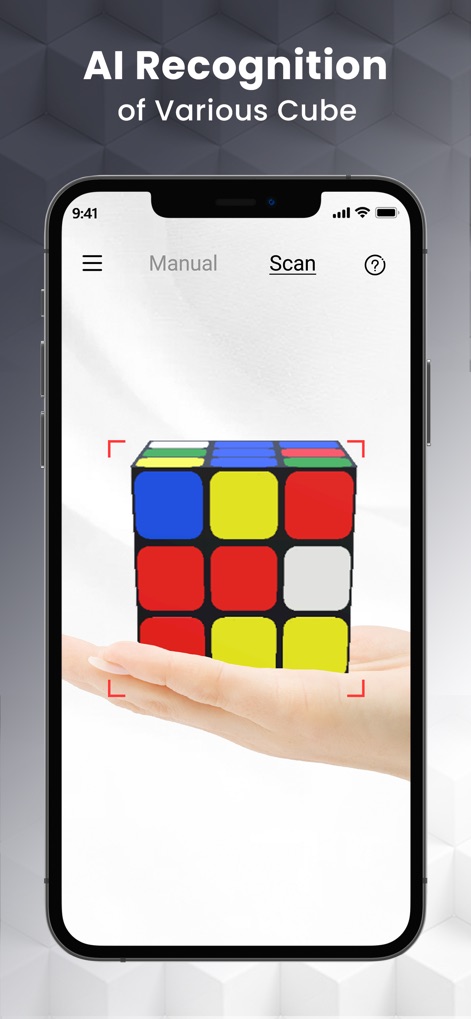
This tool demonstrates AI recognition capabilities and the intuitive scan interface, allowing users to quickly set up their puzzle.
Smart Cube Scan
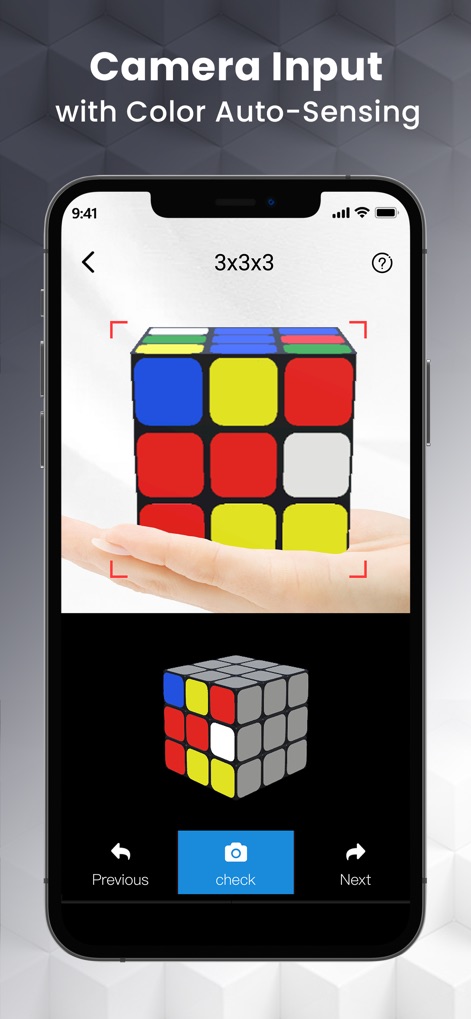
Users can leverage the app's camera input feature to auto-sense and verify cube colors, streamlining the setup process with a real-time 3D model.
Camera Cube Input

The app provides a precise manual input UI with an interactive color picker, enabling users to accurately recreate their cube's current state.
Precise Manual Setup

This tool initiates an instant solve solution, guiding users to position their physical cube as shown in the 3D visualization before beginning the process.
Instant Solve Solution

The app offers easy-to-follow step-by-step instructions, showcasing each move with clear visual guides and an interactive 3D animation of the cube.
Guided Solution Steps

Users can access comprehensive video guides for features like camera scanning, complemented by detailed text instructions for a complete understanding of the app's functionalities.
Comprehensive Video Guides
Description
Download
More Like This
Apps with similar features and user experience

LEGO® Builder: 3D Instructions
LEGO System A/S

BILT
BILT Incorporated

Puzzle School - 3D Cube Tutor
FS GIIKER TECHNOLOGY CO.,LTD

21Moves | Cube Puzzle Solver
Opitas Inc.

Miro - Scene & Friend
玮珩 蒋

Rubik's Cube Solver & Tutorial
Itiel Maimon

Love Patchwork & Quilting
Our Media Ltd

Origami - Fold & Learn
Andreas Bauer

IKEA Assembly Guide
Unrepped, Inc.
This page is not an official page of the app or its developer, but an independent editorial publication created for informational and commentary purposes. Unless expressly stated otherwise, neither the app nor its developer is affiliated with, endorsed by, sponsored by, authorized by, or otherwise officially connected with MWM, Apple, Google Play, the app publisher, or the app's developer, and nothing on this page implies that the app was developed using MWM's services. Any trademarks, logos, screenshots, and other content remain the property of their respective owners.