
This page is not an official page of the app or its developer, but an independent editorial publication created for informational and commentary purposes. Unless expressly stated otherwise, neither the app nor its developer is affiliated with, endorsed by, sponsored by, authorized by, or otherwise officially connected with MWM, Apple, Google Play, the app publisher, or the app's developer, and nothing on this page implies that the app was developed using MWM's services. Any trademarks, logos, screenshots, and other content remain the property of their respective owners.


Dialpad
Streamline your business with a unified workspace for calls, messages, and meetings. Stay productive anywhere with real-time AI transcription and seamless device switching.
Downloads
622K+User Rating
Total Ratings
4K+Publisher
Category
BusinessLocales
10Latest Version
51.0.0Size
303.9 MBFirst Released
Oct 14, 2014Communicate Without Limits
Dialpad brings your phone, messaging, and meetings together with powerful AI to help you work smarter from anywhere.
AI-Driven Productivity
Let Voice Intelligence™ handle the note-taking. Get real-time transcriptions and automated action items so you can stay fully present.
True Mobile Freedom
Transition seamlessly between your laptop and iPhone. Keep your professional identity consistent without carrying two devices.
Frequently Asked Questions
Everything you need to know about Dialpad
What is Dialpad and what does it do?
Dialpad is a comprehensive business communication platform that unifies calls, contacts, and messages. It supports various conversation types, from sales and support to one-on-one and group meetings, streamlining all business communications.
Can I switch calls between devices using Dialpad?
Yes, Dialpad enables users to seamlessly switch calls between devices, such as laptops, deskphones, and iOS devices, with a single tap. This ensures uninterrupted high-definition calls on the go.
Does Dialpad automatically take notes during calls?
Yes, Dialpad provides automatic note-taking for calls through its Voice Intelligence™ feature. Calls are transcribed automatically and presented to the user after the conversation concludes, ensuring no detail is missed.
What kind of information is included in Dialpad's contact profiles?
Dialpad's rich contact profiles go beyond basic information, displaying shared emails, upcoming events, and relevant details sourced directly from your CRM. This provides a holistic view of each contact.
Can I coach team members remotely with Dialpad?
Yes, Dialpad allows managers to monitor and coach calls remotely from a single interface. It includes listen-in features, enabling effective coaching even when not physically present at a desk.
Does Dialpad offer team messaging and collaboration features?
Yes, Dialpad supports streamlined messaging for instant communication and team collaboration. Users can engage in group chats, share multimedia like videos, and react to messages within the application.
How does Dialpad's AI assist with call management?
Dialpad's AI provides instant call summaries and recommends action items, as demonstrated by its 'AI Recap' feature. This functionality helps users quickly grasp key discussion points and follow up on tasks.
The following screenshots and description are sourced directly from the app's official store listing and are the property of the app developer.
App Store
Screenshots
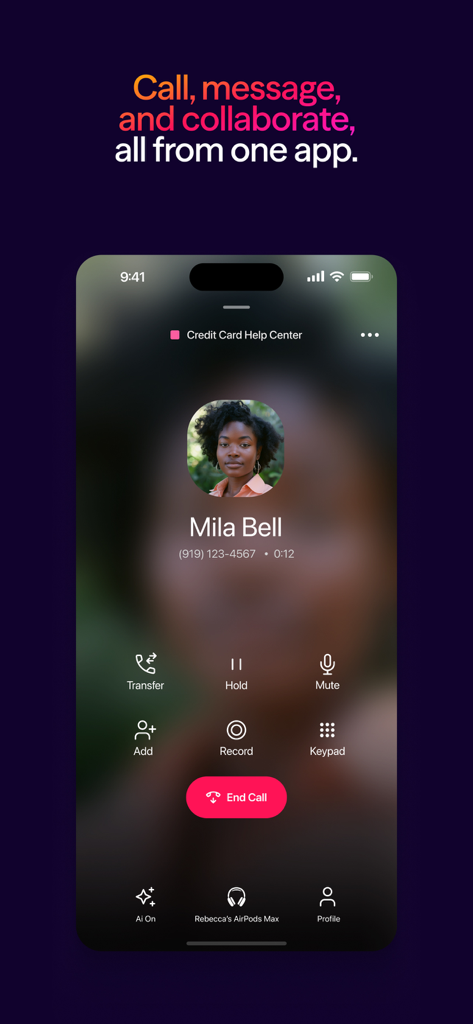
Dialpad mobile app showing an active professional business call with AI features enabled
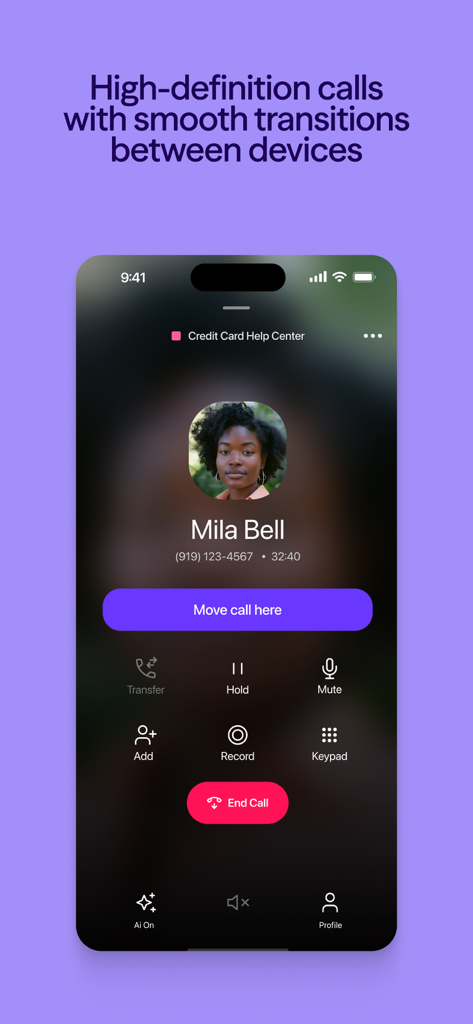
Dialpad mobile app interface showing an active call screen with a button to move the call to the current device
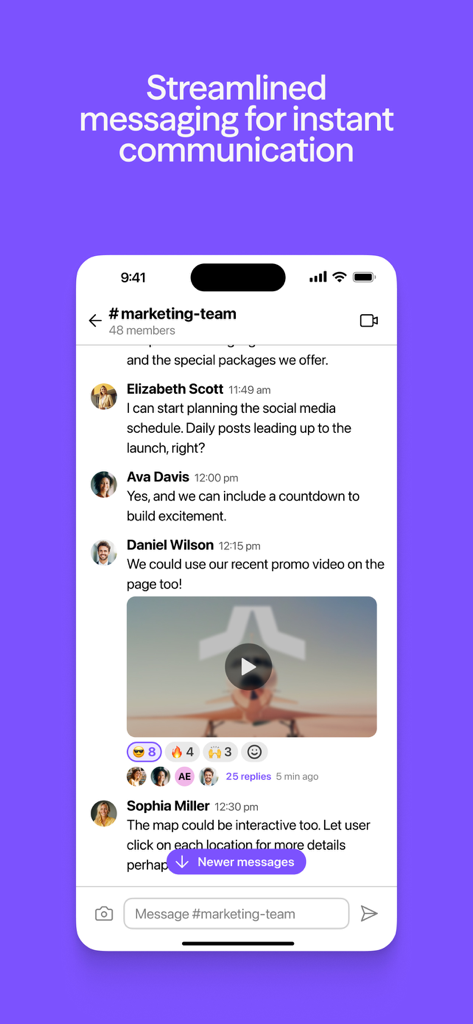
Dialpad app team messaging interface showing a marketing group chat with video and message reactions
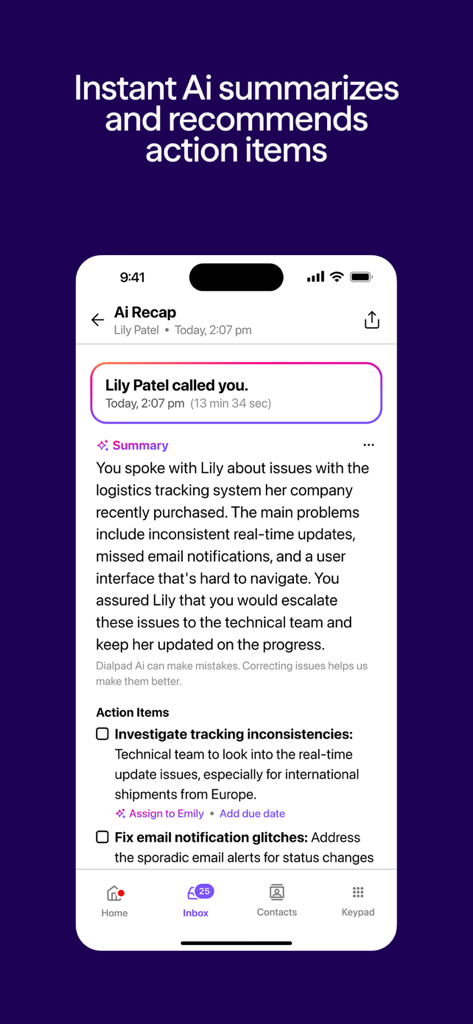
Dialpad app screen showing an AI generated call recap with a summary and recommended action items
Description
Download
More Like This
Apps with similar features and user experience

Cisco Jabber
Cisco

Bria Enterprise
CounterPath Corporation

Bria Mobile: VoIP Softphone
CounterPath Corporation

Bria - VoIP Softphone
CounterPath Corporation

Groundwire: VoIP SIP Softphone
Acrobits
Mango Talker
MANGO TELEKOM, OOO

3CX
3CX

Zoiper Lite voip soft phone
Securax

Talkyto - Twilio Calls & SMS
WEB rjesenja d.o.o.
This page is not an official page of the app or its developer, but an independent editorial publication created for informational and commentary purposes. Unless expressly stated otherwise, neither the app nor its developer is affiliated with, endorsed by, sponsored by, authorized by, or otherwise officially connected with MWM, Apple, Google Play, the app publisher, or the app's developer, and nothing on this page implies that the app was developed using MWM's services. Any trademarks, logos, screenshots, and other content remain the property of their respective owners.