
This page is not an official page of the app or its developer, but an independent editorial publication created for informational and commentary purposes. Unless expressly stated otherwise, neither the app nor its developer is affiliated with, endorsed by, sponsored by, authorized by, or otherwise officially connected with MWM, Apple, Google Play, the app publisher, or the app's developer, and nothing on this page implies that the app was developed using MWM's services. Any trademarks, logos, screenshots, and other content remain the property of their respective owners.


Digiturk Online İşlemler
Stop waiting. This app puts Digiturk control directly in your hands.
Downloads
250k+User Rating
Total Ratings
533Publisher
Category
UtilitiesLocales
1Latest Version
1.0.10Size
3.6 MBFirst Released
Jan 16, 2017An Analytical Overview for Subscribers and Prospective Users
Key Features of Digiturk Online İşlemler
Bill Management & Payments
The app enables users to easily inquire about their bills, make payments, and set up automatic payment orders, streamlining financial management for their subscriptions.
Subscription & Package Management
It allows subscribers to add or remove packages from their existing membership, offering flexibility to customize their content and services.
On-Demand Content Purchase
This tool facilitates the purchase of movies or matches from various 'salons' (on-demand sections), providing instant access to additional entertainment.
Remote Recording Functionality
The app offers a remote recording option, allowing users to save programs to their Digiturk box even when they are not at home, ensuring they never miss desired content.
Exclusive Campaign & Offer Tracking
Through the 'My Notifications' menu, users can track personalized and exclusive campaigns, enabling them to take advantage of special offers and promotions.
Technical Service Requests
Users can access information about technical services and easily request technical support, providing a direct channel for resolving issues without needing to call a call center.
Account & Personal Information Management
The app allows users to change and update their personal information, and reset their PIN code, providing self-service control over their account security and details.
Easy Onboarding & Login
It provides a straightforward process for creating a password for first-time users and enables quick login from their phone, reducing friction for new and returning users.
Frequently Asked Questions
Everything you need to know about Digiturk Online İşlemler
How do I log in to the Digiturk Online İşlemler app?
You log in to the Digiturk Online İşlemler app using your membership number, phone, email, or TR ID number, along with your password.
Can I create a new password for Digiturk Online İşlemler through the app?
Yes, you can easily create your password via the "İlk Defa Giriş" (First Time Login) menu in the Digiturk Online İşlemler app, even if you do not have one.
How can I manage my bills using the Digiturk Online İşlemler app?
The Digiturk Online İşlemler app allows you to query your bills, make payments, and set up automatic payment instructions directly from your phone.
Can I change my Digiturk packages through the Digiturk Online İşlemler app?
Yes, the Digiturk Online İşlemler app allows you to add or remove packages from your membership. You can also purchase new packages directly within the app.
Does the Digiturk Online İşlemler app offer remote recording functionality?
Yes, the Digiturk Online İşlemler app offers a remote recording option. You can record programs to your Digiturk box even when you are not at home.
Can I update my personal details in the Digiturk Online İşlemler app?
Yes, you can change and update your personal information directly within the Digiturk Online İşlemler app. You also have the option to reset your PIN code.
How do I access technical support via the Digiturk Online İşlemler app?
The Digiturk Online İşlemler app allows you to access your technical service information and call technical service directly from the app's menu.
Can I buy movies or matches using the Digiturk Online İşlemler app?
Yes, you can purchase movies or matches from "salons" (pay-per-view sections) directly through the Digiturk Online İşlemler app.
Does the Digiturk Online İşlemler app provide information on special campaigns?
Yes, the Digiturk Online İşlemler app features a "Bildirimlerim" (My Notifications) menu where you can follow special campaigns and opportunities specific to you.
Where can I provide feedback for the Digiturk Online İşlemler app?
You can provide feedback and suggestions for the Digiturk Online İşlemler app via the in-app communication form, Facebook page, or Twitter account.
The following screenshots and description are sourced directly from the app's official store listing and are the property of the app developer.
App Store
Screenshots

Users can securely access their account via various login options and immediately see a prompt to review invoice details, streamlining initial account management.
Seamless Account Access
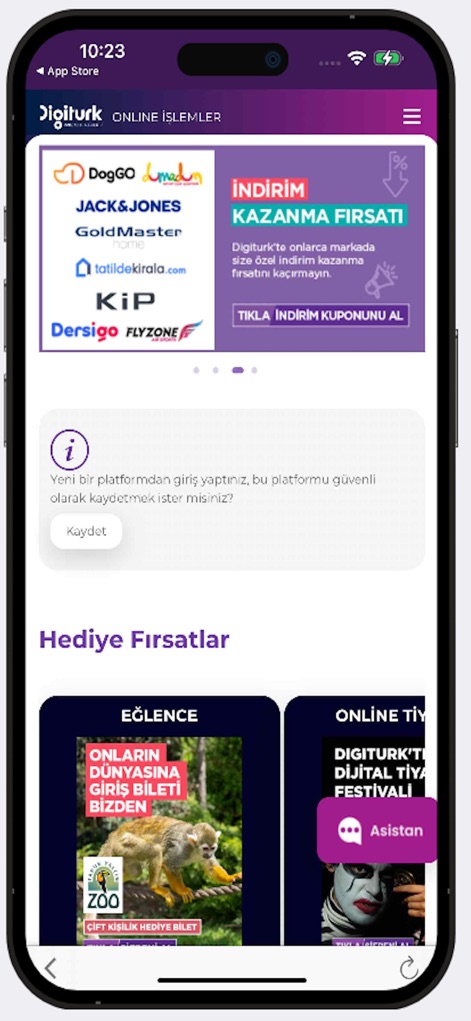
The app showcases prominent 'Discount Coupon' banners for immediate savings and highlights 'Gift Opportunities' like entertainment packages to enhance user value.
Exclusive Deals Unveiled

A comprehensive navigation menu provides quick access to essential features such as 'Uzaktan Kayıt' (Remote Recording) and 'Teknik Destek' (Technical Support) for full control.
Intuitive Navigation Hub
Description
Download
More Like This
Apps with similar features and user experience

Мой Триколор
Natsionalnaya Sputnikovaya Kompaniya NAO

Mi App Sky
CORPORACION NOVAVISION S. DE R.L DE C.V.

My Astro
MEASAT BROADCAST NETWORK SYSTEMS SDN. BHD.
beIN
beIN Media Group, LLC

MyDStv
Multichoice Support Services (Pty) Ltd

My DishTV
Dish Tv India Ltd.

App SKY
CORPORACION NOVAVISION S. DE R.L DE C.V.
This page is not an official page of the app or its developer, but an independent editorial publication created for informational and commentary purposes. Unless expressly stated otherwise, neither the app nor its developer is affiliated with, endorsed by, sponsored by, authorized by, or otherwise officially connected with MWM, Apple, Google Play, the app publisher, or the app's developer, and nothing on this page implies that the app was developed using MWM's services. Any trademarks, logos, screenshots, and other content remain the property of their respective owners.