
This page is not an official page of the app or its developer, but an independent editorial publication created for informational and commentary purposes. Unless expressly stated otherwise, neither the app nor its developer is affiliated with, endorsed by, sponsored by, authorized by, or otherwise officially connected with MWM, Apple, Google Play, the app publisher, or the app's developer, and nothing on this page implies that the app was developed using MWM's services. Any trademarks, logos, screenshots, and other content remain the property of their respective owners.


DoubleTake - Multicam video
No more single-angle mediocrity. This app grants users the power of simultaneous, multi-perspective video capture directly from their device.
Downloads
1M+User Rating
Total Ratings
320Publisher
Category
Photo & VideoLocales
11Latest Version
3.1.2Size
64.6 MBFirst Released
Jan 28, 2020An analysis of core functionalities and their impact on professional mobile video production.
Key Features of DoubleTake - Multicam video
Simultaneous Multi-Cam Capture
This enables users to produce professional-looking content without needing traditional, cumbersome multi-camera setups.
Precise Focus & Exposure Controls
This ensures professional-looking and consistently controlled footage, critical for high-quality video production.
Diverse Focal Length Capture
This allows for dynamic range and professional cinematic effects, enabling both establishing shots and punch-ins concurrently.
Simplified Shot/Reverse Shot
This simplifies complex filming techniques, placing the audience directly within the conversation without needing multiple physical camera setups.
PiP and Discreet Recording Options
This offers significant flexibility in monitoring live footage and in the post-production workflow, catering to different content creation needs.
High-Bitrate 1080p Video
This ensures maximum video quality within the constraints of Apple's multi-cam API, producing crisp and clear footage.
Dynamic Split-Screen Video
This is highly effective for engaging interviews or scenarios where two perspectives require equal weighting on screen.
Broadcast-Ready Frame Rates
This enables users to match industry standards and project requirements, offering professional versatility for various productions.
Advanced Camera Visualization
This assists users in pre-production by helping to decide how to frame shots and which cameras to select for optimal capture.
Batch Export Functionality
This streamlines the post-production workflow, making it efficient to transfer and manage captured video content.
The following screenshots and description are sourced directly from the app's official store listing and are the property of the app developer.
App Store
Screenshots
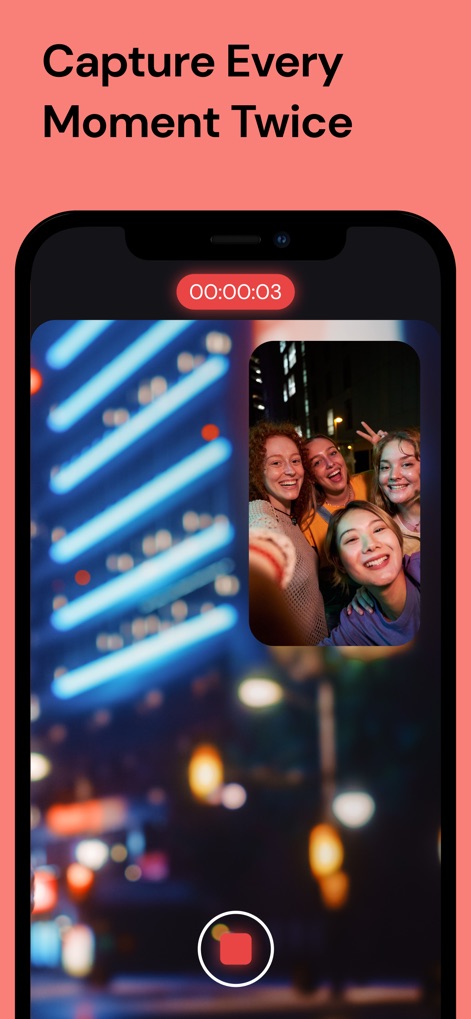
Experience simultaneous video recording with the intuitive Picture-in-Picture (PiP) display and clear real-time timer.
Multi-Cam Capture

Explore versatile recording options including the dynamic Picture in Picture and compelling Split Screen modes for varied storytelling.
Creative Capture Modes

Select diverse camera combinations, such as the expansive Ultra wide and close-up Tele lenses, to achieve unique perspectives.
Flexible Camera Selection

Fine-tune video output with professional-grade frame rate options like 60fps and high-resolution 4K capture.
Advanced Video Settings

Organize and manage recorded content effortlessly within the app's media library, featuring clear video thumbnails and selection indicators.
Efficient Media Management
Description
Download
More Like This
Apps with similar features and user experience

2Camera Dual Camera Front Back
自力 黄

CamFusion - Dual Camera 视频抽帧截图
Liangjie Information Technology (Chengmai) Co., Ltd.

Double Camera •
Dayworks, LLC

2Cam – Dual & Double Camera
VISION FZ LLE

Dualgram
Just2us Pte Ltd

Dual Camera Split Videos: Revo
Applorium Ltd
DUBL Pro
DUBL, INC.
This page is not an official page of the app or its developer, but an independent editorial publication created for informational and commentary purposes. Unless expressly stated otherwise, neither the app nor its developer is affiliated with, endorsed by, sponsored by, authorized by, or otherwise officially connected with MWM, Apple, Google Play, the app publisher, or the app's developer, and nothing on this page implies that the app was developed using MWM's services. Any trademarks, logos, screenshots, and other content remain the property of their respective owners.