
This page is not an official page of the app or its developer, but an independent editorial publication created for informational and commentary purposes. Unless expressly stated otherwise, neither the app nor its developer is affiliated with, endorsed by, sponsored by, authorized by, or otherwise officially connected with MWM, Apple, Google Play, the app publisher, or the app's developer, and nothing on this page implies that the app was developed using MWM's services. Any trademarks, logos, screenshots, and other content remain the property of their respective owners.


Drive Safe & Save® Business
Fleet owners gain control; the app exposes critical driving insights to sharpen your bottom line.
Downloads
100k+User Rating
Total Ratings
37Publisher
Category
TravelLocales
1Latest Version
1.1.0Size
94.8 MBFirst Released
Apr 16, 2025An Analytical Overview for State Farm Business Auto Policyholders
Key Features of Drive Safe & Save® Business App
Insurance Savings Potential
The app provides an opportunity for a one-time premium decrease for each enrolled vehicle and ongoing premium adjustments at renewal based on driving behavior, potentially leading to significant cost savings for businesses.
Enhanced Driver Safety Monitoring
It offers detailed driving insights and feedback derived from business vehicle data, enabling businesses to identify and address unsafe driving patterns to promote a safer driving culture.
Real-time Vehicle Tracking & Trip Mapping
This tool features near real-time location tracking and detailed trip maps for all enrolled business vehicles, providing comprehensive visibility into fleet operations and asset management.
Individual Driver Performance Feedback
It allows businesses to provide specific driving feedback to individual employee drivers, encouraging continuous improvement in safe driving habits and potentially reducing accident risks.
Fleet Management Portal Access
The app integrates with a comprehensive portal where business owners and fleet managers can oversee all enrolled vehicles, driver performance, and policy-related information efficiently.
Driver Enrollment & Management
It facilitates the seamless invitation and management of employee drivers within the system, ensuring that all relevant personnel are included and compliant with the program.
Frequently Asked Questions
Everything you need to know about Drive Safe & Save® Business
What is the Drive Safe & Save Business app?
The Drive Safe & Save Business app helps State Farm business auto customers enhance driving safety. It provides driving insights and location awareness using data from business vehicles to promote safe habits.
How does the Drive Safe & Save Business app improve driving safety?
The Drive Safe & Save Business app uses driving information from business vehicles to provide insights, detailed trip maps, and driving feedback. This promotes safe driving habits among fleet users.
Can the Drive Safe & Save Business app track vehicle locations?
Yes, the Drive Safe & Save Business portal allows monitoring of business vehicles. It provides near real-time locations, detailed trip maps, and comprehensive driving feedback.
Does Drive Safe & Save Business offer insurance premium discounts?
Yes, eligible vehicles enrolled and paired with a Bluetooth beacon receive a one-time premium decrease. Renewal adjustments are based on driving behaviors, which can vary.
What is required for a business owner to log into Drive Safe & Save Business?
Business owners cannot log into the Drive Safe & Save Business app until a State Farm agent adds the program to their existing business auto policy.
How do employee drivers gain access to the Drive Safe & Save Business app?
Employee drivers log in after the Business Owner downloads the app, accepts the privacy policy and EULA, consents to SMS messages, and specifically invites them.
What driving metrics does the Drive Safe & Save Business app monitor?
The Drive Safe & Save Business app tracks key metrics including miles, trips, time, and specific events. It monitors phone use, speeding, braking, harsh acceleration, and hard cornering behavior.
Does Drive Safe & Save Business display individual trip details?
Yes, the Drive Safe & Save Business app shows individual trip details. This includes the trip path on a map, distance, duration, and a driving score for each journey.
Can users view historical driving trends in Drive Safe & Save Business?
Yes, the Drive Safe & Save Business app provides detailed trends. Users can view their overall driving score, as well as specific trends for phone use, speeding, and hard braking over time.
Does the Drive Safe & Save Business app show driving streaks?
Yes, the Drive Safe & Save Business app tracks and displays driving streaks. These include continuous periods without phone use, speeding, braking, harsh acceleration, or hard cornering.
The following screenshots and description are sourced directly from the app's official store listing and are the property of the app developer.
App Store
Screenshots
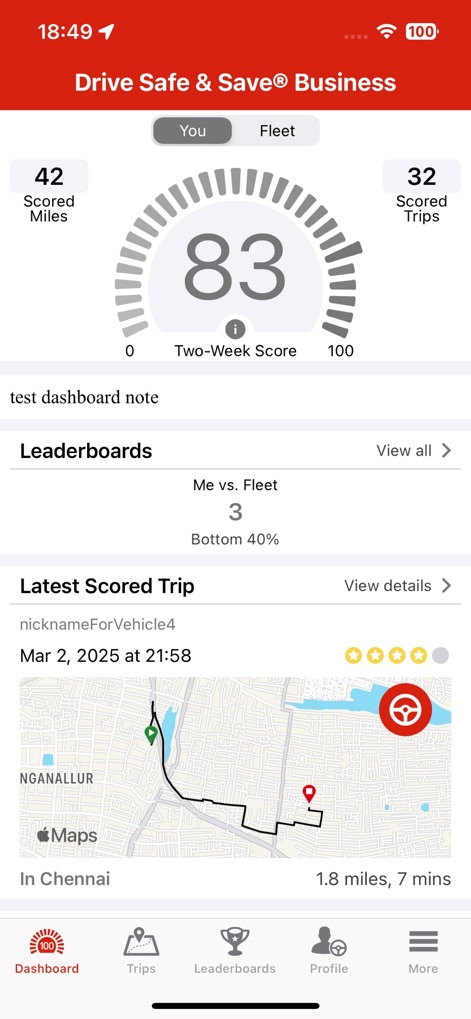
The app provides a comprehensive dashboard displaying a 'Two-Week Score' for driving behavior and an interactive map showing details of the 'Latest Scored Trip'.
Dashboard Insights View
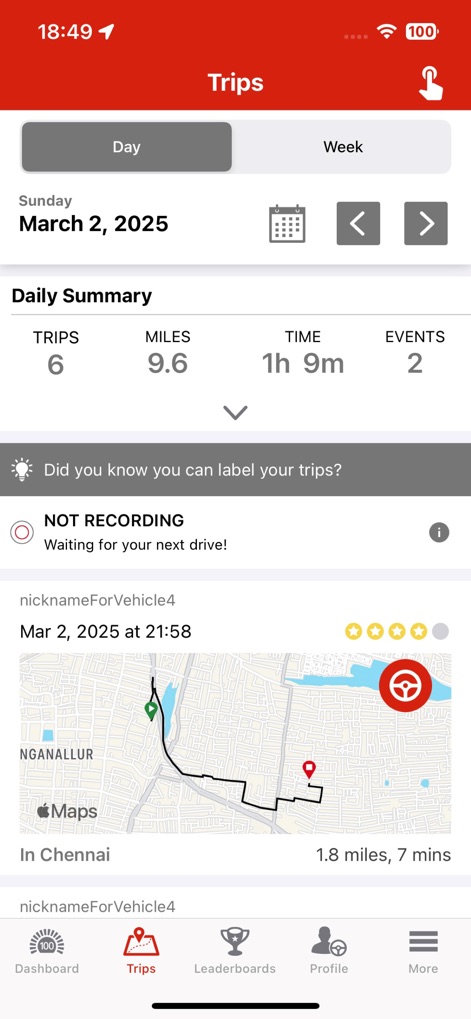
Users can review their daily driving performance with a 'Daily Summary' of trips and miles, alongside a status indicator like 'NOT RECORDING' to track app activity.
Trip Summary Overview
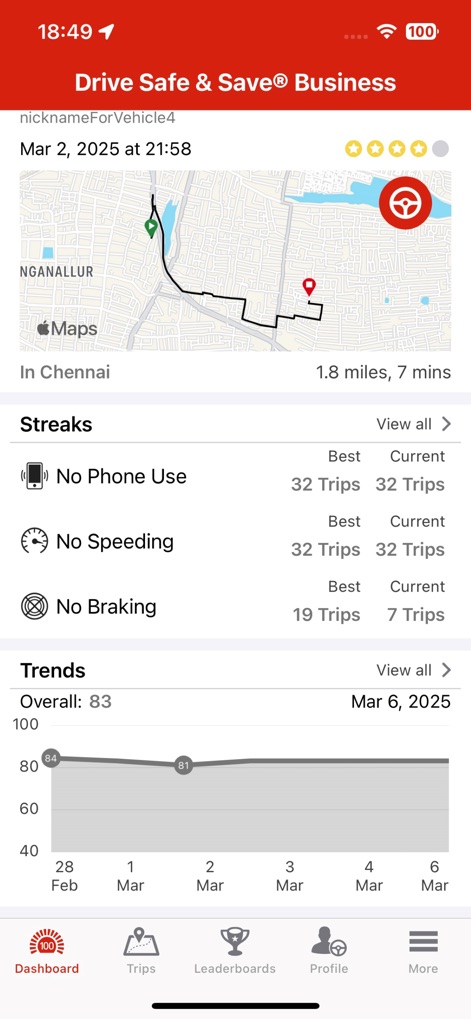
This tool highlights driver achievements through 'Streaks' for safe behaviors like 'No Phone Use', and visualizes long-term performance with a 'Trends' graph of the overall driving score.
Behavioral Streaks, Trends
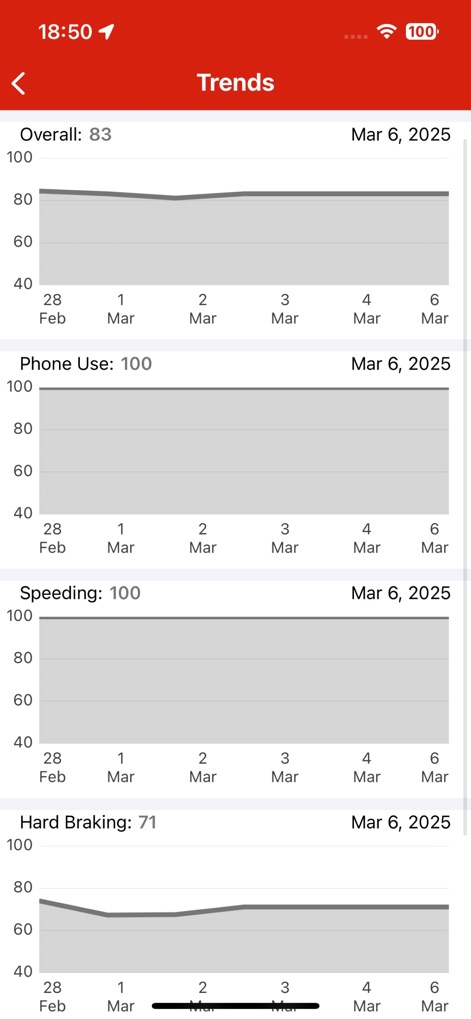
The app offers in-depth performance analytics, presenting 'Trends' graphs for an 'Overall' driving score and specific behaviors such as 'Phone Use' and 'Speeding'.
Detailed Performance Trends
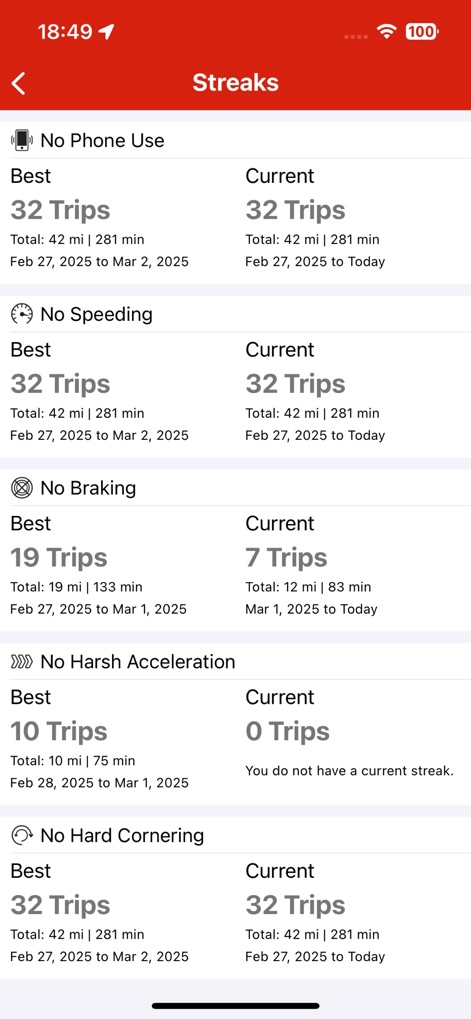
Users can view their detailed driving accomplishments in the 'Streaks' section, showcasing both 'Best' and 'Current' records for safe habits like 'No Phone Use' and 'No Speeding'.
Achieved Driving Streaks
Description
Download
More Like This
Apps with similar features and user experience
DynamicDrive
National General Insurance Company
Steer Clear®
State Farm Mutual Automobile Insurance Company
HUK Mein Auto
HUK-COBURG Datenservice und Dienstleistungen GmbH

הפניקס - נהג צעיר
THE PHOENIX INSURANCE COMPANY LTD
あいおいニッセイ同和損保アプリ
Aioi Nissay Dowa Insurance Co.,Ltd.
This page is not an official page of the app or its developer, but an independent editorial publication created for informational and commentary purposes. Unless expressly stated otherwise, neither the app nor its developer is affiliated with, endorsed by, sponsored by, authorized by, or otherwise officially connected with MWM, Apple, Google Play, the app publisher, or the app's developer, and nothing on this page implies that the app was developed using MWM's services. Any trademarks, logos, screenshots, and other content remain the property of their respective owners.