
This page is not an official page of the app or its developer, but an independent editorial publication created for informational and commentary purposes. Unless expressly stated otherwise, neither the app nor its developer is affiliated with, endorsed by, sponsored by, authorized by, or otherwise officially connected with MWM, Apple, Google Play, the app publisher, or the app's developer, and nothing on this page implies that the app was developed using MWM's services. Any trademarks, logos, screenshots, and other content remain the property of their respective owners.


ebtEDGE
No more guesswork. This app grants users total command over their EBT funds, making benefit management instant and clear.
Downloads
5M+User Rating
Total Ratings
4.3KPublisher
Category
FinanceLocales
2Latest Version
2.3.6Size
8.8 MBFirst Released
Sep 5, 2018An evaluation of essential functionalities for EBT benefit management.
ebtEDGE App: Key Features Analysis
Real-time Benefit & Balance Checks
The app provides users with immediate access to their current SNAP and TANF benefit balances, ensuring they can always monitor their available funds.
Detailed Transaction History
It allows users to review their complete transaction history, including purchases and deposits, which is crucial for managing spending and reconciling accounts.
Secure Biometric Login
This tool features secure biometric authentication options, including Apple Touch ID and Face ID, enabling quick and protected access to account information.
EBT Retailer Locator
The app provides a convenient feature to locate authorized SNAP retailers nearby or in a planned destination using location services.
Unified Benefit Display
It allows users with both SNAP and TANF benefits to view all their benefit balances and details simultaneously within a single interface.
PIN Management
The app allows users to select and manage their EBT card PIN, enhancing security and user control over their benefits.
Benefit Deposit Schedule
This tool features the ability to view upcoming benefit deposit schedules, helping users plan their finances and anticipate when funds will be available.
Multilingual Interface
The app provides support for multiple languages, including English, Spanish, and Haitian Creole, making it accessible to a wider range of users.
Frequently Asked Questions
Everything you need to know about ebtEDGE
What is the ebtEDGE mobile application?
The ebtEDGE mobile application allows cardholders to manage their SNAP or TANF benefits. Users can view benefit balances, review transaction history, and access their benefit schedule.
Is the ebtEDGE mobile application free for cardholders?
Yes, the ebtEDGE mobile application is free for cardholder use. It allows managing SNAP or TANF benefits without any cost.
How do users log in to the ebtEDGE mobile application?
Users securely log in to the ebtEDGE mobile application using a User ID and Password. New cardholders may need to register first.
Does ebtEDGE support biometric login features like Face ID or Touch ID?
Yes, the ebtEDGE app supports Apple Touch ID and Face ID for quick balance access on iOS 11+ devices where fingerprints or faces are registered.
What benefit information can I view within the ebtEDGE application?
The ebtEDGE application allows you to view your current balances, deposit history, transaction history, and your benefit schedule for both SNAP and TANF.
Can the ebtEDGE app help users find SNAP retailers?
Yes, the ebtEDGE application includes a feature to locate SNAP retailers near your current location or a specified destination using location services.
What language options are available in the ebtEDGE mobile application?
The ebtEDGE mobile application supports language preferences for English, Spanish, and Haitian Creole, which users can set within the app.
Is the ebtEDGE mobile application secure for managing benefits?
Yes, the ebtEDGE mobile application is described as the most private and secure EBT application on the market, offering secure login and data handling.
Can users select a PIN for their EBT card using the ebtEDGE app?
Yes, the ebtEDGE application allows users to select a PIN for their EBT card. This feature is accessible within the app's account services.
Does the ebtEDGE mobile application provide a help center for users?
Yes, the ebtEDGE mobile application features a dedicated Help Center to assist users with questions and provide support for their benefit management.
In which states is the ebtEDGE mobile application available for use?
The ebtEDGE application is available in numerous states, including Alaska, Arizona, California, Florida, Illinois, Michigan, New York, and Washington, among others listed.
The following screenshots and description are sourced directly from the app's official store listing and are the property of the app developer.
App Store
Screenshots

This view highlights the app's intuitive account list, displaying active benefit cards like the 'Colorado EBT Card' and providing a clear 'Add Account' option.
Account Oversight
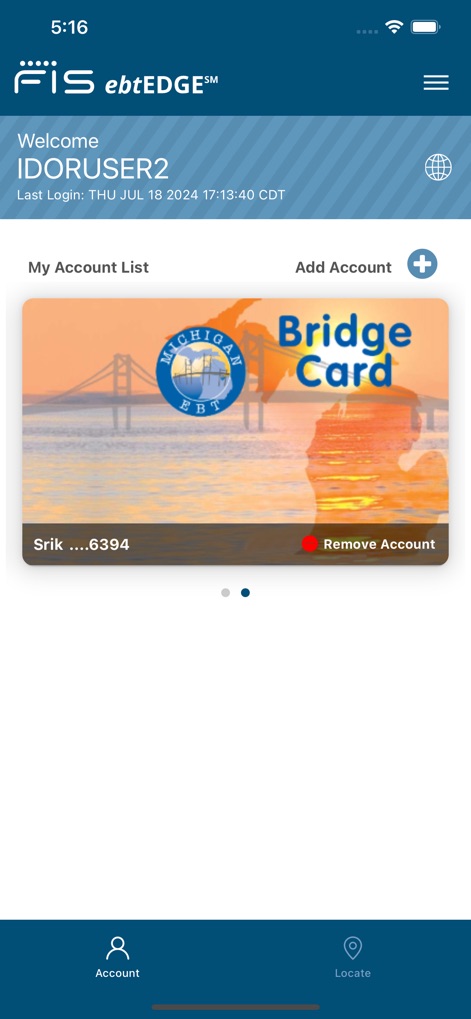
Users can manage multiple benefit accounts, as demonstrated by the 'Michigan Bridge Card' display, alongside the ability to add new cards securely.
Multiple Accounts

The Account Summary provides quick access to essential services like 'Freeze Card' and 'PIN Select', along with a clear breakdown of available 'Food' and 'Cash' balances.
Summary & Services

This screen offers a comprehensive overview of 'Pending Items' like 'Bene Avail (Food)' and a clear history of 'Posted Transactions', including 'Cash Withdrawal' entries.
Detailed Transactions

The login interface prioritizes security with dedicated 'User ID' and 'Password' fields, alongside a prominent 'Register Here' link for new users.
Secure Login

A clear 'Benefit Summary' table details items by 'Quantity' and 'Description', while the 'Issuance History' tab provides records of past benefit allocations.
Benefit Overview

The app provides a detailed 'Issuance History' list, categorizing benefits by 'Item Category' and displaying their respective 'Begin Date' for easy tracking.
Issuance History

An interactive map displays nearby EBT-accepting retailers as clustered red pins, complemented by a 'Search by Store Name/Location' bar for precise searching.
Nearby Retailers

Users can refine their search with 'SNAP' and 'WIC' filter toggles, visually distinguishing retailer types through color-coded map pins.
Filter Locations

After searching for specific areas like 'Brookfield WI', the app provides convenient options to 'Copy Address' or 'Get Driving Directions' for selected retailers.
Location Navigation
Description
Download
More Like This
Apps with similar features and user experience

Propel: EBT, SNAP, WIC, & more
Propel Inc

Netspend
NETSPEND CORPORATION

Your Texas Benefits
Texas Health and Human Services Commission

Direct Express® Mobile
Comerica Bank

Xpectations!® Plus
Green Dot Corporation

Netspend Wallet
NETSPEND CORPORATION

U.S. Bank ReliaCard
U.S. Bancorp

Serve
HI Technology Corp

NYC ACCESS HRA
Department of Information Technology And Telecomm
This page is not an official page of the app or its developer, but an independent editorial publication created for informational and commentary purposes. Unless expressly stated otherwise, neither the app nor its developer is affiliated with, endorsed by, sponsored by, authorized by, or otherwise officially connected with MWM, Apple, Google Play, the app publisher, or the app's developer, and nothing on this page implies that the app was developed using MWM's services. Any trademarks, logos, screenshots, and other content remain the property of their respective owners.