
This page is not an official page of the app or its developer, but an independent editorial publication created for informational and commentary purposes. Unless expressly stated otherwise, neither the app nor its developer is affiliated with, endorsed by, sponsored by, authorized by, or otherwise officially connected with MWM, Apple, Google Play, the app publisher, or the app's developer, and nothing on this page implies that the app was developed using MWM's services. Any trademarks, logos, screenshots, and other content remain the property of their respective owners.


NYC ACCESS HRA
No more guesswork. This app grants users total control over their benefits, turning bureaucratic hurdles into manageable tasks.
Downloads
1M+User Rating
Total Ratings
130.3KPublisher
Category
Health & FitnessLocales
7Latest Version
4.6Size
97.2 MBFirst Released
Mar 17, 2017Evaluating key functionalities for New York City public assistance recipients.
NYC ACCESS HRA: Core Features Analysis
Secure Document Upload
The app streamlines the document submission process by listing required documents and allowing users to directly upload photos or existing images from their device, with a history of submitted items, ensuring timely and convenient compliance.
Multilingual Interface
The app offers its full functionality in multiple languages, including English, Spanish, Arabic, French, Korean, Russian, and Simplified Chinese, ensuring accessibility for New York City's diverse population.
Personalized Case Notifications
It provides real-time smartphone notifications for critical case updates, including recertification deadlines, application confirmations, appointment reminders, and document requests, keeping users proactively informed.
Benefit Case and Balance Overview
The app provides a comprehensive overview of public assistance cases, including SNAP, Cash Assistance, Fair Fares NYC, and Access-A-Ride statuses, EBT balances, and recertification dates, ensuring users stay informed about their eligibility and funds.
Document Acceptance Verification
This tool provides a clear record of documents successfully received and accepted by the agency, offering peace of mind and verifying that submitted paperwork has been processed.
Payment Tracking
It allows users to track upcoming and past payments related to their case, including direct payments to landlords, utility companies, or disbursements to their EBT card, offering financial transparency.
Appointment Management
This tool features a dedicated section for viewing upcoming, missed, and completed appointments, with the added convenience of setting reminders to prevent crucial meetings from being overlooked.
Profile Management
The app enables users to review and manage their contact information and notification preferences, ensuring the agency has up-to-date details for communication.
Frequently Asked Questions
Everything you need to know about NYC ACCESS HRA
What is NYC ACCESS HRA mobile?
NYC ACCESS HRA mobile is an app that allows users to manage their benefits on-the-go. It provides access to case details, EBT balances, appointments, payments, and required documents for various assistance programs.
Can I view my EBT balance with the NYC ACCESS HRA app?
Yes, the NYC ACCESS HRA app allows users to view the EBT balance for each of their benefits, including SNAP or Cash Assistance cases, in the Cases section.
How do I check my upcoming appointments in the NYC ACCESS HRA app?
Users can view upcoming, missed, or completed appointments in the Appointments section of the NYC ACCESS HRA app. It also provides an option to add reminders to a phone or tablet.
How long do uploaded documents stay visible in NYC ACCESS HRA?
Submitted documents remain visible on the 'My Uploads' screen for 100 days. Accepted documents stay on the 'Documents' list for 60 days from their acceptance date.
Can I update my profile information in the NYC ACCESS HRA app?
Yes, the Profile section allows users to view and update contact information and notification preferences. Users with CA or SNAP cases can update every 24 hours; Fair Fares NYC clients can update as needed.
What types of payments can I view in the NYC ACCESS HRA app?
The Payments section displays upcoming and past payments related to a case. This includes payments made to landlords, utility companies, or directly to an EBT card.
Does NYC ACCESS HRA send notifications?
Yes, NYC ACCESS HRA provides real-time notifications. These alerts cover case updates like recertification due dates, online application confirmations, upcoming appointments, and required documentation.
What languages does the NYC ACCESS HRA mobile app support?
The NYC ACCESS HRA mobile app is available in multiple languages. These include English, Spanish, Arabic, French, Korean, Russian, and Simplified Chinese for broad accessibility.
How do I submit required documents using the NYC ACCESS HRA app?
The Required Documents section lists needed documents. Users can take a photo of each document or select an image from their camera roll directly from this list to submit them.
Can I see my Fair Fares NYC discount status in the app?
Yes, the NYC ACCESS HRA app allows users to track their Fair Fares NYC discount status and renewal period directly within the Cases section of the application.
The following screenshots and description are sourced directly from the app's official store listing and are the property of the app developer.
App Store
Screenshots
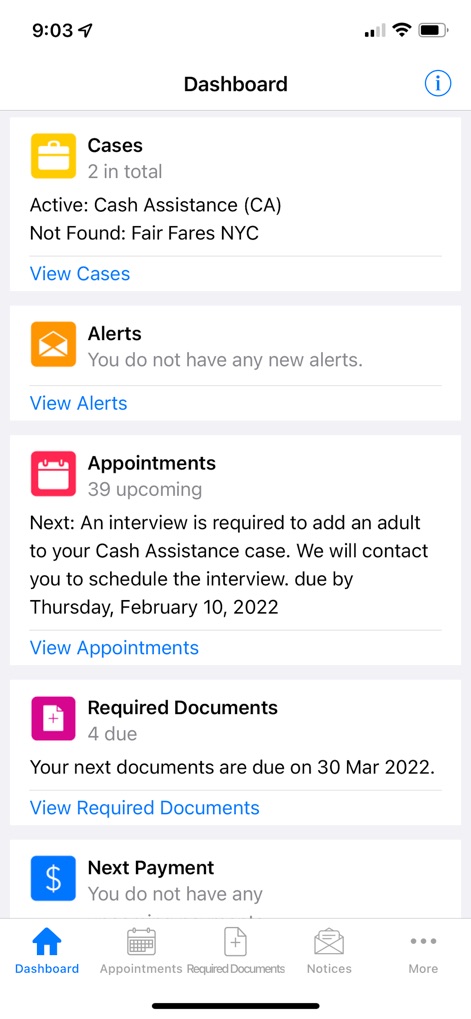
The app's central dashboard provides an at-a-glance view of active 'Cash Assistance (CA)' status and a clear summary of '39 upcoming' appointments with due dates.
Dashboard Overview
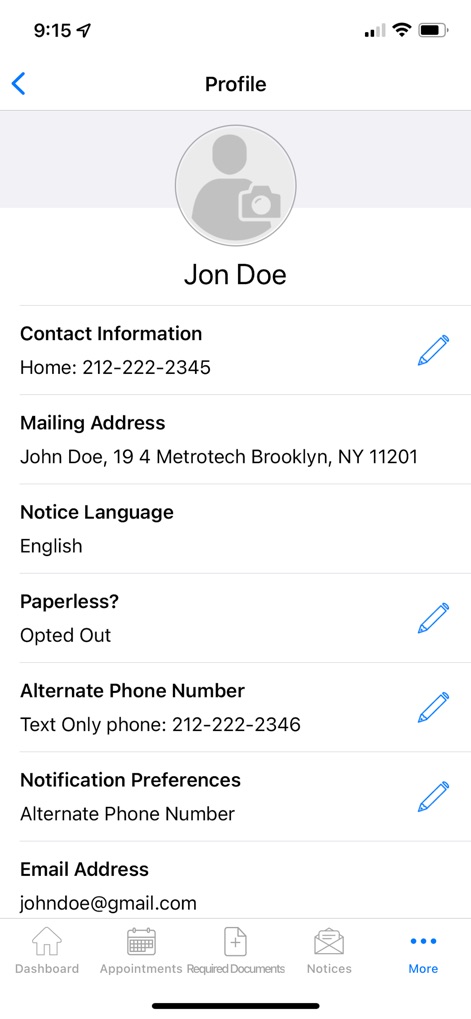
Users can easily manage their personal details, including contact information, and customize their 'Notification Preferences' for essential updates within the app.
Personal Profile Management
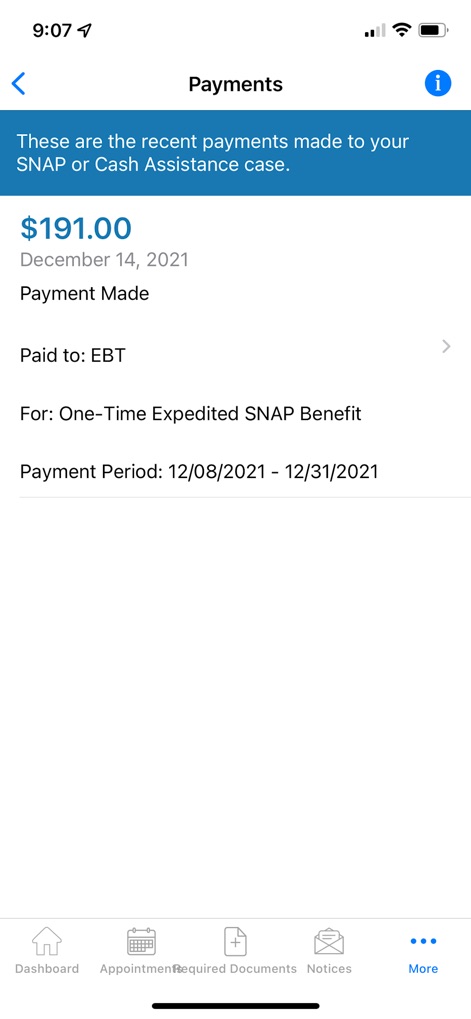
The 'Payments' section details recent transactions, showing specific amounts like '$191.00' and clarifying the purpose, such as 'One-Time Expedited SNAP Benefit'.
Payment History Review
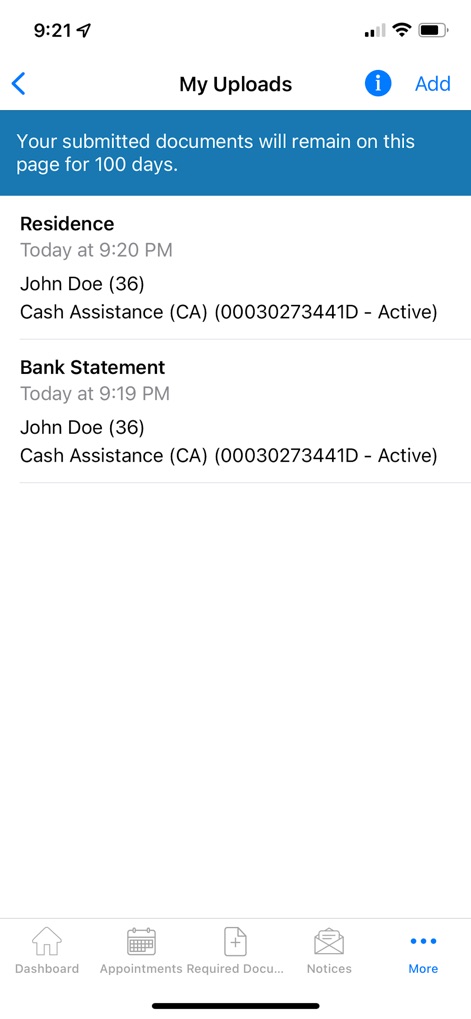
This screen allows users to track their submitted documents, listing specific items like 'Residence' and 'Bank Statement' with their respective upload times.
Document Submission Tracker
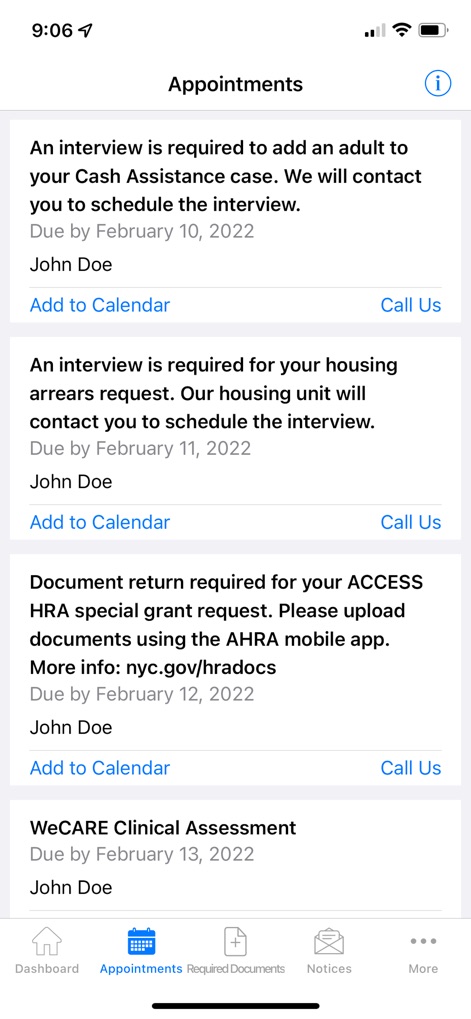
The 'Appointments' view provides a detailed list of scheduled interviews with clear 'due dates' and convenient options to 'Add to Calendar' or 'Call Us'.
Upcoming Appointment Details
Description
Download
More Like This
Apps with similar features and user experience

Propel: EBT, SNAP, WIC, & more
Propel Inc

Netspend
NETSPEND CORPORATION
Your Texas Benefits
Texas Health and Human Services Commission
Direct Express® Mobile
Comerica Bank

Xpectations!® Plus
Green Dot Corporation

Netspend Wallet
NETSPEND CORPORATION
U.S. Bank ReliaCard
U.S. Bancorp
Serve
HI Technology Corp

Vプリカ+
LIFECARD CO.,LTD.
This page is not an official page of the app or its developer, but an independent editorial publication created for informational and commentary purposes. Unless expressly stated otherwise, neither the app nor its developer is affiliated with, endorsed by, sponsored by, authorized by, or otherwise officially connected with MWM, Apple, Google Play, the app publisher, or the app's developer, and nothing on this page implies that the app was developed using MWM's services. Any trademarks, logos, screenshots, and other content remain the property of their respective owners.