
This page is not an official page of the app or its developer, but an independent editorial publication created for informational and commentary purposes. Unless expressly stated otherwise, neither the app nor its developer is affiliated with, endorsed by, sponsored by, authorized by, or otherwise officially connected with MWM, Apple, Google Play, the app publisher, or the app's developer, and nothing on this page implies that the app was developed using MWM's services. Any trademarks, logos, screenshots, and other content remain the property of their respective owners.


eCalendar - Daily Planner
Cut through the chaos. It puts household command in your palm, turning daily disarray into smooth operation.
Downloads
250k+User Rating
Total Ratings
8.3KPublisher
Category
Photo & VideoLocales
1Latest Version
1.37.0Size
256.0 MBFirst Released
Sep 30, 2024An evaluation of core functionalities for family organization and daily planning.
Key Features Analysis: eCalendar - Daily Planner
Email Reminder Import
It allows users to effortlessly add reminders from their email, streamlining task management and ensuring important family commitments are captured directly into the calendar.
Localized Weather Display
The app provides location-based weather information, assisting users in planning daily family activities and preparing for various conditions.
Frequently Asked Questions
Everything you need to know about eCalendar - Daily Planner
How much does an eCalendar membership cost?
An eCalendar monthly automatic renewal plan costs $2.99 per month, and the annual plan is $29.90 per year. Prices are based on iAP application information.
How do I cancel my eCalendar automatic renewal?
To cancel eCalendar automatic renewal, manually turn off the function in iTunes/Apple ID settings at least 24 hours before the current subscription period ends.
How does eCalendar process membership payments?
eCalendar processes payments by remitting the amount to the user's iTunes account after purchase confirmation. The Apple iTunes account is deducted within 24 hours of renewal.
What is the eCalendar Magic import feature?
The eCalendar Magic import feature allows users to add today's reminders by sending an email. This is a benefit of eCalendar membership.
Does eCalendar require access to my location information?
Yes, eCalendar requires access to your location information. It uses this data to select the city weather corresponding to your personal location.
Does eCalendar access my photo album?
Yes, eCalendar accesses your photo album. This access is necessary for uploading photos and avatars within the application.
Does eCalendar support family collaboration?
Yes, eCalendar supports family collaboration. It offers efficient management and shared schedules for treasured moments, as indicated by the "Family Collaborator" feature.
Does eCalendar offer task management with rewards?
Yes, eCalendar includes task management with rewards. Users can build good habits with visualized tasks and earn star rewards and custom incentives.
What calendar views does eCalendar offer?
eCalendar offers multiple calendar views, including month and week views. It also supports shared schedules for efficient communication.
What are the terms of service for eCalendar?
The eCalendar application is subject to Apple's standard terms of service (EULA). These terms are referenced within the app description.
The following screenshots and description are sourced directly from the app's official store listing and are the property of the app developer.
App Store
Screenshots
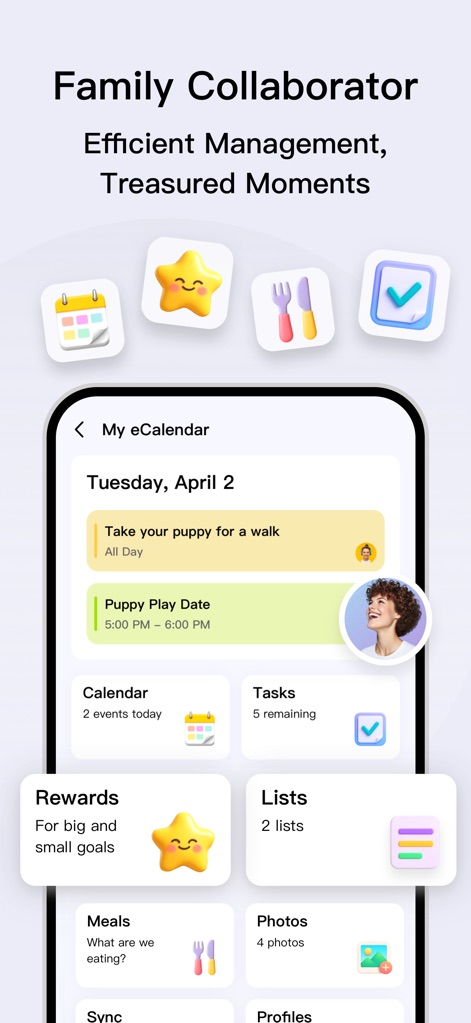
Users can quickly grasp daily organization with a central view of scheduled events and remaining tasks, ensuring efficient family management.
Family Hub
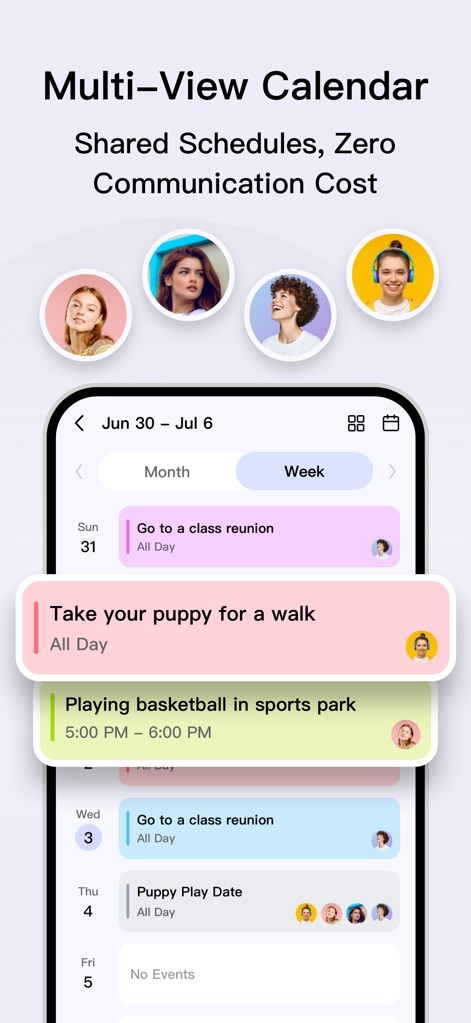
The app provides a versatile 'Week' calendar view for managing family schedules and visualizes shared events with multiple participant profiles.
Collaborative Scheduling

This tool empowers users to build good habits through visualized tasks and motivates progress with an engaging star rewards system.
Habit Builder
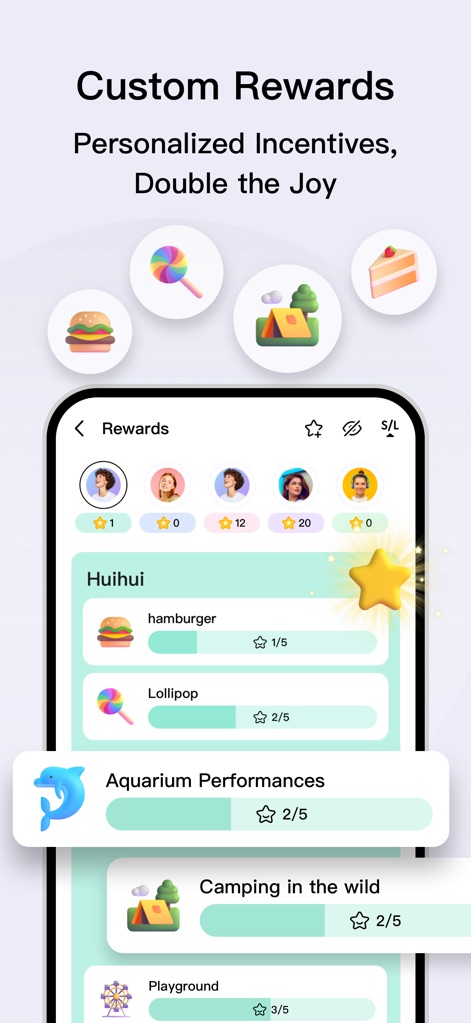
The app showcases a robust system for custom rewards, allowing users to define incentives and track individual progress towards family goals.
Personalized Rewards
Description
Download
More Like This
Apps with similar features and user experience

My PосkеtОptiоn : Smart list
Astrana LLC

Resolva - Guarda Roupa Virtual
RESOLVA CONSULTORIA DE ESTILO DE MODA LTDA

2Do - Todo List, Tasks & Notes
Beehive Innovations Services

Due - Reminders & Timers
Due Apps LLP

Task Manager Progress
Dylan Zaoui

Firetask 5
Elemental Tools GmbH

А-FriепdFindег: YourPresent
Abner Hoover

Planelo: Idea & Project Hub
David Tereba
This page is not an official page of the app or its developer, but an independent editorial publication created for informational and commentary purposes. Unless expressly stated otherwise, neither the app nor its developer is affiliated with, endorsed by, sponsored by, authorized by, or otherwise officially connected with MWM, Apple, Google Play, the app publisher, or the app's developer, and nothing on this page implies that the app was developed using MWM's services. Any trademarks, logos, screenshots, and other content remain the property of their respective owners.