
EduPage


Stay ahead with real-time grade tracking, instant schedule updates, and seamless communication. Join over 1 million parents, students, and teachers managing school life in one powerful app.
Publisher
Category
EducationDownloads
1M+User Rating
Total Ratings
15K+Locales
1Discover the interface used by 1M+ users.
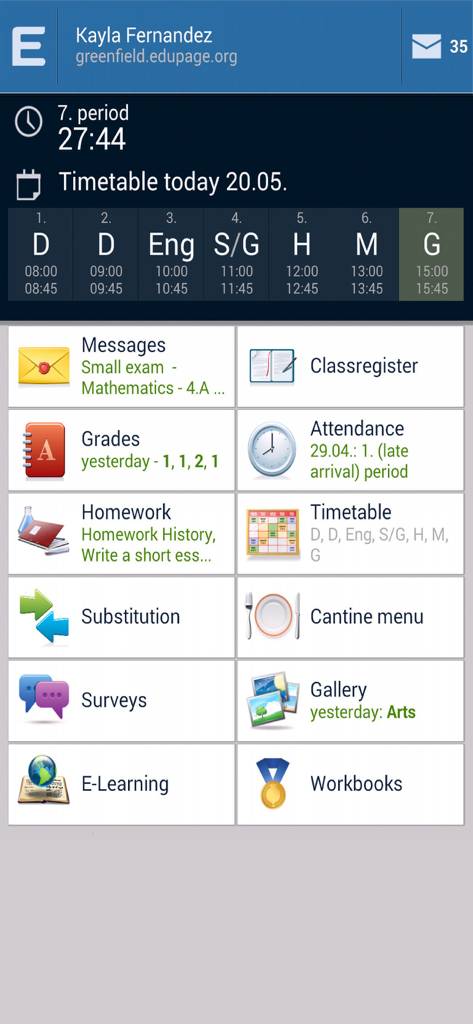
The tools that make this app stand out, trusted by 1M+ users.
Stay ahead of the curve with real-time access to the electronic gradebook and automated notifications for every new achievement or grade.
Submit digital absence notes and message teachers directly. No more lost notes in backpacks or time-consuming phone calls to the school office.
Master the school day with offline-accessible timetables and instant push notifications for substitution changes, homework tasks, and the daily menu.
Everything you need to know about EduPage.
Description
Latest Version
3.12
Size
64.8 MB
First Released
Oct 21, 2014
Get instant access to grades, attendance, and schedules. Download the ultimate tool for parents, students, and teachers today.
Everything you need to know about EduPage
The EduPage app enables sending messages to teachers, classes, or parents. Users can also initiate group discussions with an entire class or all parents directly within the application.
Yes, parents and students can view grades within the EduPage mobile application. Teachers input grades on mobile or web, and these are then visible to authorized users. The app displays specific grade details.
The EduPage electronic class register allows teachers to input curriculum for each lesson directly from their mobile. Lesson plans can also be utilized to easily select the next topic for classes.
Teachers input absent students and absence notes via EduPage. Parents can also send electronic absence notes directly from their mobile phones. The app records late arrivals.
Yes, EduPage allows teachers to input homework. Students and parents view these assignments and mark them as complete within the app. The app also displays homework history.
Yes, EduPage allows users to download their timetable for offline viewing. This feature requires the school to implement aSc TimeTables for schedule management.
Yes, EduPage provides push notifications for daily substitution changes. Users check these changes on their mobile device. This functionality requires the school to use aSc Substitutions.
EduPage's e-learning feature allows teachers to create interactive tests for students. The application automatically collects results and evaluates assigned tasks, streamlining assessment processes.
Yes, EduPage displays the weekly cantina menu. Users can order or cancel meals for specific days directly through the app, managing their school food arrangements.
EduPage ensures users receive important updates automatically by generating mobile notifications for anything a teacher inputs. This includes grades, homework, and other relevant information.
Apps with similar features and user experience

ClassDojo, Inc.

MINKOMSVYAZ ROSSII, FKU

PARENTSQUARE LLC

Agenda Kids Ltda ME

TalkingPoints Corp

Instructure, Inc.

PARENTSQUARE LLC

D2L Corporation

PowerSchool Group LLC
App information, icons, screenshots, and descriptions displayed on this page are sourced from the Apple App Store and are the property of their respective developers. Download estimates and rankings are based on MWM's proprietary models and may not reflect actual figures. This page is provided for informational and analytical purposes only.
Believe this page infringes your intellectual property? File a dispute