Euro Accident 2.0
Euro Accident 2.0
Download on App Store

This page is not an official page of the app or its developer, but an independent editorial publication created for informational and commentary purposes. Unless expressly stated otherwise, neither the app nor its developer is affiliated with, endorsed by, sponsored by, authorized by, or otherwise officially connected with MWM, Apple, Google Play, the app publisher, or the app's developer, and nothing on this page implies that the app was developed using MWM's services. Any trademarks, logos, screenshots, and other content remain the property of their respective owners.


Logo of Euro Accident 2.0
Download on App Store

Euro Accident 2.0

From filing claims and booking appointments to managing coverage for your whole family—experience frictionless healthcare support wherever your career takes you.

Key Figures

Downloads

31K+

User Rating

4.6/5

Total Ratings

800

Publisher

Euro Accident Livforsakring AB

Category

Medical

Locales

2

Latest Version

1.0.5

Size

63.9 MB

First Released

Jun 4, 2024
Features

Seamless Insurance Management

Take control of your healthcare and insurance errands with a powerful, all-in-one mobile platform built for security and speed.

Instant Care Booking

Skip the phone calls. Book, reschedule, and manage medical appointments directly in the app using digital tickets.

One-Tap Claims & Receipts

File new cases instantly and upload receipts or medical certificates via your camera for faster, hassle-free reimbursement.

The following screenshots and description are sourced directly from the app's official store listing and are the property of the app developer.

App Store

Screenshots
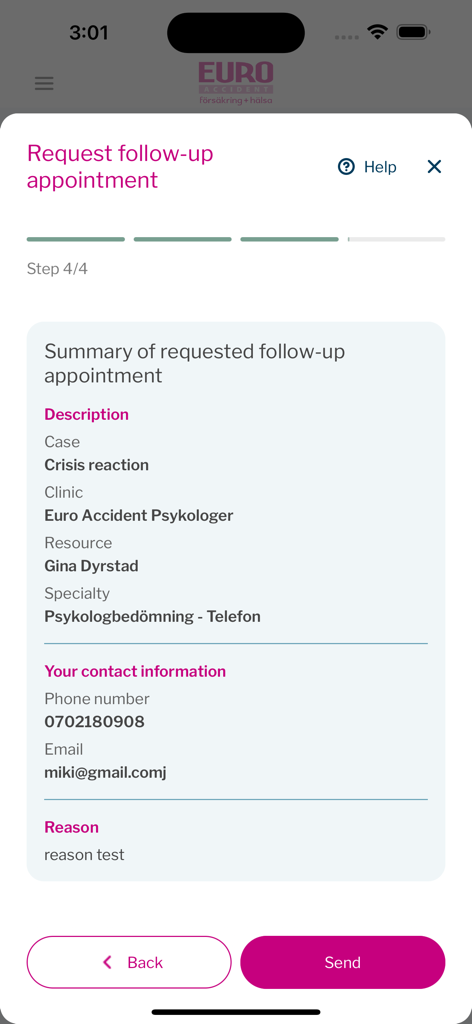
Euro Accident 2.0 - A mobile screen showing the final summary step for requesting a follow-up appointment in the Euro Accident app
A mobile screen showing the final summary step for requesting a follow-up appointment in the Euro Accident app

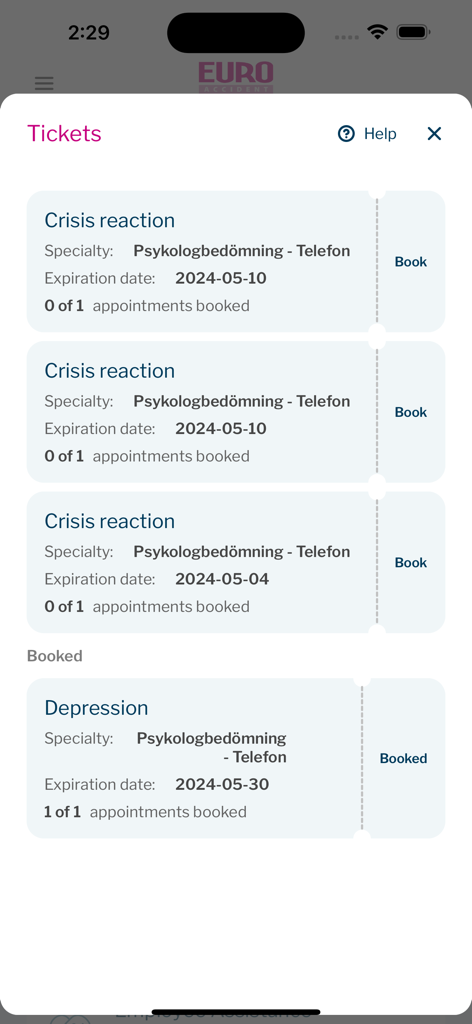
Euro Accident 2.0 - Euro Accident app interface displaying insurance tickets for booking psychological healthcare appointments
Euro Accident app interface displaying insurance tickets for booking psychological healthcare appointments

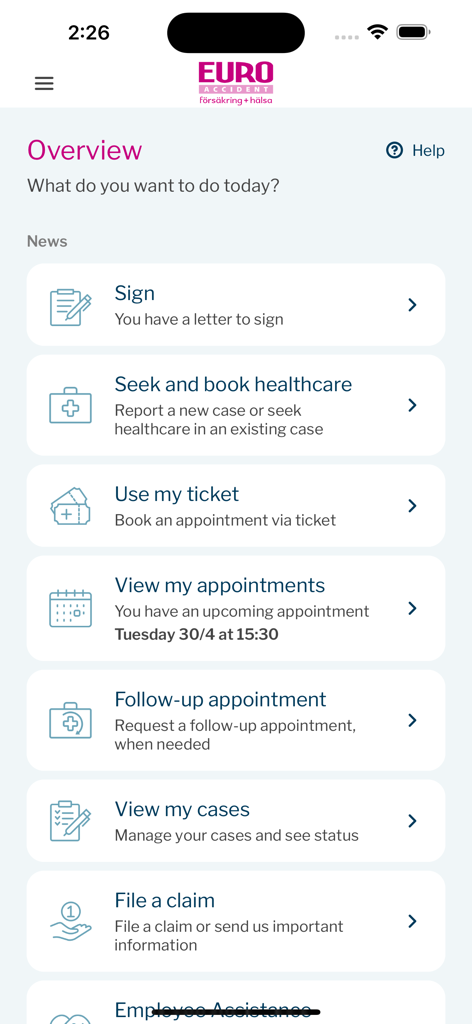
Euro Accident 2.0 - The overview dashboard of the Euro Accident 2.0 app featuring menu options for healthcare booking, claim filing, and appointment management.
The overview dashboard of the Euro Accident 2.0 app featuring menu options for healthcare booking, claim filing, and appointment management.

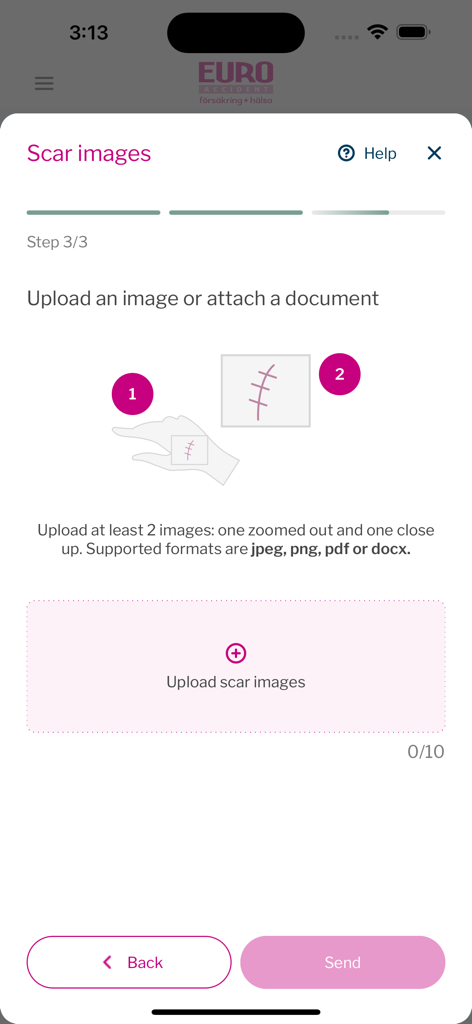
Euro Accident 2.0 - Mobile app interface for uploading scar images as part of an insurance claim
Mobile app interface for uploading scar images as part of an insurance claim

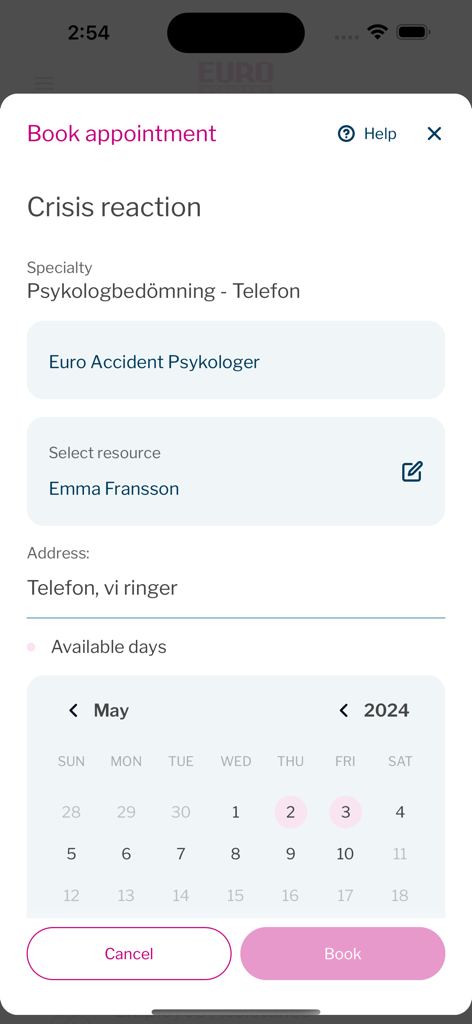
Euro Accident 2.0 - Booking a psychological assessment appointment on the Euro Accident app calendar
Booking a psychological assessment appointment on the Euro Accident app calendar

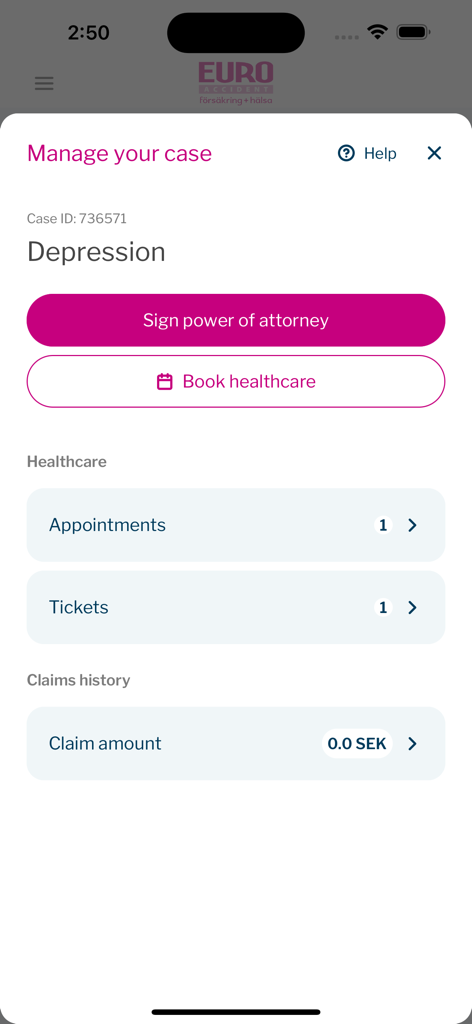
Euro Accident 2.0 - Interface of the Euro Accident 2.0 app displaying a specific insurance case management screen with options to sign power of attorney and book healthcare.
Interface of the Euro Accident 2.0 app displaying a specific insurance case management screen with options to sign power of attorney and book healthcare.

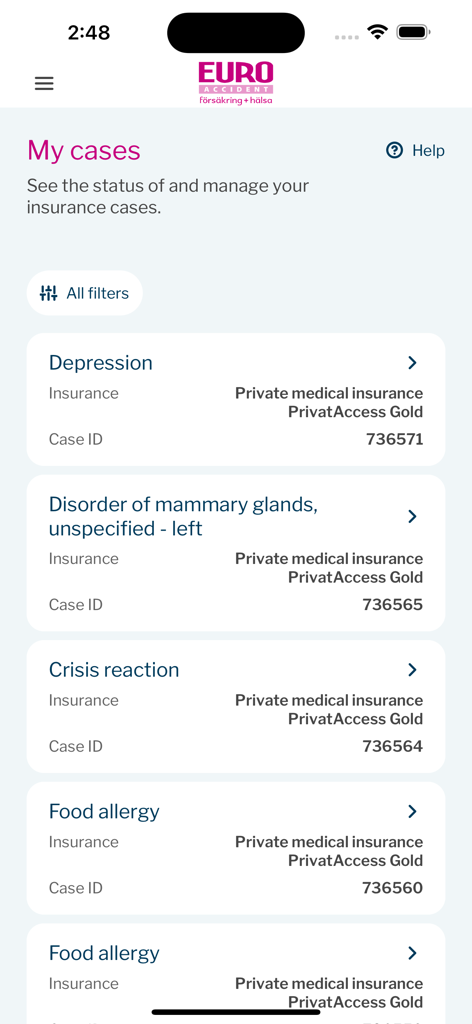
Euro Accident 2.0 - The My cases screen of the Euro Accident app showing a list of active insurance claims including case IDs and coverage details.
The My cases screen of the Euro Accident app showing a list of active insurance claims including case IDs and coverage details.

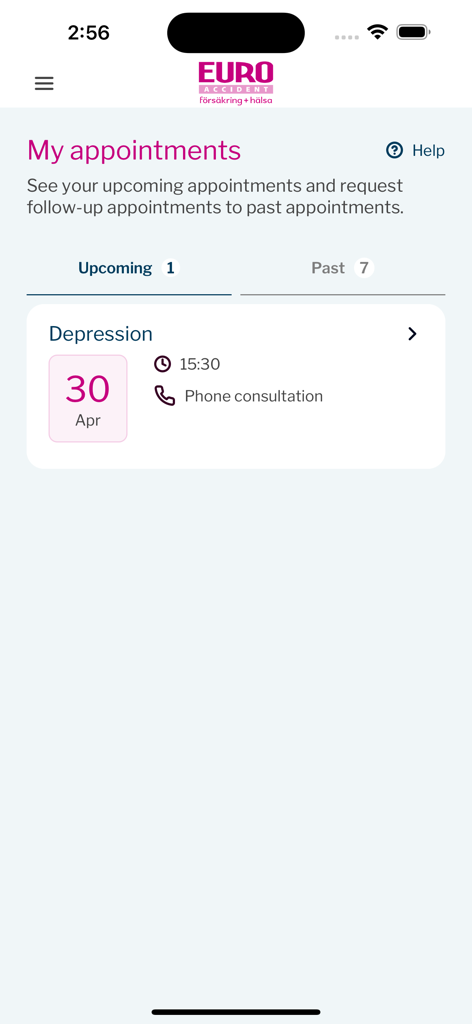
Euro Accident 2.0 - My appointments screen in the Euro Accident 2.0 app showing an upcoming phone consultation for depression on April 30th.
My appointments screen in the Euro Accident 2.0 app showing an upcoming phone consultation for depression on April 30th.

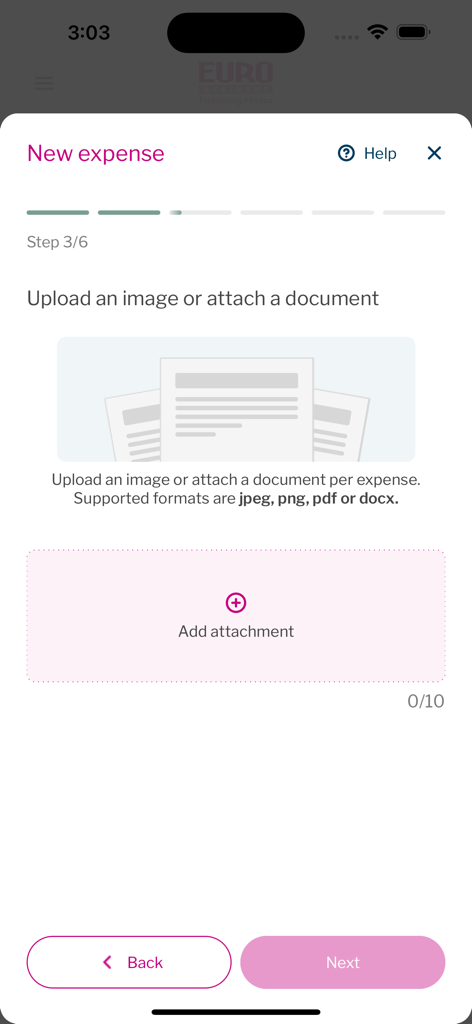
Euro Accident 2.0 - New expense upload screen in the Euro Accident app

New expense upload screen in the Euro Accident app

Description

Introduction The new Euro Accident app help Euro Accident insured customers to file claims, book and handle health care appointments, handle communicationion, get help and be informed when there are actions that they need to take in regards to their insurance errands. Log in In order to log into the app, the user needs to 1. Have at least one active Euro Accident insurance. 2. Be able to identify themselves securely with Swedish identification service BankID. (Information about BankID https://www.bankid.com/en/) Since the the production app integrates towards the production environment, only real persons that fulfil critereas 1 and 2 can test all functionality in the app. In order to review functionality all, functionality has been screen recorded and attache as separate files. Recordings demonstrate the functionalities that can be accessed through the app, depending on what Euro Accident insurance the user has. Features and screenrecording descriptions 1. Log in with BankID (missing) Screen is filmed with another device since BankID refuses to run sessions with ongoing screenrecording. - User can login to the app if they have a Euro Accident insurance by using BankID authentication. 2. File new case - User can file a new case for injury or illness to use their insurance. After filing a new case they get to speak to a doctor or nurse online for an assessment (external link) 3. Book an appointment with ticket - The user has been assigned an appointment ticket to use for booking a healthcare appointment at suitable instance, time and date. 4. Request a follow-up appointment - After user has been to the appointment and they want a follow-up appointment. 5. Manage appointments - see appontment time and location - User can view booked healthcare appointment details, time and location. 6. Manage appointments - Reschedule a booked appointment - User can reschedule a booked appointment directly in the app. 7. Manage appointments - request a follow-up appointment - User can manage appointments and book a follow-up appointment from details view. 8. File a claim - upload receipt - When user has expenses covered by insurance, user can upload receipts in order to get reimbursed for expences, such as for appointments, travel, etc. 9. File a claim - Upload scar pictures - When a user has an Euro Accident insurance that covers injury scars, a user can upload pictures of scars and connect claim to an existing case. 10. Report to us - back at work - When a user with an Euro accident insurance that covers sick leave compensation, they can report when they have returned from sick leave to working again. 11. Report to us - send medical certificate - When a Euro Accident claims adjuster handles a case, a medicial certificate from a doctor needs to be provided by the user. The user can upload the medical certificate in the app. 12. Sign Power of Attorney - In order to provide health care for an individual, user needs to sign a the document. 13. View payments - When Euro Accident customershave been approved compensation, the upcoming payments can be seen in the app. Also user can see past payments. 14. Pay deductable fee - In order to book a first appointment for a case, user needs to pay a deductable first fee either with credit card or with Swish payment solution. 15. View my insurances - User can view and read more about their insurances. 16. View my and my childrens insurances - If user has an insured child, user can switch toggle button to read about childrens insurances. 17. call Employee assistance program - Insured customers covered by the Employee assistance program can easily access the phone number to call. 18. View and edit my details - By going to View my profile, user can easily view and update contact details such as phone number and e-mail adress. 19.Log out - User can easily log out from View my profile-screen.

Download

Download on App Store

This page is not an official page of the app or its developer, but an independent editorial publication created for informational and commentary purposes. Unless expressly stated otherwise, neither the app nor its developer is affiliated with, endorsed by, sponsored by, authorized by, or otherwise officially connected with MWM, Apple, Google Play, the app publisher, or the app's developer, and nothing on this page implies that the app was developed using MWM's services. Any trademarks, logos, screenshots, and other content remain the property of their respective owners.








