FAX for iPhone: Send & Receive
Download on App Store

This page is not an official page of the app or its developer, but an independent editorial publication created for informational and commentary purposes. Unless expressly stated otherwise, neither the app nor its developer is affiliated with, endorsed by, sponsored by, authorized by, or otherwise officially connected with MWM, Apple, Google Play, the app publisher, or the app's developer, and nothing on this page implies that the app was developed using MWM's services. Any trademarks, logos, screenshots, and other content remain the property of their respective owners.

Logo of FAX for iPhone: Send & Receive
Download on App Store

FAX for iPhone: Send & Receive

Join 700,000+ professionals sending secure, HD-quality faxes worldwide. Scan contracts, medical records, and documents instantly—no landline or bulky hardware required.

Key Figures

Downloads

717K+

User Rating

4.8/5

Total Ratings

34K+

Publisher

7270356 Canada Inc

Category

Business

Locales

11

Latest Version

4.6.1

Size

79.9 MB

First Released

Aug 25, 2017
Features

Secure Faxing for Busy Professionals

Transform your phone into a high-performance administrative suite. Skip the office supply store and handle your paperwork wherever business takes you.

HIPAA-Compliant & Secure

Transmit sensitive PII, legal contracts, and medical records with end-to-end encryption and full industry compliance.

Built-in HD Document Scanner

Auto-enhance scans to remove shadows and noise, ensuring your documents arrive sharp, legible, and professional.

The following screenshots and description are sourced directly from the app's official store listing and are the property of the app developer.

App Store

Screenshots
FAX for iPhone: Send & Receive - Promotional screen for Fax for iPhone app featuring the text Send and Receive Fax and a Top Rated Fax App badge.
Promotional screen for Fax for iPhone app featuring the text Send and Receive Fax and a Top Rated Fax App badge.

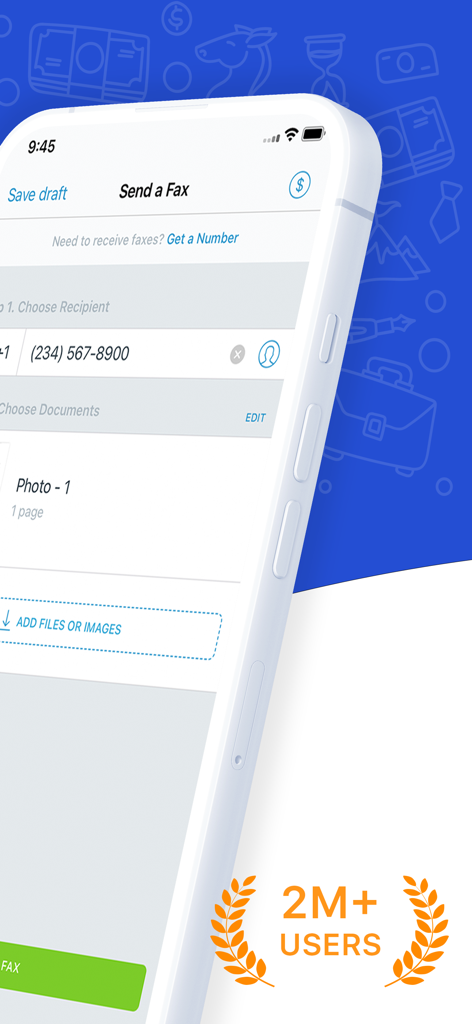
FAX for iPhone: Send & Receive - iPhone screen showing the Send a Fax interface with a badge highlighting over two million users
iPhone screen showing the Send a Fax interface with a badge highlighting over two million users

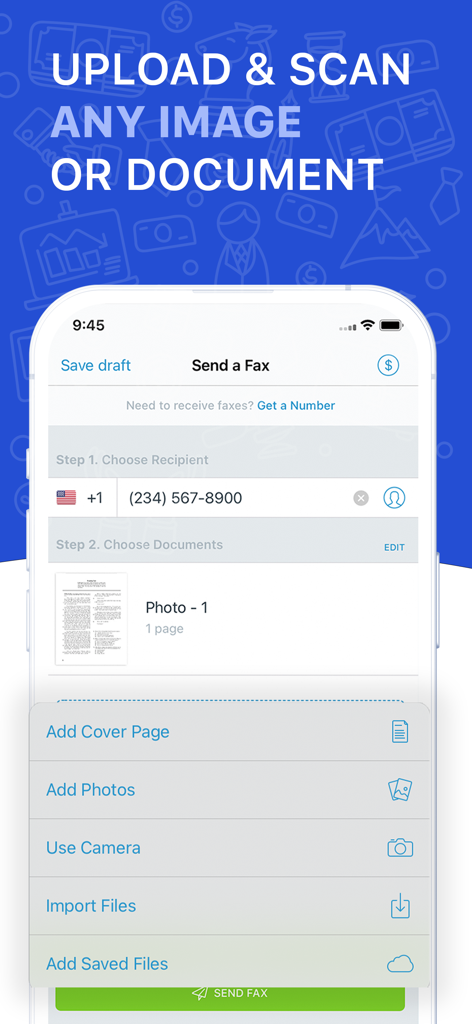
FAX for iPhone: Send & Receive - Screenshot of the FAX for iPhone app showing options to upload and scan documents for faxing.

Screenshot of the FAX for iPhone app showing options to upload and scan documents for faxing.

Description

Scan docs with camera and send faxes worldwide. Fast & easy! Fax for iPhone lets you turn your device into a fax machine! You can scan / import and fax contracts, receipts, paper notes, schedules, timetables, any kind of documents – anything you might need in your day to day life using this fax app. No fax machine or dedicated phone line needed. SEND FAXES - Fax from iPhone to 100+ countries - Advanced document scanner & image processing - Image enhancements - Combine multiple document documents into a single fax - Preview before sending to recipient - Track all sent documents - Encryption & HIPAA compliance RECEIVE FAXES - Dedicated number - Receive faxes from anywhere in the world ---------------------------------------------------------------------- TURN ANY DOCUMENT INTO A FAX - Scan documents, receipts, contracts etc… with camera - Create faxes from your camera, Files or anywhere else - Fax documents in hundreds of countries - Forget about land line and phone lines - Enhance your documents with image correction tools - Fax from iphone directly to your address book - Easy Fax app to send fax Fax from iPhone lets you take pictures of any kind of document, whether it’s for business expenses or on-the-go legal contracts. Scan them directly in-app or use your Camera Roll. You can even turn cloud-based documents into faxes via Dropbox, Google Drive and more. GET THE BEST HD QUALITY PICTURE Fax from iPhone comes bundled with powerful image-enhancement features that let you resize, enhance and improve the quality of your faxes. It includes noise removal, shadow-reduction, and even automatic angle correction. You can make sure the recipients will be able to read them as clearly as possible. MANAGE FAXES AND REDUCE FAXING ERRORS No more worries about sending poorly scanned or messy documents. Fax from iPhone lets you combine multiple documents into one, and you get to preview everything before you send it! SEND AND RECEIVE FAXES IN A COUPLE OF TAPS You can scan and send a fax in seconds! Simply type in the number of the recipient, or use your address book contacts for an even faster process. No more struggling to find a free landline or to manually type in the right number anymore. It’s an easy fax app to send fax. KEEP TRACK OF YOUR FAXES With Fax from iPhone, you will be notified when your documents are sent and you get a clear update when they are delivered. No more lost documents. SEND FAXES WORLDWIDE You can send faxes to a record number of countries around the world - perfect for international business! Easy Fax app to send fax. SCANNER APP INTEGRATION If you already use our ScannerApp, you can integrate both apps to send your faxes easily and conveniently in seconds. So if you need to send faxes regularly, forget about the trouble of locating fax machines and painstakingly scanning your documents. Easy fax - Do it in on the go and in a couple of taps right from your phone or tablet with Fax from iPhone. Subscription The Fax app contains the following subscription options: 1 week - $6.99 USD 1 month - $19.99 USD 12 months - $95.99 USD Please note the subscription automatically renews unless auto-renew is turned off at least 24-hours before the end of the current period By using Fax app Pro, you are agreeing to our Privacy Policy and Terms of Use: Private Policy http://getsfaxapp.com/privacy.html Terms of Use http://getfaxapp.com/terms.html Payment will be charged to iTunes Account at confirmation of purchase • Account will be charged for renewal within 24-hours prior to the end of the current period, and identify the cost of the renewal • Subscriptions may be managed by the user and auto-renewal may be turned off by going to the user's Account Settings after purchase • Any unused portion of a free trial period, if offered, will be forfeited when the user purchases a subscription to that publication, where applicable

Download

Download on App Store

This page is not an official page of the app or its developer, but an independent editorial publication created for informational and commentary purposes. Unless expressly stated otherwise, neither the app nor its developer is affiliated with, endorsed by, sponsored by, authorized by, or otherwise officially connected with MWM, Apple, Google Play, the app publisher, or the app's developer, and nothing on this page implies that the app was developed using MWM's services. Any trademarks, logos, screenshots, and other content remain the property of their respective owners.