
This page is not an official page of the app or its developer, but an independent editorial publication created for informational and commentary purposes. Unless expressly stated otherwise, neither the app nor its developer is affiliated with, endorsed by, sponsored by, authorized by, or otherwise officially connected with MWM, Apple, Google Play, the app publisher, or the app's developer, and nothing on this page implies that the app was developed using MWM's services. Any trademarks, logos, screenshots, and other content remain the property of their respective owners.


Flexcil Note & Good PDF Reader
Gestures, redefined: This app weaponizes your Apple Pencil, turning digital documents into dynamic workspaces.
Downloads
1M+User Rating
Total Ratings
18.0KPublisher
Category
ProductivityLocales
15Latest Version
1.5.24Size
159.4 MBFirst Released
Nov 2, 2020An analytical breakdown of Flexcil's core functionalities for enhanced productivity and digital document management on Apple devices.
Flexcil Note & Good PDF Reader: Key Features Evaluation
Gesture-Based Note-Taking and Content Capture
The app provides an exclusive pen gesture mode that enables swift highlighting, text capture, and image selection, significantly reducing the time spent on transcribing and summarizing content from digital documents.
Advanced PDF Annotation and Document Management
This tool features comprehensive capabilities for editing and annotating PDF documents, allowing users to instantly open, read, study, and mark up virtually any PDF, making it ideal for academic and professional document review.
Integrated Audio Recording with Timestamp Sync
It allows users to record audio during lectures or meetings and synchronize it with their notes, enabling seamless review by tapping on a note to replay what was said at that exact moment.
Robust Multitasking and Split-View Functionality
The app supports advanced multitasking features, including the ability to use Flexcil alongside other applications, edit two PDFs simultaneously, and utilize various viewing modes such as full-screen or 4-page views for enhanced productivity.
Optimized Apple Pencil Integration
This tool offers an enhanced experience with Apple Pencil, providing a natural writing feel, guaranteeing zero touch malfunctions, and supporting advanced features like the 2nd generation Apple Pencil's double-tap functionality.
Seamless Cloud Synchronization
The app provides cloud sync functionality, enabling users to access their notes and documents from anywhere and ensure they are seamlessly updated across all their devices.
Extensive Customization for Notes and Bullet Journals
It allows for endless creativity and personalization with hundreds of pen colors and stroke sizes, diverse covers, and templates, facilitating engaging and organized note-taking and bullet journaling.
Broad Third-Party Application and File Compatibility
The app ensures high interoperability by supporting integration with popular platforms like Zoom, Google Classroom, Google Drive, Dropbox, and iCloud, as well as various file types including digital textbooks and ebooks.
Frequently Asked Questions
Everything you need to know about Flexcil Note & Good PDF Reader
What is Flexcil?
Flexcil is an ultimate iOS note-taking app that supports bullet journaling, reading documents, and editing pages from textbooks. Users can annotate PDFs, capture text/images with gestures, and organize notes.
Can I annotate PDFs in Flexcil?
Yes, Flexcil allows users to easily annotate PDFs. It supports editing PDF pages and annotating almost anything within the document.
Does Flexcil support Apple Pencil?
Yes, Flexcil supports the Apple Pencil, including the 2nd generation with double-tap functionality. It simulates real-life note-taking and guarantees zero touch malfunctions.
Can Flexcil record audio during note-taking?
Yes, Flexcil offers audio recording and playback features. Users can record lectures or meetings while taking notes simultaneously, then review by tapping specific notes.
Does Flexcil offer cloud synchronization?
Yes, Flexcil includes cloud sync as a new feature. Users can access notes from anywhere and seamlessly sync them across multiple devices.
Can I view multiple documents at once in Flexcil?
Yes, Flexcil offers multitasking capabilities, including a Pop-up Viewer that allows users to effortlessly compare and view two documents side-by-side. It also supports editing two PDFs simultaneously.
What is the masking pen feature in Flexcil?
The masking pen is a new feature in Flexcil designed to enhance annotations with precision. It allows users to refine their mark-ups.
Does Flexcil offer a dark mode for studying?
Yes, Flexcil includes a Dark Mode feature. This provides a comfortable study environment, specifically designed to be easy on the eyes.
How do pen gestures work in Flexcil?
Flexcil utilizes pen gestures for efficient note-taking, allowing users to highlight, capture images and text, and summarize content. This streamlines tasks in just two easy steps.
Is Flexcil compatible with Google Drive?
Yes, Flexcil is compatible with Google Drive. It also integrates with other services such as Zoom, Google Classroom, Dropbox, Box, and iCloud for versatile use.
The following screenshots and description are sourced directly from the app's official store listing and are the property of the app developer.
App Store
Screenshots

This tool introduces essential premium features, clearly showcased by icons for cloud sync and audio recording, along with a dual-device view highlighting consistent cross-device functionality.
Premium Features Unveiled
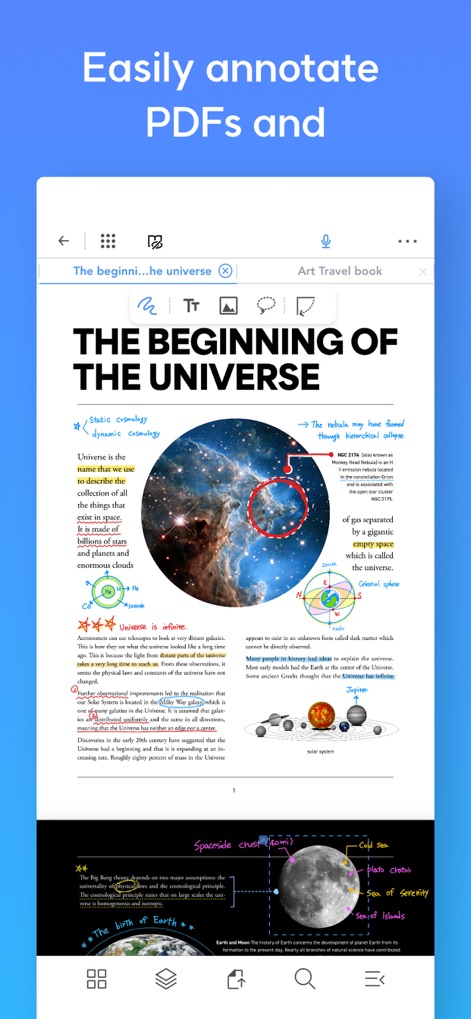
Users can effortlessly annotate PDF documents with varied pen strokes and highlighted sections, making important information stand out directly on the content.
Intuitive PDF Annotation

The app enables integrated note-taking with a split-screen layout, allowing users to view a PDF document while simultaneously adding notes and dragging visual elements like images.
Unified Note-taking Canvas

This tool facilitates efficient document review through its main display and an interactive pop-up viewer, enabling users to compare annotated text and visuals across two files simultaneously.
Seamless Document Comparison

Users can quickly extract information by dragging images from a source document and dropping them into a new note, streamlining the summarization process.
Effortless Information Extraction

The app provides a convenient reference link next to copied text, allowing users to instantly jump to the original document's section and verify information.
Instant Source Linking

This tool empowers users to capture lectures by simultaneously taking handwritten notes and recording audio, with a clear audio timeline and synchronized text playback.
Dynamic Audio Notes

The app simplifies interactions with intuitive pen gestures for selecting content, which then activates a convenient pop-up menu for quick formatting or action.
Smart Gesture Controls

The app offers a comprehensive side menu that provides an at-a-glance overview of all mark-up information, including categorized annotations and linked references within the document.
Organized Annotation Overview
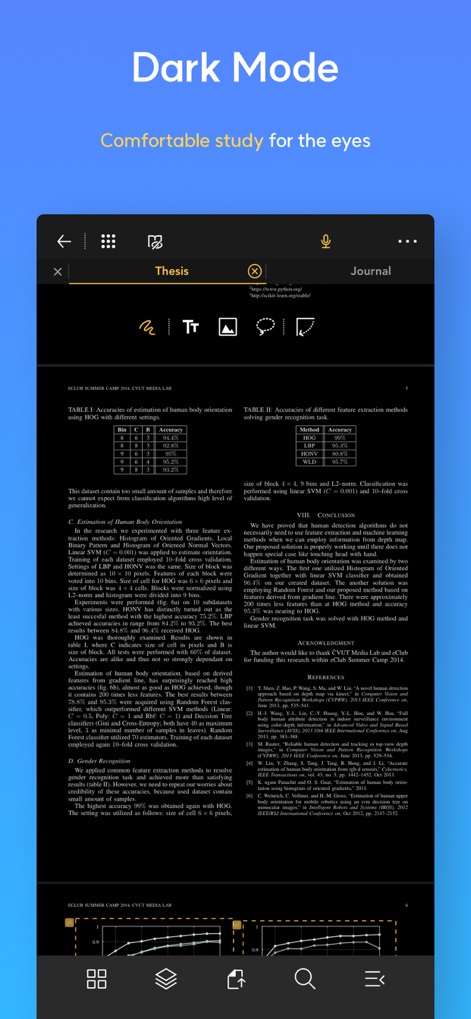
This tool provides a comfortable dark mode display, featuring inverted document colors and bright text, which significantly reduces eye strain during extended reading sessions.
Enhanced Viewing Comfort
Description
Download
More Like This
Apps with similar features and user experience

MarginNote 3
Beijing Yunsi Software Technology Co., Ltd

公文宝-公文写作
Guangzhou Weia Information Technology Co., Ltd.

Mapify: AI Mind Map Summarizer
Xmind Ltd.

Readest - eBook Reader
Bilingify LLC

BoardNotes: Notes&PDF&Mindmap
朝民 肖

LiquidText Prepaid
LiquidText, Inc.

Readwise
Readwise, Inc

Essayist: Academic Writing App
Essayist Software Inc.

GitMind: AI Mind Map & Notes
Wangxu Technology Co., Ltd
This page is not an official page of the app or its developer, but an independent editorial publication created for informational and commentary purposes. Unless expressly stated otherwise, neither the app nor its developer is affiliated with, endorsed by, sponsored by, authorized by, or otherwise officially connected with MWM, Apple, Google Play, the app publisher, or the app's developer, and nothing on this page implies that the app was developed using MWM's services. Any trademarks, logos, screenshots, and other content remain the property of their respective owners.