
This page is not an official page of the app or its developer, but an independent editorial publication created for informational and commentary purposes. Unless expressly stated otherwise, neither the app nor its developer is affiliated with, endorsed by, sponsored by, authorized by, or otherwise officially connected with MWM, Apple, Google Play, the app publisher, or the app's developer, and nothing on this page implies that the app was developed using MWM's services. Any trademarks, logos, screenshots, and other content remain the property of their respective owners.


Flipkart Seller Hub
Start selling in India with 0% commission and seamless digital onboarding. Manage your inventory and scale your cross-border operations effortlessly from anywhere in the world.
Downloads
1M+User Rating
Total Ratings
2.0KPublisher
Category
BusinessLocales
1Latest Version
6.0.21Size
90.2 MBFirst Released
Apr 27, 2016Scale Your Business in India from Anywhere
Bridge the distance and tap into India's 400 million customers with the most efficient mobile-first seller ecosystem for global entrepreneurs.
Sell to 400M+ Customers
Access one of the world's fastest-growing markets and maximize your margins with 0% commission in select categories.
Automated Pan-India Logistics
Manage fulfillment without the headache; we ship to 100% of India's serviceable pin-codes while you monitor from abroad.
Frequently Asked Questions
Everything you need to know about Flipkart Seller Hub
How to register to sell products using the Flipkart Seller Hub?
To register on Flipkart Seller Hub, sellers need a mobile number, email ID, pick-up address, pin code, GSTIN, and bank details. Afterwards, sellers add product listings and inventory to begin selling.
Does Flipkart Seller Hub charge commission for product sales?
Yes, Flipkart Seller Hub offers 0% commission in specific product verticals. This policy allows sellers to maximize their profit margins and reduces the overall cost of conducting business.
What advantages does registering on Flipkart Seller Hub provide?
Registering on Flipkart Seller Hub offers hassle-free onboarding, access to 400 million customers, low business costs, and shipping to all serviceable Indian pin-codes. It also includes 24x7 seller support.
How does Flipkart Seller Hub support business growth for sellers?
Flipkart Seller Hub supports growth through training, webinars, events, and Account Manager assistance. The app also features "Flipkart Growth Plan" and "Partner Services" to help sellers expand and develop their business effectively.
Can I monitor my daily business performance within the Flipkart Seller Hub app?
Yes, the Flipkart Seller Hub app displays daily business performance. It shows current sales and units sold, providing a clear, at-a-glance overview of your business activity and progress.
What support options are available for sellers using Flipkart Seller Hub?
Flipkart Seller Hub provides 24x7 seller support, guidance for app usage, and extensive FAQs. Sellers can also access "Help and My Tickets" and manage "SPF Claims" directly through the app's support section.
How does Flipkart Seller Hub manage order and return updates?
The Flipkart Seller Hub app offers real-time updates on orders and returns. It clearly displays pending RTD + Label orders and the count of returns currently being processed back to the seller.
Does the Flipkart Seller Hub app offer insights for business expansion?
Yes, the Flipkart Seller Hub app provides powerful insights under its "Growth" section. These include "NXT I BUSINESS" metrics like sales and impressions, plus "SELECTION INSIGHTS" for product performance.
What critical actions are highlighted on the Flipkart Seller Hub dashboard?
The Flipkart Seller Hub dashboard highlights critical actions needing attention. These include "Critical GST actions" and "Pending Tickets," ensuring sellers address urgent tasks and maintain compliance promptly.
Can sellers create advertising campaigns directly through the Flipkart Seller Hub app?
Yes, sellers can create advertising campaigns directly within the Flipkart Seller Hub app. The "Advertisements" section allows viewing wallet balance and launching new campaigns to promote products efficiently.
The following screenshots and description are sourced directly from the app's official store listing and are the property of the app developer.
App Store
Screenshots

flipkart-seller-hub-app-dashboard
Flipkart Seller Hub mobile app business performance dashboard
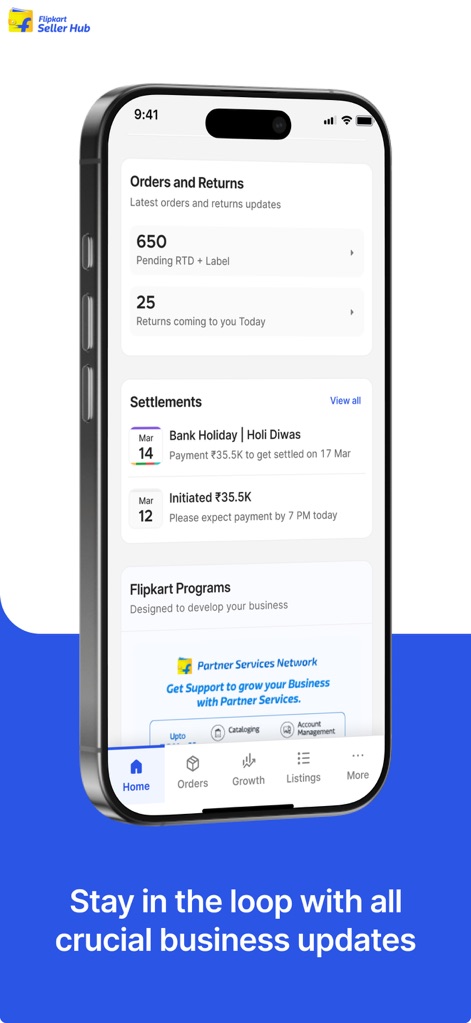
flipkart-seller-hub-business-dashboard
Flipkart Seller Hub mobile app interface showing business updates for orders returns and financial settlements
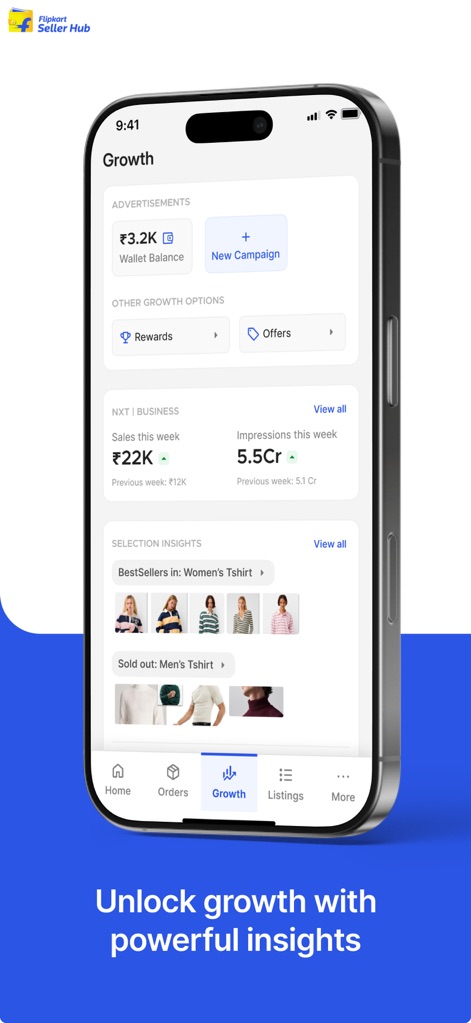
flipkart-seller-hub-growth-insights
The growth dashboard of the Flipkart Seller Hub app showing sales performance and product insights.
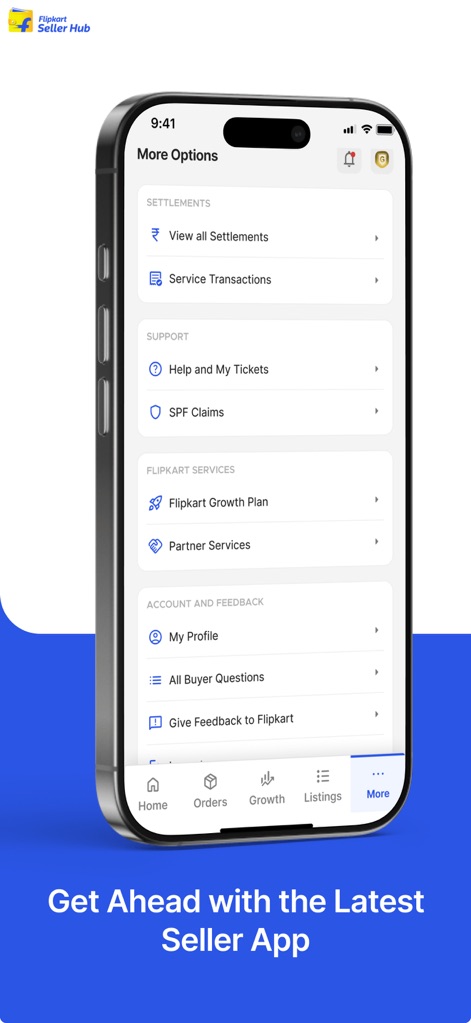
flipkart-seller-hub-more-options-menu
Flipkart Seller Hub mobile app displaying the more options menu for settlements and support
Description
Download
More Like This
Apps with similar features and user experience

TikTok Shop Seller Center
TIKTOK PTE. LTD.

京麦-京东商家版
BEIJING JINGDONG 360 DU E-COMMERCE LTD.

Ozon Seller
INTERNET SOLUTIONS, LLC

Lazada Seller Center
Lazada Group GmbH

Walmart Seller
Walmart

Hepsiburada İş Ortağım
D-MARKET ELEKTRONIK HIZMETLER VE TICARET ANONIM SIRKETI

Amazon Seller
AMZN Mobile LLC

Etsy Seller: Manage Your Shop
Etsy, Inc.

Pulse for Booking.com Partners
Booking.com B.V.
This page is not an official page of the app or its developer, but an independent editorial publication created for informational and commentary purposes. Unless expressly stated otherwise, neither the app nor its developer is affiliated with, endorsed by, sponsored by, authorized by, or otherwise officially connected with MWM, Apple, Google Play, the app publisher, or the app's developer, and nothing on this page implies that the app was developed using MWM's services. Any trademarks, logos, screenshots, and other content remain the property of their respective owners.