
This page is not an official page of the app or its developer, but an independent editorial publication created for informational and commentary purposes. Unless expressly stated otherwise, neither the app nor its developer is affiliated with, endorsed by, sponsored by, authorized by, or otherwise officially connected with MWM, Apple, Google Play, the app publisher, or the app's developer, and nothing on this page implies that the app was developed using MWM's services. Any trademarks, logos, screenshots, and other content remain the property of their respective owners.


Gallery Lock - Photos Vault
It grants digital invisibility, making your personal media truly yours alone.
Downloads
250k+User Rating
Total Ratings
5.9KPublisher
Category
ProductivityLocales
9Latest Version
3.1.5Size
193.3 MBFirst Released
Jul 5, 2023An Analytical Review of Key Privacy and Security Offerings
Gallery Lock - Photos Vault: Core Features Evaluation
Secure Media Vault
The app provides robust protection for photos and videos, accessible only via PIN or biometric authentication, ensuring privacy for personal media.
Intruder Detection
It automatically captures photos of unauthorized access attempts, providing evidence and enhancing security awareness.
Versatile File Hiding
This tool extends privacy protection beyond media to include audio files, documents, and other file types, centralizing sensitive data security.
Discreet App Icon
The app offers the ability to disguise its presence by changing its icon, adding an extra layer of discretion against prying eyes.
Private Web Browsing
It features a secure browser that allows private internet surfing and direct downloading of media into the vault, preventing traces in standard browsers.
Encrypted Cloud Backup
The app provides cloud backup and restore options for hidden content, ensuring data recovery and persistence even if the device is lost or damaged.
Frequently Asked Questions
Everything you need to know about Gallery Lock - Photos Vault
How does Gallery Lock hide photos and videos?
Gallery Lock hides photos and videos privately within the app. They are accessible only after successful numeric PIN or biometric authentication, including Face ID.
Can Gallery Lock hide more than just photos and videos?
Yes, Gallery Lock can hide audio, various file types, and documents. Users can also create and save private notes inside the locker.
Does Gallery Lock support biometric authentication?
Yes, Gallery Lock supports biometric authentication for accessing hidden files. This includes Face ID, as shown in the app's interface.
Does Gallery Lock offer cloud backup for hidden files?
Yes, Gallery Lock Premium offers cloud backup. Users can back up their hidden photos, videos, files, and notes to the cloud and restore them.
What is the Intruder Photo feature in Gallery Lock?
The Intruder Photo feature automatically captures a photo of anyone attempting to access Gallery Lock by entering a wrong password or incorrect biometric authentication.
Can I transfer files wirelessly to Gallery Lock?
Yes, Gallery Lock supports Wireless (WiFi) Files Transfer. This premium feature allows users to import files from a computer and other devices wirelessly.
How much do Gallery Lock subscriptions cost?
Gallery Lock offers a 1-week Lock+ subscription from $4.99 per week and a 1-month Lock+ subscription from $19.99 per month. Prices may vary.
How do I manage my Gallery Lock subscription?
Users can manage their Gallery Lock subscriptions and switch automatic renewal on or off within their iOS settings. Subscriptions automatically renew unless disabled 24 hours prior.
How can I recover my password for Gallery Lock?
Gallery Lock allows password recovery using your registered email ID. You can regain access by selecting the "forgot password" option on the lock pad.
Does Gallery Lock include a safe browser?
Yes, Gallery Lock features a Safe Browser. Users can surf the internet, download photos and videos secretly, and bookmark favorite sites within the app.
Can I change the app icon for Gallery Lock?
Yes, Gallery Lock Premium offers an app icon replacement feature. The app icon can disappear and be replaced with other gallery icons for enhanced privacy.
The following screenshots and description are sourced directly from the app's official store listing and are the property of the app developer.
App Store
Screenshots

This screenshot highlights the robust PIN pad and Face ID support, ensuring only authorized users can access the app's protected content.
Secure Access Control

Observe how the app allows users to seamlessly hide a diverse range of media, from personal photos and videos to confidential documents and private notes.
Diverse File Protection

Discover the app's intuitive folder system for managing private media and its quick access options for Cloud Backup and the integrated Secure Browser.
Organized Secure Vault

This visual demonstrates the app's 'Amazing Themes' feature, showcasing both the crisp Light Mode and the sleek Dark Mode interface for user preference.
Personalized Visuals

Examine the app's innovative Intruder Photo feature, which captures images of unauthorized access attempts and tracks the number of wrong password tries.
Intruder Alert System
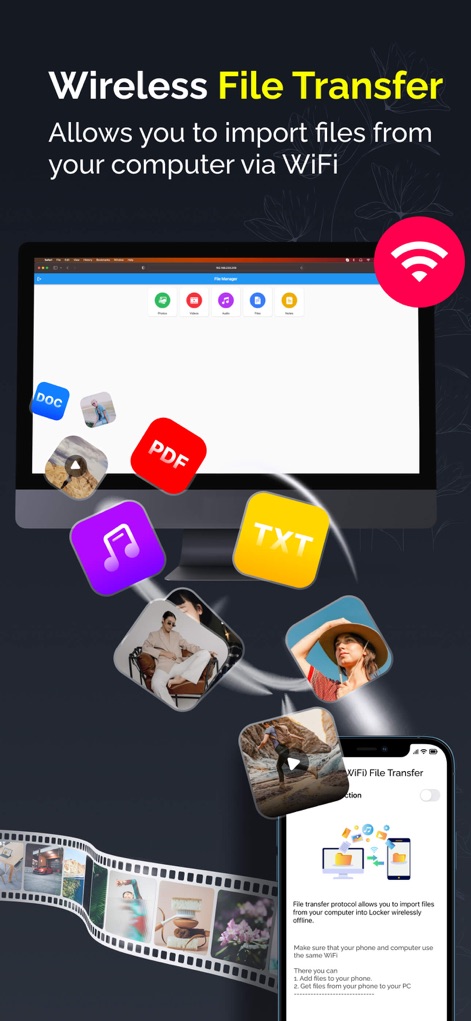
Witness the convenience of Wireless File Transfer, allowing users to effortlessly import various files and media from a computer directly into the secure vault.
Effortless File Transfer
Description
Download
More Like This
Apps with similar features and user experience

Private Photo Vault - Pic Safe
Legendary Software Labs LLC

PBox-Private Photo Vault
宇 刘

Safe Lock - Hidden Photo Vault
Katerina Akhlebinina

SV - Private Photo Vault PRO
Legendary Software Labs LLC

PV - Secret Photo Album
Haibin Jiao

Converter: Hidden Photo Vault
Dmitry Petrov

Calculator Lock - Secure Vault
MacyMind

Secret Photo Vault: Keepsafe
KeepSafe Software, Inc

Digiposte: secure storage
la poste
This page is not an official page of the app or its developer, but an independent editorial publication created for informational and commentary purposes. Unless expressly stated otherwise, neither the app nor its developer is affiliated with, endorsed by, sponsored by, authorized by, or otherwise officially connected with MWM, Apple, Google Play, the app publisher, or the app's developer, and nothing on this page implies that the app was developed using MWM's services. Any trademarks, logos, screenshots, and other content remain the property of their respective owners.