
This page is not an official page of the app or its developer, but an independent editorial publication created for informational and commentary purposes. Unless expressly stated otherwise, neither the app nor its developer is affiliated with, endorsed by, sponsored by, authorized by, or otherwise officially connected with MWM, Apple, Google Play, the app publisher, or the app's developer, and nothing on this page implies that the app was developed using MWM's services. Any trademarks, logos, screenshots, and other content remain the property of their respective owners.


Calculator Lock - Secure Vault
It grants impenetrable digital discretion. This app ensures your private media remains exactly that: private.
Downloads
1M+User Rating
Total Ratings
50.9KPublisher
Category
UtilitiesLocales
1Latest Version
3.8Size
80.1 MBFirst Released
May 2, 2023An Analytical Overview of Core Safeguards for Digital Privacy
Key Security Features: Calculator Lock - Secure Vault
Disguised App Interface & Icon Changer
The app provides a discreet interface, appearing as a functional calculator, and allows users to change the app's icon for enhanced stealth, concealing the presence of a secure vault.
Intruder Selfie Capture
It automatically captures selfie photos of anyone attempting unauthorized access to the vault with incorrect passwords, enhancing security.
Photo and Video Hiding
It allows users to securely hide private photos and videos within a secret vault, making them inaccessible through standard galleries and viewable via built-in players.
Cloud Backup Options (iCloud/Google Drive)
The app supports secure backup of hidden data to iCloud or Google Drive, ensuring data safety and recoverability in case of device loss or damage.
Integrated Password Manager
This tool features a secure password manager to store and protect various login credentials within an encrypted format.
Seamless Data Migration
This tool facilitates easy and secure migration of all hidden data from an old device to a new one, preventing data loss during device transitions.
Data Export/Restore
The app provides the functionality to restore or export hidden media and files from the vault back to the user's phone when needed, offering data flexibility.
Secure Contact Hiding
The tool enables users to create and securely store private contacts, keeping them hidden from the device's standard contact list.
Frequently Asked Questions
Everything you need to know about Calculator Lock - Secure Vault
How do I open the Calculator Lock - Secure Vault app?
To open the Calculator Lock app, enter your password on the hidden calculator photo vault interface. Then, press the '=' button to gain access to your secure files.
What should I do if I forget my password for Calculator Lock?
If you forget your Calculator Lock password, enter "11223344=" into the app. This allows you to master reset your password after verifying your security question.
Does Calculator Lock store my private photos and videos on its servers?
No, Calculator Lock - Photo Lock & safe Calculator Vault app does not copy or store your Photos, Videos, Audio, Contacts, Notes, or Passwords on its servers. All data remains local.
Will my hidden files be lost if I uninstall Calculator Vault - Secure Vault?
Yes, if you uninstall the Calculator Vault - Secure Vault app, all your hidden files will be permanently lost. The app strongly advises against uninstallation to prevent data loss.
What kind of media can Calculator Lock - Secure Vault hide?
Calculator Lock - Secure Vault effectively hides photos and videos. It stores this data within a hidden vault, ensuring these files are not visible in other standard galleries or file managers.
Can I back up my hidden data with Calculator Lock?
Yes, Calculator Lock offers robust backup solutions for your hidden data. You can securely back up your files using both Google Drive and iCloud backup options to prevent data loss.
Does Calculator Lock include a password management feature?
Yes, Calculator Lock features a dedicated "My Password Manager." This function allows you to securely hide and store all your passwords in an encrypted format within the secret gallery lock.
Can I change the icon of the Calculator Lock app for privacy?
Yes, Calculator Lock provides a "Disguise Mode" feature. This allows users to change the app's icon or logo to a less conspicuous one, enhancing privacy and security.
Does Calculator Lock capture photos of unauthorized access attempts?
Yes, Calculator Lock includes an "Intruder selfie" feature. It automatically snaps photos of intruders who attempt to access your Secret vault by entering incorrect passwords.
Is it possible to transfer data to a new device using Calculator Lock?
Yes, Calculator Lock supports "App Migration." This feature facilitates the seamless transfer of all your protected data from an old device to a new one, ensuring no data loss.
The following screenshots and description are sourced directly from the app's official store listing and are the property of the app developer.
App Store
Screenshots

The app highlights its commitment to user data protection, showcasing a '1 Million+ Installs' badge and vital integrations like 'Google Drive Backup' for peace of mind.
Essential Security Features

Users can manage their personal content within a secure environment, with the visual grid of photos demonstrating the app's intuitive gallery organization.
Private Media Hub
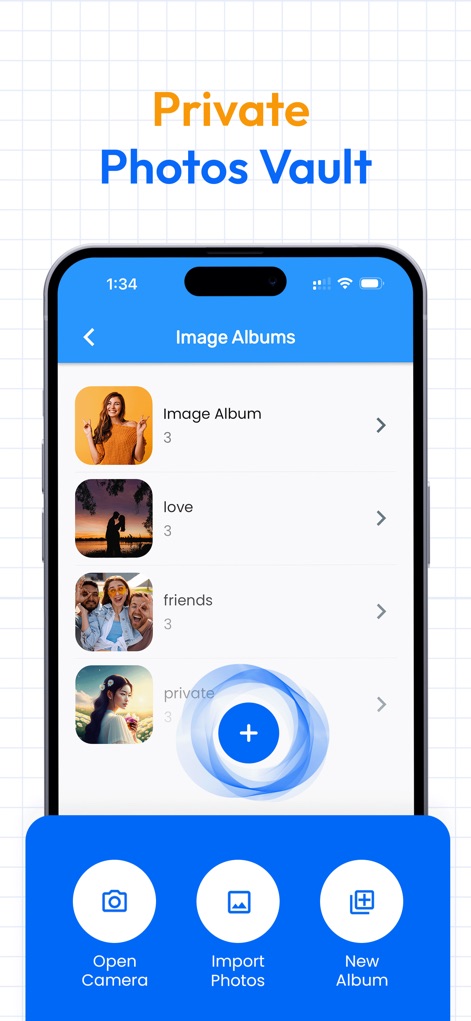
This tool allows for structured content management, displaying various 'Image Albums' and offering convenient options to 'Import Photos' or create a 'New Album'.
Organized Private Albums

The app facilitates secure content movement, illustrating a 'Wireless Transfer' process between a mobile device and a desktop interface via an IP address.
Seamless Content Transfer

This feature proactively guards against unauthorized access, showing the 'Intruder Selfie' option with configurable wrong password attempts and a dedicated 'Check Intruder Selfie' button.
Enhanced Security Monitoring

Users can access advanced privacy functionalities, with the display showing a 'Premium Features' overview including 'Disguise Mode' and a 'Panic switch' for heightened security.
Unlock Premium Protection

The app offers robust password protection, showcasing organized categories for 'Bank Accounts' and 'Card Details' entries for comprehensive digital security.
Secure Credential Management
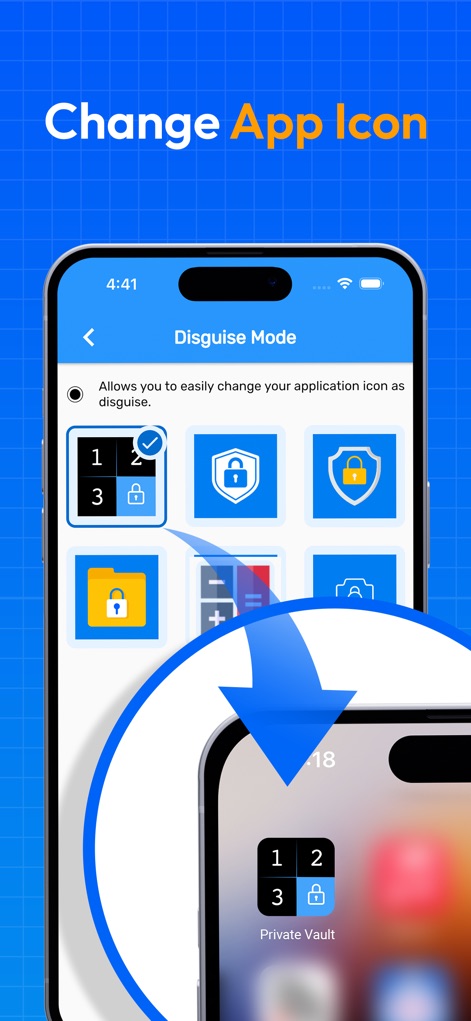
This tool ensures discreet operation through 'Disguise Mode', allowing users to 'Change App Icon' from a selection of alternative symbols for enhanced stealth.
Discreet App Identity
Description
Download
More Like This
Apps with similar features and user experience

Private Photo Vault - Pic Safe
Legendary Software Labs LLC

PBox-Private Photo Vault
宇 刘

Safe Lock - Hidden Photo Vault
Katerina Akhlebinina

SV - Private Photo Vault PRO
Legendary Software Labs LLC

PV - Secret Photo Album
Haibin Jiao

Converter: Hidden Photo Vault
Dmitry Petrov

Secret Photo Vault: Keepsafe
KeepSafe Software, Inc

Digiposte: secure storage
la poste

FileMate
俊波 贾
This page is not an official page of the app or its developer, but an independent editorial publication created for informational and commentary purposes. Unless expressly stated otherwise, neither the app nor its developer is affiliated with, endorsed by, sponsored by, authorized by, or otherwise officially connected with MWM, Apple, Google Play, the app publisher, or the app's developer, and nothing on this page implies that the app was developed using MWM's services. Any trademarks, logos, screenshots, and other content remain the property of their respective owners.