
This page is not an official page of the app or its developer, but an independent editorial publication created for informational and commentary purposes. Unless expressly stated otherwise, neither the app nor its developer is affiliated with, endorsed by, sponsored by, authorized by, or otherwise officially connected with MWM, Apple, Google Play, the app publisher, or the app's developer, and nothing on this page implies that the app was developed using MWM's services. Any trademarks, logos, screenshots, and other content remain the property of their respective owners.


GC Auto Clicker
Stop tapping. Start dominating. This app hands users the power to automate the mundane and conquer any click-intensive task.
Downloads
2.5M+User Rating
Total Ratings
8.1KPublisher
Category
ProductivityLocales
19Latest Version
1.1.7Size
82.3 MBFirst Released
Oct 11, 2023An in-depth analysis of GC Auto Clicker's core functionalities and their impact on user productivity and gaming performance.
GC Auto Clicker: Key Features Assessment
Automated Tapping for Repetitive Tasks
The app provides advanced automation for repetitive tasks, allowing users to automate single tap actions with increased speed and convenience.
Multi-Target Click Mode
This tool features a multi-target click mode that enables the automation of complex sequences by taping multiple points successively, enhancing efficiency for intricate tasks.
Performance Tracking & History
It allows users to track and record their historical click-through rates in detail, providing insights into changes in click speed and performance over time.
CPS Test (Click-Through Rate Calculator)
The app includes a CPS Test to precisely calculate the user's click-through rate, offering accurate performance metrics superior to manual measurement.
Counter History & Reporting
This tool allows users to view the history of their counters and export counter values with historical reports, facilitating comprehensive data review.
Multi-Functional Digital Counter
The app provides a versatile online counter that helps users easily track various numbers, supporting multiple customizable counters with specific names, values, and steps.
Left-Handed Mode
It features a dedicated left-handed mode to improve accessibility and comfort for left-handed users, optimizing the user experience.
Customizable Floating Window
The app allows for the adjustment of its floating window size, ensuring it accommodates click requirements without obstructing the phone screen.
Frequently Asked Questions
Everything you need to know about GC Auto Clicker
What is GC Auto Clicker?
GC Auto Clicker is a click assistant that helps automate repeated clicks for tasks like playing games, auto-liking, and accepting tasks, making phone usage faster and more effective.
Does GC Auto Clicker support multiple clicking points?
Yes, GC Auto Clicker supports multi-target click mode, allowing users to tap multiple target points successively for complex tasks, in addition to single-target clicking.
Can GC Auto Clicker measure click-through rate?
Yes, GC Auto Clicker includes a CPS Test feature that precisely calculates your click-through rate, displays your click speed, and records historical results with graphs.
How do I manage my subscription for GC Auto Clicker?
Subscriptions for GC Auto Clicker are managed through your App Store Account Settings after purchase. Auto-renewal can be turned off at least 24 hours before the current period ends.
Does GC Auto Clicker offer an online counter feature?
Yes, GC Auto Clicker provides an online counter to track various numbers easily. It supports multiple counters, custom names, values, steps, and comprehensive history tracking.
Can I customize the UI size in GC Auto Clicker?
Yes, GC Auto Clicker allows UI customization. Users can adjust the size of the action point and the control bar through the app's settings to suit their specific requirements.
Where can I find guides on using GC Auto Clicker?
GC Auto Clicker provides usage guides on its official website, gcautoclicker.com, and on its dedicated YouTube Channel, 'GC Auto Clicker,' covering various application scenarios.
Does GC Auto Clicker save scripts?
Yes, GC Auto Clicker allows users to save scripts, particularly for multi-point modes. This feature is visible in the 'Save Scripts' section and through the 'added save/load script' option.
The following screenshots and description are sourced directly from the app's official store listing and are the property of the app developer.
App Store
Screenshots
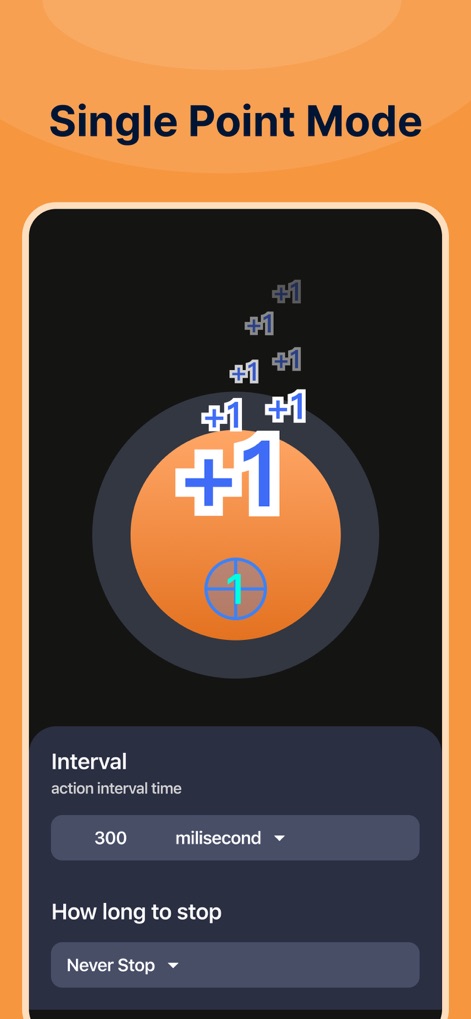
The app demonstrates its single-target click mode with customizable "Interval" timing and a clear display of automated taps ("+1" indicators).
Precision Single Click

Users can efficiently manage and organize their automation routines through the "Script" list, where each saved "multipoint mode" script is readily accessible.
Script Management

This view highlights the app's user-friendly interface, featuring a prominent "Start" button for quick initiation and a floating control bar with options like "Add a click action" and "Edit script settings".
Intuitive Control Panel

The tool offers extensive "UI size" customization, allowing users to adjust the visual scale of the "action point" and the "control bar" for optimal comfort.
Tailored Interface

Experience the power of multi-target automation, where users can define a sequence of "numbered target points" and precisely control the "Interval" between each tap.
Advanced Multi-Target

Beyond automation, the app includes playful elements like the "Crazy clicker game" where users can achieve high scores (e.g., "605") and witness fun visual effects.
Engaging Clicker Fun

The app features a captivating "Cube War" game mode, challenging users with a grid-based puzzle where they must interact with specific "highlighted squares" to progress.
Strategic Cube Challenge

Sharpen reflexes with the "Color response speed test", displaying "average speed" and "fastest speed" in milliseconds, challenging users to tap quickly when the "blue circle" changes.
Reaction Speed Test

Discover unique features like the "electronic wooden fish" mode, providing a calming tap experience while tracking progress with visible "Money +1" increments and a cumulative "Total" counter.
Zen Counter Mode
Description
Download
More Like This
Apps with similar features and user experience

自动ּ连点器 - 自动点击器
壮壮 彭

连点器-高效自动点击按键辅助工具
和圆 魏

连点器 - 自动点击持续滚动刷新&旋转指针工具
源 韦

自动点击器·连点器
磊 赵

Auto Clicker-Auto Tapper tool
佳豪 张

Auto Clicker: Click Automatic
RH LANDSCAPING LLC

连点器-自动连点神器&点赞抢购助手
倩格 刘

Auto Clicker - Tap Assistant
乐飞 张

Auto Tapper Assistant App
KUPERTINO BIL. YAZ. HALIL IBRAHIM KARAHAN SAFFET ARSLAN MUSTAFA AYTEN MUHAMMET YALCIN OZDEMIR K. S.
This page is not an official page of the app or its developer, but an independent editorial publication created for informational and commentary purposes. Unless expressly stated otherwise, neither the app nor its developer is affiliated with, endorsed by, sponsored by, authorized by, or otherwise officially connected with MWM, Apple, Google Play, the app publisher, or the app's developer, and nothing on this page implies that the app was developed using MWM's services. Any trademarks, logos, screenshots, and other content remain the property of their respective owners.