
This page is not an official page of the app or its developer, but an independent editorial publication created for informational and commentary purposes. Unless expressly stated otherwise, neither the app nor its developer is affiliated with, endorsed by, sponsored by, authorized by, or otherwise officially connected with MWM, Apple, Google Play, the app publisher, or the app's developer, and nothing on this page implies that the app was developed using MWM's services. Any trademarks, logos, screenshots, and other content remain the property of their respective owners.


Gs Fit
Tired of app overload? This app grants total control over your tech ecosystem, from wearables to headphones, all in one place. It streamlines device management and health tracking, giving users mastery over their digital lives.
Downloads
500k+User Rating
Total Ratings
364Publisher
Category
Health & FitnessLocales
27Latest Version
2.3.2Size
501.9 MBFirst Released
Dec 2, 2022An analytical overview of Gs Fit's capabilities for integrated device management and personal well-being.
Gs Fit: A Comprehensive Smart Ecosystem Hub
Centralized Multi-Device Management
The app provides a unified platform to connect and manage various smart devices, from smartwatches to speakers, eliminating the need to switch between multiple applications.
Quick Device Connection & Control
It allows users to quickly pair devices and monitor their real-time status with an intuitive interface, enabling one-click parameter settings for efficient device operation.
Customizable Smart Scenes
This tool features the ability to create and adapt device interaction modes for diverse scenarios like home, office, or travel, with intelligent recommendations to meet specific user needs.
Integrated Health & Wellness Tracking
The app supports the synchronization and clear visualization of key health data, such as steps and weight, offering a scientific reference for personal health and exercise management.
Frequently Asked Questions
Everything you need to know about Gs Fit
What is Gsfit?
Gsfit is a smart device management and health assistant application. It simplifies multi-device collaboration and health management, providing a seamless smart life experience with centralized control.
What types of smart devices can Gsfit manage?
Gsfit connects and manages smartwatches, translators, headphones, speakers, and power banks. It enables centralized cross-device control, eliminating the need for multiple apps.
Does Gsfit offer health tracking features?
Yes, Gsfit offers health tracking. It supports synchronization of key health information, such as steps and weight, and generates clear data views for exercise and health management.
How do I add a new device to Gsfit?
Users add devices to Gsfit through the "Add equipments" button or by selecting "Scan the code to add" within the application's home screen.
Can Gsfit customize device settings?
Yes, Gsfit allows one-click parameter settings for connected smart devices. It also supports customizable scenes and flexible interconnection for different scenarios.
Does Gsfit provide features for meditation or relaxation?
Yes, Gsfit includes a "Discover" section with meditation features. This section offers options for white noise, sleep-to-music, concentration, sleep, and breathe activities.
Does the Gsfit app support language switching?
Yes, the Gsfit app supports language switching. Users access this option within the "Mine" section under settings.
Does Gsfit integrate with Apple Health?
Yes, Gsfit integrates with Apple Health. This integration option is available in the "Mine" section of the application.
What kind of device customization options are available in Gsfit?
Gsfit offers a "Dial Mall" for watch face customization. It also includes functional settings such as sedentary reminders, water reminders, and alarm clock settings.
How does Gsfit handle device connection issues?
Gsfit provides a "Guide to Device Connection Issues" directly on its home screen. This guide assists users with troubleshooting connectivity problems.
The following screenshots and description are sourced directly from the app's official store listing and are the property of the app developer.
App Store
Screenshots
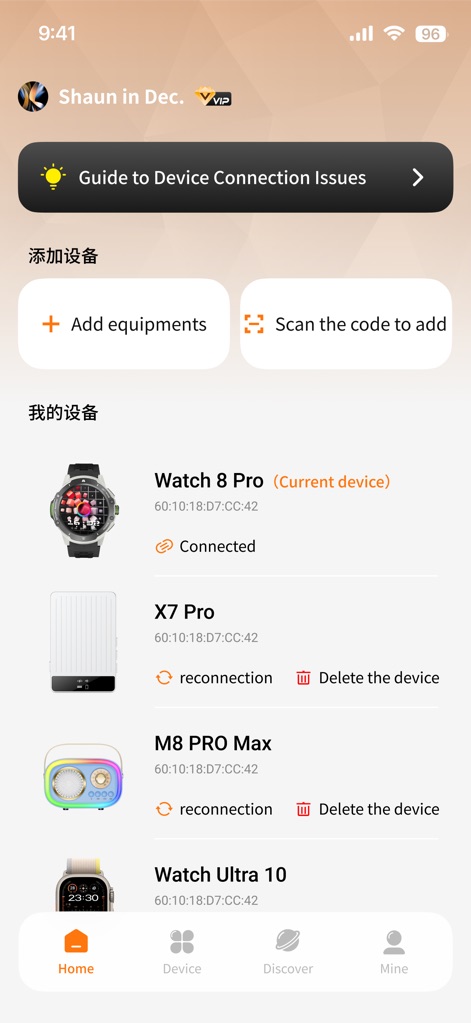
This screen reveals how users can easily 'Add equipments' or 'Scan the code to add' new devices, alongside a clear list showcasing currently 'Connected' smart devices such as the 'Watch 8 Pro' and 'Watch Ultra 10'.
Device Dashboard Overview
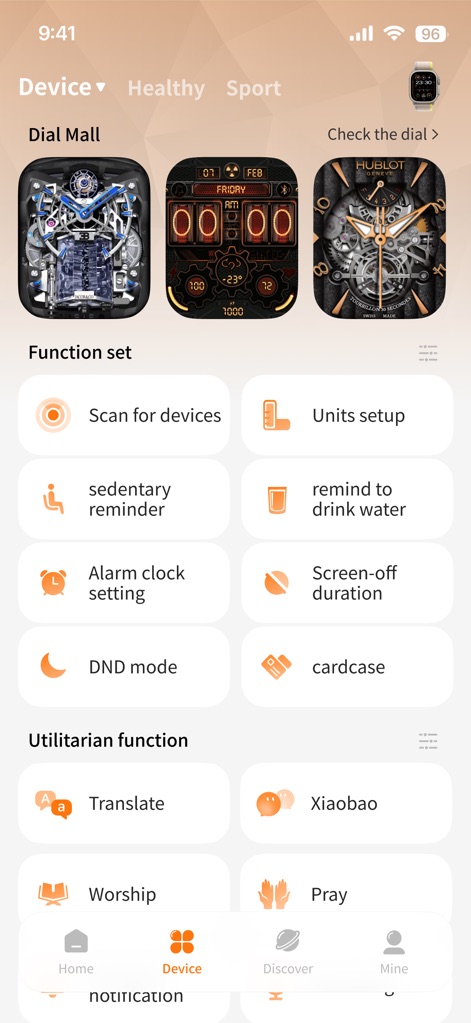
The app offers extensive 'Dial Mall' options for smartwatch customization, alongside a comprehensive 'Function set' that includes practical features such as a 'sedentary reminder' and 'Alarm clock setting'.
Device Customization Options
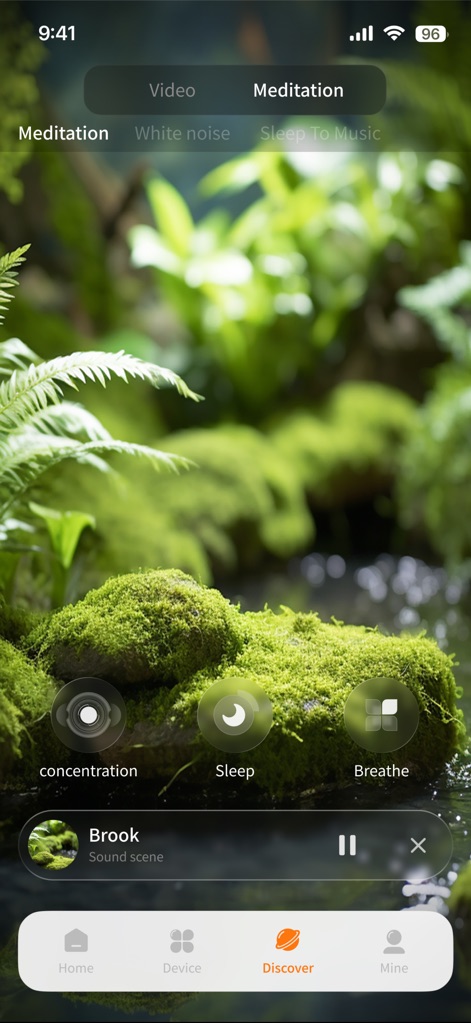
Within the 'Discover' section, users find various wellness modules like 'Meditation' and 'White noise,' complete with interactive elements for 'concentration' and 'Breathe' exercises in a calming visual environment.
Wellness & Discovery Hub
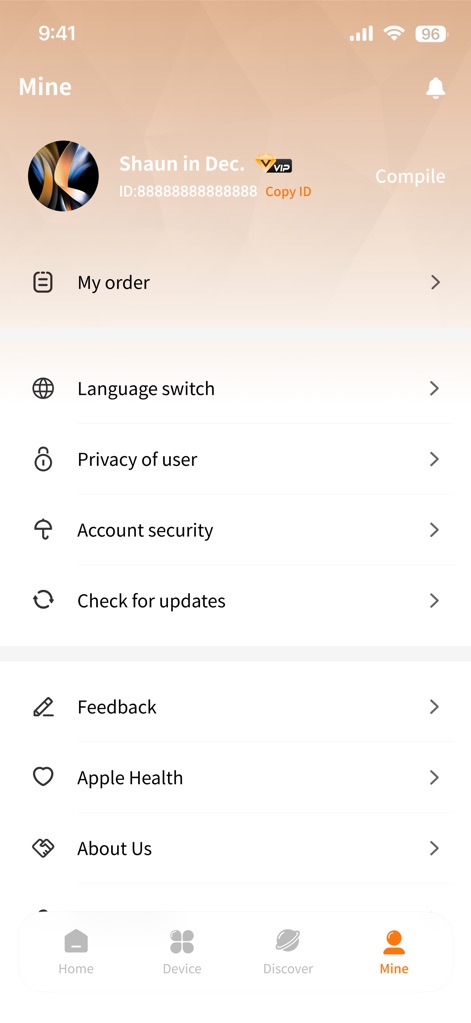
The 'Mine' section provides a personal hub for managing user information, including 'Language switch' and 'Account security,' as well as integrating with 'Apple Health' for comprehensive health data synchronization.
User Profile & Settings
Description
Download
More Like This
Apps with similar features and user experience

Mi Fitness (Xiaomi Wear Lite)
Beijing Xiaomi Co., Ltd

HUAWEI Health
Huawei Software Technologies Co., Ltd.

Oura
Oura Health Oy

iHealth MyVitals
iHealth Labs Inc.

Da Fit
MO YOUNG LIMITED

Zepp
Zepp Inc.
OMRON connect US/CAN/EMEA
Omron Healthcare, Inc.
CASIO WATCHES
CASIO COMPUTER CO., LTD.

NoiseFit: Health & Fitness
NEXXBASE MARKETING PRIVATE LIMITED
This page is not an official page of the app or its developer, but an independent editorial publication created for informational and commentary purposes. Unless expressly stated otherwise, neither the app nor its developer is affiliated with, endorsed by, sponsored by, authorized by, or otherwise officially connected with MWM, Apple, Google Play, the app publisher, or the app's developer, and nothing on this page implies that the app was developed using MWM's services. Any trademarks, logos, screenshots, and other content remain the property of their respective owners.