
This page is not an official page of the app or its developer, but an independent editorial publication created for informational and commentary purposes. Unless expressly stated otherwise, neither the app nor its developer is affiliated with, endorsed by, sponsored by, authorized by, or otherwise officially connected with MWM, Apple, Google Play, the app publisher, or the app's developer, and nothing on this page implies that the app was developed using MWM's services. Any trademarks, logos, screenshots, and other content remain the property of their respective owners.


Huji Cam
Digital snapshots often feel sterile. This app injects the raw, imperfect charm of 1998 film directly into your feed.
Downloads
25M+User Rating
Total Ratings
30.2KPublisher
Category
Photo & VideoLocales
12Latest Version
2.5Size
38.0 MBFirst Released
Sep 28, 2017Huji Cam: Key Features Analysis
An evaluation of the application's core functionalities designed for vintage photography enthusiasts.
Vintage Film Aesthetic
The app makes digital photos mimic the distinct look and feel of vintage analog film from the late 20th century, appealing to users seeking nostalgic and aesthetically unique content for social media.
Authentic Film Imperfections
This tool automatically adds authentic film-like imperfections such as random light leaks and grain, enhancing the spontaneous, imperfect, and artistic qualities desired by the target audience.
Automatic Date Stamping
It automatically overlays a classic date stamp on photos, significantly contributing to the 1998-era nostalgic illusion and making content distinctly retro.
Unpredictable Film Processing
The app applies varied and unpredictable film-like processing to each photo, ensuring unique and spontaneous results that capture the essence of film photography's artistic qualities.
Simplified Point-and-Shoot UI
It provides a straightforward, user-friendly interface that replicates the simplicity of disposable cameras, making vintage photography accessible without the complexities of actual analog equipment.
Adjustable Viewfinder
The app allows users to adjust the size of the viewfinder via a touch mode, improving usability and composition flexibility for various shooting preferences.
Frequently Asked Questions
Everything you need to know about Huji Cam
Is Huji Cam officially affiliated with FUJIFILM?
No, Huji Cam is a product of Manhole and is not the official application of FUJIFILM or any other entity.
What is the primary function of Huji Cam?
Huji Cam makes moments feel like analog film from 1998, creating vivid and vibrant photographs with an old memory aesthetic.
How do users share Huji Cam photos on social media platforms?
Users can share Huji Cam photos on social media by utilizing the hashtag #HUJI to connect with other users.
How does the viewfinder operate within the Huji Cam app?
The Huji Cam viewfinder magnifies the view when an iPhone is held in Landscape Mode. Users can activate "Viewfinder Touch Mode" via Lab > Settings to adjust its size by tapping.
How can camera access issues with Huji Cam be resolved?
To resolve Huji Cam camera access problems, navigate to iPhone Settings, locate Huji, toggle off Camera access, restart Huji Cam, and then tap 'Resolve Problems' in the app.
How does Huji Cam process photos after they are taken?
Huji Cam processes photos by simulating a 'developing' process immediately after capture. This process only occurs while the Huji Cam application is actively running.
Does Huji Cam automatically add the year '98 to captured photos?
Yes, Huji Cam adds a '98 date stamp to photos by default to mimic vintage film. Users can configure the date display settings within the application.
Can Huji Cam organize saved photos into a dedicated album?
Yes, Huji Cam provides a setting to "Create 'HUJI' album when saving," which enables the automatic organization of saved photos into a dedicated album.
The following screenshots and description are sourced directly from the app's official store listing and are the property of the app developer.
App Store
Screenshots
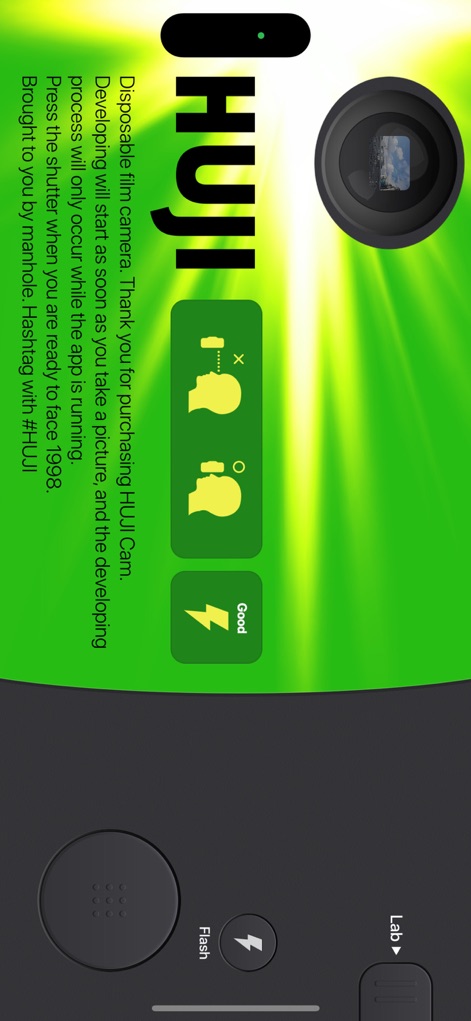
Capture Instant Nostalgia
The app's primary interface invites users to snap photos with a clear shutter button and an accessible 'Lab' section for advanced settings.
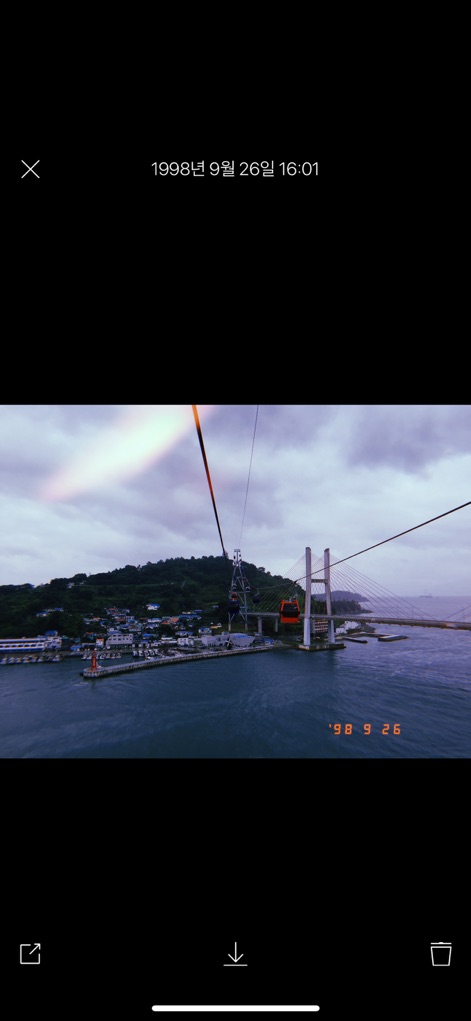
Timeless Photo Results
Users can review their developed images, complete with an authentic '98 date stamp and subtle light leak effects, mimicking vintage film.

Authentic Film Effects
This tool brings an artistic flair to photos, showcasing vibrant red light leaks and the characteristic '98 date embedded directly onto the image.
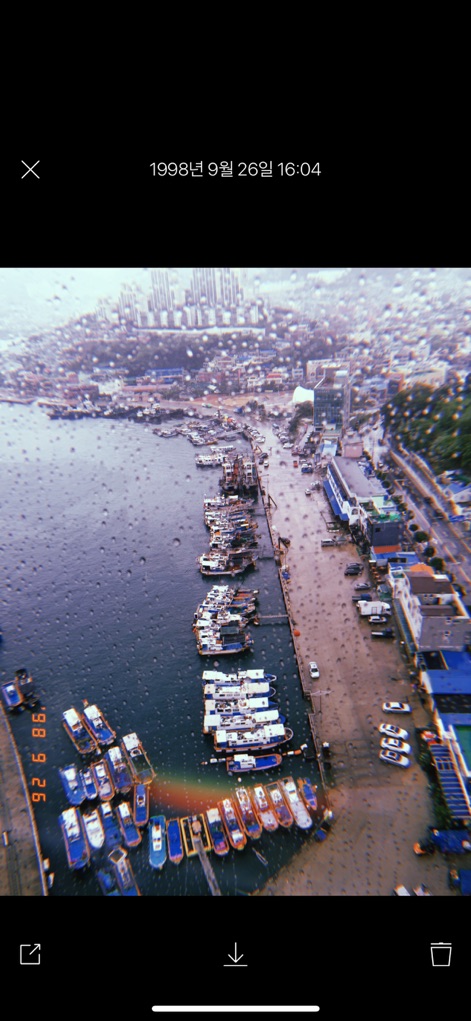
Gritty Film Aesthetics
Witness the app's ability to infuse images with dramatic light leaks and simulated rain or dust on the lens, creating a truly unique retro feel.
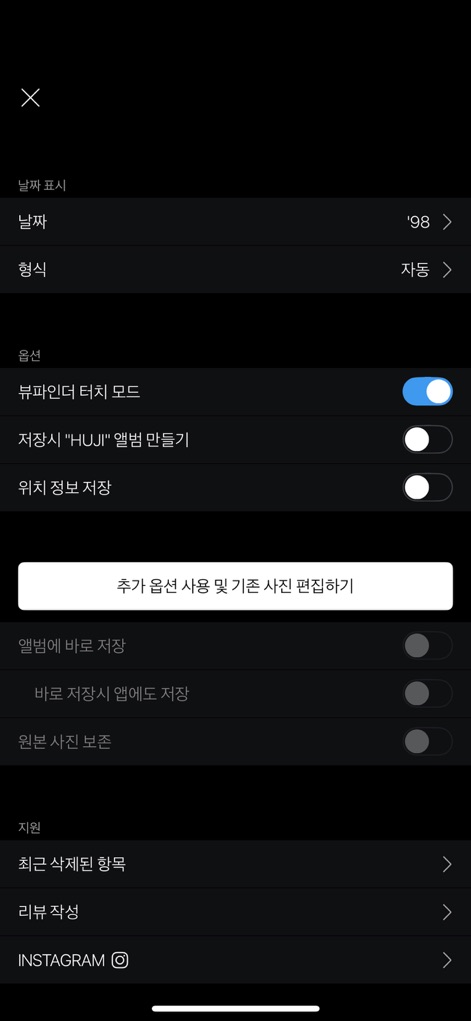
Customize Your Experience
The settings menu offers granular control, including options to toggle "Viewfinder Touch Mode" and create a dedicated 'HUJI' album for saved photos.
Description
Download
More Like This
Apps with similar features and user experience

Dazz Cam - Vintage Camera
DAZZ PTE. LTD.

Kapi - Vintage Film Camera
Shanghai Yuhuan Technology Co., Ltd.
ProCCD - Digital Film Camera
秉妍 蔡

Fomz - Vintage Analog Camera
Guangzhou Mengdong Information Technology Co., Ltd.

Liit - Photo & Video Editor
DAZZ PTE. LTD.
1998 Cam - Vintage Camera
Huu Nguyen Chi

y2k: 2000s photo editor
Abel Thomas Noble

Uplens: Photo & Video Editor
MPGAMES LTD

Buttercam
Beijing Muke Technology Co., Ltd.
This page is not an official page of the app or its developer, but an independent editorial publication created for informational and commentary purposes. Unless expressly stated otherwise, neither the app nor its developer is affiliated with, endorsed by, sponsored by, authorized by, or otherwise officially connected with MWM, Apple, Google Play, the app publisher, or the app's developer, and nothing on this page implies that the app was developed using MWM's services. Any trademarks, logos, screenshots, and other content remain the property of their respective owners.