
This page is not an official page of the app or its developer, but an independent editorial publication created for informational and commentary purposes. Unless expressly stated otherwise, neither the app nor its developer is affiliated with, endorsed by, sponsored by, authorized by, or otherwise officially connected with MWM, Apple, Google Play, the app publisher, or the app's developer, and nothing on this page implies that the app was developed using MWM's services. Any trademarks, logos, screenshots, and other content remain the property of their respective owners.


IDV - IMAIOS DICOM Viewer
Stop guessing. This app turns raw DICOM into immediate insight for medical education. No uploads, no fuss, just your data, analyzed.
Downloads
500k+User Rating
Total Ratings
1.7KPublisher
Category
MedicalLocales
11Latest Version
3.2.1Size
131.8 MBFirst Released
Dec 7, 2018An evaluation for medical education, research, and personal study
IDV - IMAIOS DICOM Viewer: Key Features Analysis
Free for Education & Research
The app is completely free for personal and non-commercial use, making it highly accessible for students and researchers.
Comprehensive DICOM Support
This tool supports all types of DICOM files, including ultrasound, scanner, MRI, and PET, allowing users to analyze a wide range of medical images.
Data Privacy & Offline Security
Data loaded into the app is not uploaded to the network, ensuring the safety and security of personal health information by keeping it stored locally.
Advanced Image Analysis Tools
It provides several fast and intuitive tools such as scrolling, image manipulation, and measurement, crucial for in-depth study of medical images.
Frequently Asked Questions
Everything you need to know about IDV - IMAIOS DICOM Viewer
Is IDV - IMAIOS DICOM Viewer safe for patient data?
Yes, IDV - IMAIOS DICOM Viewer does not upload loaded data to the network, ensuring the safety and security of patient personal health information. This excludes sharing features.
What DICOM file types does IDV - IMAIOS DICOM Viewer support?
IDV - IMAIOS DICOM Viewer supports all DICOM file types, including ultrasound, scanner, MRI, and PET. It offers intuitive tools for image manipulation.
Can IDV - IMAIOS DICOM Viewer open files from my device?
Yes, IDV - IMAIOS DICOM Viewer allows users to easily open any DICOM file stored directly on their device or accessible online for quick viewing.
How much does IDV - IMAIOS DICOM Viewer cost?
IDV - IMAIOS DICOM Viewer is completely free for personal and non-commercial use. An online version is also accessible via the www.imaios.com website.
Is IDV - IMAIOS DICOM Viewer approved for clinical diagnosis?
No, IDV - IMAIOS DICOM Viewer is not approved as a medical device and is not certified for clinical use. It cannot be used for primary medical imaging diagnosis.
Does IDV - IMAIOS DICOM Viewer offer image measurement tools?
Yes, IDV - IMAIOS DICOM Viewer includes a dedicated "Measures" tool within its settings. Users can toggle this feature on to perform measurements on DICOM images.
Can I invert images in IDV - IMAIOS DICOM Viewer?
Yes, IDV - IMAIOS DICOM Viewer provides an "Invert" tool in the settings menu. This allows users to easily invert the display of DICOM images.
How are DICOM studies organized in IDV - IMAIOS DICOM Viewer?
IDV - IMAIOS DICOM Viewer organizes studies under a "Studies" tab by patient and allows users to group them into custom "Albums" for enhanced organization.
What viewing options does IDV - IMAIOS DICOM Viewer provide?
IDV - IMAIOS DICOM Viewer offers flexible viewing options, including 2D layouts and Multiplanar Reconstruction (MPR). Users can adjust window level, window width, and layouts.
The following screenshots and description are sourced directly from the app's official store listing and are the property of the app developer.
App Store
Screenshots

Users can efficiently browse medical studies through a clear list view and utilize the search bar to quickly locate specific patient records marked by their respective modalities (CT, CR, MR).
Study Management
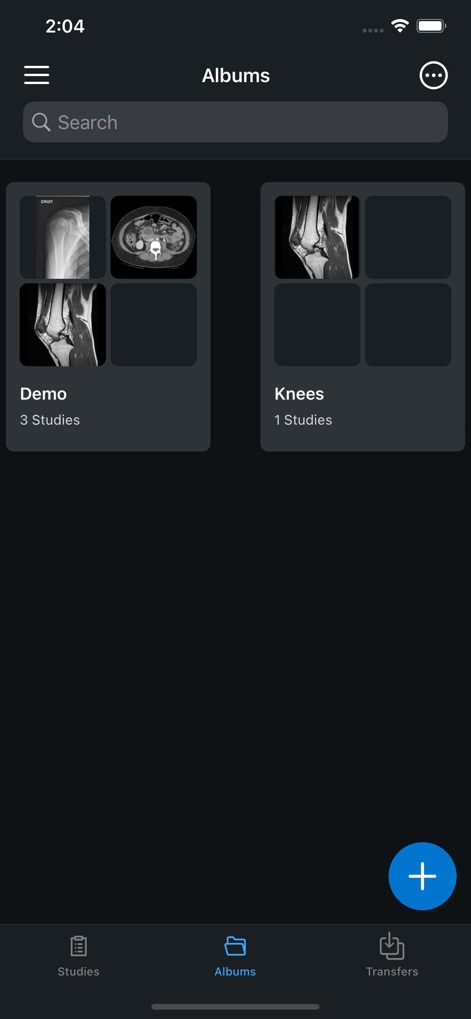
This tool allows users to organize DICOM images into custom albums, providing visual thumbnail previews and indicating the number of studies within each collection.
Organized Image Albums
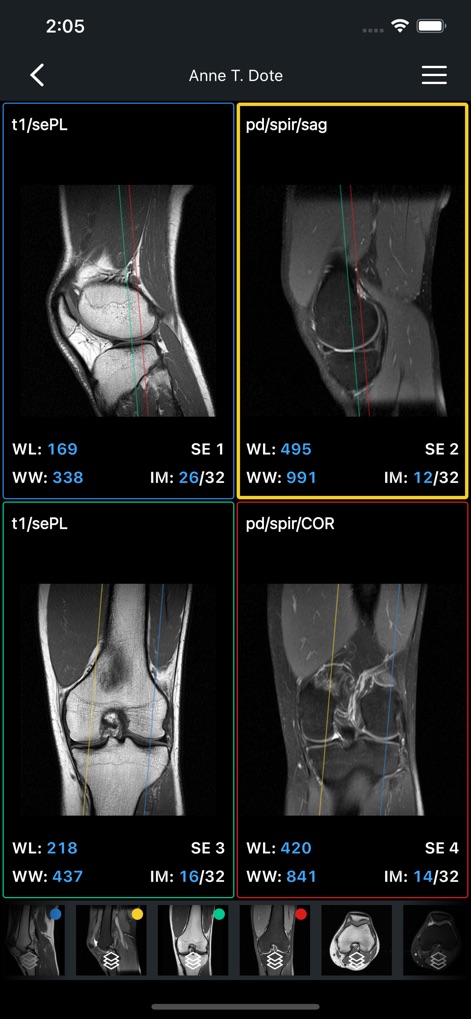
The app presents detailed medical images in a multi-pane grid layout, showcasing precise cross-reference lines and customizable window level (WL) and window width (WW) parameters for in-depth examination.
Detailed Image Analysis
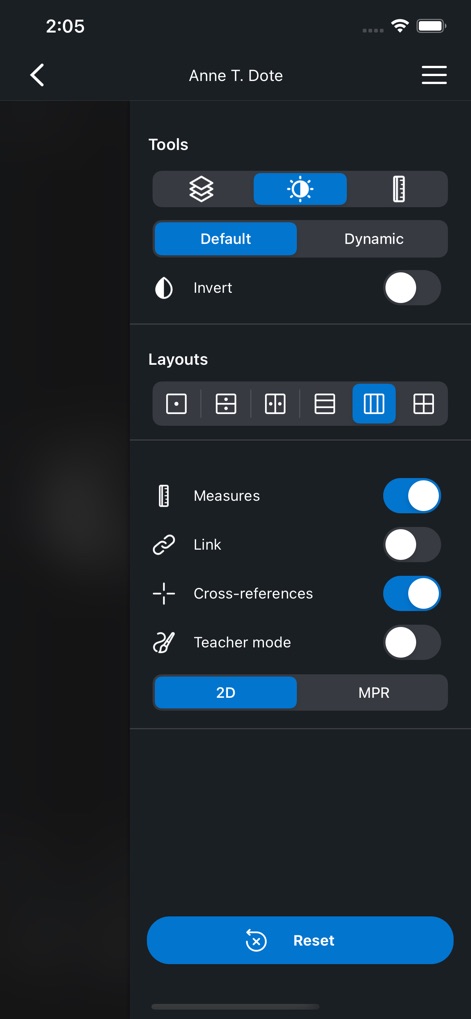
Users can access a comprehensive suite of image manipulation tools, including brightness and contrast adjustments, alongside flexible layout options for arranging multiple views and toggling cross-references.
Powerful Viewing Tools

This tool facilitates multi-planar reconstruction (MPR), allowing simultaneous viewing of medical images across different anatomical planes with intersecting cross-reference lines for precise spatial correlation.
Multi-Planar Views
Description
Download
More Like This
Apps with similar features and user experience

DiagnosUs
CENTAUR DIAGNOSTICS INC

丁震医学教育
Beijing Dingding Yihe Technology Company Limited
Medical Findings
Eleanor Quijano

RX - Radiographic Positioning
Fabricio Tarter

Dental Hygiene Mastery - NBDHE
Higher Learning Technologies, Inc.

CT Anatomy
MEDIWARE CY LTD
Memorix Anatomy and Histology
MEMORIX s.r.o.

Xray Anatomy
XO INTERNATIONAL COMPANY

Netters Anatomy Flash Cards
Skyscape Medpresso Inc
This page is not an official page of the app or its developer, but an independent editorial publication created for informational and commentary purposes. Unless expressly stated otherwise, neither the app nor its developer is affiliated with, endorsed by, sponsored by, authorized by, or otherwise officially connected with MWM, Apple, Google Play, the app publisher, or the app's developer, and nothing on this page implies that the app was developed using MWM's services. Any trademarks, logos, screenshots, and other content remain the property of their respective owners.