
This page is not an official page of the app or its developer, but an independent editorial publication created for informational and commentary purposes. Unless expressly stated otherwise, neither the app nor its developer is affiliated with, endorsed by, sponsored by, authorized by, or otherwise officially connected with MWM, Apple, Google Play, the app publisher, or the app's developer, and nothing on this page implies that the app was developed using MWM's services. Any trademarks, logos, screenshots, and other content remain the property of their respective owners.


Instapaper
No more internet chaos. The app liberates content, turning the web into your personal library, accessible anywhere, anytime.
Downloads
1M+User Rating
Total Ratings
11.3KPublisher
Category
NewsLocales
14Latest Version
9.4.1Size
47.0 MBFirst Released
Feb 12, 2019An in-depth look at its core functionalities and advanced capabilities for dedicated readers.
Instapaper: Key Feature Analysis
Offline Reading Access
It allows users to access their saved articles without an internet connection, catering to reading on-the-go or in areas with limited connectivity.
Clutter-Free Reading
The app provides a mobile-optimized text view that removes web page clutter, offering a clean and distraction-free reading experience.
Full-Text Search
This tool features a powerful full-text search capability, enabling users to quickly locate specific information within their entire library of saved articles.
Highlighting & Annotations
It allows users to highlight important text and add personal notes directly within articles, enhancing comprehension and review.
Speed Reading
The app offers a speed reading feature designed to help users consume articles up to three times faster, optimizing reading efficiency.
Seamless Article Saving
The app provides a convenient one-tap saving option, allowing users to quickly send articles from other applications to their Instapaper library.
Folder Organization
It allows users to create and utilize folders for logical organization of their saved articles, streamlining content management.
Text-to-Speech Playlists
This tool includes a text-to-speech playlist feature, enabling seamless, continuous listening to multiple articles.
Customizable Reading
The app offers extensive customization options for fonts, color themes, and spacing, allowing users to tailor their optimal reading environment.
Article Narration
The app provides text-to-speech narration for articles, allowing users to listen to content when reading visually is not feasible.
Frequently Asked Questions
Everything you need to know about Instapaper
What is Instapaper?
Instapaper is an iOS application designed to save and store articles for reading offline, anytime, anywhere. It provides a mobile-optimized text view, ensuring a clean and uncluttered reading experience.
Does Instapaper allow offline reading?
Yes, Instapaper enables offline reading. Users can access their saved articles on airplanes, subways, or other locations without needing an internet connection.
Can I save articles to Instapaper from other apps?
Yes, Instapaper allows users to save web content from other iOS applications directly into their reading list with a single tap.
What reading customization options does Instapaper offer?
Instapaper offers extensive reading customization, including various font styles, color themes, spacing options, and brightness controls. Users can tailor their reading environment.
Does Instapaper include a text-to-speech feature?
Yes, Instapaper includes a text-to-speech feature. Users can have articles narrated by turning up their device's volume. Premium subscribers also get a text-to-speech Playlist.
How much does Instapaper Premium cost?
Instapaper Premium costs $5.99 per month or $59.99 per year. This optional subscription unlocks advanced features for an enhanced reading experience.
What features are included with Instapaper Premium?
Instapaper Premium includes full-text search for articles, unlimited highlights and notes, a text-to-speech Playlist, and unlimited access to the speed reading feature.
How do I manage or cancel my Instapaper Premium subscription?
Users can manage and cancel their Instapaper Premium subscription directly through their Apple ID account settings in the App Store after purchase. Subscriptions renew automatically unless canceled at least 24 hours prior.
Can I highlight text and add notes in Instapaper?
Yes, Instapaper allows users to highlight text and add notes within any article. This feature helps in remembering key information and facilitates sharing quotes.
How can I organize articles within Instapaper?
Instapaper provides folders for organizing articles easily. Users can also sort their saved article lists by popularity, date added, or article length.
The following screenshots and description are sourced directly from the app's official store listing and are the property of the app developer.
App Store
Screenshots
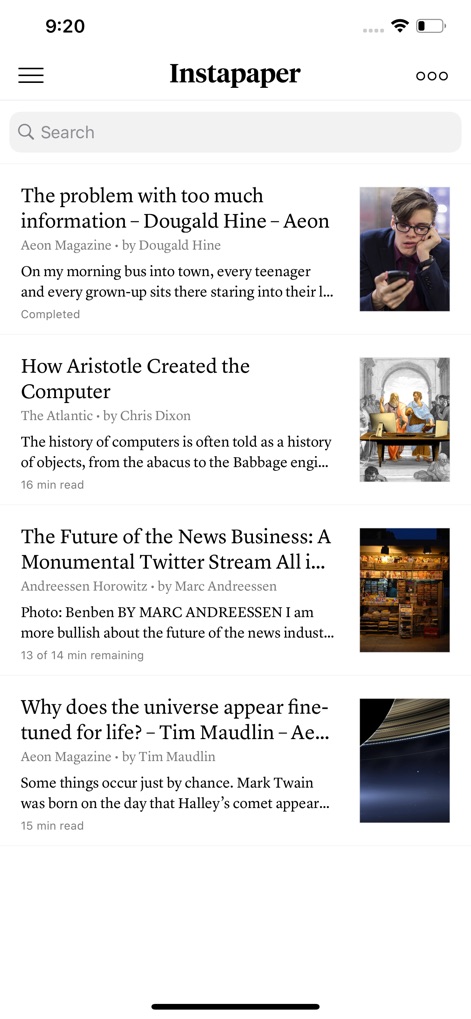
This initial view displays a clean article list with accompanying thumbnail images and prominent article titles for easy selection.
Your Reading List

The app delivers a distraction-free reading experience, featuring a minimalist layout and clear article text, allowing users to concentrate on content.
Focused Reading Mode
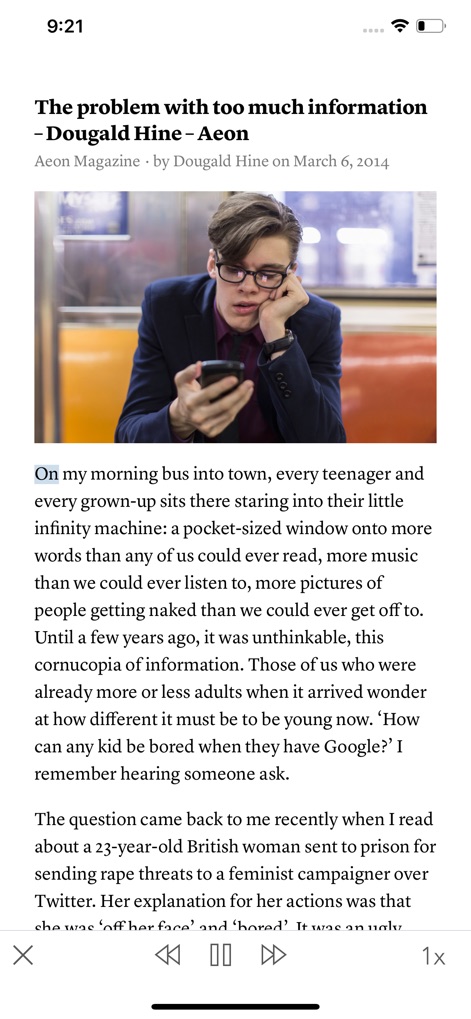
Users can leverage the app's text-to-speech feature, indicated by the highlighted text and easily accessible playback controls at the bottom.
Listen On The Go
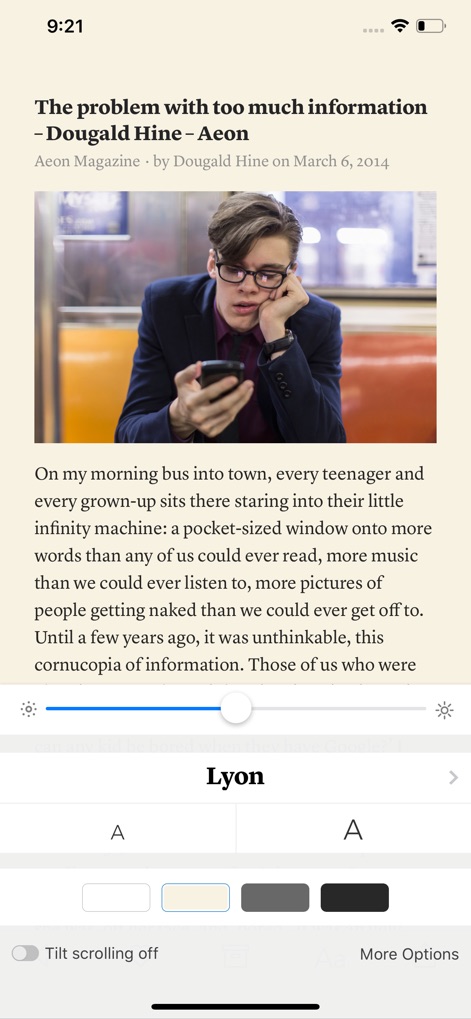
This tool offers extensive customization options, including a range of font styles and adjustable background themes to suit individual preferences.
Personalize Your View
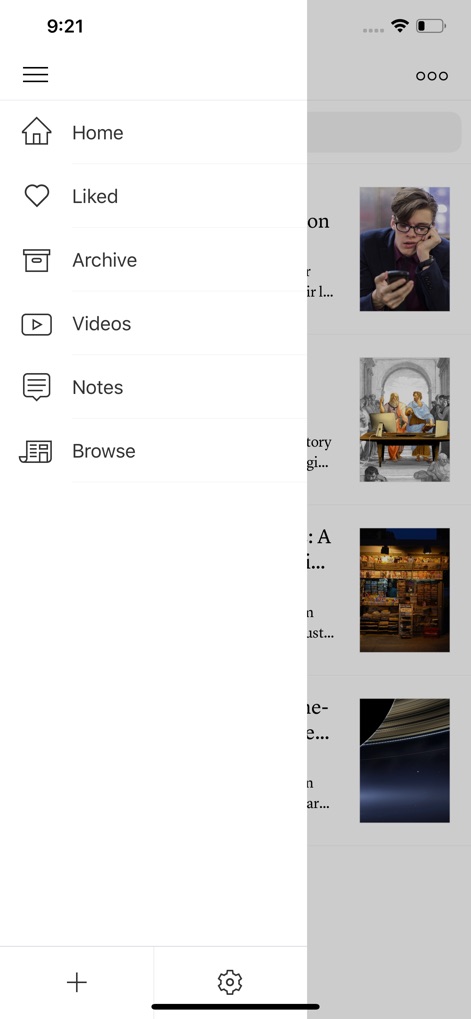
The intuitive side menu provides quick access to essential sections like 'Archive' and 'Notes,' streamlining content management for users.
Effortless Navigation
Description
Download
More Like This
Apps with similar features and user experience

InstaGet Instagram Video Saver
HASAN KUTAS

Matter: Reading App
Dig Wells, Inc.

GoodLinks
Ngoc Luu

Readwise Reader
Readwise, Inc

딸깍 - 링크, 스크린샷, 메모 한 곳에 저장
minseok choi

Offline Pages
Codium Labs LLC

Wayback Machine
Internet Archive

Send to Kindle by KTool
Long Nguyen Hai

Black CirkleAI Pro
Rizwana Sultan
This page is not an official page of the app or its developer, but an independent editorial publication created for informational and commentary purposes. Unless expressly stated otherwise, neither the app nor its developer is affiliated with, endorsed by, sponsored by, authorized by, or otherwise officially connected with MWM, Apple, Google Play, the app publisher, or the app's developer, and nothing on this page implies that the app was developed using MWM's services. Any trademarks, logos, screenshots, and other content remain the property of their respective owners.