
This page is not an official page of the app or its developer, but an independent editorial publication created for informational and commentary purposes. Unless expressly stated otherwise, neither the app nor its developer is affiliated with, endorsed by, sponsored by, authorized by, or otherwise officially connected with MWM, Apple, Google Play, the app publisher, or the app's developer, and nothing on this page implies that the app was developed using MWM's services. Any trademarks, logos, screenshots, and other content remain the property of their respective owners.

Interval Timer □ HIIT Timer
No more guesswork. This app equips users to dominate their workouts with precision timing, turning every session into a calculated victory.
Downloads
2.5M+User Rating
Total Ratings
270.5KPublisher
Category
Health & FitnessLocales
22Latest Version
26.3.0Size
33.7 MBFirst Released
Jun 21, 2016An Analytical Overview for Fitness Enthusiasts
Key Features of Interval Timer □ HIIT Timer
Customizable Workout Intervals
It allows users to easily set and customize intervals for various workout phases like work, rest, and rounds, providing precise control over their training sessions for HIIT, Tabata, or circuit training.
Background Audio Guidance & Music Integration
The app provides clear voice or beep guides that operate seamlessly in the background, allowing users to listen to their preferred music or other audio apps without interruption during workouts.
Comprehensive Workout History & Statistics
This tool features detailed history and statistics pages, enabling users to effortlessly track their workout progress, review past sessions, and monitor their fitness journey over time.
Quick Workout Replay
It allows users to quickly repeat any previous workout directly from their history, eliminating the need to manually set up recurring routines and saving valuable time.
Frequently Asked Questions
Everything you need to know about Interval Timer □ HIIT Timer
How do I set custom intervals in Interval Timer?
You set custom intervals in Interval Timer by dragging to define durations for work, rest, and rounds. The app provides sliders for easy customization of your workout structure.
Does Interval Timer play audio guides during workouts?
Yes, Interval Timer provides voice or beep guides for every workout. These audio guides continue even if you leave the app to use other applications.
Can I listen to music while using the Interval Timer app?
Yes, Interval Timer does not interfere with your music. You can listen to your music apps while you workout, as the timer functions concurrently in the background.
How does Interval Timer track my workout progress?
Interval Timer tracks your workout progress by offering detailed history and statistics pages. It records your workout data, allowing you to review and repeat previous sessions.
Is there a subscription for Interval Timer?
Yes, Interval Timer offers an optional auto-renewable subscription called Premium Pass. This subscription typically includes a free trial period before initiating the monthly charges.
Does Interval Timer offer a free trial for its Premium Pass?
Yes, the Premium Pass in Interval Timer begins with a free trial period. The auto-renewable monthly subscription starts automatically once this trial period ends.
How do I manage my Interval Timer Premium Pass subscription?
You manage your Interval Timer Premium Pass subscription through your Apple Account Settings. Here, you can turn off auto-renewal at least 24 hours before the current period ends.
Can I repeat a previous workout in Interval Timer?
Yes, Interval Timer allows you to repeat a previous workout directly from your history. This feature eliminates the need to manually set up your workout again.
Where can I find the Privacy Policy for Interval Timer?
The Privacy Policy for Interval Timer is available at the following URL: https://float.support/interval-timer/privacy. The app description provides this direct link.
The following screenshots and description are sourced directly from the app's official store listing and are the property of the app developer.
App Store
Screenshots

Experience seamless workout setup with the prominent timer display and clearly organized interval settings for work and rest.
Intuitive Timer Interface

This tool empowers precise training configuration using intuitive draggable sliders and clear numerical values for setting repetitions and rest periods.
Custom Interval Control

Maintain focus with the real-time circular progress bar and the dynamic display showing time remaining for each exercise segment.
Live Workout Guidance
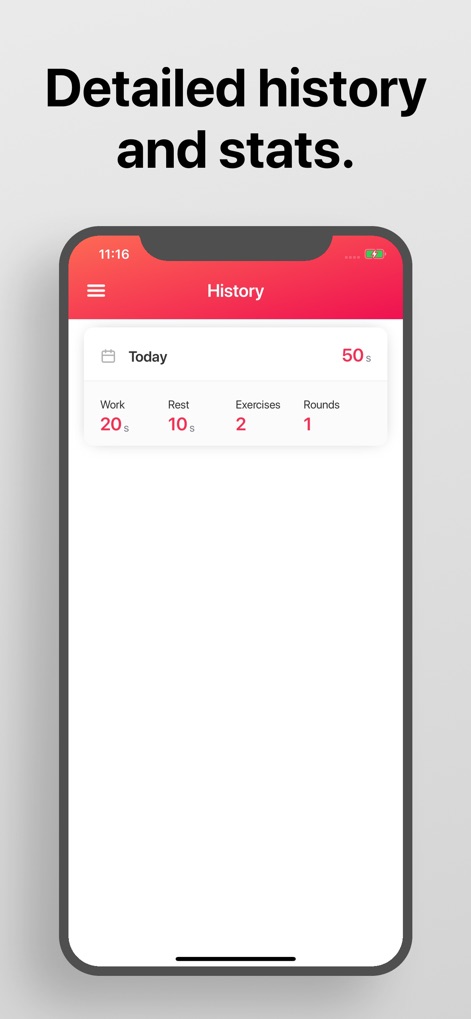
Review past training sessions through a clear daily workout summary and detailed breakdowns of work, rest, and round specifics.
Performance Overview
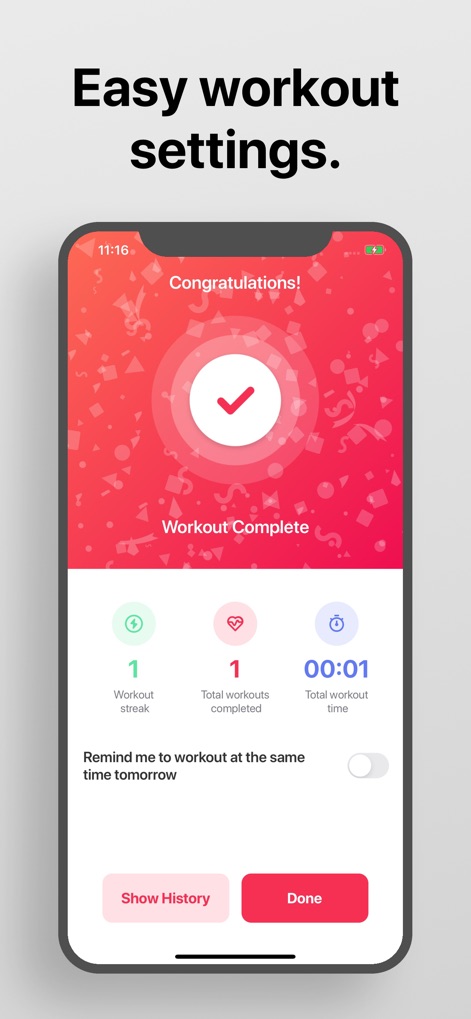
Celebrate milestones with the motivational 'Workout Complete' screen and track progress through key performance metrics like workout streak and total workouts.
Achievement Tracking
Description
Download
More Like This
Apps with similar features and user experience
Timer Plus - Workouts Timer
VGFIT LLC
Tabata Timer: Interval Timer.
Oleksandr Serhiienko
SmartWOD Timer - WOD Clock
SmartWOD GmbH
Interval Timer Plus
Su-Au Hwang
Boxing Interval Timer
Thang Nguyen

Tabata Timer and HIIT Timer
Anuj Seth

Simple Interval Timer
Alena Kazarova
Interval Timer: Tabata & HIIT
AppManage LLC
Tabata Timer □
Float Tech, LLC
This page is not an official page of the app or its developer, but an independent editorial publication created for informational and commentary purposes. Unless expressly stated otherwise, neither the app nor its developer is affiliated with, endorsed by, sponsored by, authorized by, or otherwise officially connected with MWM, Apple, Google Play, the app publisher, or the app's developer, and nothing on this page implies that the app was developed using MWM's services. Any trademarks, logos, screenshots, and other content remain the property of their respective owners.