
This page is not an official page of the app or its developer, but an independent editorial publication created for informational and commentary purposes. Unless expressly stated otherwise, neither the app nor its developer is affiliated with, endorsed by, sponsored by, authorized by, or otherwise officially connected with MWM, Apple, Google Play, the app publisher, or the app's developer, and nothing on this page implies that the app was developed using MWM's services. Any trademarks, logos, screenshots, and other content remain the property of their respective owners.


Interval Timer Plus
Time bends to your will. This app delivers precision control over every workout, from HIIT to Tabata, ensuring users dominate their routines.
Downloads
250k+User Rating
Total Ratings
50.4KPublisher
Category
Health & FitnessLocales
1Latest Version
2.2.8Size
20.6 MBFirst Released
Feb 18, 2021An evaluation of key features enhancing user experience for fitness enthusiasts.
Interval Timer Plus: Core Functionality Analysis
Unlimited Custom Presets
The app provides the ability to create and save an unlimited number of custom workout presets, allowing users to quickly access and repeat their favorite routines without reconfiguring settings.
Highly Customizable Intervals
It allows users to define multiple intervals within a workout, each with individual durations, names, colors, and sounds, offering unparalleled flexibility for diverse training methodologies.
Voice Announcements for Intervals
This tool features clear voice prompts that read out interval names, ensuring users stay informed about their workout phase without needing to look at the screen.
Visual Clarity (Large Fonts & Color-Coding)
The app ensures glanceability with very large fonts and full-screen color-coding, which functions like a traffic light to visually indicate workout phases, enhancing usability from a distance.
Background & Locked Screen Operation
It allows the timer to run seamlessly in the background or with the screen locked, enabling users to focus on their exercise or use other apps simultaneously without interrupting the workout flow.
1-Tap Quickstart
The app provides a convenient 1-Tap Quickstart function, allowing users to initiate a workout instantly from a saved preset, optimizing efficiency and reducing setup time.
Time and Repetition Tracking
This tool features the flexibility to track workouts by either time duration or repetitions, accommodating a wide range of exercise types and user preferences.
Seamless Music Integration
It works effectively with headphones and integrates well with personal music playback, allowing users to enjoy their favorite tunes while receiving timely interval notifications.
Instant Accessibility (No Signup)
The app offers immediate use upon download with no signup required, providing instant access to its features for a quick and hassle-free start.
Haptic and Silent Feedback Modes
This tool includes vibration and silent modes, offering discrete notification options for environments where audible alerts are not suitable or preferred.
Frequently Asked Questions
Everything you need to know about Interval Timer Plus
Is Interval Timer Plus a free application?
Yes, Interval Timer Plus is a free application. It offers a simple and easy-to-use interval timer for various activities without any sign-up requirements.
How do I start a quick timer in Interval Timer Plus?
Interval Timer Plus features a 1-Tap Quickstart. Simply set your desired sets, work, and rest times on the Quickstart screen, then tap the 'START' button to begin.
Does Interval Timer Plus support custom interval presets?
Yes, Interval Timer Plus supports powerful advanced presets. Users can create and save an unlimited amount of presets, each with multiple customizable intervals, individual colors, sounds, and spoken interval names.
Can I use Interval Timer Plus while my phone screen is locked?
Yes, Interval Timer Plus is accessible and continues to work even when your screen is locked or while you are using another application. It also reads out the interval name.
What visual cues does Interval Timer Plus provide during a workout?
Interval Timer Plus provides glanceable visual cues, featuring very big fonts and full-screen color coding that works like a traffic light (red for stop, green for go). It functions in both portrait and landscape modes.
Does Interval Timer Plus offer audio feedback for intervals?
Yes, Interval Timer Plus offers audio feedback. It reads out the interval name and supports individual sounds for intervals. It integrates seamlessly with headphones and your personal music.
Can I change the app's appearance or theme in Interval Timer Plus?
Yes, Interval Timer Plus supports both dark and light modes, allowing users to choose their preferred app appearance. Users can also customize the colors for prepare, work, rest, and finish states.
The following screenshots and description are sourced directly from the app's official store listing and are the property of the app developer.
App Store
Screenshots
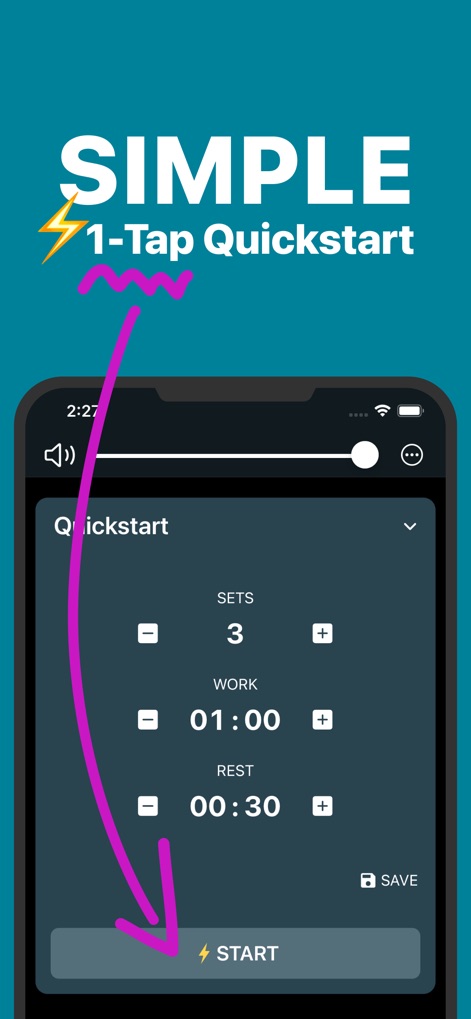
The app features a streamlined 1-Tap Quickstart button and clear 'Sets', 'Work', and 'Rest' interval settings for immediate use.
Effortless Quickstart
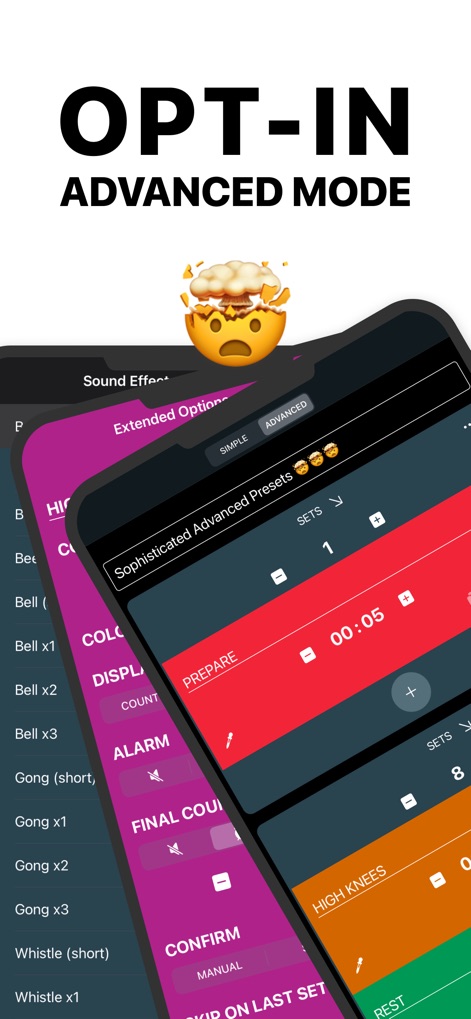
Explore the 'Advanced' mode, offering sophisticated presets with customizable sound effects and detailed interval configurations for tailored workouts.
Advanced Customization

Experience intuitive guidance with full-screen color coding, using vibrant red for 'STOP' and bright green for 'GO', mirroring a traffic light system.
Visual Workout Cues

This tool ensures maximum visibility with very big fonts for the timer and prominent interval names like 'SPACE WALK', visible from any distance.
Glanceable Display

Benefit from spoken prompts as the app reads out the current interval name, such as 'BURPEES', keeping users informed even when the screen is not visible.
Auditory Guidance
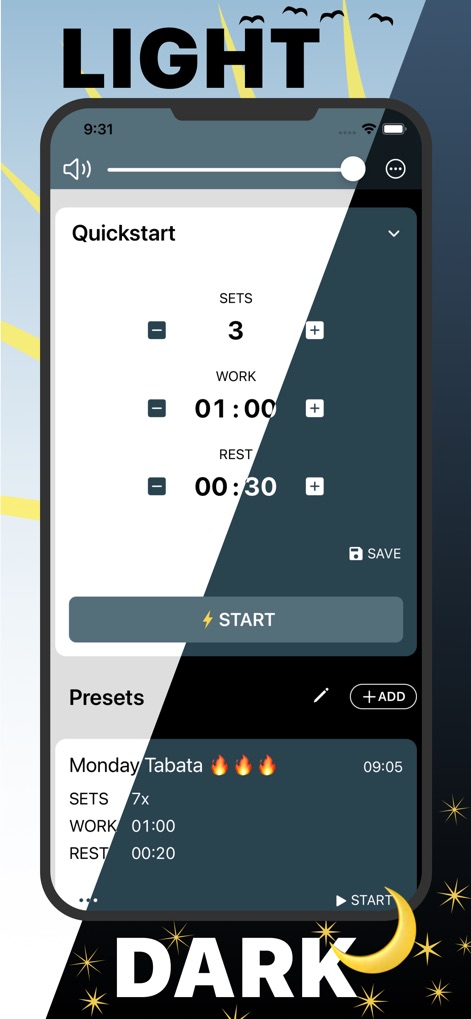
Users can personalize their experience with adaptive light and dark mode options, seamlessly integrated across the 'Quickstart' and 'Presets' sections.
Adaptive Interface

Customize the app's behavior through detailed settings, including sound options and individual color assignments for 'Prepare', 'Work', 'Rest', and 'Finish' intervals.
Personalized Settings
Description
Download
More Like This
Apps with similar features and user experience
Timer Plus - Workouts Timer
VGFIT LLC
Interval Timer □ HIIT Timer
Float Tech, LLC
Tabata Timer: Interval Timer.
Oleksandr Serhiienko
SmartWOD Timer - WOD Clock
SmartWOD GmbH
Boxing Interval Timer
Thang Nguyen

Tabata Timer and HIIT Timer
Anuj Seth

Simple Interval Timer
Alena Kazarova
Interval Timer: Tabata & HIIT
AppManage LLC
Tabata Timer □
Float Tech, LLC
This page is not an official page of the app or its developer, but an independent editorial publication created for informational and commentary purposes. Unless expressly stated otherwise, neither the app nor its developer is affiliated with, endorsed by, sponsored by, authorized by, or otherwise officially connected with MWM, Apple, Google Play, the app publisher, or the app's developer, and nothing on this page implies that the app was developed using MWM's services. Any trademarks, logos, screenshots, and other content remain the property of their respective owners.