
Invert Colors


Transform your photos and documents with a single tap. The minimalist tool for high-contrast visuals, dark mode accessibility, and creative expression.
Publisher
Category
ProductivityDownloads
10K+User Rating
Total Ratings
0Locales
1Discover the interface used by 10K+ users.
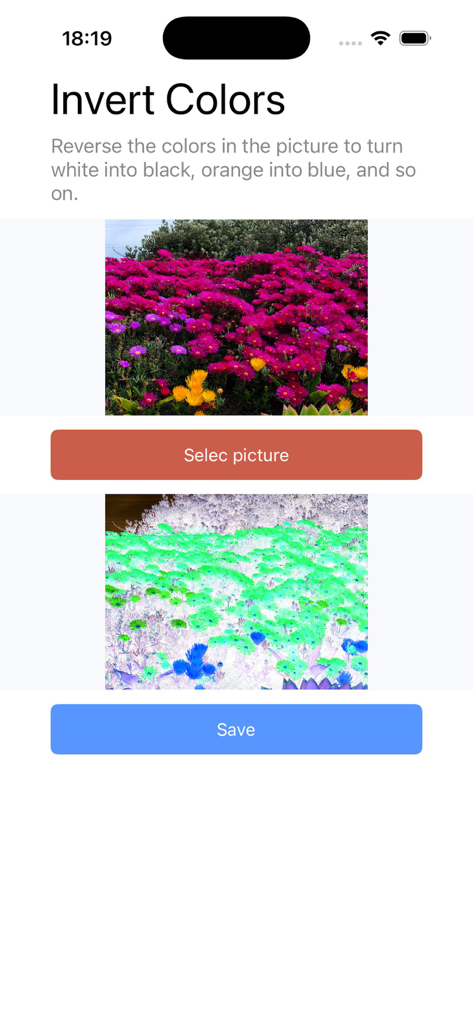
The tools that make this app stand out, trusted by 10K+ users.
Instantly transform bright screenshots and diagrams into eye-soothing, high-contrast visuals to reduce strain during late-night productivity sessions.
Skip the bloated editors. Our minimalist interface is optimized for the 'one-and-done' user who needs precise results in seconds, not minutes.
From previewing film negatives to crafting unique social media aesthetics and memes, get professional-grade inversion without the learning curve.
Everything you need to know about Invert Colors.
Description
Latest Version
1.5
Size
33.8 MB
First Released
Dec 15, 2025
Join 10,000+ users who trust the fastest, most lightweight tool for instant color inversion. Whether for accessibility or creative flair, start inverting in just one tap.
Everything you need to know about Invert Colors
The Invert Colors app reverses the colors in a picture, transforming white into black, orange into blue, and applying similar inversions.
The Invert Colors app reverses colors by changing white to black, orange to blue, and applying similar inversions across the entire image spectrum.
Users process an image by first tapping the "Selec picture" button. After the inversion is applied, they can save the modified image using the "Save" button.
Yes, the Invert Colors app allows users to save the inverted pictures. A clearly visible "Save" button is available for this function after inversion.
Top-ranked apps in the same category

OpenAI OpCo, LLC

Google LLC

X.AI Corporation

Google LLC

Shanghai Zhixin Puhui Technology Co., Ltd.

Google LLC

Microsoft Corporation

Google LLC

Google LLC
App information, icons, screenshots, and descriptions displayed on this page are sourced from the Apple App Store and are the property of their respective developers. Download estimates and rankings are based on MWM's proprietary models and may not reflect actual figures. This page is provided for informational and analytical purposes only.
Believe this page infringes your intellectual property? File a dispute