
This page is not an official page of the app or its developer, but an independent editorial publication created for informational and commentary purposes. Unless expressly stated otherwise, neither the app nor its developer is affiliated with, endorsed by, sponsored by, authorized by, or otherwise officially connected with MWM, Apple, Google Play, the app publisher, or the app's developer, and nothing on this page implies that the app was developed using MWM's services. Any trademarks, logos, screenshots, and other content remain the property of their respective owners.

LiquidText
Go beyond traditional PDFs. Seamlessly connect ideas, compare distant pages side-by-side, and synthesize complex information across multiple documents with a fluid, non-linear interface designed for professionals.
Downloads
3M+User Rating
Total Ratings
14K+Publisher
Category
ProductivityLocales
1Latest Version
7.1.10Size
303.9 MBFirst Released
Sep 3, 2015Unleash Your Analytical Power
Move beyond the limits of paper. LiquidText provides a fluid visual workspace to synthesize complex information, connect distant ideas, and accelerate your deep work.
Dynamic Information Extraction
Pull key excerpts and images directly into a flexible workspace to organize findings without losing the link to your original source.
Intelligent Document Squeezing
Pinch to collapse hundreds of pages and compare distant sections side-by-side, eliminating scroll fatigue during intensive reviews.
Frequently Asked Questions
Everything you need to know about LiquidText
What is LiquidText designed for?
LiquidText is an iPad app that enables users to review, gather, and organize information from documents and webpages. It facilitates extracting facts, connecting ideas, annotating, and preparing research or study materials.
Which document formats does LiquidText support for import?
LiquidText supports importing PDF, Word, and PowerPoint document types. It also allows direct content import from webpages and Safari, enhancing document accessibility for users.
Does LiquidText include OCR functionality?
Yes, LiquidText provides instant OCR for selecting text in scanned documents and full document-OCR to enable search across the entire document. Full document-OCR requires a paid upgrade.
Can I collaborate with others on projects in LiquidText?
Yes, LiquidText offers real-time collaboration. Users can invite colleagues to shared projects, work together synchronously, and utilize commenting features. This real-time collaboration requires a paid upgrade.
What export formats are supported by LiquidText?
LiquidText supports exporting projects as PDF files, including the Workspace and original documents. It also converts notes and excerpts into a linear Word document. Users can send full LiquidText files.
Does LiquidText provide multi-device synchronization?
Yes, LiquidText offers real-time, cross-platform synchronization and continuous cloud backup. It supports multi-device display, allowing users to use different devices together. This feature requires a paid upgrade.
Does LiquidText integrate with academic reference managers?
Yes, LiquidText integrates with reference managers like Zotero and Mendeley. Users can import documents and metadata directly from these managers, and send annotations back. This feature requires a paid upgrade.
Is freehand drawing available in LiquidText?
Yes, LiquidText allows freehand drawing on notes, the workspace, and directly on documents. Features such as drawing live 'ink links' to connect ideas typically require a paid upgrade.
How can I compare documents or sections within LiquidText?
LiquidText allows users to pinch a document for side-by-side comparison of different pages. It also collapses text to view annotated parts or search results together. Users can view up to three documents simultaneously with a paid upgrade.
Does LiquidText offer privacy settings for collaborative projects?
Yes, LiquidText provides privacy controls for shared projects. Users determine whether individual workspaces and documents within their projects are shared or kept private. This control is part of paid features.
Are all features in LiquidText free, or are there paid upgrades?
LiquidText offers core functionalities, but many advanced features require a paid upgrade. These include OCR, real-time collaboration, sync & backup, and reference manager integration, marked with an asterisk in the feature list.
The following screenshots and description are sourced directly from the app's official store listing and are the property of the app developer.
App Store
Screenshots
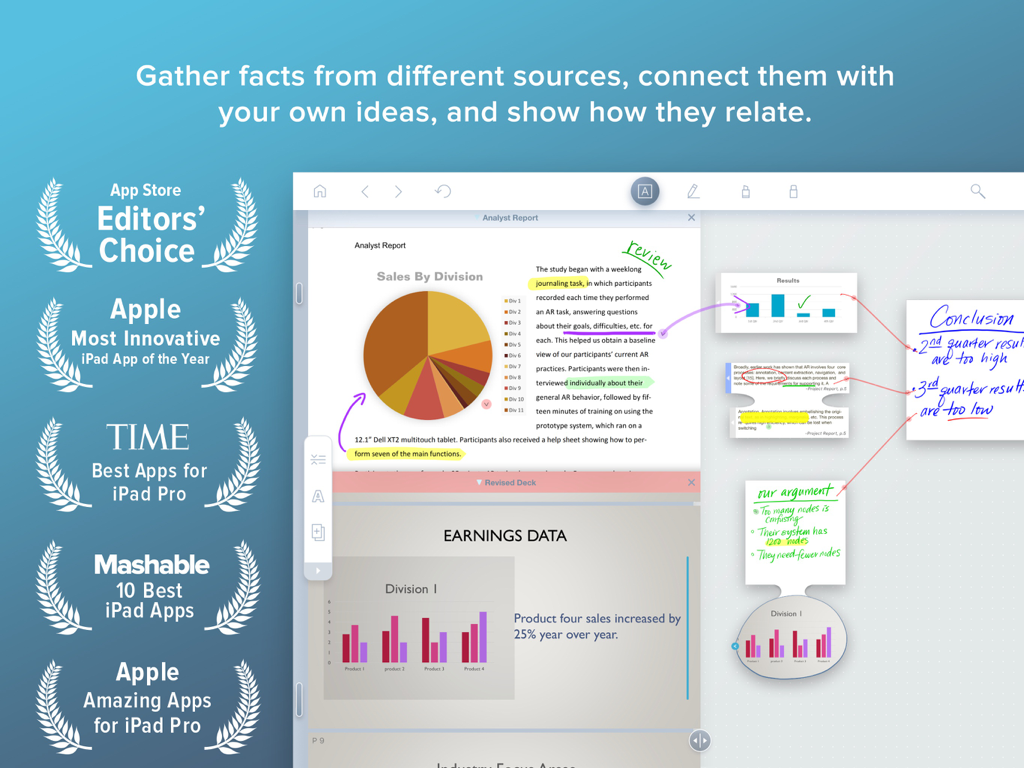
LiquidText app on iPad showing document analysis and handwritten notes connected by visual links in a workspace
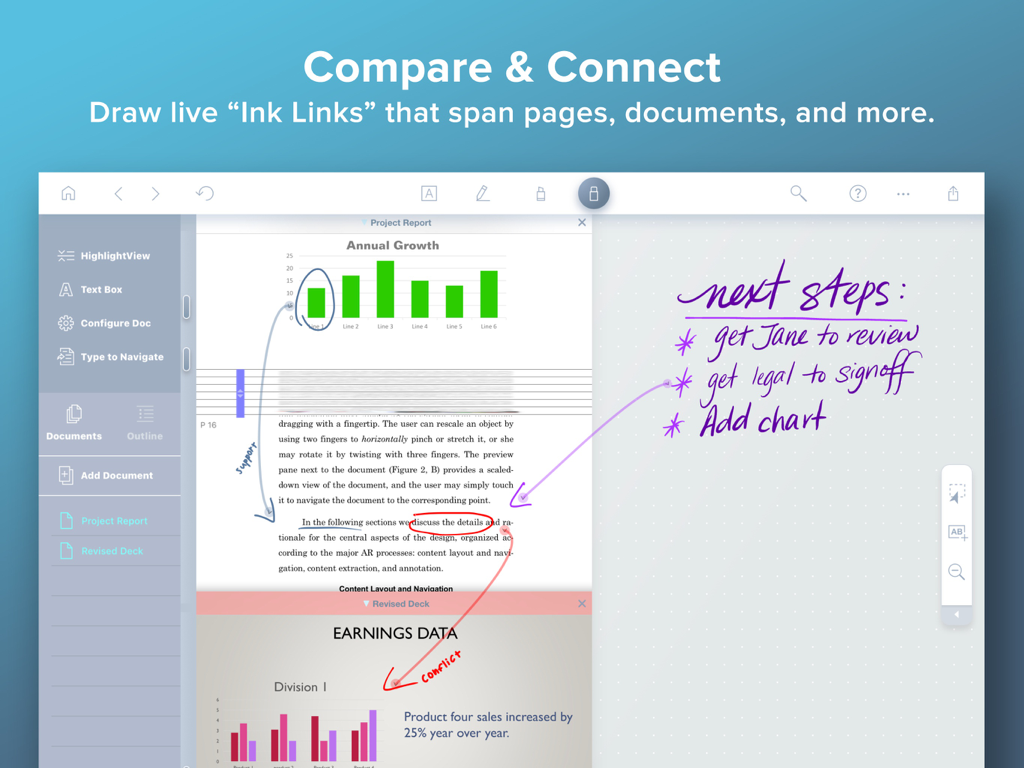
LiquidText app interface showing live ink links connecting charts in a PDF to handwritten project notes.
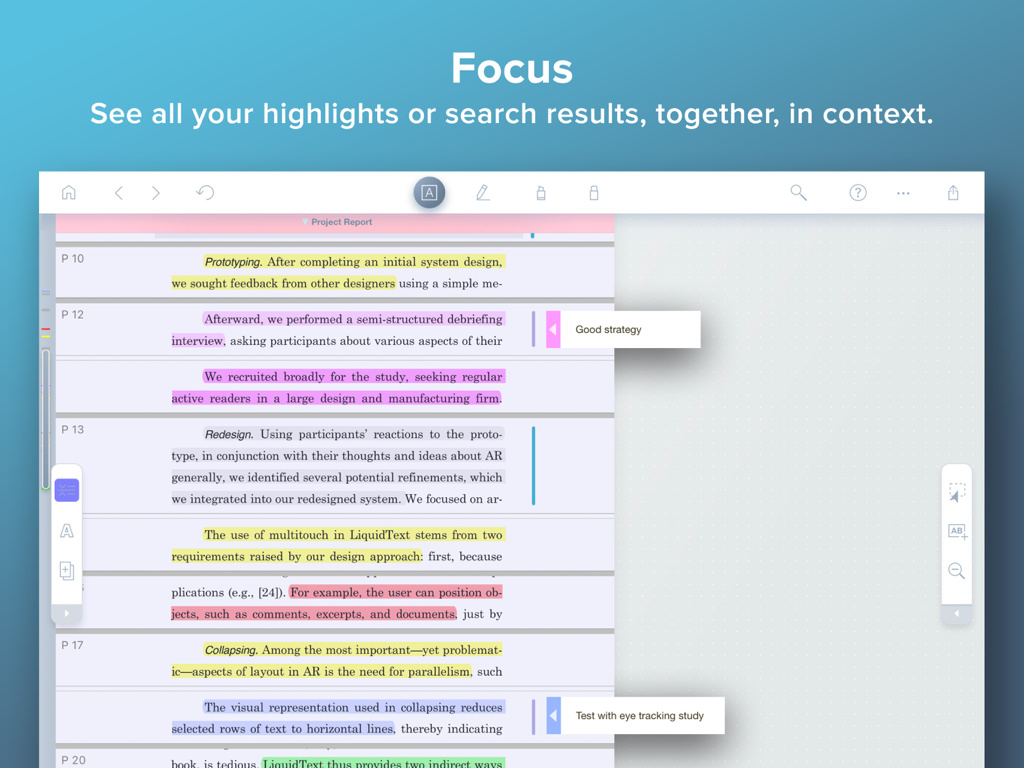
LiquidText focus mode showing multiple highlighted document sections and margin notes condensed together.
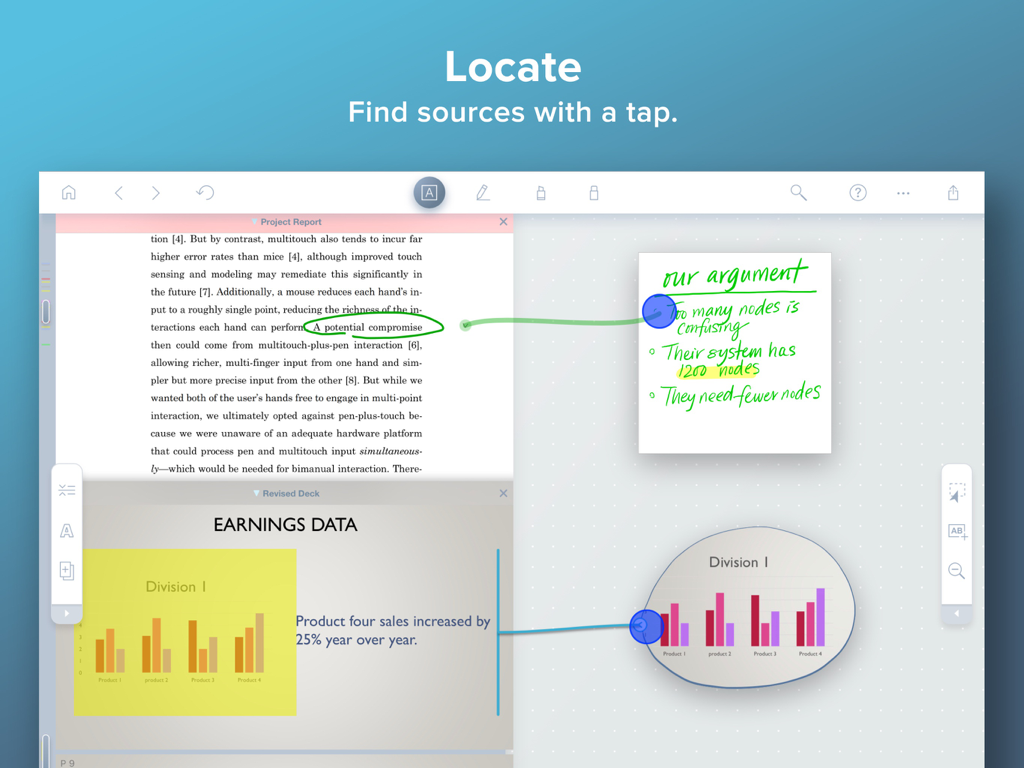
LiquidText iPad app interface showing ink links connecting notes to document sources
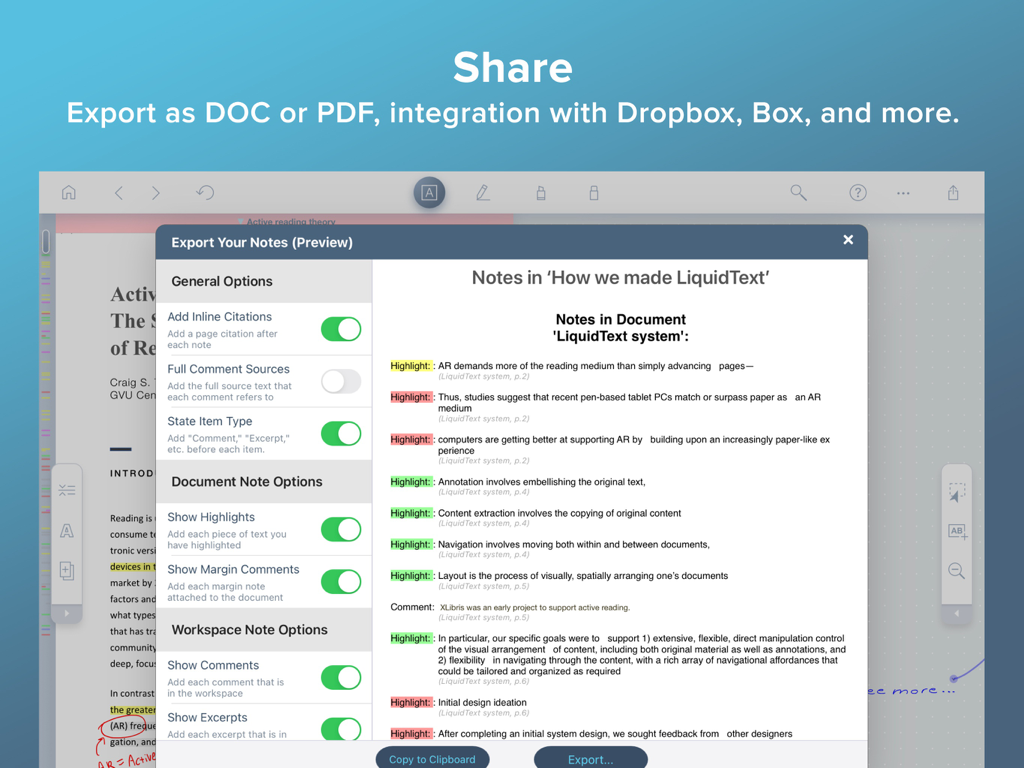
LiquidText app interface showing note export options and document preview on iPad
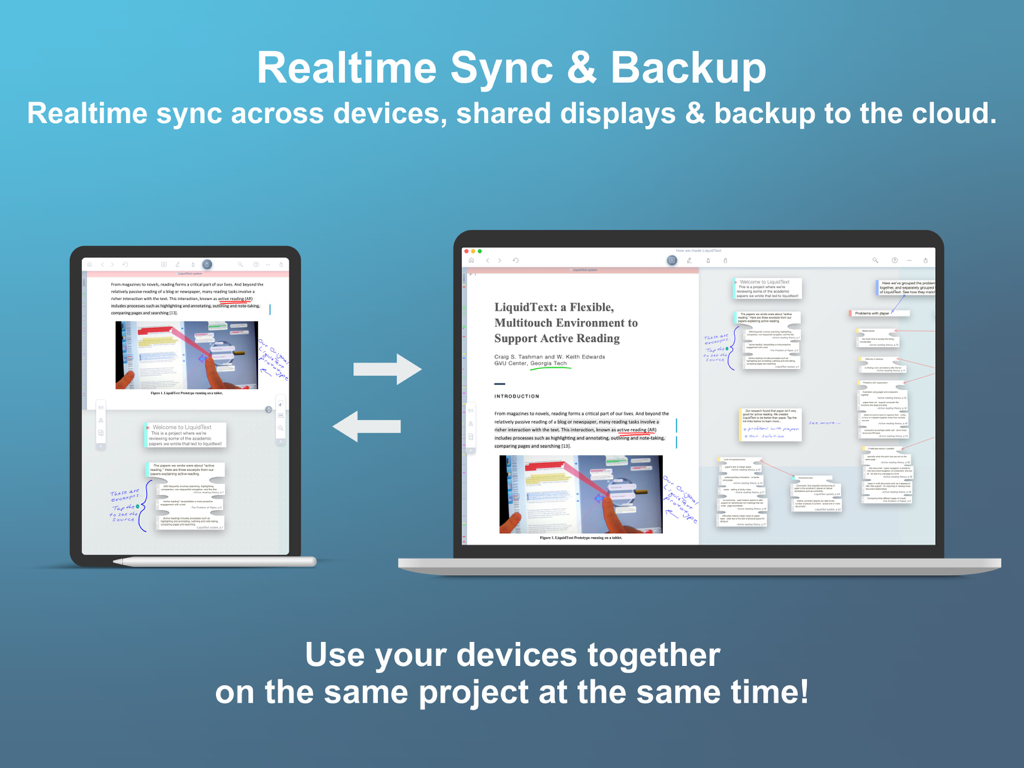
LiquidText app demonstrating realtime sync and cloud backup between an iPad and a Mac laptop
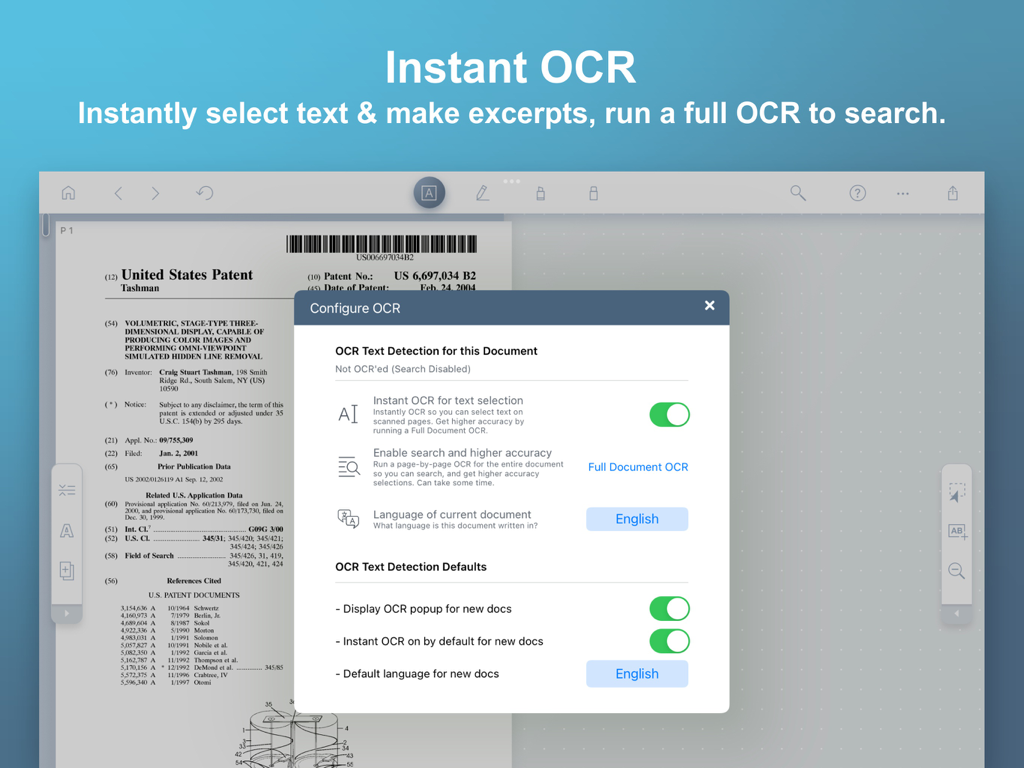
LiquidText app interface showing instant OCR and text detection settings for a patent document
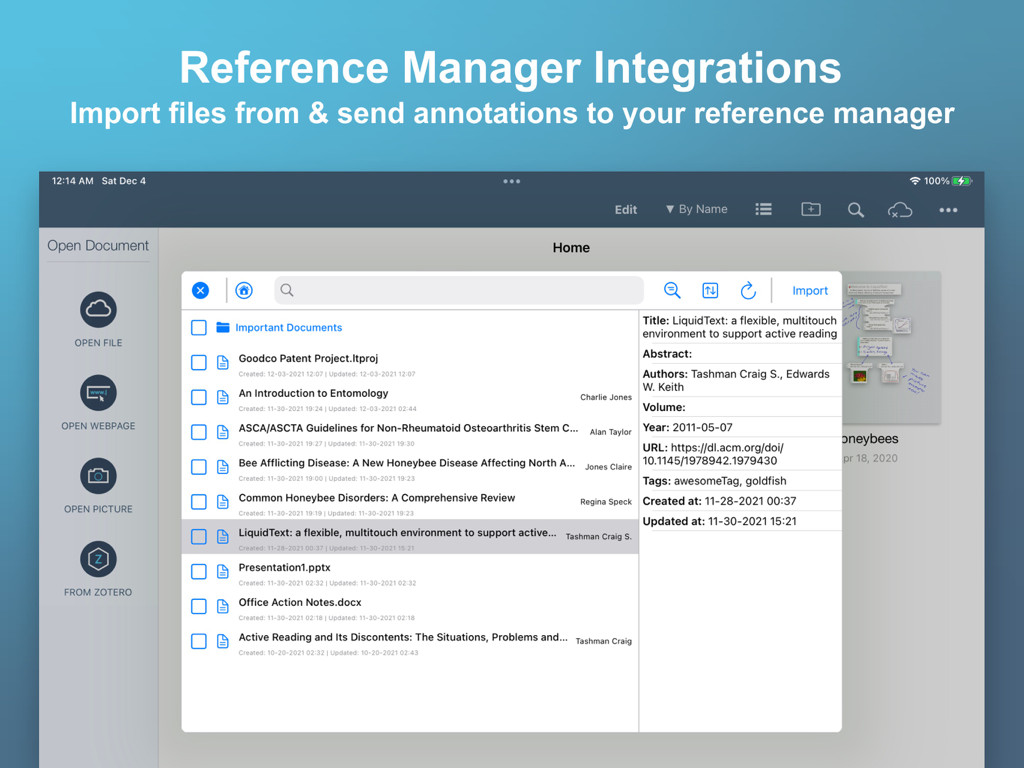
LiquidText app interface showing reference manager integration for research documents
Description
Download
More Like This
Apps with similar features and user experience

Google NotebookLM
Google LLC

ChatPDF - Chat PDF AI
ChatPDF GmbH

Earo
钊均 李
Flashcards to Study - Synt
Roberto Diaz Badra
Highlights: PDF Reader & Notes
Jonas Myren Ribe

Notebook LM:Magic Podcast
Mogens Erik Egeskov-Madsen

Parenix
Beraat Oeruek
Markup Ultimate
Kdan Mobile Software LTD

秘塔AI搜索
Shanghai MetaSOTA Technology Inc.
This page is not an official page of the app or its developer, but an independent editorial publication created for informational and commentary purposes. Unless expressly stated otherwise, neither the app nor its developer is affiliated with, endorsed by, sponsored by, authorized by, or otherwise officially connected with MWM, Apple, Google Play, the app publisher, or the app's developer, and nothing on this page implies that the app was developed using MWM's services. Any trademarks, logos, screenshots, and other content remain the property of their respective owners.