mydlink Lite

mydlink Lite

Download on App StoreDownload on Google Play
Logo of mydlink Lite

mydlink Lite: Your All-in-One Command Center for Home Security and Connectivity

Stay connected to what matters most. Effortlessly monitor live camera feeds, manage your router’s security, and protect your family with real-time alerts and parental controls—all from your smartphone with no monthly fees.

Download on App Store

Publisher

D-Link International PTE LTD

Category

Productivity

Downloads

500K+

User Rating

3.4/5

Total Ratings

16K+

Locales

16

Your Home, Visualized

Discover the interface used by 500K+ users.

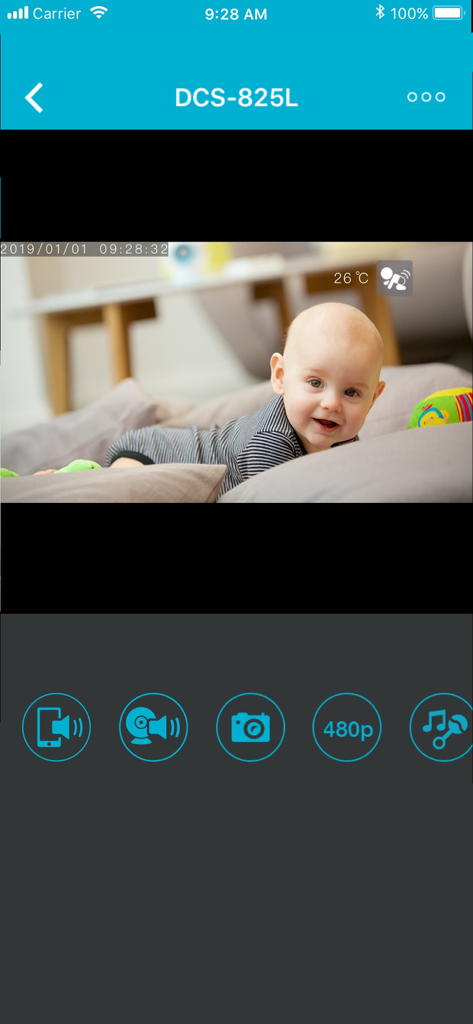
A live video feed of a baby crawling on a bed displayed within the mydlink Lite app interface for the DCS-825L camera model.
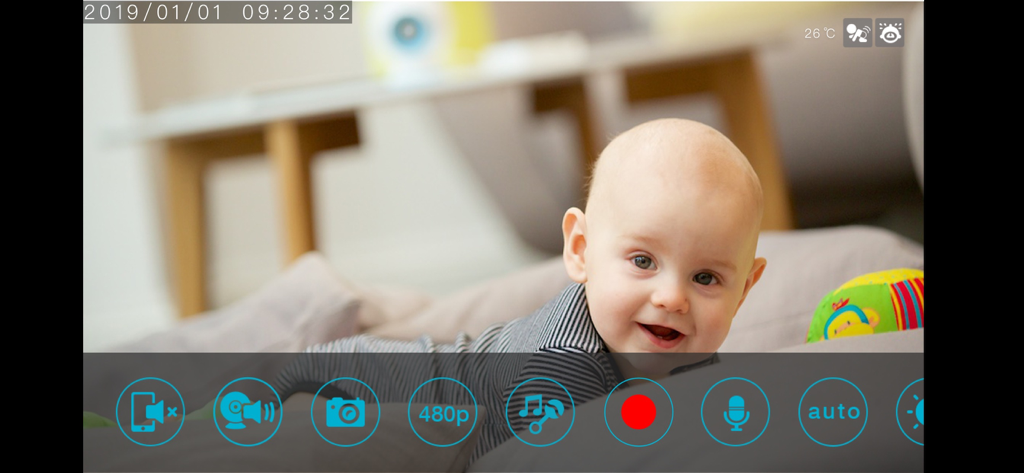
A live video feed of a baby crawling on a bed displayed within the mydlink Lite app interface for the DCS-825L camera model.

Live baby monitor video feed in the mydlink Lite app interface

Live baby monitor video feed in the mydlink Lite app interface

Your Home, Always Within Reach

The tools that make this app stand out, trusted by 500K+ users.

🏠

Real-Time Home Monitoring

Stream high-quality live video of your home, kids, or pets directly to your phone, ensuring peace of mind whether you're at work or on vacation.

👨‍👩‍👧

Smart Parental & Network Controls

Take charge of your digital home. Monitor bandwidth, see which sites your children visit, and manage device access with a single tap.

📣

Instant Alerts & Two-Way Talk

Receive push notifications for motion or sound detection and use two-way audio to talk back to pets or family members instantly.

About the app

Everything you need to know about mydlink Lite.

Description

Quickly and easily view your live Cloud Camera feeds and manage your Cloud Routers from anywhere using a Wi-Fi or 3G/4G connection. Whether you're at the office, having an evening out, or away on vacation, the mydlink Lite app gives you access to your Cloud Cameras, Cloud Routers and NVR even when you’re on-the-go. You can also check your Cloud Router’s current upload/download bandwidth, or manage your wireless network security and status. Parental controls let you see what sites your children have visited when you were away, and you can even block or unblock network access for individual devices. For more information, go to mydlink.com or dlink.com Features: - View live video from your Cloud Camera, including a full-screen view. iPad users may purchase the mydlink+ app for multiple camera viewing. - Supports H.264 video streaming for smooth high-quality video (specific models only.) - Listen to audio from your camera’s microphone (audio-enabled models only) - Save snapshots of your camera’s video to your iPhone or iPod Touch - View the online status of your Cloud Cameras and Cloud Routers - Remotely monitor and configure your Cloud Routers - Access and view your camera's video feed (without audio) through your NVR. - Support remote viewing period of five minutes in relay mode. Helpful 60 second left countdown timer. - Touch and drag to move your view around for non-PT cameras. Pinch to zoom in/out. - Toggle camera's view modes between Night mode, Day mode, and Automatic mode. - After initial settings on the mydlink website, you can enable/disable motion/sound detection from the app for supported cameras. - You can talk back with 2-way audio support (for DCS-942L, DCS-5211L, DCS-5222L, DCS-2132L, DCS-2310L, DCS-7010L, DCS-6010L), and cameras will mute their microphones to avoid feedback during two-way audio communication. - SD Card Playback (for DCS-942L, DCS-5211L, DCS-5222L) - Camera Firmware upgrade feature - Support push notifications: Tap to select which device you want to receive push notifications from. - Support local mode: Allow users to explore and access nearby cameras that are connected to the same LAN network with your phone. - Online setup: Users can follow the online setup feature to configure new cameras. This app will lead you to configure your camera from A to Z. - White light light-emitting diode feature of DCS-2136L - Chat mode selection (OFF to mute camera's microphone) for DCS-942L two-way audio feature This app is compatible with the following models: - Cloud Cameras: DCS-930L,DCS-932L,DCS-933L,DCS-931L,DCS-942L,DCS-5211L,DCS-5222L,DCS-2332L,DCS-6010L,DCS-2132L,DCS-2310L,DCS-7010L,DCS-5020L,DCS-5010L,DCS-2136L,DCS-5222LB1,DCS-2330L,DCS-6004L - Cloud Routers: DAP-1160L,DAP-1360L,DIR-140L,DIR-505L,DIR-600L,DIR-600LW,DIR-602L,DIR-605L,DIR-605LW,DIR-619L,DIR-626L,DIR-636L,DIR-640L,DIR-645L,DIR-810L,DIR-820L,DIR-820LW,DIR-826L,DIR-836L,DIR-840L,DIR-845L,DIR-850L,DIR-855L,DIR-860L,DIR-865L,DIR-868L,DIR-880L,DIR-900L,DIR-905L,DSL-2770L,DSL-2870B,DSL-2890AL,DSL-2900AL,DSL-3590L - NVR: DNR-322L Note: For Cloud Storage support, please download the mydlink Access-NAS app. * The mydlink Lite app is linked to the FFmpeg shared video decoding library, which is compiled to contain LGPL decoders and splitters only. The repository can be cloned from git://github.com/dlinker/mydlink-Lite.git using the git clone command. * HD H264 feature doesn't work for DCS-931L,DCS-933L,DCS-5010L,DCS-5020L, DCS-5009L, DCS-6045L so far.

Latest Version

3.8.17

Size

80.4 MB

First Released

May 25, 2010

Your Home Command Center, Right in Your Pocket

Get instant peace of mind with real-time camera feeds, remote router management, and smart parental controls—all without the burden of monthly subscription fees.

Download on App StoreDownload on Google Play

App information, icons, screenshots, and descriptions displayed on this page are sourced from the Apple App Store and are the property of their respective developers. Download estimates and rankings are based on MWM's proprietary models and may not reflect actual figures. This page is provided for informational and analytical purposes only.

Believe this page infringes your intellectual property? File a dispute