
This page is not an official page of the app or its developer, but an independent editorial publication created for informational and commentary purposes. Unless expressly stated otherwise, neither the app nor its developer is affiliated with, endorsed by, sponsored by, authorized by, or otherwise officially connected with MWM, Apple, Google Play, the app publisher, or the app's developer, and nothing on this page implies that the app was developed using MWM's services. Any trademarks, logos, screenshots, and other content remain the property of their respective owners.


Network Analyzer Pro
Gain complete visibility into your network with advanced LAN scanning, real-time troubleshooting, and professional-grade tools designed for sysadmins and tech-savvy power users.
Downloads
545K+User Rating
Total Ratings
11K+Publisher
Category
UtilitiesLocales
1Latest Version
9.0.1Size
9.8 MBFirst Released
Sep 18, 2012Master Your Network with Professional-Grade Tools
From instant device discovery to deep-dive diagnostic traces, get the ultimate mobile toolkit for network administrators and tech enthusiasts.
Advanced LAN Discovery
Instantly identify every device on your network with detailed IP/MAC addresses, NetBIOS names, and Bonjour services.
Precision Diagnostic Suite
Resolve connectivity issues fast with real-time ping statistics and visual traceroute mapping across the globe.
Frequently Asked Questions
Everything you need to know about Network Analyzer Pro
What is Network Analyzer Pro?
Network Analyzer Pro is an advanced tool for network diagnostics, LAN scanning, and problem detection. It helps diagnose issues in your WiFi network setup, Internet connectivity, and on remote servers.
Can Network Analyzer Pro scan for devices on my LAN?
Yes, Network Analyzer Pro features a fast WiFi LAN scanner. It detects all connected network devices, including WiFi and VPN, and lists their IP addresses, NetBIOS, mDNS (Bonjour), LLMNR, and DNS names.
Does Network Analyzer Pro support Wake on LAN (WOL)?
Yes, Network Analyzer Pro supports Wake on LAN (WOL). It allows users to initiate both local and remote WOL for discovered network devices directly from the application interface.
Can I perform a traceroute with Network Analyzer Pro?
Yes, Network Analyzer Pro includes a traceroute tool. It displays round trip delay, IP, hostname for each network node, and visualizes the complete trace route on an interactive map. IPv4 and IPv6 are supported.
What kind of network information does Network Analyzer Pro provide?
Network Analyzer Pro provides details like default gateway, external IP (v4/v6), DNS server, HTTP proxy, and WiFi network specifics (SSID, BSSID, IP address, subnet mask). It also monitors data usage.
Does Network Analyzer Pro include a port scanner?
Yes, Network Analyzer Pro features a port scanner. It scans common or user-specified port ranges, detecting closed, firewalled, and open ports. It also describes known open port services for both IPv4 and IPv6.
Can Network Analyzer Pro test internet speed?
Yes, Network Analyzer Pro includes an Internet Speed Tester. It measures both download and upload speeds, presenting graphical real-time views and maintaining a history of all speed test results.
Does Network Analyzer Pro offer full IPv6 support?
Yes, Network Analyzer Pro provides full IPv6 support across all its functionalities. This includes LAN scanning, ping, traceroute, port scanning, and displaying IPv6 addresses where available.
How can Network Analyzer Pro help diagnose network problems?
Network Analyzer Pro diagnoses network problems using a wide range of tools. These include LAN scanning, ping, traceroute, port scanner, DNS lookup, whois, and an Internet speed tester.
What details does Network Analyzer Pro show for discovered LAN devices?
Network Analyzer Pro shows details such as IP addresses, NetBIOS, mDNS (Bonjour), LLMNR, and DNS names for all discovered LAN devices. It also performs a pingability test and indicates IPv6 availability.
Does Network Analyzer Pro provide geolocation data for network hops?
Yes, Network Analyzer Pro's traceroute tool provides geolocation data for every network node. This includes latitude, longitude, country, city, time zone, AS number, and network name information.
Can Network Analyzer Pro lookup DNS records?
Yes, Network Analyzer Pro includes a DNS lookup tool. It supports various record types such as A, AAAA, CNAME, MX, NS, PTR, SOA, SPF, SRV, TXT, and can decode DNSSEC records.
Is there a history feature in Network Analyzer Pro?
Yes, Network Analyzer Pro maintains a history of all performed tasks. Users can also star their favorite tasks for quick access later, streamlining repeated diagnostics.
The following screenshots and description are sourced directly from the app's official store listing and are the property of the app developer.
App Store
Screenshots
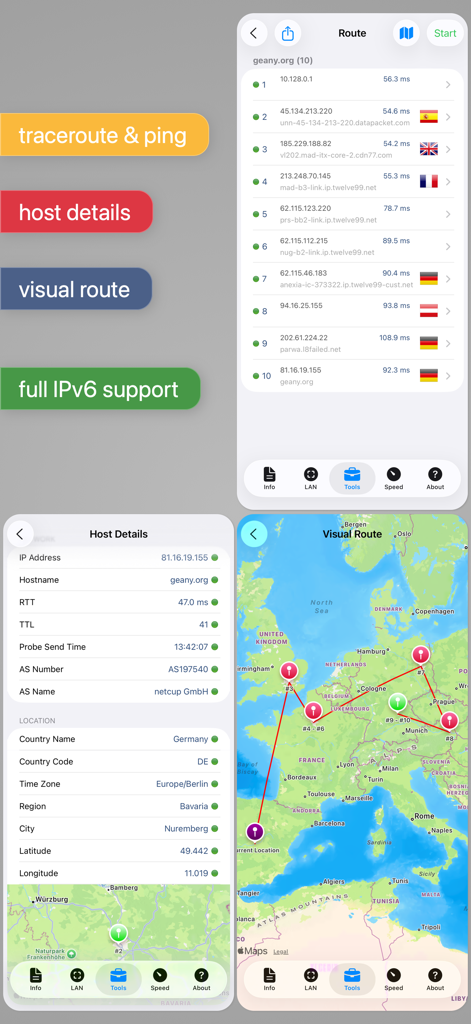
Screenshots of Network Analyzer Pro app showing a traceroute list, host location details, and a visual network route on a map.
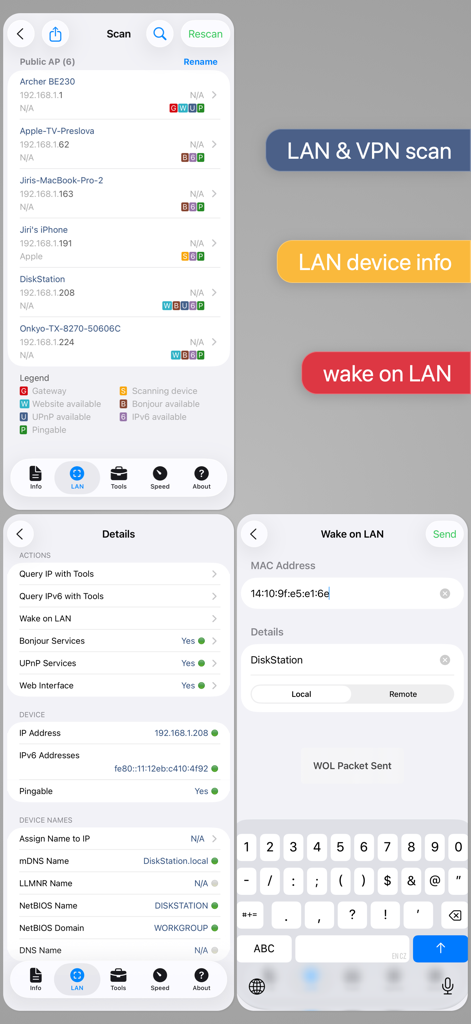
Network Analyzer Pro screenshots showing LAN scanning list, device details with IP and NetBIOS, and the Wake on LAN interface.
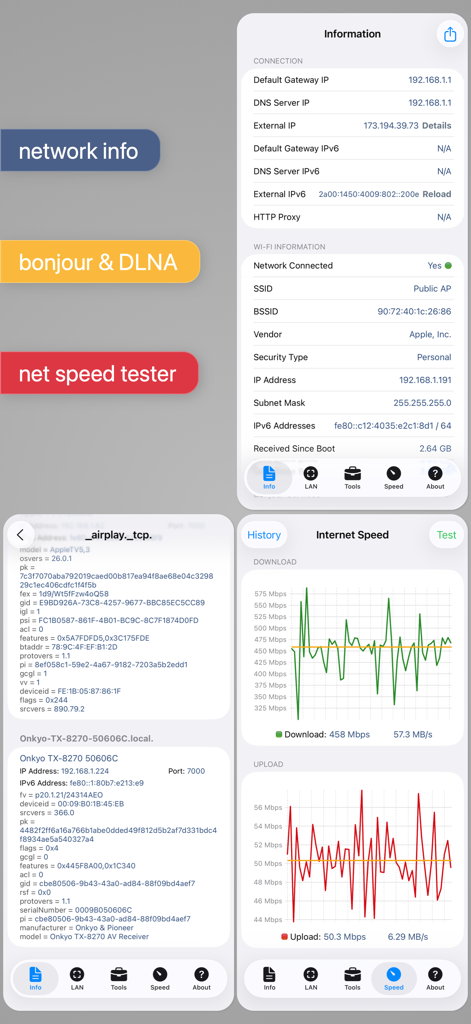
Interface screenshots of Network Analyzer Pro showing network info, service discovery, and speed test graphs
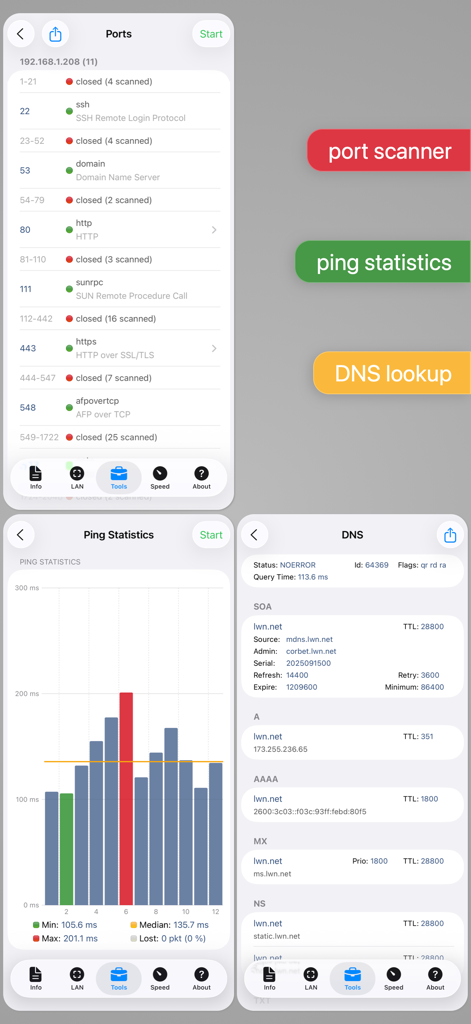
Collage of Network Analyzer Pro screens showing port scanner results, ping statistics graph, and DNS lookup records
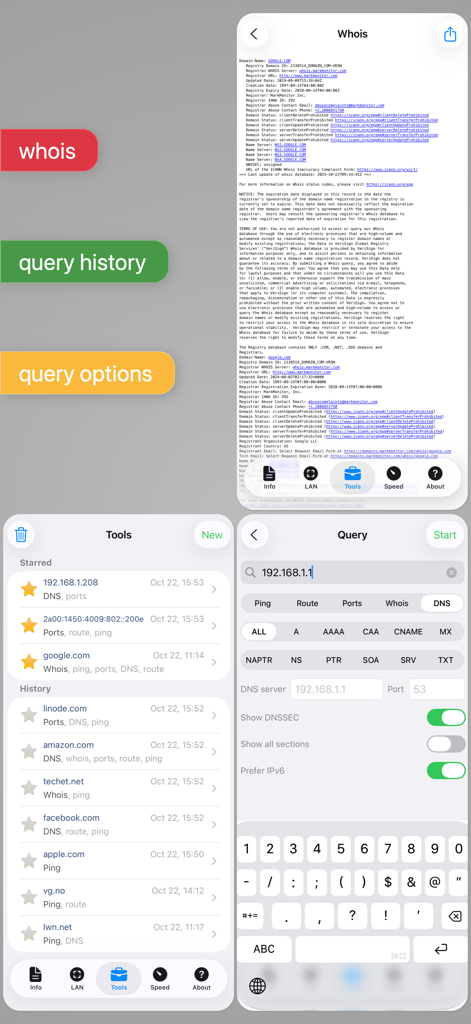
Interface of Network Analyzer Pro showing whois lookup details query history and network diagnostic settings
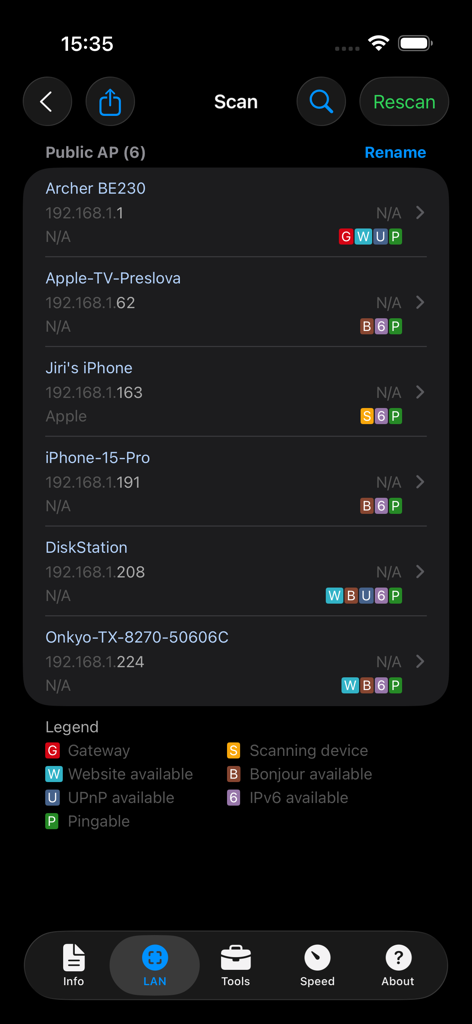
Network Analyzer Pro interface showing a list of discovered LAN devices with IP addresses
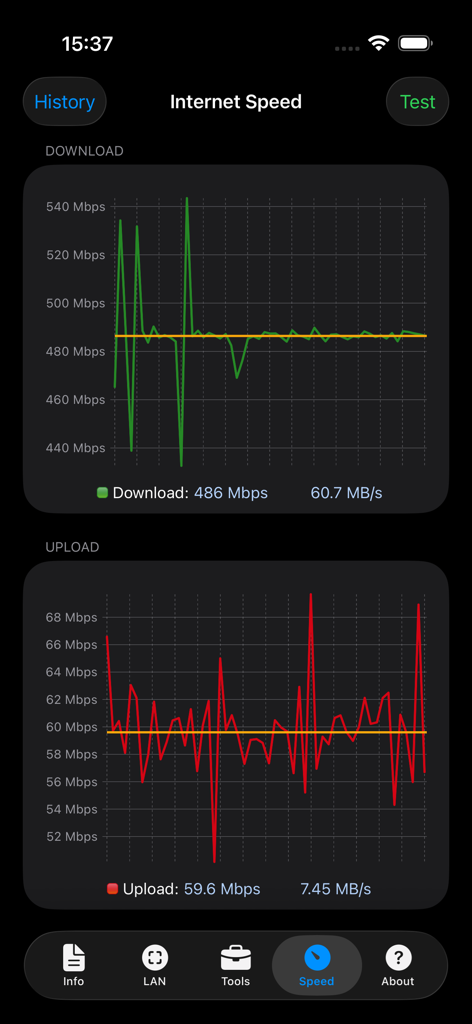
Internet speed test interface of Network Analyzer Pro showing download and upload graphs
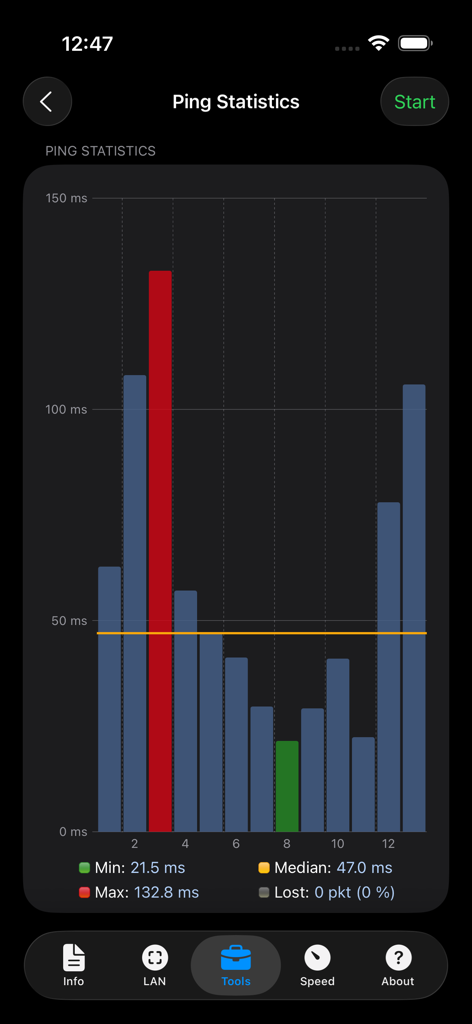
A bar chart screen from the Network Analyzer Pro app showing real-time ping statistics including minimum maximum and median network latency
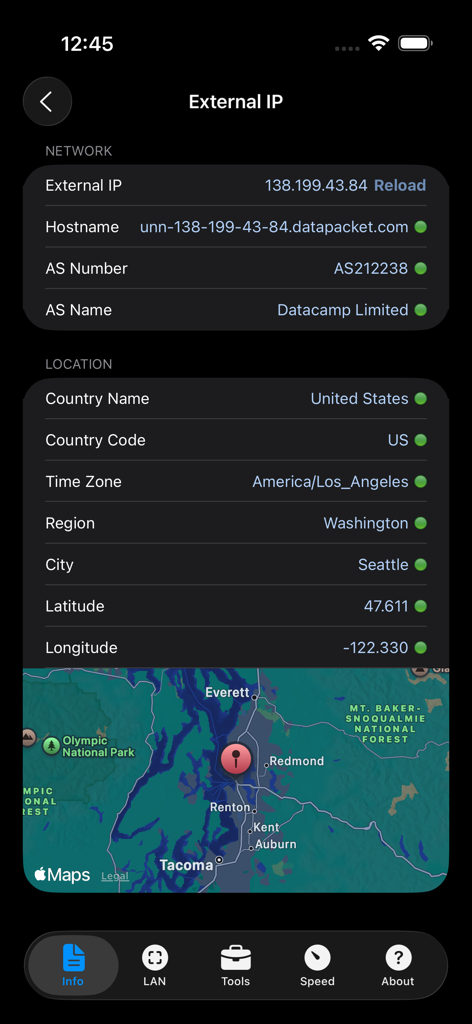
Network Analyzer Pro screenshot showing external IP network details and geolocation map
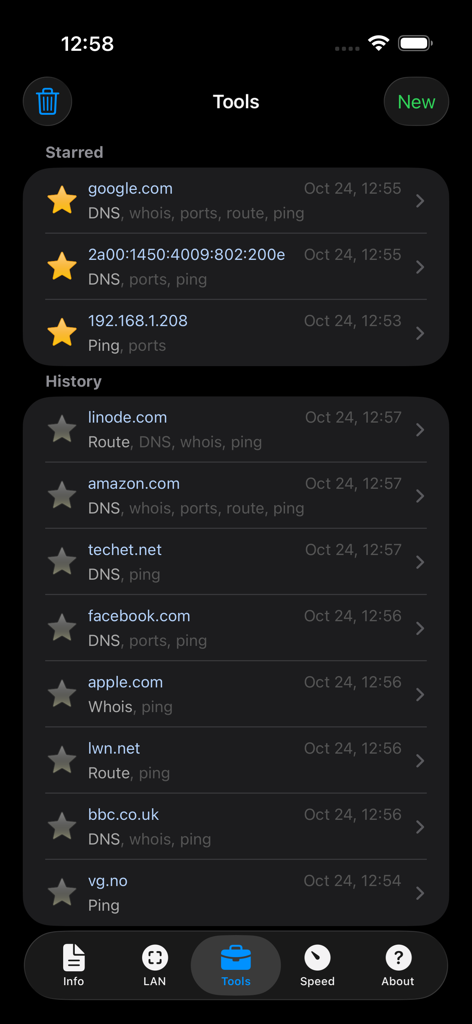
Network Analyzer Pro app interface showing the history and starred list of network diagnostic tools
Description
Download
More Like This
Apps with similar features and user experience

Ubiquiti WiFiman
Ubiquiti Inc.

Fing - Network Scanner
Fing Limited

SPEED TEST MASTER: Wifi Tester
Spring Tech Co., Ltd.

Internet Speed Test Master App
Huacen Co., LTD

NetClash-Network's Vital Signs
Mattis Knutsson

Network Analyzer: net tools
Jiri Techet

Speed Test - WiFi Analyzer +
方勇 侯

Ping - network utility
Iurii Mozharovskyi
wifi万能助手-万能wifi管家,wifi安全管理
荣阳 乌
This page is not an official page of the app or its developer, but an independent editorial publication created for informational and commentary purposes. Unless expressly stated otherwise, neither the app nor its developer is affiliated with, endorsed by, sponsored by, authorized by, or otherwise officially connected with MWM, Apple, Google Play, the app publisher, or the app's developer, and nothing on this page implies that the app was developed using MWM's services. Any trademarks, logos, screenshots, and other content remain the property of their respective owners.