Nexary: Bring Your Cherished Family Memories Back to Life with One Tap
Easily repair scratches, enhance colors, and sharpen faded snapshots. Professional-grade photo restoration designed for simplicity and built with your privacy in mind.
Publisher
Wenzhou Moji Cosmetics Co., Ltd
Category
Utilities
Downloads
0
User Rating
1.0/5
Total Ratings
0
Locales
1
Memories Reimagined
Discover the interface used by 0 users.
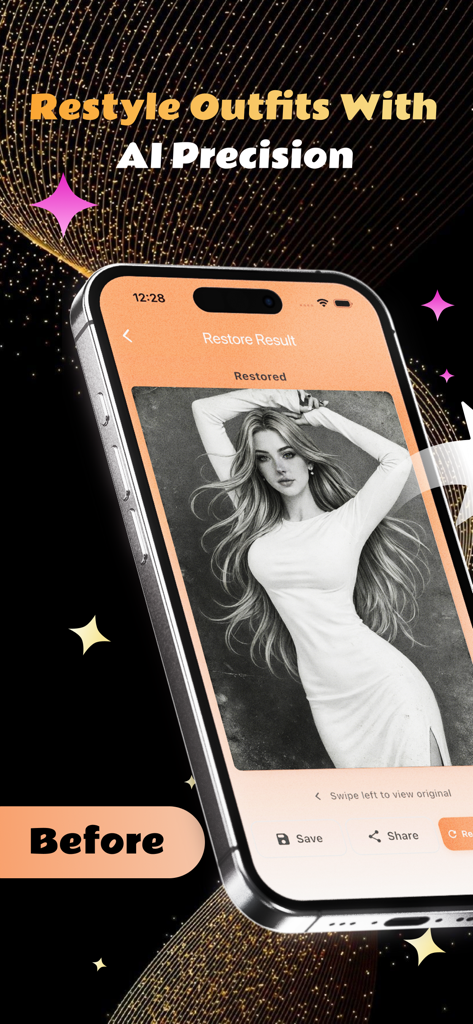
A smartphone showing the Nexary app interface with a restored black and white photo of a woman in a long white dress
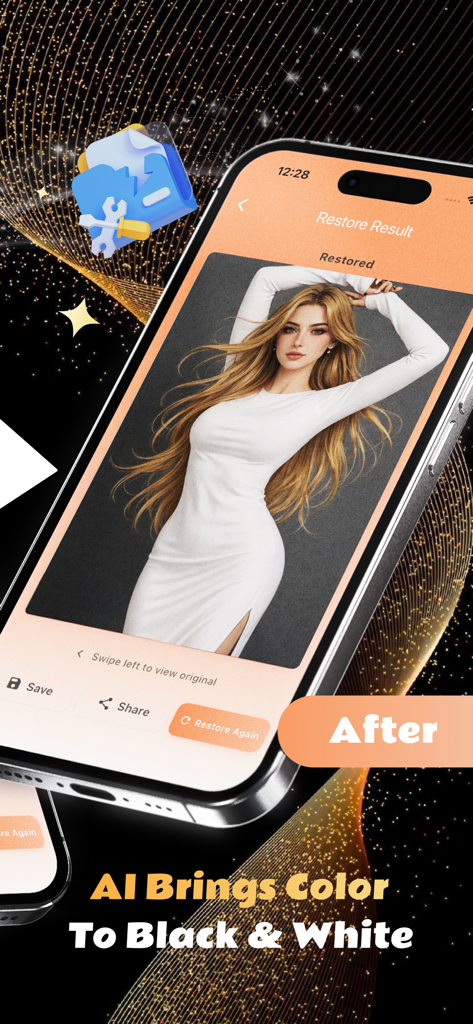
Nexary mobile app interface showing a colorized portrait of a woman
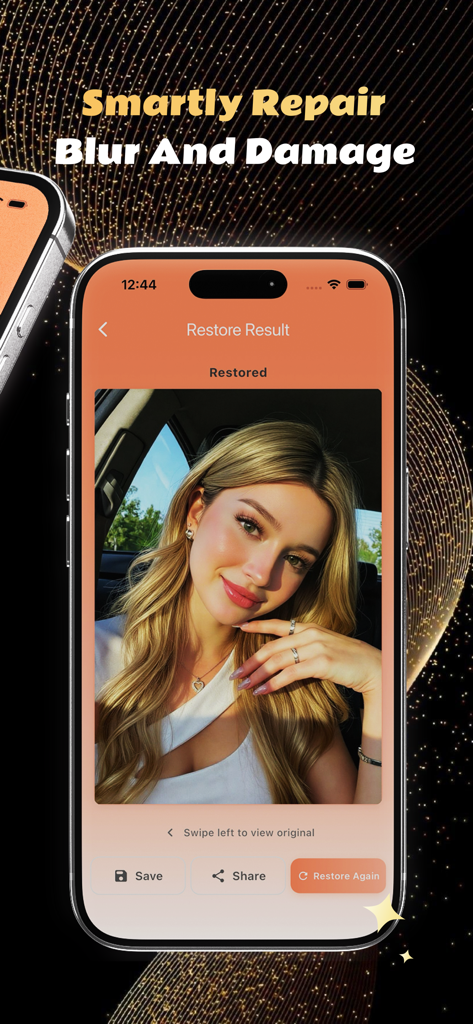
Nexary app on iPhone showing a restored photo of a woman with options to save and share
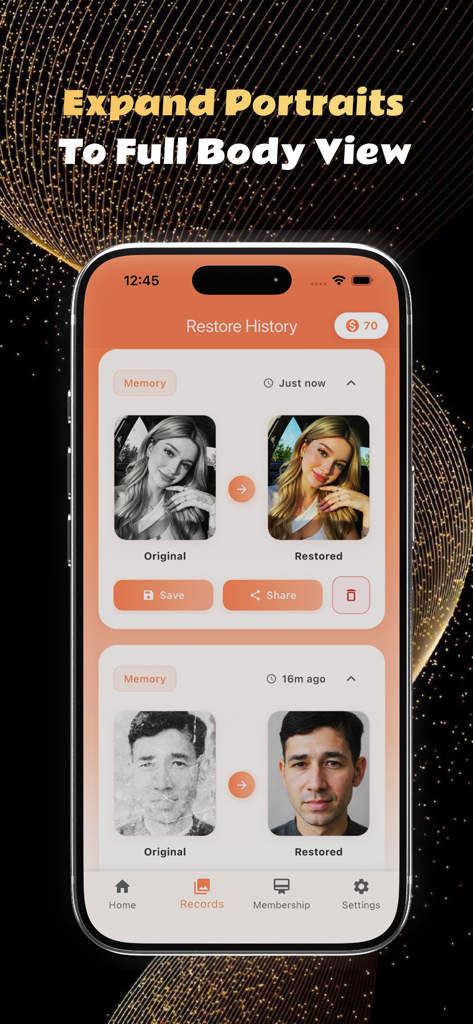
Nexary app Restore History screen displaying before and after comparisons of enhanced portrait photos
Revive Your Most Precious Memories
The tools that make this app stand out, trusted by 0 users.
🪄
One-Tap Restoration
Transform blurry, faded, or scratched physical scans into vibrant, high-definition digital photos instantly without needing professional editing skills.
🔒
Privacy You Can Trust
We never collect or store facial or biometric data. Your family photos are processed solely for restoration, keeping your personal memories secure and private.
↔️
Interactive Comparisons
Relive the moment with a side-by-side slider that lets you swipe between the original and the restored image to see the high-quality transformation.
About the app
Everything you need to know about Nexary.
Description
Nexary is an iOS app that helps you restore old or damaged photos. Choose a photo from your library, tap to restore, then compare the result with the original and save or share. No professional editing skills are required. The interface is simple: a main upload area, clear progress feedback, and straightforward options to save, share, or restore again.
What you can do: Pick a single photo from your photo library in JPG, PNG, or HEIC format. The app restores it in one step by fixing scratches, dust, and fading and by restoring or enhancing colors and clarity. You see a progress indicator while the restoration runs. When it is done, you get a side-by-side view of the original and the restored image. You can swipe between the two. From there you can save the restored photo to your camera roll, share it through the system share sheet, or run another restoration. Restore History keeps a list of your past restorations in reverse chronological order. Each entry shows the original and restored thumbnails and the time of the restore. For any entry you can view the comparison, save the restored image to your gallery, share it, or delete that record. You can also clear all restore records from the list. In Settings you will find links to the Privacy Policy and User Agreement, a Privacy Settings section that explains how we handle your data, About Us, Clear Cache to remove cached restored photos, Contact Us to reach support, and the app version.
We do not collect, store, or use your facial information. Nexary does not use face detection, face recognition, or any form of biometric identification. Your photos are used only to perform the restoration you request. We do not extract, retain, or use facial or biometric data from your images for any other purpose.
Your privacy matters throughout the app. When you restore a photo, we use it only to produce the restored image you asked for. We do not collect or use your face or any other biometric data from your photos. Restore records are stored on your device so you can revisit and manage them. In Settings you can read our Privacy Policy and User Agreement and see how we treat your data. The Privacy Settings section describes our approach to processing and privacy. We are committed to not collecting facial information and to using your images solely for the restoration service.
Nexary is built for old family photos, nostalgic film scans, and blurry or faded snapshots. The restoration aims to bring back detail and color while keeping the same subject. You can use it for portraits, group photos, or casual shots that have become worn or faded over time. The home screen shows the main upload button and short descriptions of what the app does: fix damage, restore or enhance colors, and improve clarity. You move between the main restore screen, the Restore History list, and Settings using the bottom tab bar. For best results, use photos with clear subjects. The app supports images up to a reasonable size and outputs high-quality results. There are no in-app features that analyze or store your face; every use of your photo is for the single purpose of delivering the restored image you requested. We do not collect facial or biometric information at any point. If you have questions or feedback, use Contact Us in Settings to get in touch. Thank you for choosing Nexary.
Subscription Plans:
Monthly Subscription, Price: $8.49 / 1 month,
Six Month Subscription, Price: $34.99 / 6 months,
Yearly Subscription, Price: $49.99 / 1 year
User Agreement
https://nexarypro.com/contract/UserAgreement.html
Privacy Policy
https://nexarypro.com/contract/PrivacyPolicy.html
Subscription Terms
https://nexarypro.com/contract/SubscriptionAgreement.html
Latest Version
1.1.1
Size
28.2 MB
First Released
Mar 2, 2026
Bring Your Cherished Memories Back to Life
Experience the magic of one-tap restoration. Fix scratches, enhance colors, and preserve your family legacy with total privacy and no professional skills required.
App information, icons, screenshots, and descriptions displayed on this page are sourced from the Apple App Store and are the property of their respective developers. Download estimates and rankings are based on MWM's proprietary models and may not reflect actual figures. This page is provided for informational and analytical purposes only.
Believe this page infringes your intellectual property? File a dispute