
This page is not an official page of the app or its developer, but an independent editorial publication created for informational and commentary purposes. Unless expressly stated otherwise, neither the app nor its developer is affiliated with, endorsed by, sponsored by, authorized by, or otherwise officially connected with MWM, Apple, Google Play, the app publisher, or the app's developer, and nothing on this page implies that the app was developed using MWM's services. Any trademarks, logos, screenshots, and other content remain the property of their respective owners.


Offline Music Player - mp3
Stop worrying about data limits or spotty signals. Import your high-quality tracks from Google Drive or Dropbox for a seamless, ad-free listening experience designed for commuters, travelers, and audiophiles.
Downloads
2M+User Rating
Total Ratings
2K+Publisher
Category
MusicLocales
25Latest Version
2.0.4Size
26.8 MBFirst Released
Jul 31, 2019Take Full Control of Your Audio Library
Ditch the subscriptions and data drains. Import your favorite tracks, DJ sets, and high-fidelity files to listen anytime, anywhere—no Wi-Fi required.
Seamless Cloud Integration
Instantly sync your collection from Google Drive, Dropbox, or OneDrive. Your personal library follows you across all your iOS devices without the hassle of cables.
Lossless Audio for Purists
Experience crystal-clear sound with support for FLAC, WAV, and AIFF. Enjoy the high-bitrate playback that mainstream streaming services often compress.
Frequently Asked Questions
Everything you need to know about Offline Music Player - mp3
What is the primary function of the Offline Music Player app?
The Offline Music Player app lets users download their favorite music, podcasts, and audio files to an iPhone or iPad, enabling offline listening without internet access, Wi-Fi, or data.
Which audio file formats does Offline Music Player support?
Offline Music Player supports popular audio formats including MP3, FLAC, WAV, M4A, AIFF, and MP4. This allows users to play a diverse range of their personal music library.
How can I import music files into the Offline Music Player app?
Users can import music into Offline Music Player from cloud services like Google Drive, Dropbox, Yandex Disk, OneDrive, via Wi-Fi Transfer from a computer, or using "Open in" from other apps.
Does the Offline Music Player app offer offline listening?
Yes, Offline Music Player provides dedicated offline listening. Users download music to their device, allowing playback without an internet connection or cellular data, even in airplane mode.
Can I control Offline Music Player from my Apple Watch?
Yes, Offline Music Player supports control from an Apple Watch. Users can manage playback, including play/pause and track skipping, directly from their watch interface.
Does Offline Music Player have a dark mode?
Yes, Offline Music Player features a dark mode. This option is available to enhance user experience and can contribute to saving device battery life.
Is there a free trial for Offline Music Player Premium Access?
Yes, Offline Music Player offers a 3-day free trial for its Premium Access subscription. This allows users to experience the full functionality of the app before subscribing.
What benefits does Premium Access offer in Offline Music Player?
Premium Access in Offline Music Player offers unlimited downloads and storage, no advertisements, full cloud synchronization, and advanced playback options. It is available via subscription.
Can I create playlists in the Offline Music Player app?
Yes, users can create unlimited playlists within the Offline Music Player app. This functionality enables organizing and customizing audio tracks for various listening scenarios.
Does the free version of Offline Music Player contain advertisements?
Yes, the free version of Offline Music Player includes advertisements. Subscribing to Premium Access removes all ads, providing an uninterrupted listening experience.
The following screenshots and description are sourced directly from the app's official store listing and are the property of the app developer.
App Store
Screenshots
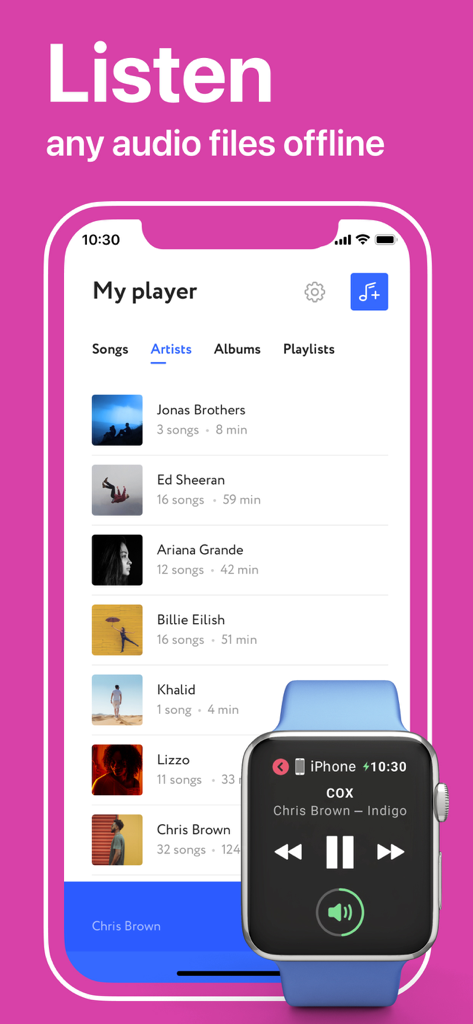
Offline Music Player app displaying an artist library on iPhone and music controls on an Apple Watch
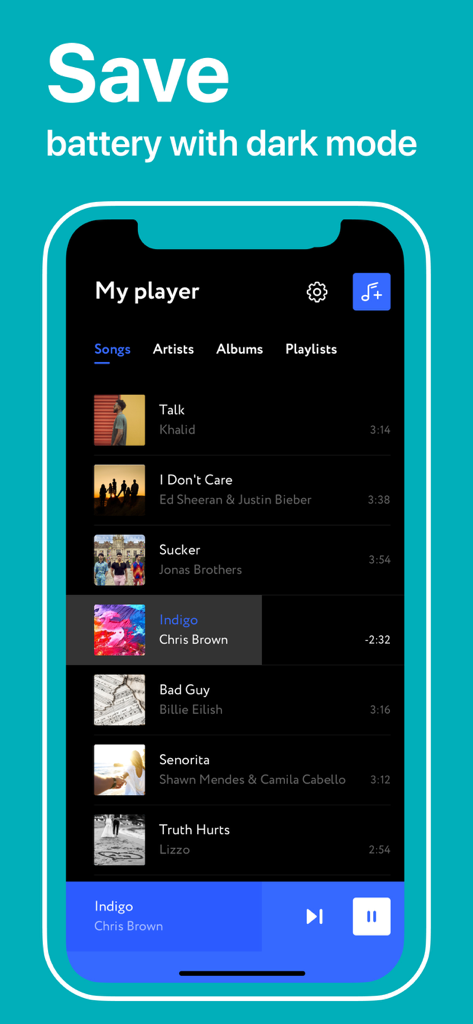
Offline Music Player app interface in dark mode displaying a list of songs to save battery

Screenshot of the Offline Music Player app showing options to import music from cloud services like Google Drive and Dropbox.

Offline Music Player interface showing song playback controls on an iPhone

Offline music player app interface showing a grid of albums to browse
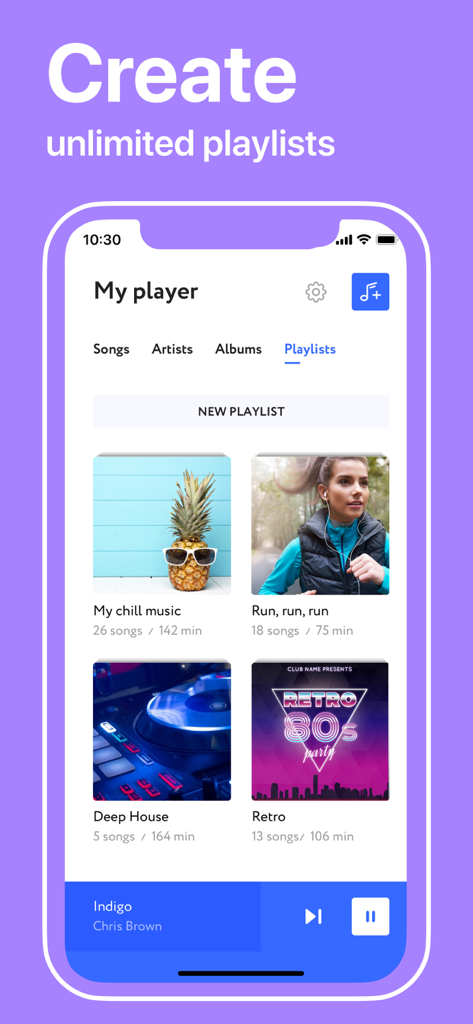
Offline Music Player app interface showing various music playlists with cover images.
Description
Download
More Like This
Apps with similar features and user experience

Offline Music Player Pro & MP3
娟 杨

Anywhere - Music Player
Volodymyr Klymenko
Bass Booster - Audio Equalizer
Pretty View LLC

PewPee: Music Player Offline
Daniil Taiakin

Cloud Music Drive
Mehmet Aygun

Cloud Music Player for Clouds
Yajing Qian

HiByMusic
Dongguan Haibei Information Technology Co. LTD.

Music Cloud Offline
Richard Levi

jetAudio Hi-Res Music Player
Jae Ook Jeong
This page is not an official page of the app or its developer, but an independent editorial publication created for informational and commentary purposes. Unless expressly stated otherwise, neither the app nor its developer is affiliated with, endorsed by, sponsored by, authorized by, or otherwise officially connected with MWM, Apple, Google Play, the app publisher, or the app's developer, and nothing on this page implies that the app was developed using MWM's services. Any trademarks, logos, screenshots, and other content remain the property of their respective owners.