
This page is not an official page of the app or its developer, but an independent editorial publication created for informational and commentary purposes. Unless expressly stated otherwise, neither the app nor its developer is affiliated with, endorsed by, sponsored by, authorized by, or otherwise officially connected with MWM, Apple, Google Play, the app publisher, or the app's developer, and nothing on this page implies that the app was developed using MWM's services. Any trademarks, logos, screenshots, and other content remain the property of their respective owners.


PeakWatch - AI Fitness Coach
The data deluge ends. Users gain a crystal-clear command of their body's readiness, transforming raw stats into actionable intelligence.
Downloads
500k+User Rating
Total Ratings
13.9KPublisher
Category
Health & FitnessLocales
7Latest Version
2.6.0Size
421.4 MBFirst Released
Jun 26, 2024An evaluation of key features designed for performance-driven individuals.
PeakWatch - AI Fitness Coach: Core Analytical Capabilities
AI-Powered Health Insights
The app provides personalized, context-rich explanations of health data, including recovery, sleep, and performance, to inform optimized training and recovery strategies.
Advanced Recovery Status Calculation
This tool analyzes physiological metrics like HRV and RHR to precisely calculate recovery status, guiding users on when to train intensely or prioritize rest.
Intelligent Exertion and Training Load Management
It calculates cardiovascular load from continuous heart rate data and suggests target exercise ranges based on recovery status, preventing overtraining and injuries.
Comprehensive Sleep Trend Analysis
The app offers detailed insights into sleep stages, restorative sleep, debt, consistency, and vital signs, crucial for enhancing recovery and performance.
In-Depth Training Session Analysis
Users can delve into each workout with color-coded heart rate zones, effort scores, aerobic/anaerobic insights, and the impact on HRV.
Long-Term Training Balance Visualizations
It features vibrant charts displaying short- and long-term exercise loads, aiding in the assessment of recovery, cardiovascular health, and overall training progression.
AI-Driven Food Logging & Nutrition Tracking
The app utilizes AI to analyze calories and nutrients from photos, enabling precise tracking of macros and daily energy balance to fuel performance.
Holistic Body Energy Metric
This tool presents a unique metric that synthesizes recovery, sleep, strain, and stress to provide a comprehensive view of cumulative energy levels throughout the day.
Frequently Asked Questions
Everything you need to know about PeakWatch - AI Fitness Coach
What is PeakWatch?
PeakWatch is an AI Personal Trainer app that analyzes HealthKit data to provide personalized health insights and daily training guidance for smarter training, faster recovery, and better sleep.
How does PeakWatch calculate recovery status?
PeakWatch calculates your recovery status by analyzing your Heart Rate Variability (HRV) and Resting Heart Rate (RHR) data. This guides users on when to train hard or rest.
Does PeakWatch help prevent overtraining?
Yes, PeakWatch helps prevent overtraining and injuries by calculating your cardiovascular load from continuous heart rate data and suggesting a target exercise range based on your recovery status.
How does PeakWatch analyze food intake?
PeakWatch features a Food Log where users take a photo, and AI analyzes calories and nutrients. It also tracks macros, energy balance, and daily intake.
Can I create custom workouts in PeakWatch?
Yes, PeakWatch allows users to build their own custom workouts, including AMRAP, EMOM, Interval, Open Gym, and For Time. You can also share them with friends.
What is Body Energy in PeakWatch?
Body Energy is a unique metric in PeakWatch that combines Recovery, Sleep, Strain, and Stress. It tracks your cumulative energy level throughout the day.
Is PeakWatch free to use?
Yes, PeakWatch is available for free. Users have the option to upgrade to PeakWatch PRO with an auto-renewing subscription for advanced features.
How does PeakWatch handle my health data?
PeakWatch reads data from HealthKit. All health data is stored and processed locally on your device, ensuring privacy and control over your personal information.
What types of sleep data does PeakWatch track?
PeakWatch tracks sleep stages, restorative sleep, sleep debt, consistency, HRV, heart rate, respiratory rate, and blood oxygen. It visualizes these in detailed charts.
Does PeakWatch integrate with Apple Watch?
Yes, PeakWatch integrates with Apple Watch, providing multiple watch face options. Users get a quick overview of their body status directly on their Apple Watch.
How do I cancel a PeakWatch PRO subscription?
You can cancel your PeakWatch PRO subscription by switching off auto-renew in your Apple ID Account Settings. Subscriptions renew monthly or yearly unless canceled 24 hours prior.
What health data does PeakWatch analyze from HealthKit?
PeakWatch analyzes health data from HealthKit, including heart rate, HRV, RHR, sleep, and breathing. This data informs recovery, exertion, and training recommendations.
Can PeakWatch identify influencing factors for Bio Age?
Yes, PeakWatch identifies influencing factors for Bio Age, such as Sleep Duration and Sleep Consistency, which are noted as Pro features. It also displays Pace of Aging.
The following screenshots and description are sourced directly from the app's official store listing and are the property of the app developer.
App Store
Screenshots
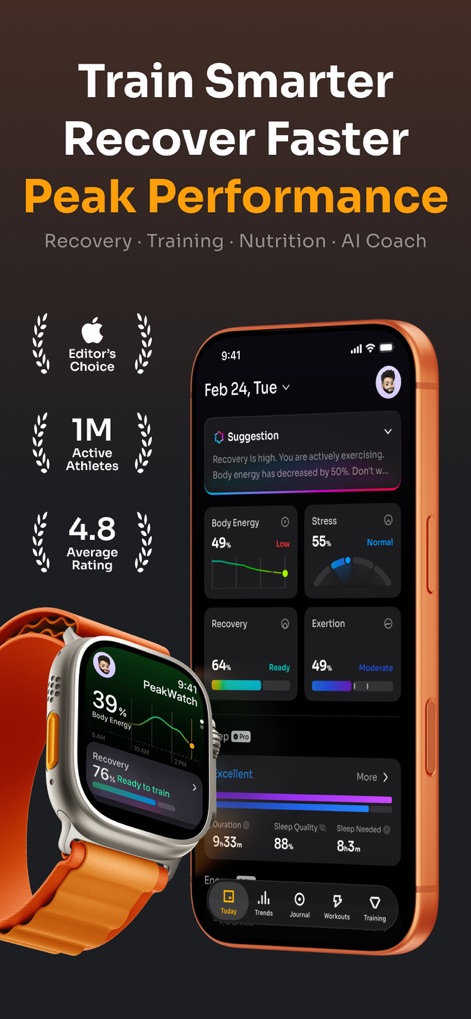
The app's main dashboard provides an instant overview of critical metrics like Body Energy, Stress, Recovery, and Exertion, while the Apple Watch integration displays real-time recovery status and energy levels.
Holistic Performance Dashboard
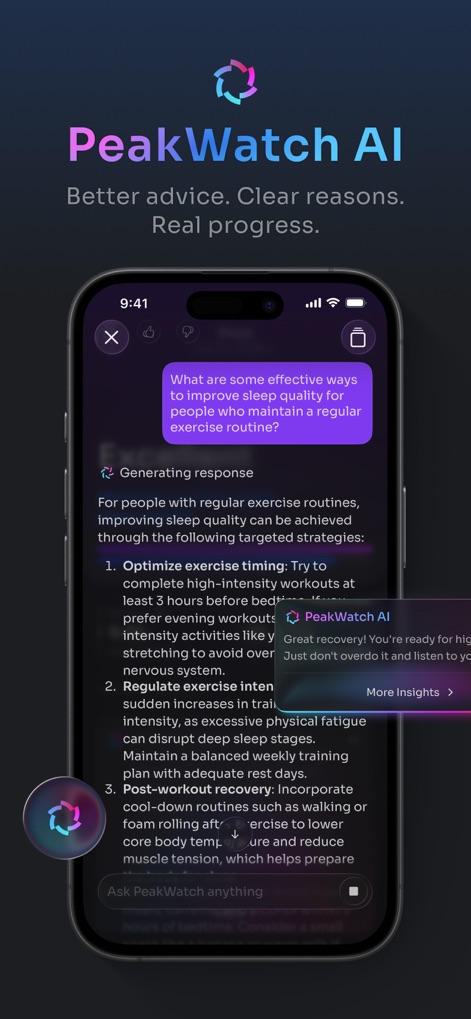
The AI chatbot delivers personalized, data-driven advice in response to user queries, offering comprehensive explanations and actionable strategies to optimize wellness.
AI Coaching Insights
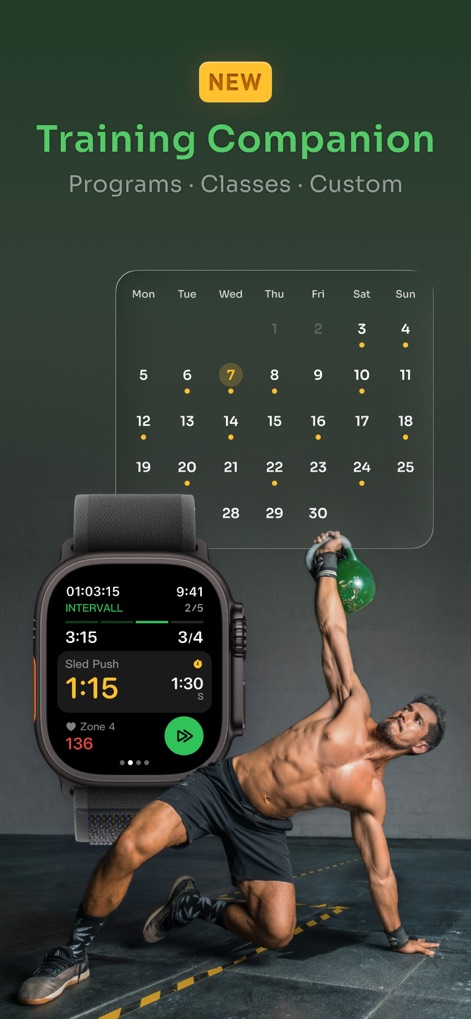
Users can easily plan and track diverse workout programs with the intuitive calendar, and the Apple Watch interface provides real-time workout metrics and interval guidance.
Integrated Training Companion

This tool offers dynamic visualizations of daily stress levels and trends, alongside a comprehensive Body Energy metric tracking cumulative energy throughout the day.
Stress & Energy Tracking

The app utilizes AI-powered photo analysis for instant calorie and nutrient detection, enabling detailed macro and energy balance tracking from logged meals.
Smart Nutrition Logging
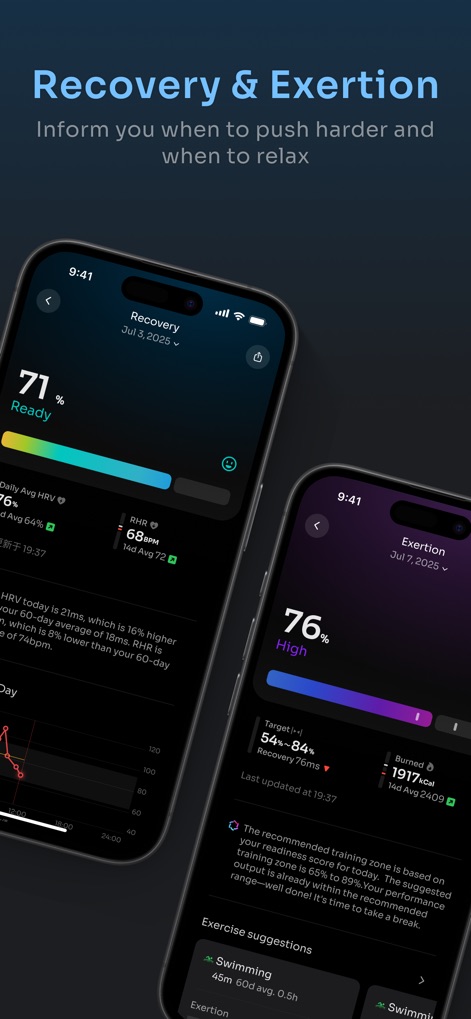
The app provides a clear recovery status derived from HRV and RHR analysis, paired with personalized exertion metrics and exercise suggestions to optimize training.
Recovery & Exertion Guidance
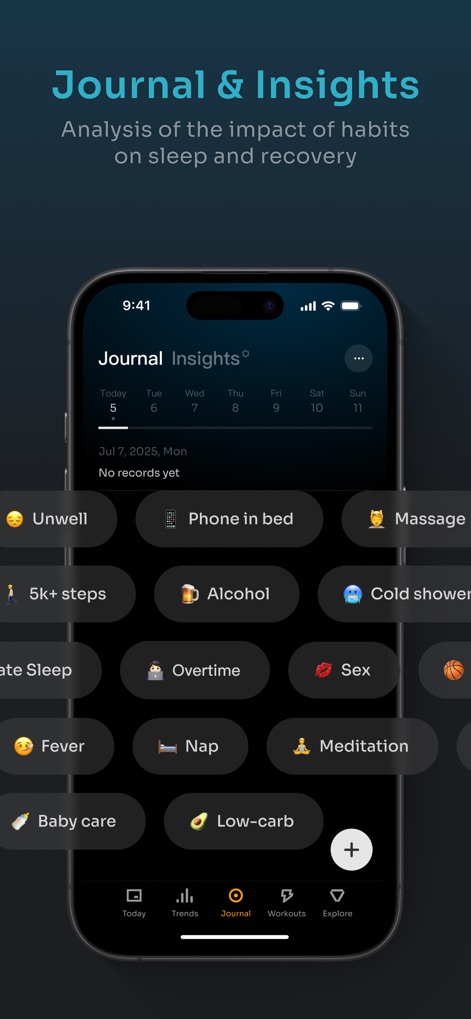
Users can log extensive events with pre-defined and custom habit entries, allowing the app to analyze their impact on sleep and recovery.
Journal Your Habits
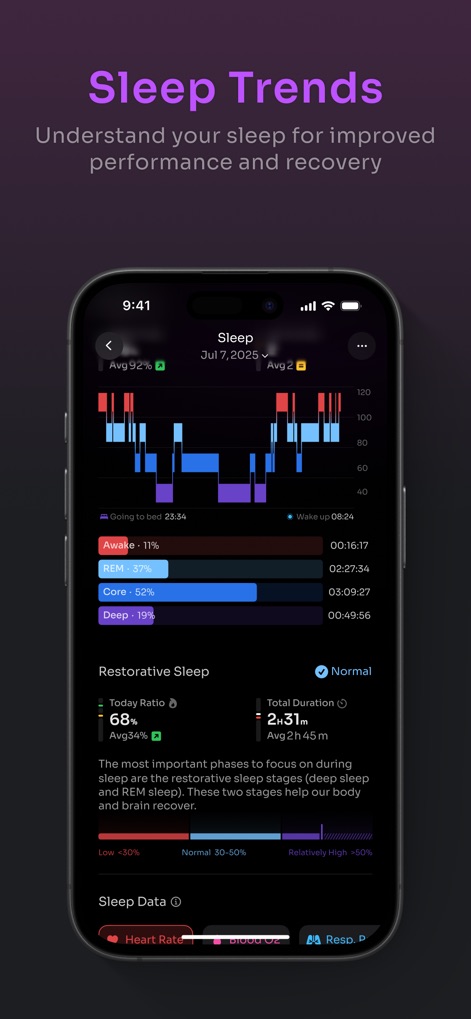
The app presents a visual breakdown of sleep stages and their duration, alongside comprehensive insights into restorative sleep and vital health metrics during rest.
Detailed Sleep Analytics
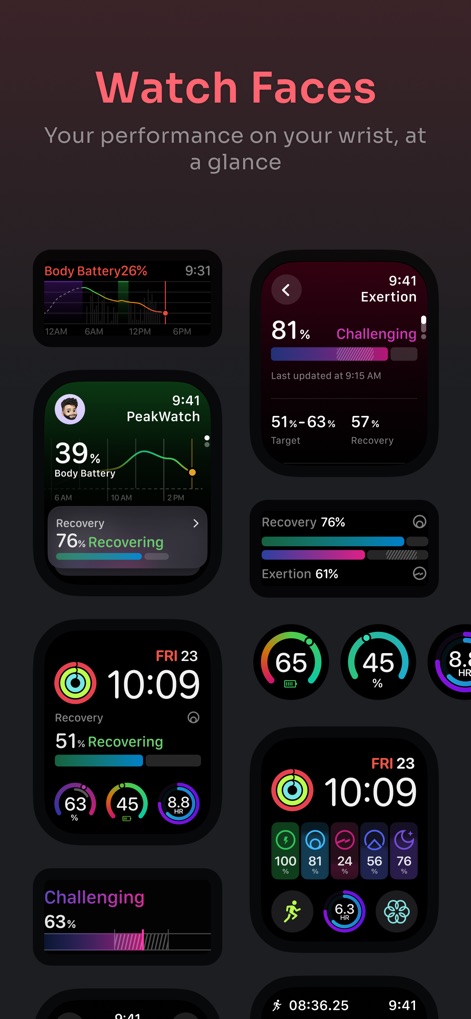
The app offers diverse Apple Watch face complications providing quick metric overviews, with customizable displays for Body Battery, Recovery status, and Exertion levels directly on the wrist.
Apple Watch Integration
Description
Download
More Like This
Apps with similar features and user experience

StressWatch: AI Stress Monitor
One Hundred Bad Ideas Limited

GrowPal: Health & Fitness
Hangzhou Floating Island Technology Co., Ltd.

Life Time Digital
Life Time, Inc.

RelaxWatch: Stress&HRV Tracker
Unreal Technology Limited

AMood - 你的健康生活好伙伴
恒一 杨

Death Clock: AI Health
Most Days Inc

Athlytic: AI Fitness Coach
MyndArc, LLC

StressTracker: AI Stress Check
赞美 陈

PulseBuddy AI: Stress Monitor
Hangzhou Free Notes Technology Co., Ltd
This page is not an official page of the app or its developer, but an independent editorial publication created for informational and commentary purposes. Unless expressly stated otherwise, neither the app nor its developer is affiliated with, endorsed by, sponsored by, authorized by, or otherwise officially connected with MWM, Apple, Google Play, the app publisher, or the app's developer, and nothing on this page implies that the app was developed using MWM's services. Any trademarks, logos, screenshots, and other content remain the property of their respective owners.