
This page is not an official page of the app or its developer, but an independent editorial publication created for informational and commentary purposes. Unless expressly stated otherwise, neither the app nor its developer is affiliated with, endorsed by, sponsored by, authorized by, or otherwise officially connected with MWM, Apple, Google Play, the app publisher, or the app's developer, and nothing on this page implies that the app was developed using MWM's services. Any trademarks, logos, screenshots, and other content remain the property of their respective owners.


StressWatch: AI Stress Monitor
Your Apple Watch just became your stress sentinel. It offers a direct line to understanding your body's stress response, empowering you to reclaim calm and dictate your bio age.
Downloads
7.5M+User Rating
Total Ratings
199.9KPublisher
Category
Health & FitnessLocales
9Latest Version
3.0.2Size
425.8 MBFirst Released
Apr 26, 2023An Analytical Overview for Proactive Health Management on Apple Watch
Key Features of StressWatch: AI Stress Monitor
AI-Powered Real-time Stress Monitoring & Alerts
The app provides advanced AI analysis of Heart Rate Variability (HRV) and Resting Heart Rate (RHR) data from the Apple Watch to continuously monitor stress levels and deliver immediate alerts when stress peaks, enabling proactive intervention.
Long-term Stress Trend Analysis
It allows users to track and analyze their stress levels over weekly and monthly periods, offering insights into long-term patterns and progress in stress management and habit building.
Context-Aware Actionable Reminders
This tool features intelligent, context-aware reminders that prompt users to take specific actions, such as resting or getting fresh air, when elevated stress is detected in various daily scenarios.
Simplified Visual Stress Interpretation
The app utilizes a unique visual indicator, 'Mr. Fizz,' which changes colors to provide an easy-to-understand representation of the user's current stress levels without requiring complex data interpretation.
Apple Watch Face Integration
It offers seamless integration with the Apple Watch Face, enabling users to conveniently monitor their stress and HRV levels at a glance directly from their wrist.
Bio Age Tracking & Improvement
The app aims to help users improve their 'Bio Age' over time by fostering better habits related to stress management, sleep, and movement, encouraging a holistic approach to well-being.
Frequently Asked Questions
Everything you need to know about StressWatch: AI Stress Monitor
What is StressWatch: AI Stress Monitor?
StressWatch is an AI Stress Monitor application that analyzes your Resting Heart Rate (RHR) and Heart Rate Variability (HRV) data from Apple Health to determine and monitor your current stress levels.
Does StressWatch provide real-time stress level notifications?
Yes, StressWatch continuously monitors your status and provides immediate reminders if your stress levels become too high, prompting you to take action to reduce stress.
What data does StressWatch use to monitor stress?
StressWatch relies on your Resting Heart Rate (RHR) and Heart Rate Variability (HRV) data, which it retrieves from Apple Health to analyze and interpret your stress levels.
Can I add StressWatch to my Apple Watch face?
Yes, you can monitor your HRV and stress levels directly from your Apple Watch by adding StressWatch to your Watch Face for constant visibility.
What is "Mr.Fizz" in StressWatch?
StressWatch features "Mr.Fizz," a visual indicator that changes colors as your stress levels rise, designed to help users easily interpret their data.
Does StressWatch provide medical advice?
No, StressWatch explicitly states that the information it provides cannot be considered medical advice or diagnosis. Users should seek professional medical help for excessive stress.
Does StressWatch offer historical stress trend analysis?
Yes, StressWatch offers detailed charts and trend analysis for hourly, daily, monthly, and yearly stress levels, helping users decode stress patterns over time.
Is StressWatch a free app?
Yes, StressWatch is free to download. Users can upgrade to StressWatch Pro to unlock all paid features through monthly or annual auto-renewing subscriptions.
What are the subscription options for StressWatch Pro?
StressWatch Pro offers monthly and annual auto-renewal subscription options. These subscriptions automatically renew through your Apple iTunes account.
How do I cancel my StressWatch Pro subscription?
To cancel a StressWatch Pro subscription, manually turn off the auto-renewal feature in your iTunes/Apple ID settings management at least 24 hours before the current period ends.
Can StressWatch monitor my sleep patterns?
Yes, StressWatch tracks sleep duration, quality, and average heart rate during sleep, helping users understand their rest for a restful night.
Does StressWatch track water intake and mood?
Yes, StressWatch supports tracking mood, water intake, and caffeine consumption, featuring interactive widgets for the latest iOS and watchOS.
Does StressWatch offer customizable Watch Faces?
Yes, StressWatch provides a growing library of custom Watch Faces, allowing users to personalize their Apple Watch with different styles and data displays.
Where can I find the StressWatch Privacy Policy?
The StressWatch Privacy Policy is available at the provided link: https://docs.ideation.love/stresswatch/en/service/privacy-policy.html.
The following screenshots and description are sourced directly from the app's official store listing and are the property of the app developer.
App Store
Screenshots

This tool leverages Apple Watch to display real-time HRV data and a dynamic 'Mr. Fizz' visual indicator for immediate stress feedback.
Monitor Stress Live
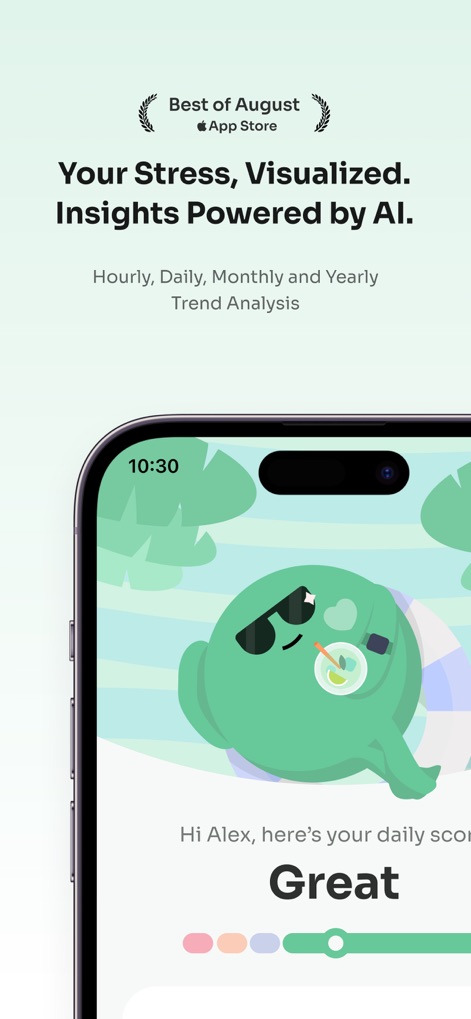
The app provides personalized daily stress scores and visualizes trends through the expressive 'Mr. Fizz' character.
AI-Powered Insights

Users can explore detailed stress level breakdowns and various data visualizations like bar graphs and scatter plots for comprehensive health understanding.
Deep Dive Analytics

The app offers a diverse collection of engaging Watch faces and customizable widgets to display real-time HRV and stress indicators directly on the Apple Watch.
Custom Watch Faces

This feature allows users to interact with an AI large language model to receive personalized insights based on HRV and resting heart rate data.
Conversational AI Guidance

The app tracks and visualizes HRV trends and detailed heart rate data over time, presenting key health indicators.
Comprehensive Heart Metrics

Users can monitor daily activities like sleep duration and quality, fitness metrics, and mindfulness minutes to build healthier habits.
Holistic Health Tracking

The app provides comprehensive sleep analysis, showcasing sleep duration, quality scores, and detailed heart rate data during rest.
Optimize Sleep Quality
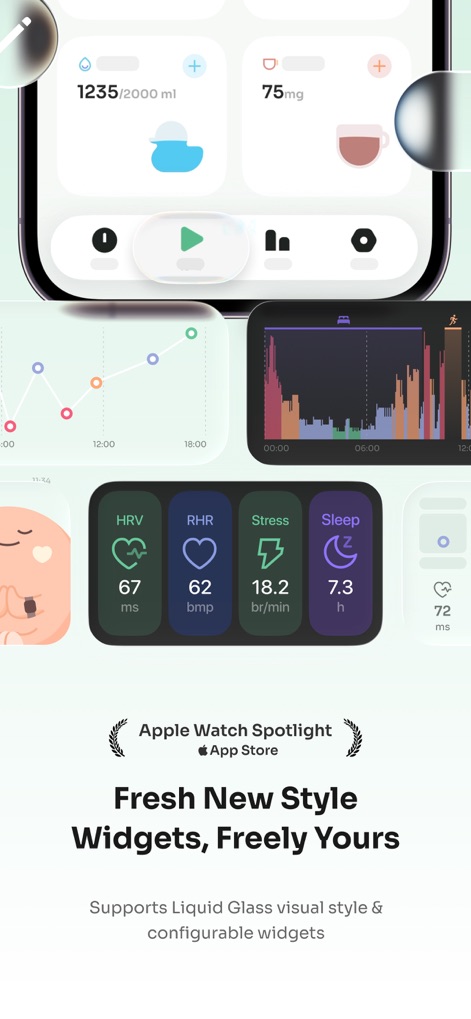
The app features interactive widgets that display essential health metrics like HRV, RHR, and stress levels on the home screen for quick access.
Dynamic Widgets

Users can easily log and track daily intake of water and caffeine, alongside monitoring their emotional state for holistic well-being.
Lifestyle Habit Tracker
Description
Download
More Like This
Apps with similar features and user experience
PeakWatch: AI Personal Trainer
Future Artifact Labs Limited

GrowPal: Health & Fitness
Hangzhou Floating Island Technology Co., Ltd.

Life Time Digital
Life Time, Inc.

RelaxWatch: Stress&HRV Tracker
Unreal Technology Limited

AMood - 你的健康生活好伙伴
恒一 杨

Death Clock: AI Health
Most Days Inc

Athlytic: AI Fitness Coach
MyndArc, LLC

StressTracker: AI Stress Check
赞美 陈

PulseBuddy AI: Stress Monitor
Hangzhou Free Notes Technology Co., Ltd
This page is not an official page of the app or its developer, but an independent editorial publication created for informational and commentary purposes. Unless expressly stated otherwise, neither the app nor its developer is affiliated with, endorsed by, sponsored by, authorized by, or otherwise officially connected with MWM, Apple, Google Play, the app publisher, or the app's developer, and nothing on this page implies that the app was developed using MWM's services. Any trademarks, logos, screenshots, and other content remain the property of their respective owners.