
This page is not an official page of the app or its developer, but an independent editorial publication created for informational and commentary purposes. Unless expressly stated otherwise, neither the app nor its developer is affiliated with, endorsed by, sponsored by, authorized by, or otherwise officially connected with MWM, Apple, Google Play, the app publisher, or the app's developer, and nothing on this page implies that the app was developed using MWM's services. Any trademarks, logos, screenshots, and other content remain the property of their respective owners.


Pedometer & Step Counter
Finally, a pedometer that respects your battery and your privacy. Users get data without the drain, a true win.
Downloads
2.5M+User Rating
Total Ratings
54.7KPublisher
Category
Health & FitnessLocales
23Latest Version
2.2.0Size
113.6 MBFirst Released
Dec 14, 2017An in-depth evaluation of essential functionalities tailored for health-conscious users.
Key Features Analysis: Pedometer & Step Counter
Robust Data Privacy
The app ensures complete user anonymity and data privacy by requiring no sign-in and explicitly stating it never collects or shares personal information with third parties.
Battery-Efficient Step Tracking
This tool features a built-in sensor for step counting, eliminating GPS tracking to significantly conserve battery power, which is ideal for all-day use.
Automatic Background Tracking
It allows users to automatically record steps in the background, even with the screen locked or the phone in a pocket, ensuring seamless activity logging.
Intuitive Progress Reports
The app provides innovative, mobile-optimized report graphs that display daily, weekly, and monthly walking statistics, helping users visualize their progress towards fitness goals and offers Apple Health sync.
Comprehensive Activity Tracking
This tool tracks essential metrics beyond steps, including burned calories, walking distance, and time, offering a holistic view of daily physical activity.
Adjustable Step Accuracy
It allows users to fine-tune sensitivity and input personal information to optimize the accuracy of step counting, distance, and calorie calculations.
Frequently Asked Questions
Everything you need to know about Pedometer & Step Counter
What is the "Pedometer & Step Counter" app?
"Pedometer & Step Counter" uses your phone's sensor to count steps, track burned calories, walking distance, and time. It displays all data clearly in graphs for user analysis.
Does the Pedometer & Step Counter app drain battery?
No, "Pedometer & Step Counter" uses the built-in sensor, not GPS tracking, to count steps. This approach ensures it barely consumes battery power, making it energy-efficient.
Does the Pedometer & Step Counter app collect personal data?
No, "Pedometer & Step Counter" is 100% private. It does not require sign-in, and it never collects personal data or shares information with third parties.
Does the Pedometer & Step Counter app have locked features or hidden charges?
No, the "Pedometer & Step Counter" app offers all features without any locked content or hidden charges. Users can access all functionalities without paying for them.
How does the Pedometer & Step Counter app auto-record steps?
The "Pedometer & Step Counter" app automatically records steps after tapping start. It counts steps even if the phone is in a hand, bag, pocket, armband, or when the screen is locked.
What kind of reports does the Pedometer & Step Counter app provide?
The "Pedometer & Step Counter" app provides innovative report graphs showing last 24 hours, weekly, and monthly statistics. These are designed for mobile devices to track walking data efficiently.
Can "Pedometer & Step Counter" app sync data to Apple Health?
Yes, the "Pedometer & Step Counter" app can sync data directly to Apple Health. This feature allows users to integrate their walking statistics with other health data.
How can I improve step counting accuracy in the Pedometer & Step Counter app?
To improve accuracy, users must input correct personal information in settings. Adjusting sensitivity can also make "Pedometer & Step Counter" count steps more accurately.
Why does "Pedometer & Step Counter" stop counting steps when the screen is locked on some devices?
Some devices stop counting steps when the screen is locked due to power-saving processing. This is a device limitation, not a bug, and cannot be solved by "Pedometer & Step Counter".
What are the subscription options for the "Pedometer & Step Counter" app?
The "Pedometer & Step Counter" app offers unlimited access for USD $1.99/week without a trial or USD $29.99/year with a 7-day trial.
How can I manage my "Pedometer & Step Counter" app subscription or turn off auto-renewal?
Subscriptions can be managed, and auto-renewal can be turned off by accessing Account Settings after purchase. This must be done at least 24 hours before the current period ends.
Does the "Pedometer & Step Counter" app help with weight loss?
Yes, the "Pedometer & Step Counter" app functions as a weight loss aid. It counts steps and tracks burned calories, assisting users in their weight loss journey.
How many users does the "Pedometer & Step Counter" app have?
The "Pedometer & Step Counter" app has over 50 million users. This indicates its widespread adoption and popularity among fitness tracking applications.
The following screenshots and description are sourced directly from the app's official store listing and are the property of the app developer.
App Store
Screenshots
This visual introduces the app's focus on user well-being, featuring active individuals running and a subtle progress graph indicating health improvement.
Health Journey Begins
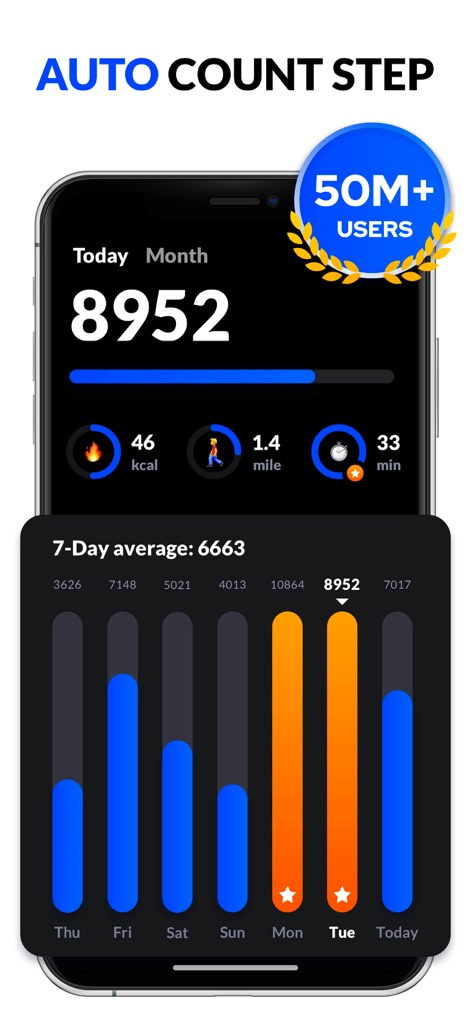
Users can instantly monitor their daily step count and key metrics like calories burned, alongside an intuitive 7-day average bar graph for weekly performance overview.
Daily Progress At a Glance

The app motivates users by showcasing total and average steps, complemented by a congratulatory pop-up highlighting multiple monthly step goal achievements.
Goal Achievement Visualization
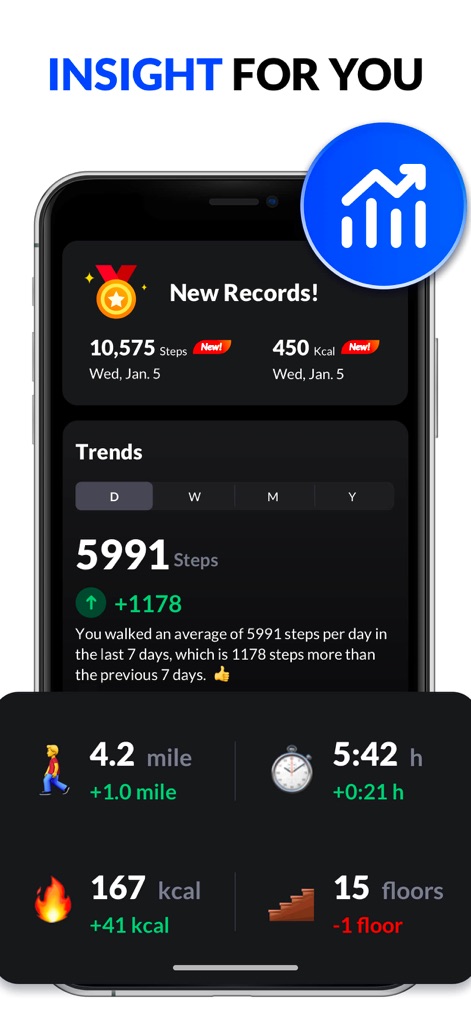
This screen provides comprehensive activity trends with daily, weekly, monthly, and yearly views, alongside detailed metrics such as miles walked and floors climbed for a complete health overview.
Deep Activity Insights

The app engages users through a leveling system displaying progress to the next level, and celebrates milestones with "New Achievements!" notifications and unlockable daily step badges.
Gamified Progress & Rewards
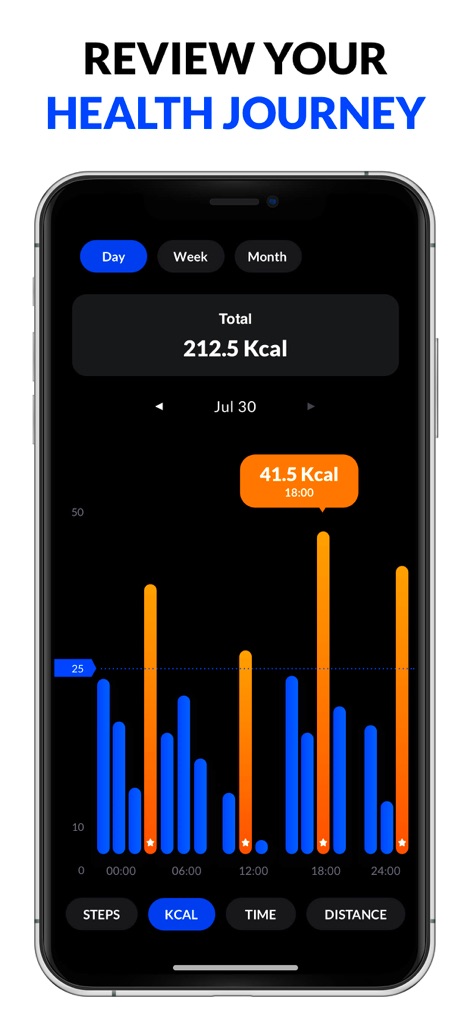
Users can review their calorie expenditure over different periods using the Day, Week, and Month tabs, with a detailed dual-color bar graph visualizing kcal burn throughout the day.
Calorie Burn Tracking
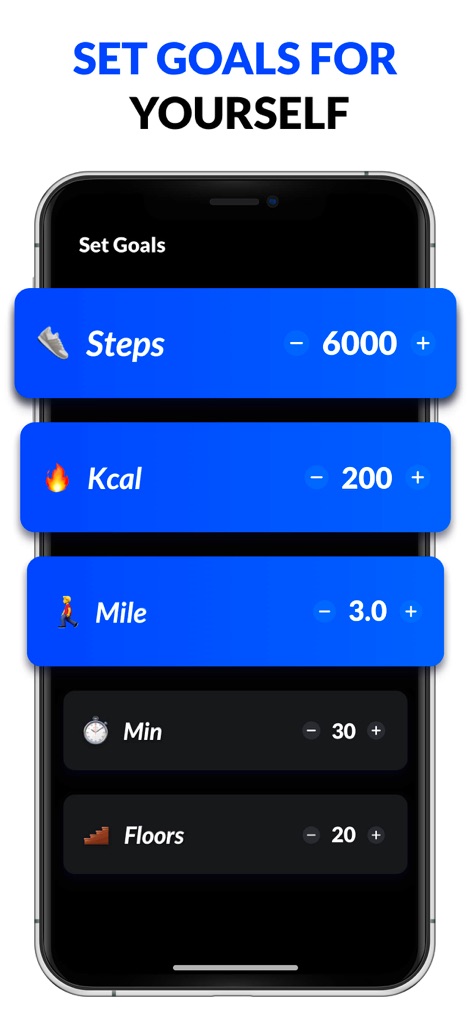
This interface allows users to easily customize personal fitness goals for metrics like daily steps and calories, utilizing intuitive adjustable value selectors.
Personalized Goal Setting
Description
Download
More Like This
Apps with similar features and user experience

Step Tracker · Step Counter
Leap Health Fitness Limited
StepsApp Pedometer
StepsApp GmbH
Pedometer α - Step Counter
ITO Technologies Inc.

Pedometer - Run & Step Counter
Appenvision Ltd
MySteps - Step Counter
Company Next Leap

Step Counter Maipo - Pedometer
Shigeru Nakaya

Step Counter Pedometer doSteps
AK Apptuitive GmbH

The Pedometer
MUTLU ISLER TEKNOLOJI VE ILETISIM HIZMETLERI TICARET LTD STI

Steps - Activity Tracker
Year of Code, LLC
This page is not an official page of the app or its developer, but an independent editorial publication created for informational and commentary purposes. Unless expressly stated otherwise, neither the app nor its developer is affiliated with, endorsed by, sponsored by, authorized by, or otherwise officially connected with MWM, Apple, Google Play, the app publisher, or the app's developer, and nothing on this page implies that the app was developed using MWM's services. Any trademarks, logos, screenshots, and other content remain the property of their respective owners.