
This page is not an official page of the app or its developer, but an independent editorial publication created for informational and commentary purposes. Unless expressly stated otherwise, neither the app nor its developer is affiliated with, endorsed by, sponsored by, authorized by, or otherwise officially connected with MWM, Apple, Google Play, the app publisher, or the app's developer, and nothing on this page implies that the app was developed using MWM's services. Any trademarks, logos, screenshots, and other content remain the property of their respective owners.


Step Counter Maipo - Pedometer
Stop guessing your activity levels. This app puts precise movement data directly into the user's hand, transforming casual walks into trackable fitness gains.
Downloads
2.5M+User Rating
Total Ratings
200.9KPublisher
Category
Health & FitnessLocales
2Latest Version
1.17.2Size
44.0 MBFirst Released
Dec 8, 2015An evaluation of core functionalities and user experience enhancements for active iPhone users.
Key Feature Analysis: Step Counter Maipo - Pedometer
Automatic Step Tracking
The app automatically tracks daily walking activities, including steps, distance, walking time, and calories burned, providing an effortless way for users to monitor their physical activity.
HealthKit Integration
This tool seamlessly integrates with Apple Health, enabling users to import past step data, including measurements from Apple Watch, for a comprehensive overview of their activity.
Battery Efficient
This tool is designed to be highly battery efficient, ensuring minimal power consumption while continuously tracking steps, which is crucial for daily, long-term use.
Home & Lock Screen Widgets
It provides Home and Lock Screen widgets, allowing users to quickly view their daily step count without opening the app, promoting constant awareness of their progress.
Calendar View
It offers a calendar view to visualize daily step counts, achievement levels, and trends, allowing users to easily review their progress and identify their most active days.
Personal Records
It showcases users' top 100 all-time best walking days, serving as a motivational tool to encourage consistent activity and personal achievement.
iCloud Backup & Restore
(Premium) It provides iCloud backup and restore capabilities, allowing for seamless data transfer to new devices or recovery of information if needed.
CSV Export
(Premium) This tool allows for the export of daily steps, distance, calories, and time data in CSV format, offering flexibility for external analysis or use with other applications.
Daily Notes
The app enables users to add personal daily notes, facilitating the logging of workouts, memories, or other relevant information alongside their activity data.
Custom Themes
The app offers a selection of 8 custom color themes, allowing users to personalize its appearance to match their preferences or mood.
Frequently Asked Questions
Everything you need to know about Step Counter Maipo - Pedometer
What activity metrics does Step Counter Maipo - Pedometer track automatically?
Step Counter Maipo automatically tracks steps, distance, calories burned, and walking time. It operates without setup, requiring only installation to begin monitoring your activity.
Is the Step Counter Maipo - Pedometer app free?
Yes, the Step Counter Maipo app is free to download and use for its core step tracking functionalities. A premium version is available to remove ads and unlock advanced features.
Does Step Counter Maipo - Pedometer support Apple Health integration?
Yes, Step Counter Maipo integrates with Apple Health. This feature allows users to import historical step data, including measurements from an Apple Watch, directly into the app.
Can I view my daily and monthly step totals in Step Counter Maipo?
Yes, Step Counter Maipo offers a calendar view. This feature allows users to easily review daily step counts, track achievement levels, and see monthly totals, weekly trends, and their best walking day.
Does Step Counter Maipo - Pedometer offer widgets for iOS home and lock screens?
Step Counter Maipo provides Home & Lock Screen Widgets for iOS 16+ users. These widgets offer a quick way to check today’s step count and other activity data directly from your device's screen.
How do I back up my activity data in Step Counter Maipo - Pedometer?
Step Counter Maipo offers iCloud Backup & Restore as a premium feature. This functionality enables users to seamlessly transfer their data to a new device or recover it if needed.
Can I export my step data from the Step Counter Maipo app?
Yes, premium users of Step Counter Maipo can export their data. The app allows daily steps, distance, calories, and time to be exported in CSV format for compatibility with other applications.
Is the Step Counter Maipo - Pedometer app battery efficient?
No, the Step Counter Maipo app is designed for battery efficiency. It minimizes power consumption while ensuring full compatibility with the latest iOS versions for optimal performance.
The following screenshots and description are sourced directly from the app's official store listing and are the property of the app developer.
App Store
Screenshots
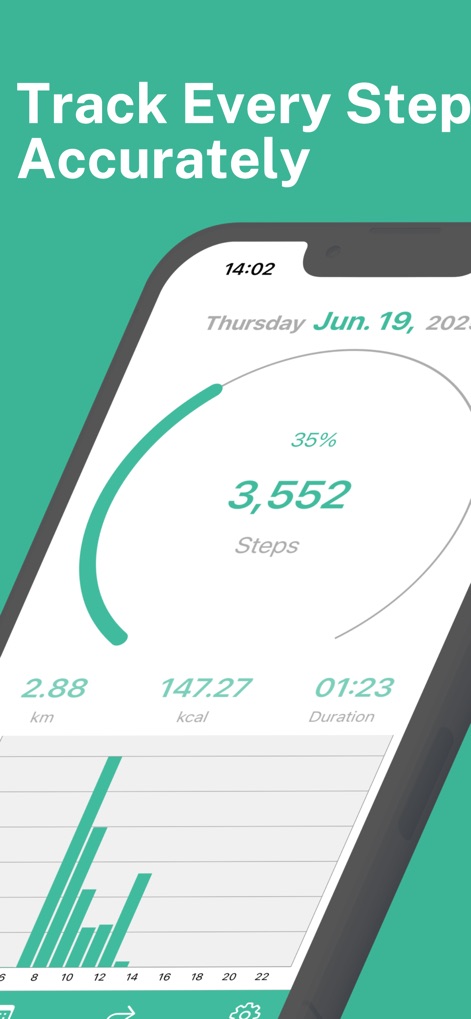
The app provides a clear main dashboard displaying current step count and offers detailed insights through the hourly activity graph.
Daily Activity Overview
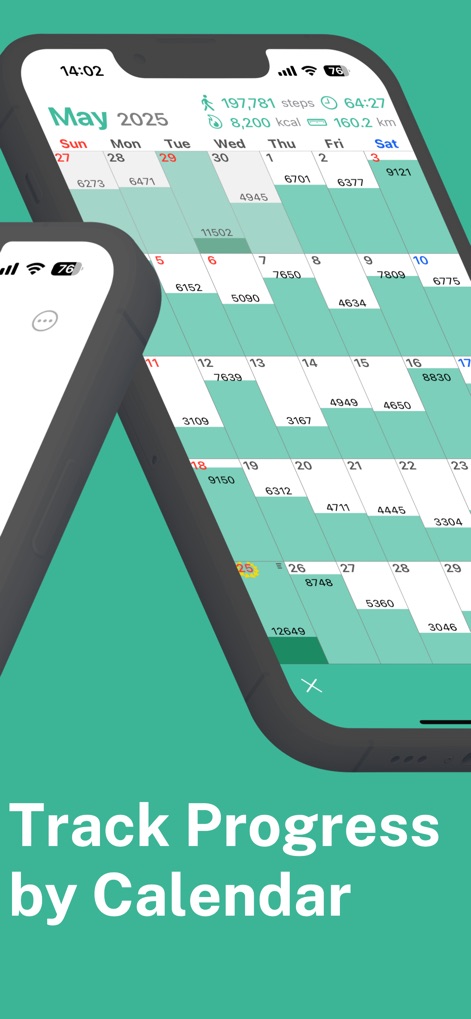
Users can visually track their progress with the intuitive calendar view and review monthly totals for steps and distance.
Monthly Progress Visuals
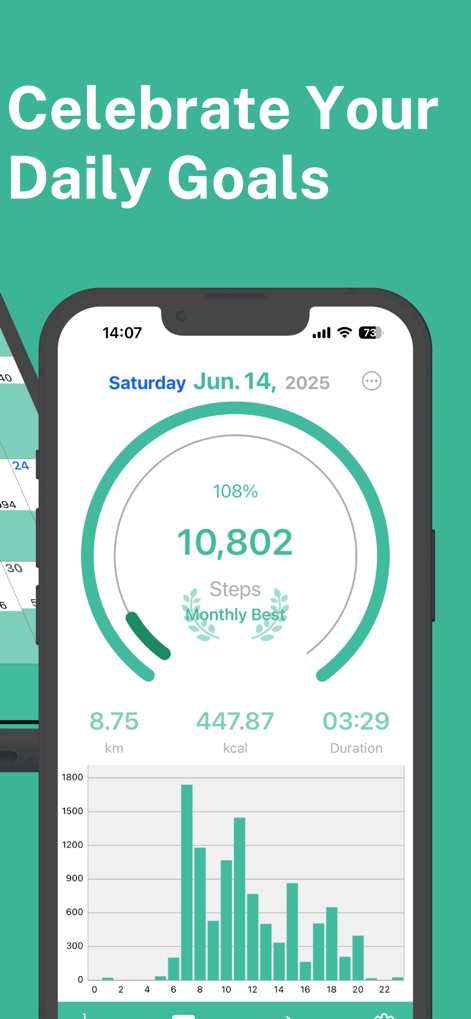
This tool highlights goal achievements with a prominent completion percentage and celebrates personal milestones such as a 'Monthly Best' record.
Achieve Milestones Daily
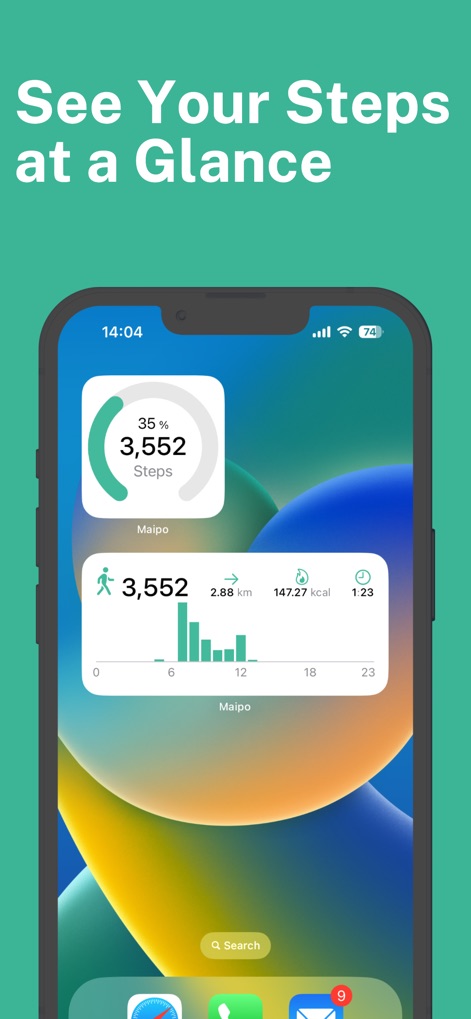
Convenient home and lock screen widgets allow for quick checking of current step counts and a summary of daily activity.
Instant Widget Access
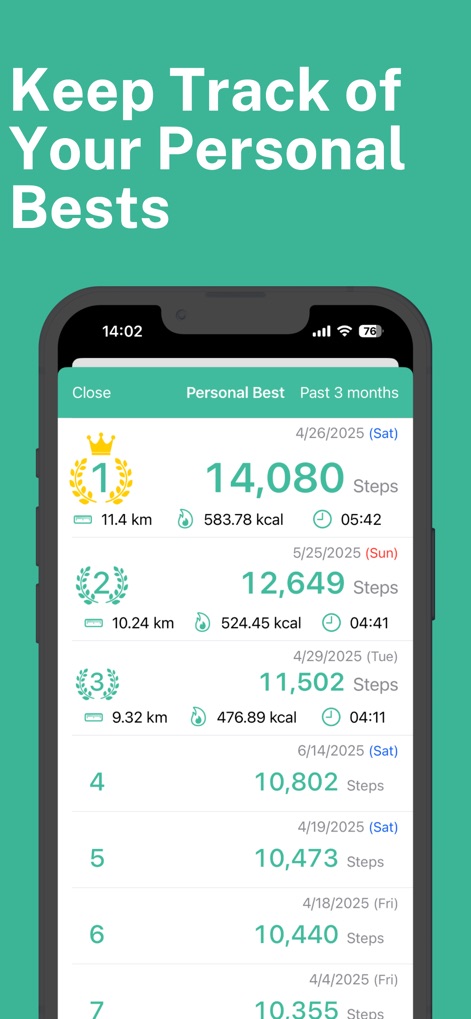
The app keeps a detailed log of personal bests, showcasing top walking days with metrics like steps, distance, and duration.
Personal Records Log
Description
Download
More Like This
Apps with similar features and user experience

Pedometer & Step Counter
Leap Health Fitness Limited

Step Tracker · Step Counter
Leap Health Fitness Limited
StepsApp Pedometer
StepsApp GmbH

Pedometer α - Step Counter
ITO Technologies Inc.

Pedometer - Run & Step Counter
Appenvision Ltd
MySteps - Step Counter
Company Next Leap

Step Counter Pedometer doSteps
AK Apptuitive GmbH

The Pedometer
MUTLU ISLER TEKNOLOJI VE ILETISIM HIZMETLERI TICARET LTD STI

Steps - Activity Tracker
Year of Code, LLC
This page is not an official page of the app or its developer, but an independent editorial publication created for informational and commentary purposes. Unless expressly stated otherwise, neither the app nor its developer is affiliated with, endorsed by, sponsored by, authorized by, or otherwise officially connected with MWM, Apple, Google Play, the app publisher, or the app's developer, and nothing on this page implies that the app was developed using MWM's services. Any trademarks, logos, screenshots, and other content remain the property of their respective owners.