Pedometer - Steps Counter app
Download on App Store

This page is not an official page of the app or its developer, but an independent editorial publication created for informational and commentary purposes. Unless expressly stated otherwise, neither the app nor its developer is affiliated with, endorsed by, sponsored by, authorized by, or otherwise officially connected with MWM, Apple, Google Play, the app publisher, or the app's developer, and nothing on this page implies that the app was developed using MWM's services. Any trademarks, logos, screenshots, and other content remain the property of their respective owners.


Logo of Pedometer - Steps Counter app
Download on App Store

Pedometer - Steps Counter app

The simple, battery-friendly way to stay active and reach your weight goals. Just carry your phone to automatically track your steps and health progress with beautiful, easy-to-read reports.

Key Figures

Downloads

0

User Rating

4.4/5

Total Ratings

0

Publisher

Komorebi Inc.

Category

Health & Fitness

Locales

7

Latest Version

4.2.0

Size

81.2 MB

First Released

Sep 21, 2018
Features

Simple Tracking for Your Daily Wellness

No complicated buttons or battery drain. Just clear, easy-to-read steps and health insights designed for your everyday life.

Easy to Read, Easy to Use

Check your daily progress with large, clear numbers and a simple layout. No confusing menus—just the data you need at a single glance.

Automatic Battery-Saving

Your phone tracks your steps automatically in the background. Experience accurate counting all day long without draining your battery life.

The following screenshots and description are sourced directly from the app's official store listing and are the property of the app developer.

App Store

Screenshots
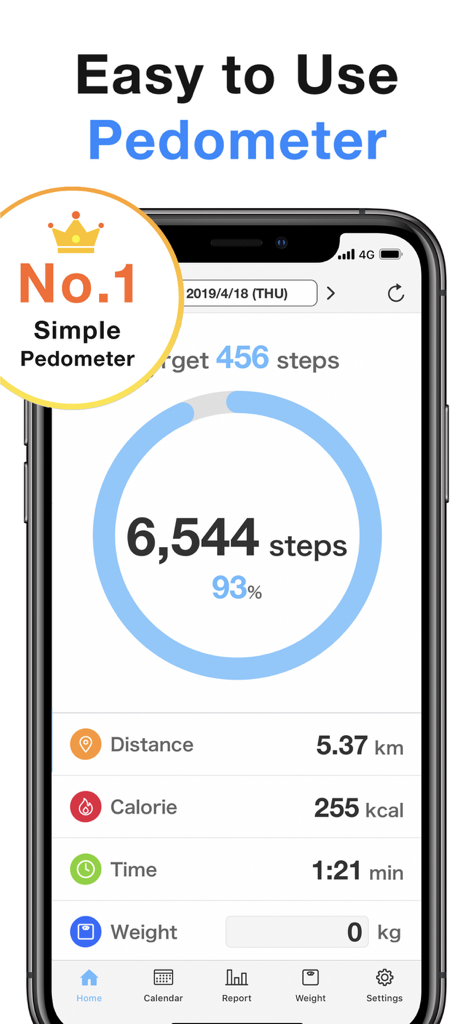
Pedometer - Steps Counter app - Main screen of the Pedometer app displaying a daily step count of 6544 with calories and distance tracking
Main screen of the Pedometer app displaying a daily step count of 6544 with calories and distance tracking

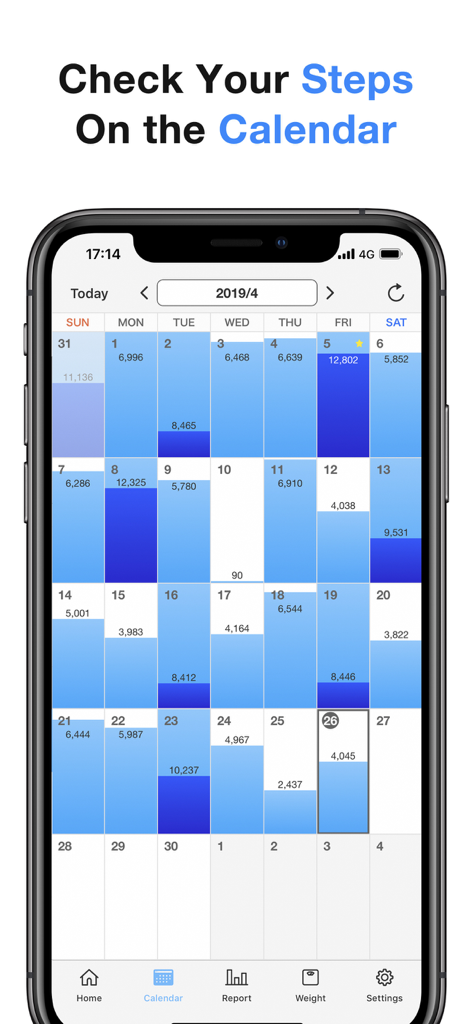
Pedometer - Steps Counter app - Monthly calendar view showing daily step counts and activity progress in the pedometer app
Monthly calendar view showing daily step counts and activity progress in the pedometer app

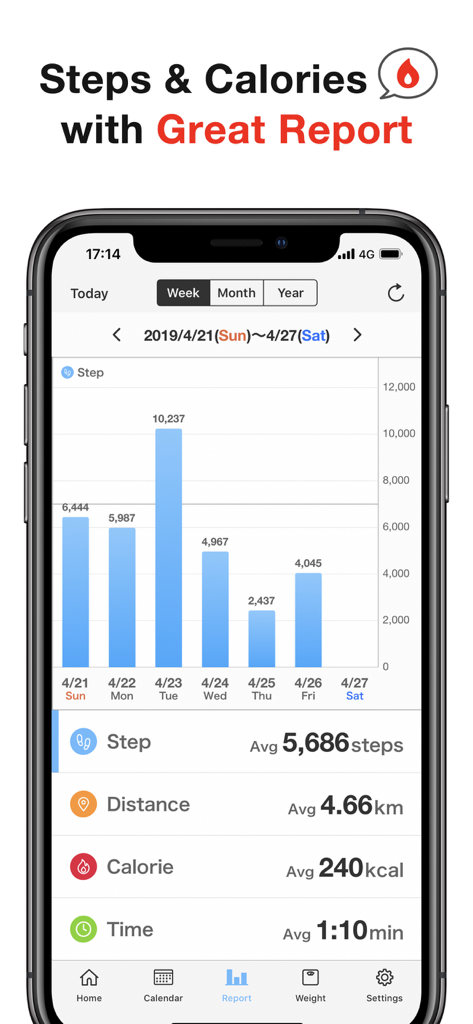
Pedometer - Steps Counter app - Weekly steps and calories report showing a bar chart of daily activity and average fitness statistics.
Weekly steps and calories report showing a bar chart of daily activity and average fitness statistics.

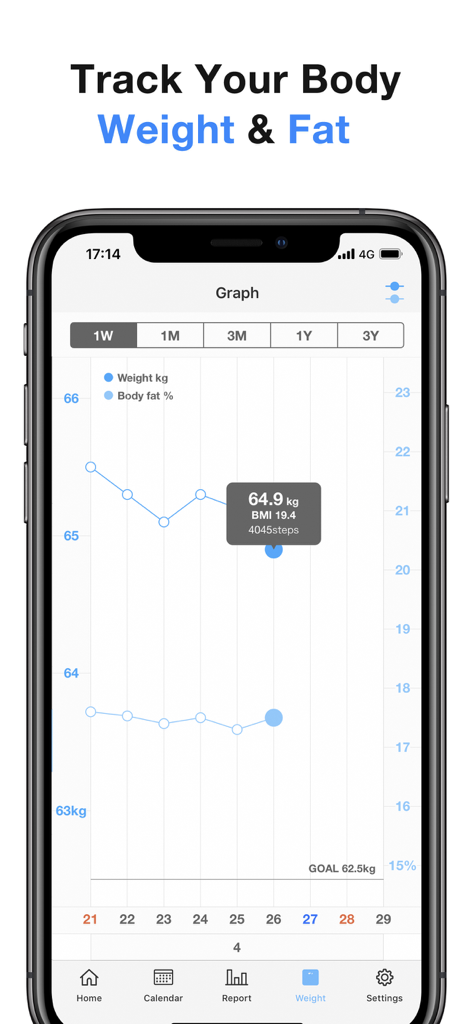
Pedometer - Steps Counter app - A graph in the Pedometer app displaying body weight and body fat percentage trends over time.
A graph in the Pedometer app displaying body weight and body fat percentage trends over time.

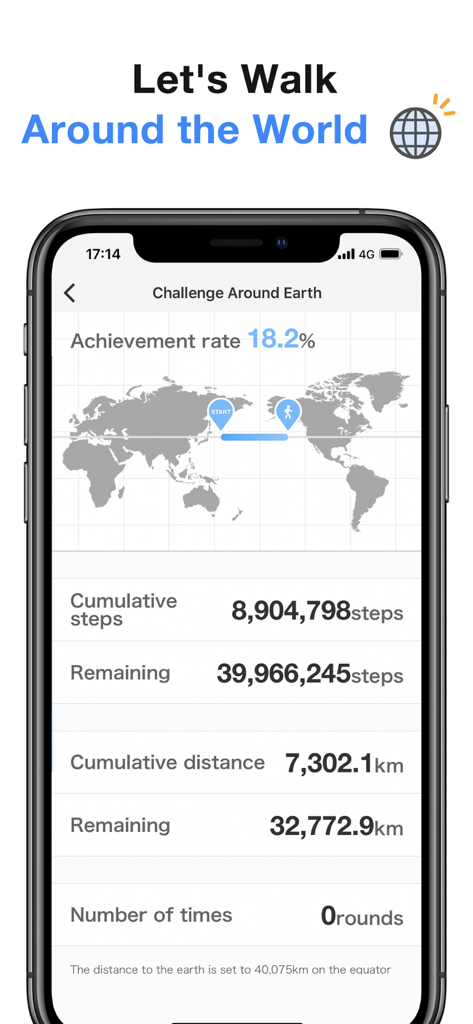
Pedometer - Steps Counter app - Pedometer app interface showing a walking challenge around the world with progress map and step counts
Pedometer app interface showing a walking challenge around the world with progress map and step counts

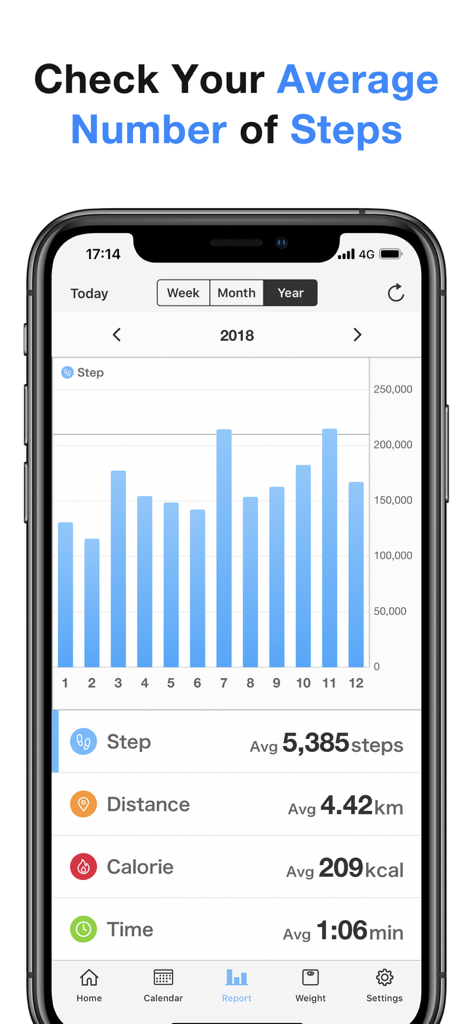
Pedometer - Steps Counter app - A smartphone displaying a yearly step count report with a monthly bar chart and daily averages for steps, distance, and calories.

A smartphone displaying a yearly step count report with a monthly bar chart and daily averages for steps, distance, and calories.

Description

Pedometer App, "Pedometer - Simple Count Steps" is powerful pedometer app. Using iPhone's pedometer function, you can automatically track the number of steps, calorie, moving distance and moving time, and you can see the number of steps each day with easy-to-understand reports. In addition, you can pleasantly enjoy a game in which you can check if you have walked around the world. It is a recommended pedometer app that allows you to easily record the number of steps without consuming the battery of the iPhone because it is made in a way that you can use it even if you do not start the application. Furthermore, it even has weight record and body fat percentage graph function. That’s why it is perfect for people who want to start diet and walking. [Recommended for] ・People who want to use pedometer, pedometer app ・People who like pedometer that has big and clear numbers ・People who want to check the number of steps on the calendar ・People who want to use diet and weight management functions ・People who want pedometer that have games ・People who want to change into cute themes ・Those who like to check check number of steps on widget ・Those who like pedometer that can take note or diary ・Even people who do not use complicated functions can use it easily [Simple pedometer’s features] ・You can use it easily in just a few steps ・You can check the number of steps everyday by just launching the application ・You can check the number of steps everyday on the calendar ・You can set target for number of steps everyday and see if you have achieved it or not ・You can record weight and body fat percentage ・Changes in body weight and body fat percentage everyday can be shown as graph ・You can leave note and diary for daily records ・You can analyze cumulative data up until now ・You can see number of steps・calorie consumption・moving distance・moving time in a week, month, year ・You can set step width ・You can also play games to check if you have walked around Japan with the number of steps up until now ・You can choose theme color from 11 colors ・You can choose App icon from 11 colors ・You can also use password lock so that no one can see the application ・You can receive report notification of steps every weekend ・You can change languages like English, Chinese, Korean,Vietnamese, Portuguese and so on… (7 languages) [Frequently Asked Questions] ・Why can you see the number of steps in the past? -> The iPhone has a function to automatically record the number of steps and by using this function, this simple pedometer application allows you to see step count data in the past . In other words, since the iPhone already recorded the number of steps automatically before installing the application, it will display it. ・Can I use it for free? -> Of course you can! You can use this App for free with most of the functions. However, some parts must be purchased if you wish to hide ads or use some special themes. [Notice] This app uses the Health Care API and Motion and Fitness Censor.

Download

Download on App Store

This page is not an official page of the app or its developer, but an independent editorial publication created for informational and commentary purposes. Unless expressly stated otherwise, neither the app nor its developer is affiliated with, endorsed by, sponsored by, authorized by, or otherwise officially connected with MWM, Apple, Google Play, the app publisher, or the app's developer, and nothing on this page implies that the app was developed using MWM's services. Any trademarks, logos, screenshots, and other content remain the property of their respective owners.