
This page is not an official page of the app or its developer, but an independent editorial publication created for informational and commentary purposes. Unless expressly stated otherwise, neither the app nor its developer is affiliated with, endorsed by, sponsored by, authorized by, or otherwise officially connected with MWM, Apple, Google Play, the app publisher, or the app's developer, and nothing on this page implies that the app was developed using MWM's services. Any trademarks, logos, screenshots, and other content remain the property of their respective owners.


Phonto - Text on Photos
Mediocre visuals disappear. Phonto hands users the power to craft decisive visual narratives, ensuring their photos don't just show, they *speak*.
Downloads
25M+User Rating
Total Ratings
948.0KPublisher
Category
Photo & VideoLocales
4Latest Version
4.9.51Size
65.9 MBFirst Released
May 24, 2011Phonto - Text on Photos: Key Feature Analysis
An evaluation of core functionalities for visually-driven content creators.
Core Text Overlay
The app provides the fundamental ability to layer text directly onto images, serving as the core functionality for visual storytelling and content creation for social media and personal projects.
Diverse Font Collection
This tool features an extensive built-in library of over 400 fonts, offering users a wide array of stylistic choices to perfectly match their visual content and expressive needs.
Personalized Font Upload
It allows users to import and install their own custom fonts, providing unparalleled flexibility for brand consistency and unique personal expression beyond the app's native offerings.
Advanced Text Styling
The app offers comprehensive styling options including changeable size, color, gradient, stroke, shadow, and background for text, enabling detailed aesthetic control to enhance readability and visual impact.
Dynamic Text Manipulation
This tool features advanced text manipulation capabilities such as curving, perspective transformation, rotation, kerning, line spacing, and even the ability to erase parts of text, facilitating highly creative and artistic designs.
Flexible Backgrounds
It allows users to utilize not only existing pictures but also plain images as a canvas, offering versatility for creating text-centric graphics, quotes, or branded messages without requiring a photographic background.
Seamless Social Sharing
The app facilitates direct sharing of edited photos to popular social media platforms like Facebook, Twitter, and Instagram, streamlining the workflow for content creators to instantly publish their work.
Decorative Overlays
This tool includes a selection of pre-designed decorative items such as balloons, rectangles, stars, and hearts, providing quick and easy ways to add visual flair and emphasis to text and images.
Frequently Asked Questions
Everything you need to know about Phonto - Text on Photos
What is Phonto - Text on Photos?
Phonto is a simple application designed to add custom text to pictures. It offers over 400 fonts, comprehensive text styling, and features like curved or perspective text, allowing creative photo enhancements.
How do I install custom fonts in Phonto?
Yes, you can install custom fonts in Phonto. Copy .ttf or .otf font files into the app's "File Sharing" section via iTunes. After transferring, restart Phonto to access the new fonts under "My Fonts."
How many built-in fonts does Phonto offer?
Phonto offers more than 400 built-in fonts for users to choose from. Additionally, the app provides the capability to install and use external custom fonts for broader design options.
Can Phonto change text color and apply gradients?
Yes, Phonto allows comprehensive text color customization. Users can change text color, apply gradients, modify stroke color, and adjust the text's background color for diverse visual effects.
Does Phonto support curved text effects?
Yes, Phonto supports creating curved text. It also includes features for perspective text, rotation, kerning adjustments, and line spacing to fully customize text appearance on images.
What user interface languages does Phonto support?
Phonto supports English (US), Chinese, and Japanese. The application's display language automatically adjusts based on the device's regional language settings, with priority given to certain languages.
Can I share Phonto creations directly to social media?
Yes, Phonto allows direct sharing of your edited photos. You can easily share your text-enhanced pictures to popular social media platforms like Facebook, Twitter, and Instagram.
Can Phonto add text to blank images?
Yes, Phonto can add text to both pictures and plain, blank images. This flexibility enables users to create text-based graphics without requiring an existing photograph as a background.
The following screenshots and description are sourced directly from the app's official store listing and are the property of the app developer.
App Store
Screenshots

Creative Text Overlays
See how the app allows users to seamlessly add custom text to their photos and easily modify text color with vibrant options.
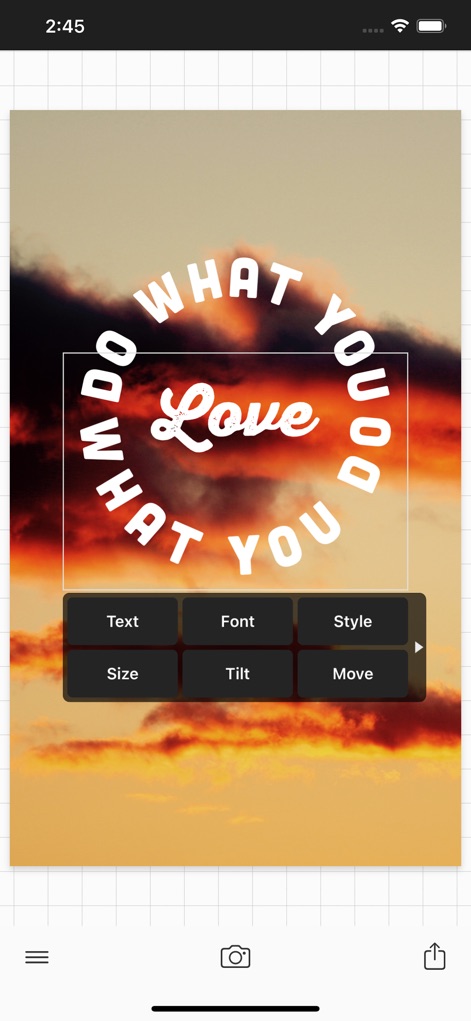
Dynamic Text Shaping
Discover how Phonto enables dynamic curved text effects and provides an intuitive menu for adjusting font, style, and size.

Perspective & Impact
Witness the power of perspective text to create dramatic visual depth, coupled with the ability to adjust text size for maximum impact.

Endless Style Choices
Explore the vast array of over 400 fonts available in the app, complemented by an endless selection of text styles and layouts for every mood.
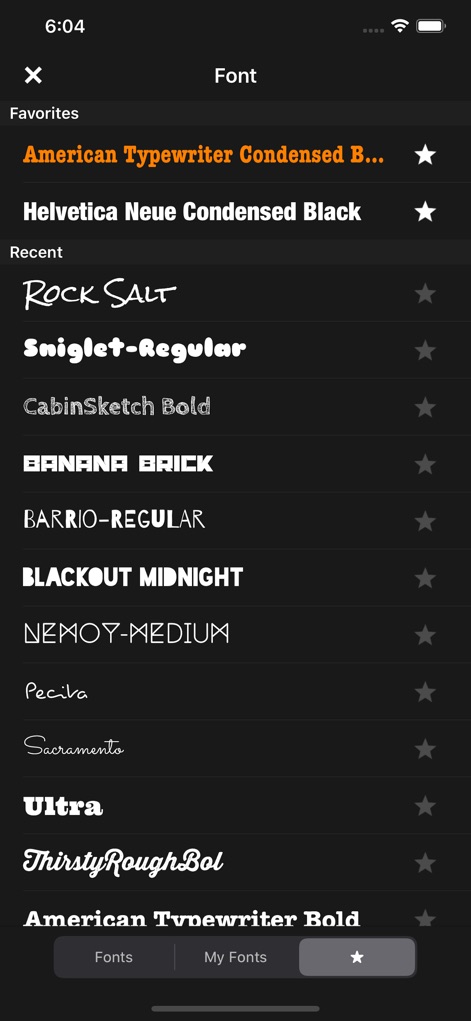
Font Library Explorer
Dive into the extensive font library, featuring hundreds of choices, and efficiently manage preferred fonts using the Favorites and Recent categories.

Precise Color Control
Utilize the app's precise RGB color sliders for granular text color adjustments and apply customizable background colors to enhance visibility.

Gradient & Stroke
Master sophisticated text gradient effects, allowing for multi-color transitions, and refine text appearance with detailed stroke color adjustments.
Description
Download
More Like This
Apps with similar features and user experience

排版小动物 - tinytype 你的文字排版助手
Kairutu Technology (Shanghai) Co., Ltd.

LOOMY: Fonts & Aesthetic Text
Anton Havrylenko

Fonting: Font Editor for IG
SPARKLECT CO.,LTD.

微商文案-模拟聊天对话电影制作
庆 李

txt: Add Text To Photo & Video
Ancle Apps LTD

StoryFont for Instagram Story
Alireza Namazian

Typorama: Text on Photo Editor
App Business Ventures LLC

ColadaPic – Aesthetic Stickers
NEX INNOVATION PTE. LTD

Fonto - story font for IG
ZEEBAVERSE LLC
This page is not an official page of the app or its developer, but an independent editorial publication created for informational and commentary purposes. Unless expressly stated otherwise, neither the app nor its developer is affiliated with, endorsed by, sponsored by, authorized by, or otherwise officially connected with MWM, Apple, Google Play, the app publisher, or the app's developer, and nothing on this page implies that the app was developed using MWM's services. Any trademarks, logos, screenshots, and other content remain the property of their respective owners.