QuickSearch PDF Reader

QuickSearch PDF Reader


Download on App Store
Logo of QuickSearch PDF Reader

QuickSearch PDF Reader: Search Across All Your Documents Instantly

Stop wasting time opening files one by one. Find any phrase across your entire PDF library with background indexing and lightning-fast navigation designed for professionals.

Publisher

Olive Toast Software Ltd

Category

Productivity

Downloads

162K+

User Rating

4.1/5

Total Ratings

200

Locales

1

Efficiency in Action

Discover the interface used by 162K+ users.
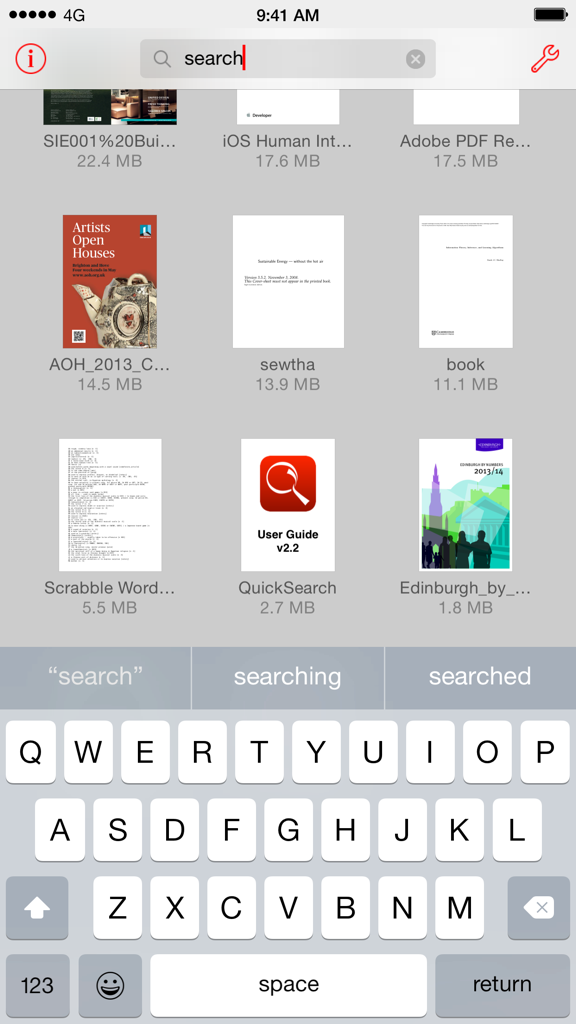
QuickSearch PDF Reader app interface showing a grid of PDF documents and a search bar.

QuickSearch PDF Reader app interface showing a grid of PDF documents and a search bar.

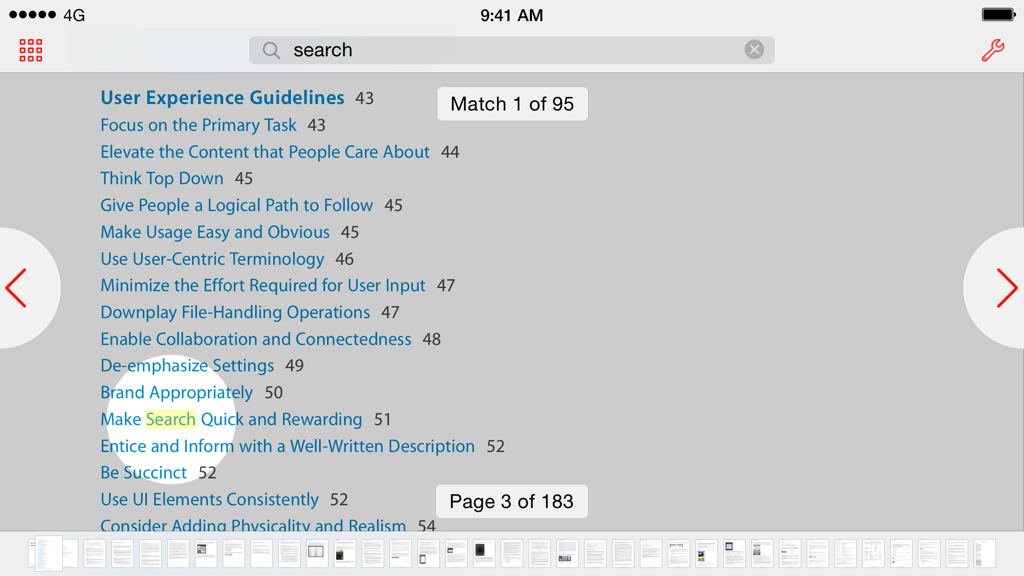
QuickSearch PDF Reader app interface on iPad showing search result highlighting and page navigation

QuickSearch PDF Reader app interface on iPad showing search result highlighting and page navigation

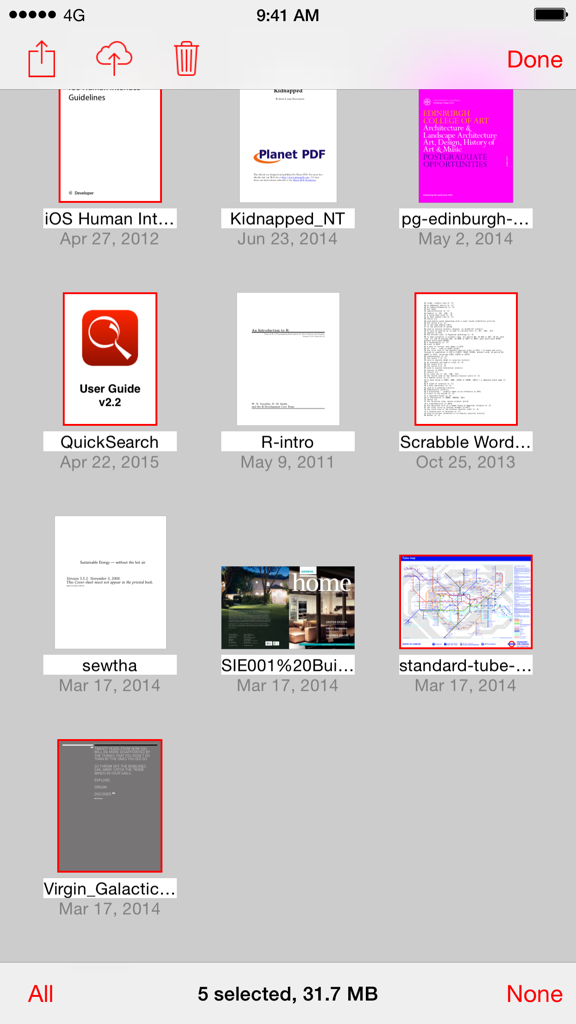
A library view within the QuickSearch PDF Reader app showing a grid of various PDF documents with five files selected for management

A library view within the QuickSearch PDF Reader app showing a grid of various PDF documents with five files selected for management

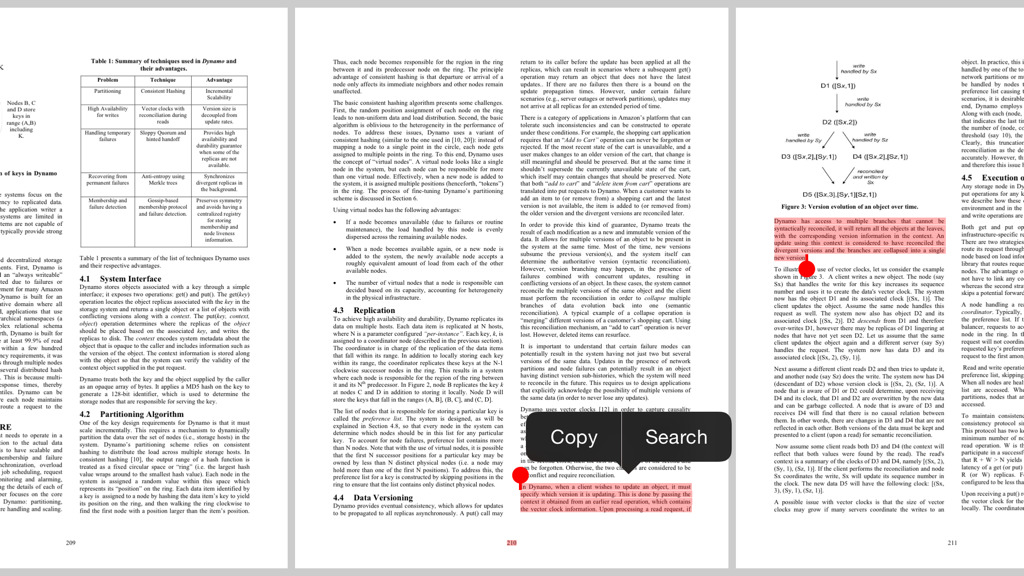
QuickSearch PDF Reader interface on iPad showing highlighted text and search options in a technical document.

QuickSearch PDF Reader interface on iPad showing highlighted text and search options in a technical document.

Find Information, Not Files

The tools that make this app stand out, trusted by 162K+ users.

🔍

Cross-Library Search

Search across your entire collection of PDFs simultaneously. One keyword search reveals every occurrence across all your files instantly.

Lightning-Fast Indexing

Documents are indexed in the background as soon as they are added, ensuring your search results are always immediate, no matter how large the library.

📑

Optimized Reader UI

Experience fluid navigation with page-snapping, double-tap zooming, and a high-speed scrub bar designed for serious research and deep reading.

About the app

Everything you need to know about QuickSearch PDF Reader.

Description

"QuickSearch PDF Reader is the tool you didn't realize you needed ... searches are extra fast but it's the interface design that shines ... a terrific app" -- The Unofficial Apple Weblog (tuaw.com) QuickSearch PDF Reader makes it fast and easy to find text in PDF documents. When you add a document, it is scanned in the background, so when you search, results are instant. And as well as searching within a document, you can search across all your documents at once. It’s also a great PDF viewer with a very natural style of navigation. It snaps to page boundaries, yet it’s easy to flick past them. Zooming is straightforward by pinching, or you can double-tap a region of text to zoom to fit. You can easily jump to any part of the document using the scrub bar. And everything is lightning-fast, even on large documents. You can easily get your documents into QuickSearch from other apps on your iPad or iPhone that support the "Open In..." function, such as Mail, Safari, or Dropbox. You can also use iTunes File Sharing to transfer documents to and from your Mac or PC. Full step-by-step instructions are included.

Latest Version

2.2.15

Size

6.5 MB

First Released

May 18, 2012

Stop Hunting. Start Finding.

Join thousands of professionals who save hours every week. Download QuickSearch PDF Reader and search across your entire library instantly—no subscriptions, just lightning-fast performance for your iPad and iPhone.

Download on App Store

App information, icons, screenshots, and descriptions displayed on this page are sourced from the Apple App Store and are the property of their respective developers. Download estimates and rankings are based on MWM's proprietary models and may not reflect actual figures. This page is provided for informational and analytical purposes only.

Believe this page infringes your intellectual property? File a dispute