
This page is not an official page of the app or its developer, but an independent editorial publication created for informational and commentary purposes. Unless expressly stated otherwise, neither the app nor its developer is affiliated with, endorsed by, sponsored by, authorized by, or otherwise officially connected with MWM, Apple, Google Play, the app publisher, or the app's developer, and nothing on this page implies that the app was developed using MWM's services. Any trademarks, logos, screenshots, and other content remain the property of their respective owners.


Seeing
Security, demystified. This app grants users the power to transform their smartphone into an unblinking, remote sentinel for their home.
Downloads
750k+User Rating
Total Ratings
63.5KPublisher
Category
UtilitiesLocales
14Latest Version
2.0.6Size
153.7 MBFirst Released
Mar 25, 2024An analytical overview of the core functionalities enhancing home security and peace of mind.
Key Features of the 'Seeing' App
Instant Alerts for Doorbell Rings & Motion
The app provides instant notifications whenever a visitor presses the doorbell or the PIR motion sensors are triggered, ensuring users are always aware of activity at their property.
Seamless Two-Way Visitor Communication
It allows users to see, hear, and speak to visitors from anywhere, providing remote interaction capabilities for convenience and security.
Frequently Asked Questions
Everything you need to know about Seeing
What is the Seeing app and what does it do?
The Seeing app provides home monitoring by sending instant messages for doorbell presses or PIR motion sensor triggers. It enables users to view, hear, and speak to visitors in high-definition video from any location.
Does the Seeing app provide motion detection alerts?
Yes, the Seeing app offers motion detection capabilities. It sends instant messages when PIR motion sensors are triggered, and users can enable "Motion Alert" and configure "Human Detection" features in the settings.
What features are included with Seeing cloud storage?
Seeing cloud storage includes video review, video download, loop recording, and unlimited storage. These features are accessible upon subscribing to one of the available cloud plans.
How much does a Seeing cloud storage subscription cost?
A 6-month cloud storage plan for the Seeing app costs $28.99. The One Year Plan for cloud storage costs $29.99. These are automatic subscription services.
How do I cancel my automatic subscription for the Seeing app?
To cancel your Seeing automatic subscription, open your Apple phone "Settings," enter "iTunes Store & App Store," click your "Apple ID," select "View Apple ID," go to "Account Settings," click "Subscribe," and select "Seeing" to cancel.
Does the Seeing app offer human detection features?
Yes, the Seeing app offers advanced human detection. Users can enable a "Human Bounding Box" and specify "Human Detection Zones" within the device settings to refine alerts and monitoring.
Where can I find the Privacy Policy for the Seeing app?
The Privacy Policy for the Seeing app is available online. Users can access the full policy at https://www.seeing.store/privacy_policy.html, as provided in the app's official store description.
The following screenshots and description are sourced directly from the app's official store listing and are the property of the app developer.
App Store
Screenshots
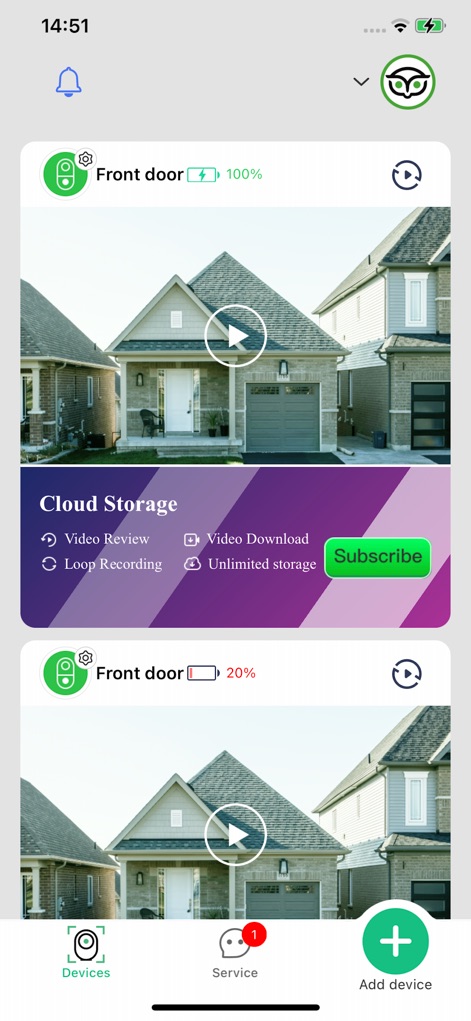
This tool presents a clear dashboard with live doorbell feeds and convenient cloud storage options for secure video management.
Home Hub Overview

Users can fine-tune their doorbell's performance with adjustable alerts like 'Ring Alert' and advanced 'Human Detection Zones' for personalized monitoring.
Smart Security Customization
Description
Download
More Like This
Apps with similar features and user experience

DMSS
Hangzhou Dong Bin Information Technology Co., Ltd.

Joolink
Shenzhen Jooan Technology Company

VicoHome: Smart Home Camera
PHOTON SAIL TECHNOLOGIES PTE. LTD.

Ubox
洪波 王

SimpliSafe Home Security App
SimpliSafe, Inc.

Active Mobile V4
JFL Equipamentos Eletronicos Industria e Comercio Ltda.

Dzees Home
Shenzhen Weixi Technology Co., Ltd

Ring - Always Home
Bot Home Automation, INC

Hik-Connect - for End user
Hangzhou Hikvision Digital Technology Co., Ltd.
This page is not an official page of the app or its developer, but an independent editorial publication created for informational and commentary purposes. Unless expressly stated otherwise, neither the app nor its developer is affiliated with, endorsed by, sponsored by, authorized by, or otherwise officially connected with MWM, Apple, Google Play, the app publisher, or the app's developer, and nothing on this page implies that the app was developed using MWM's services. Any trademarks, logos, screenshots, and other content remain the property of their respective owners.