
This page is not an official page of the app or its developer, but an independent editorial publication created for informational and commentary purposes. Unless expressly stated otherwise, neither the app nor its developer is affiliated with, endorsed by, sponsored by, authorized by, or otherwise officially connected with MWM, Apple, Google Play, the app publisher, or the app's developer, and nothing on this page implies that the app was developed using MWM's services. Any trademarks, logos, screenshots, and other content remain the property of their respective owners.


TempSpike
Monitor your grill remotely from your iPhone or Apple Watch. Get instant alerts when your meat reaches the ideal temperature and never overcook a prime cut again.
Downloads
567K+User Rating
Total Ratings
2K+Publisher
Category
Food & DrinkLocales
5Latest Version
2.2.1Size
42.6 MBFirst Released
Mar 26, 2022Master Your BBQ with Precision
Stop hovering and start hosting. TempSpike gives you the freedom to monitor your grill remotely while ensuring professional-grade results every time.
Total Wireless Freedom
Join your guests and watch the game. Long-range Bluetooth keeps you connected to your grill from anywhere in the house.
Perfect Results Guaranteed
Set custom temperature targets and receive instant alerts the moment your meat is ready, protecting your investment in premium cuts.
Frequently Asked Questions
Everything you need to know about TempSpike
How do I set up my TempSpike device?
To set up your TempSpike, fully charge the booster and probes. Turn on the booster by removing a probe or pressing 'S'. Then, open the TempSpike app and tap "Add Device" to pair.
Does TempSpike monitor both internal and ambient temperatures?
Yes, the TempSpike app monitors both internal and ambient temperatures. It displays these crucial measurements alongside your target temperature, ensuring comprehensive cooking oversight for users.
Can I receive alerts from the TempSpike app?
Yes, the TempSpike app provides immediate reminders and alerts. You can configure alarms for reaching target temperatures, ambient temperature ranges, and device disconnection.
Can I change the temperature unit in the TempSpike app?
Yes, the TempSpike app allows you to change the temperature unit. Navigate to the app's settings menu to select between Celsius (°C) and Fahrenheit (°F) as needed.
What types of alarms are available on the TempSpike?
The TempSpike offers alarms for internal temperature reaching its target, ambient temperature exceeding set ranges, and device disconnection. A Temp Pre-Alarm option is also available.
Does the TempSpike app provide cooking time estimations?
Yes, the TempSpike app provides an estimated time left for cooking. This feature appears on the detailed monitoring screen, helping users track their food's progress to the target.
Can I track temperature trends over time with TempSpike?
Yes, the TempSpike app tracks temperature trends. It generates a graph showing internal, target, and ambient temperatures over the cooking duration, providing visual insights.
Does TempSpike support multiple probes?
Yes, the TempSpike system supports monitoring multiple probes simultaneously. The app displays distinct readings for each connected probe, such as "Probe Black" and "Probe White," on the main screen.
The following screenshots and description are sourced directly from the app's official store listing and are the property of the app developer.
App Store
Screenshots
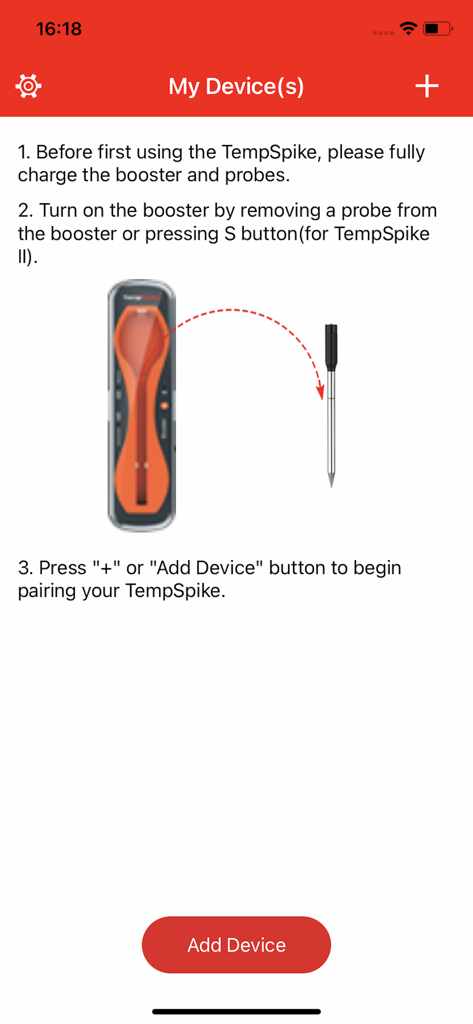
TempSpike app screen with instructions for pairing a wireless meat thermometer
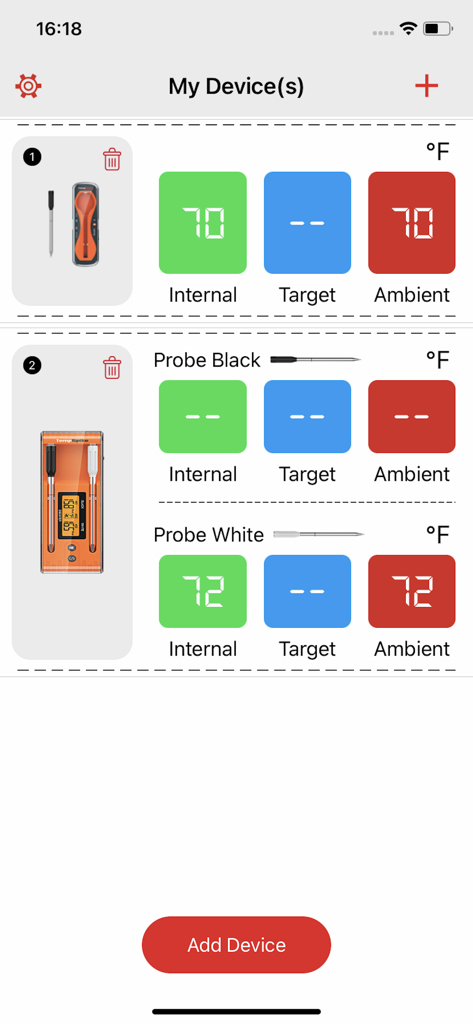
TempSpike mobile app dashboard showing real-time internal and ambient meat temperatures for multiple probes
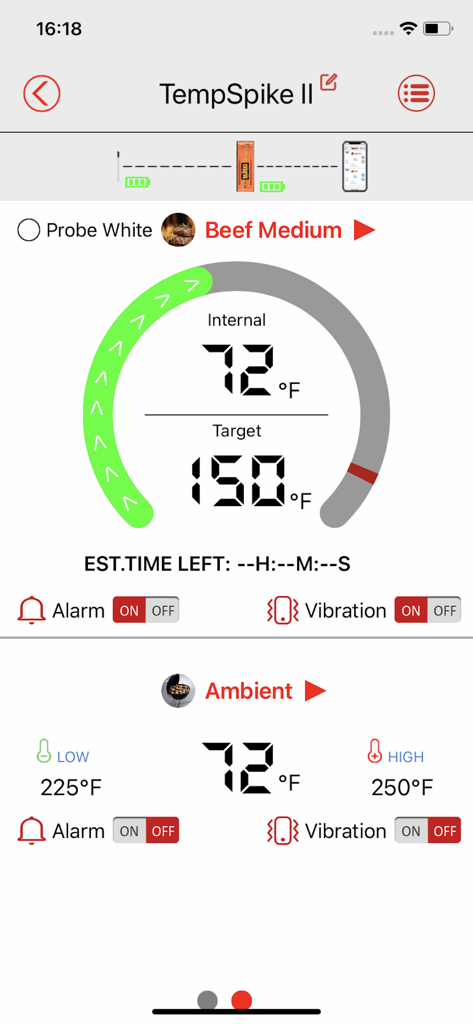
TempSpike mobile app interface showing internal meat temperature and target settings for beef medium.
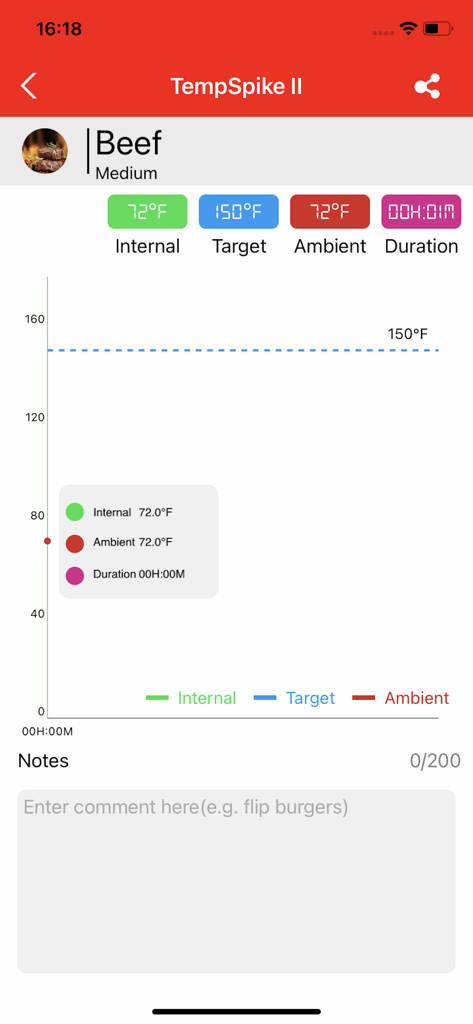
TempSpike mobile app dashboard showing real time beef temperature graph and target alerts
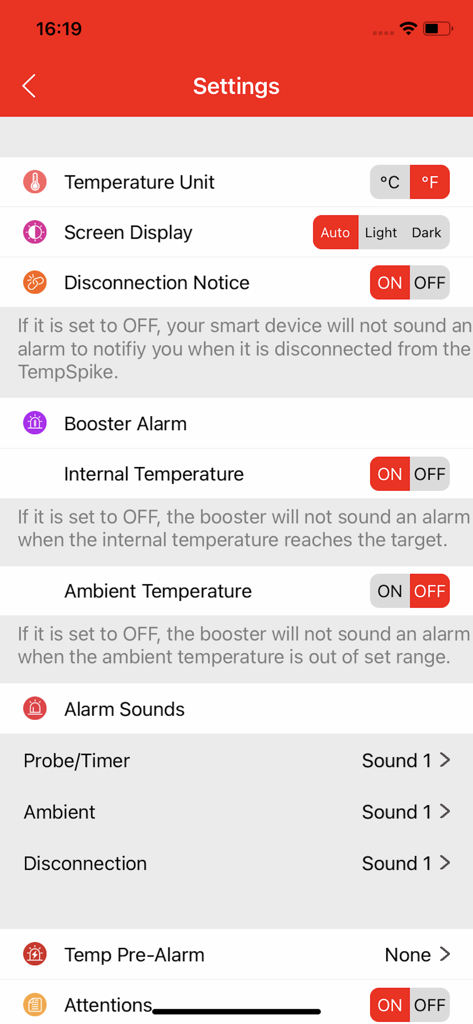
Settings interface of the TempSpike app showing configuration for alarms and temperature units.
Description
Download
More Like This
Apps with similar features and user experience

Traeger
Traeger Pellet Grills, LLC

Cookomix
Cooknet

ZauberTopf Rezepte
falkemedia digital GmbH

Thermomix® Cookidoo® App
Vorwerk, LLC

HomeID (Kitchen+)
Versuni Netherlands B.V

MEATER® Smart Meat Thermometer
Apption Labs Limited

CHEF iQ
RJ Brands, LLC

Starbucks-Inspired Secret Menu
Anthem Ventures LLC

Instant Connect ™
IB Appliances US Holdings, LLC
This page is not an official page of the app or its developer, but an independent editorial publication created for informational and commentary purposes. Unless expressly stated otherwise, neither the app nor its developer is affiliated with, endorsed by, sponsored by, authorized by, or otherwise officially connected with MWM, Apple, Google Play, the app publisher, or the app's developer, and nothing on this page implies that the app was developed using MWM's services. Any trademarks, logos, screenshots, and other content remain the property of their respective owners.