
This page is not an official page of the app or its developer, but an independent editorial publication created for informational and commentary purposes. Unless expressly stated otherwise, neither the app nor its developer is affiliated with, endorsed by, sponsored by, authorized by, or otherwise officially connected with MWM, Apple, Google Play, the app publisher, or the app's developer, and nothing on this page implies that the app was developed using MWM's services. Any trademarks, logos, screenshots, and other content remain the property of their respective owners.


TestFlight
Unforgiving user feedback defines success. This app empowers developers to face that reality early, shaping their product with unvarnished insights.
Downloads
100M+User Rating
Total Ratings
15.2MPublisher
Category
Developer ToolsLocales
33Latest Version
4.1.0Size
16.7 MBFirst Released
Jul 23, 2014TestFlight: A Comprehensive Beta Testing Platform
An Analytical Overview of Its Core Features for Mobile App Development and Quality Assurance
Pre-App Store Release Validation
The app enables developers to thoroughly test their applications and App Clips in real-world conditions prior to public availability on the App Store, significantly reducing post-launch issues.
Automated Crash & Usage Analytics
This tool automatically collects detailed crash logs and anonymized usage data, providing developers with essential insights to quickly identify and resolve stability and performance issues.
Centralized Feedback Mechanism
It provides a straightforward and structured system for beta testers to submit comprehensive feedback, including bug reports, feature requests, and usability suggestions, directly to developers.
Flexible Beta Build Distribution
The app simplifies the distribution of beta versions to a select group of testers, supporting various app types including iPhone, iPad, watchOS, and tvOS apps.
Diverse Tester Invitation Options
It allows developers to invite testers using convenient methods such as email invitations or shareable public links, offering flexibility in managing test groups.
App Clip Beta Support
The platform extends its testing capabilities to App Clips, enabling developers to thoroughly evaluate these miniature app experiences before their official release.
Frequently Asked Questions
Everything you need to know about TestFlight
What is TestFlight and what does it do?
TestFlight enables users to test beta versions of apps and App Clips, providing valuable feedback directly to developers before their apps are released on the App Store.
How do developers invite testers to TestFlight?
Developers invite testers to TestFlight beta programs through email invitations or by providing a public link. Testers then accept these invitations to begin testing.
What data does TestFlight collect during beta testing?
When you test a beta app via TestFlight, Apple collects and sends crash logs, usage information, and any submitted feedback to the developer. Apple may also use crash logs and usage for its own product improvement.
How do developers use the data collected by TestFlight?
Developers use the information collected by TestFlight, including crash logs, usage data, and feedback, to improve their apps and related products before their official release.
Can users view all their beta apps in TestFlight?
Yes, TestFlight displays all beta apps a user is currently testing or has previously tested within its main interface. This includes apps that require updates.
Does TestFlight allow users to update beta apps?
Yes, TestFlight allows users to update beta apps directly from its interface. An 'Update' button appears next to apps with newer versions available for installation.
How do I accept a beta app invitation using TestFlight?
Yes, TestFlight presents a dedicated screen to accept beta app invitations, displaying app details, developer, category, and build expiration, with an 'Accept' button.
Can I send feedback to developers directly through TestFlight?
Yes, TestFlight provides a dedicated feedback interface where users can share thoughts, describe issues, and directly submit feedback to the app's developer.
Can I attach screenshots to my feedback in TestFlight?
Yes, TestFlight allows users to attach screenshots to their feedback submissions, providing developers with visual context for reported issues or suggestions.
Does TestFlight share my email address with developers when I submit feedback?
Yes, TestFlight indicates that beta feedback and device information are collected and shared with the developer, along with the user's email address.
Can I manage which devices I use for TestFlight beta testing?
Yes, TestFlight provides a settings menu where users can manage the devices they use for testing apps, listing current and other associated devices.
Does TestFlight support automatic updates for beta apps?
Yes, TestFlight features an option for 'Automatic updates for new apps'. This toggle enables automatic installation of new beta versions when they become available.
Can I provide feedback if I decide not to join a TestFlight beta app?
Yes, TestFlight allows users to provide feedback even if they choose not to join a beta app, using a 'Leave Feedback' option within the app list.
The following screenshots and description are sourced directly from the app's official store listing and are the property of the app developer.
App Store
Screenshots
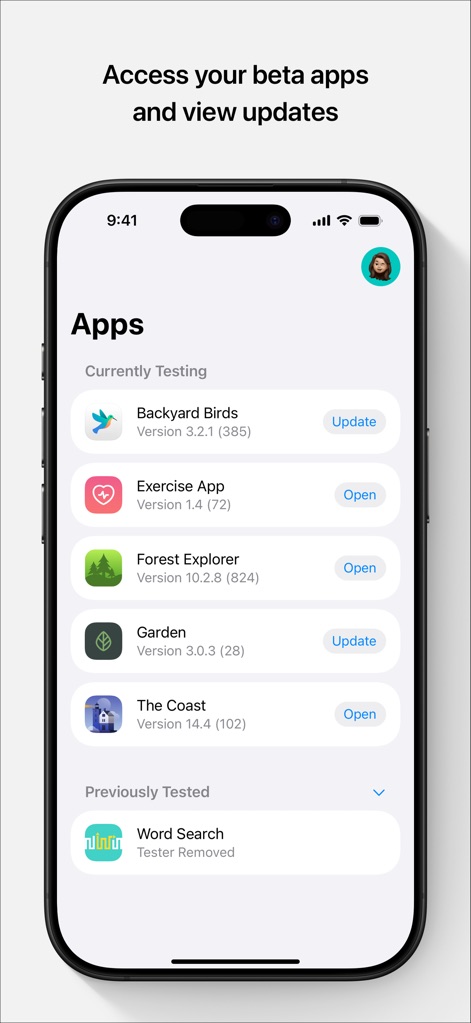
Beta App Dashboard
See how TestFlight organizes "Currently Testing" and "Previously Tested" applications, featuring version numbers and clear "Update" or "Open" action buttons.
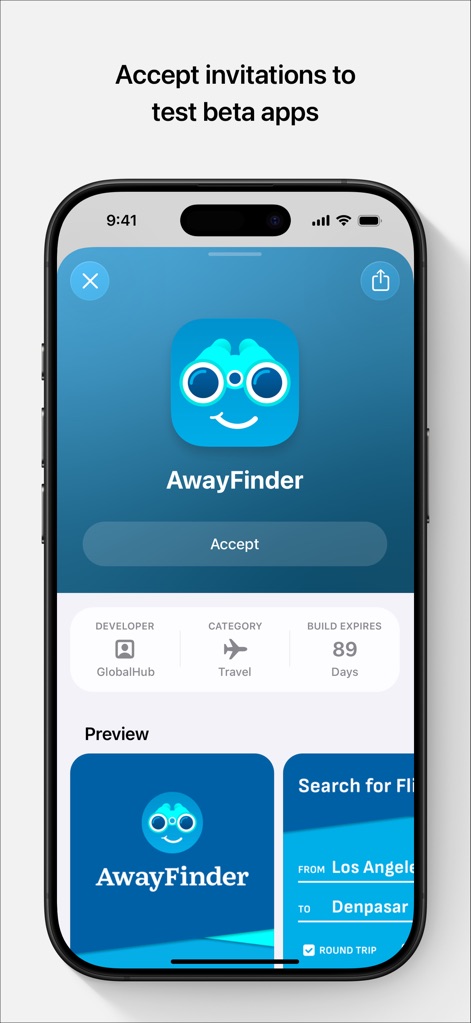
Invitation Acceptance
Discover how users accept invitations to beta apps, clearly displaying an "Accept" button alongside critical details like the "Developer" and "Build Expires" countdown.
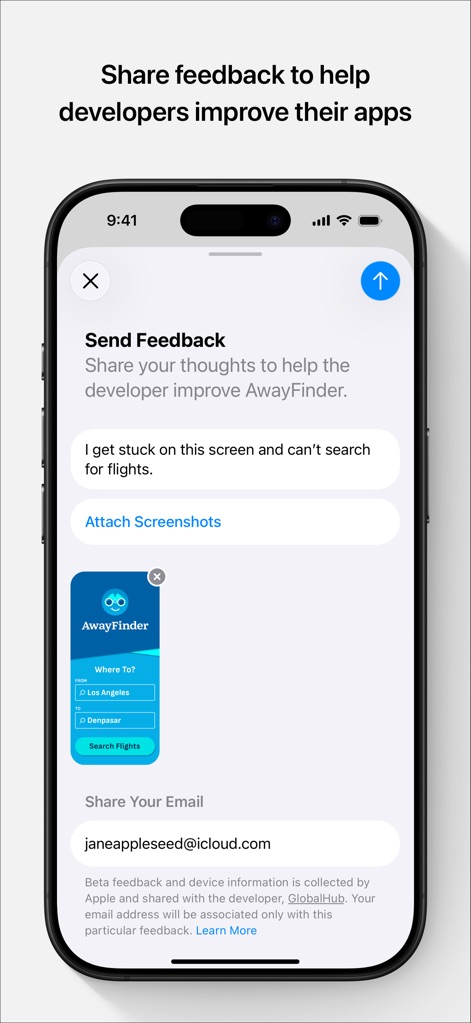
Feedback Submission
Observe the streamlined feedback submission process, highlighting the text input area for detailed comments and the "Attach Screenshots" feature for visual clarification.
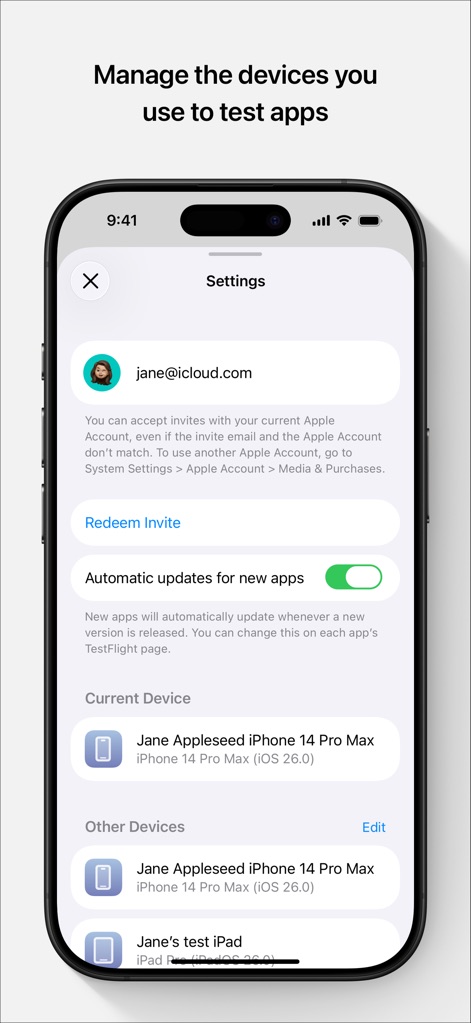
Device & Settings
Explore the app's settings, showcasing the "Automatic updates for new apps" toggle and a comprehensive list of "Current Device" and "Other Devices" used for testing.
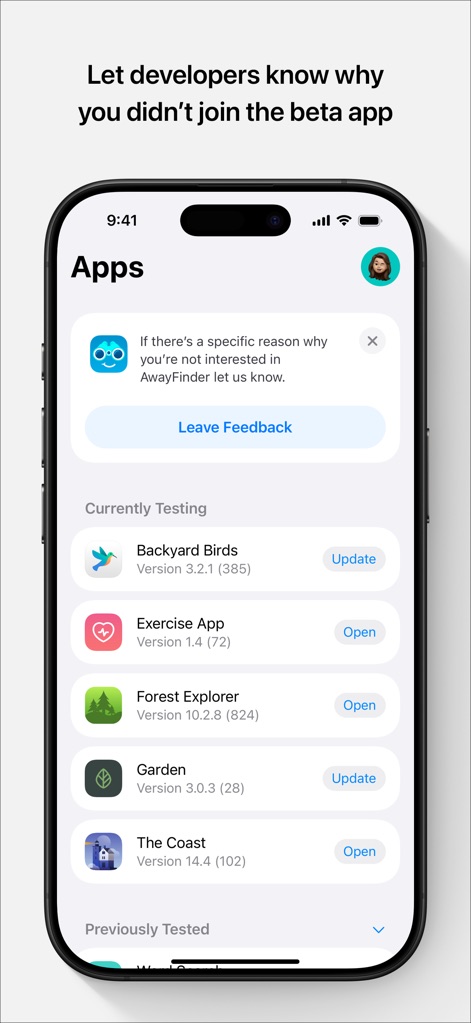
Decline Feedback
See how the app prompts for feedback when a user declines an invitation, featuring a dedicated "Leave Feedback" button and the familiar list of "Currently Testing" applications.
Description
Download
More Like This
Apps with similar features and user experience

This page is not an official page of the app or its developer, but an independent editorial publication created for informational and commentary purposes. Unless expressly stated otherwise, neither the app nor its developer is affiliated with, endorsed by, sponsored by, authorized by, or otherwise officially connected with MWM, Apple, Google Play, the app publisher, or the app's developer, and nothing on this page implies that the app was developed using MWM's services. Any trademarks, logos, screenshots, and other content remain the property of their respective owners.