
This page is not an official page of the app or its developer, but an independent editorial publication created for informational and commentary purposes. Unless expressly stated otherwise, neither the app nor its developer is affiliated with, endorsed by, sponsored by, authorized by, or otherwise officially connected with MWM, Apple, Google Play, the app publisher, or the app's developer, and nothing on this page implies that the app was developed using MWM's services. Any trademarks, logos, screenshots, and other content remain the property of their respective owners.


Tricefy - for Patients
Access, save, and share your ultrasounds and medical reports directly from your healthcare provider. Keep your complete health history in your pocket, even when you're offline.
Downloads
873K+User Rating
Total Ratings
100Publisher
Category
MedicalLocales
8Latest Version
2.0.20Size
50.3 MBFirst Released
Feb 20, 2019Everything You Need to Cherish Every Milestone
Access, store, and share your medical images and reports instantly. From first heartbeats to full health histories, your medical data is now as mobile as you are.
Share the Joy Instantly
Post high-quality ultrasound images and clips directly to social media or text them to family before you even leave the clinic parking lot.
Your History in Your Pocket
Access your entire pregnancy or medical case history anytime, anywhere—even without an internet connection for those important family moments.
Frequently Asked Questions
Everything you need to know about Tricefy - for Patients
What is the Tricefy app?
The Tricefy app receives and manages your medical images and clips digitally from healthcare providers. It allows you to view exams, share content, save images, and access your complete medical history.
How do I receive medical images through the Tricefy app?
You receive medical images by downloading the Tricefy app, then opening the link sent via email or text message from your healthcare provider. Your images and clips appear in the app.
Can I share images from the Tricefy app?
Yes, Tricefy allows users to share selected medical images on social media or any messaging app. This feature enables easy distribution of your medical content.
Does the Tricefy app support offline viewing?
Yes, the Tricefy app enables users to view a complete pregnancy or case history, including images and clips, even without an internet connection.
What languages does the Tricefy app support?
Yes, Tricefy supports multiple languages including English, German, French, Italian, Japanese, Portuguese (Brazil), Spanish, and Swedish. This provides broad accessibility.
Can I save images from the Tricefy app to my device?
Yes, Tricefy allows users to save their medical images directly to their photo library. This provides convenient access to your images.
Who shares medical images with users on Tricefy?
Healthcare providers connected to Tricefy share medical images and clips with patients directly through the app. The app serves as a secure delivery platform.
Does Tricefy organize medical images and reports together?
Yes, the Tricefy app displays your exams with images, clips, and reports side by side. This organization allows for a comprehensive overview of your medical data.
The following screenshots and description are sourced directly from the app's official store listing and are the property of the app developer.
App Store
Screenshots
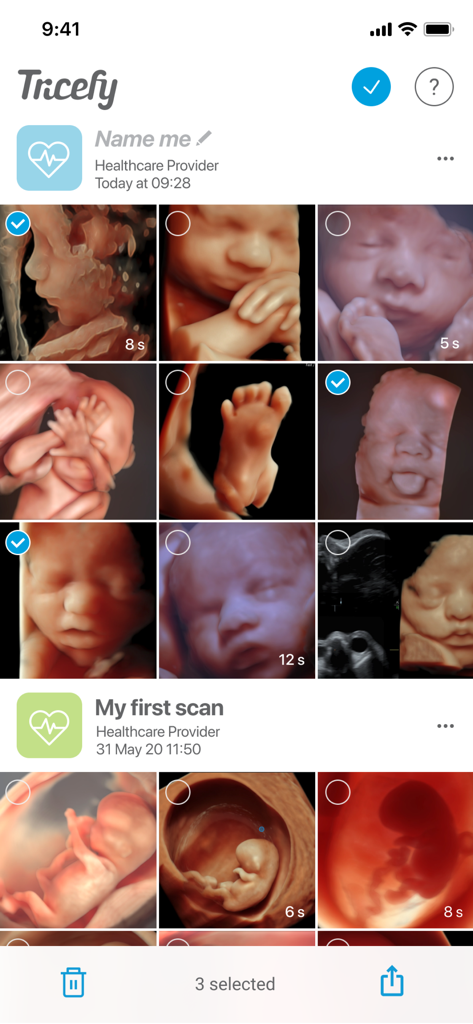
Gallery of 3D ultrasound images in the Tricefy for Patients app
Description
Download
More Like This
Apps with similar features and user experience

Accredo
Accredo Health Group, Inc

ASPIRE Galderma Rewards
Galderma Laboratories, L.P.

myAir™ by Resmed
RESMED LTD.

CenterWell Pharmacy
Humana Inc.

myAPP by Adapthealth
ADAPTHEALTH CORP

SleepCircle
Lincare Holdings Inc.

CVS Specialty
CVS Pharmacy

MARLÖ
Alcon Vision, LLC

MyCareLink Heart™
Medtronic, Inc.
This page is not an official page of the app or its developer, but an independent editorial publication created for informational and commentary purposes. Unless expressly stated otherwise, neither the app nor its developer is affiliated with, endorsed by, sponsored by, authorized by, or otherwise officially connected with MWM, Apple, Google Play, the app publisher, or the app's developer, and nothing on this page implies that the app was developed using MWM's services. Any trademarks, logos, screenshots, and other content remain the property of their respective owners.