
This page is not an official page of the app or its developer, but an independent editorial publication created for informational and commentary purposes. Unless expressly stated otherwise, neither the app nor its developer is affiliated with, endorsed by, sponsored by, authorized by, or otherwise officially connected with MWM, Apple, Google Play, the app publisher, or the app's developer, and nothing on this page implies that the app was developed using MWM's services. Any trademarks, logos, screenshots, and other content remain the property of their respective owners.


TV Cast for LG webOS
Unlock your LG Smart TV's true potential: This app turns your small screen into the ultimate remote for web-video domination.
Downloads
5M+User Rating
Total Ratings
28.6KPublisher
Category
Photo & VideoLocales
1Latest Version
3.7Size
33.0 MBFirst Released
Jun 2, 2016An analysis of key features for seamless iOS to LG Smart TV streaming.
Software Evaluation: TV Cast for LG webOS
Direct Web Video Casting
The app provides direct casting of web videos, online movies, and livestreams from an iOS device to an LG Smart TV, eliminating the need for complex media servers or additional hardware.
Simplified One-Tap Casting
It allows users to initiate streaming to their LG Smart TV with a single tap after the app automatically detects the video link, ensuring a straightforward and efficient user experience.
Extensive Video Format Compatibility
This tool features broad compatibility with various web video formats, including MP4, M3U8, HLS livestreams, and video-over-HTTPS, supporting a wide array of online content.
In-App Web Browser
The app includes an integrated web browser, enabling users to easily navigate websites and discover online video content directly within the application before casting.
Unrestricted Streaming Duration
It provides the capability for uninterrupted video playback, allowing users to stream content of any length—from short clips to full-length movies—without time limits.
Personal Media Casting
This tool features the ability to cast personal videos (MP4, M4V, MOV) directly from the iOS device's camera roll to the LG Smart TV, facilitating viewing of private media on a larger screen.
Advanced Playback Controls
It offers an advanced remote playbar, providing comprehensive video control directly from the iOS device, including scrubbing, fast-forward, rewind, play, pause, and stop functions.
Integrated Ad-Blocking
The app provides an optional ad-blocker feature that suppresses advertisements and pop-ups on most websites, leading to a more seamless and less interrupted viewing experience.
Frequently Asked Questions
Everything you need to know about TV Cast for LG webOS
What is TV Cast for LG webOS?
TV Cast for LG webOS is an app that allows users to browse the web and stream web videos, online movies, livestreams, and live TV shows to their LG Smart TV (webOS and NetCast).
Does TV Cast for LG webOS support DRM-protected content like Netflix?
No, TV Cast for LG webOS does not support DRM-protected videos such as Amazon Prime, Netflix, Hulu, Vudu, DirecTV, Xfinity, and HBO now. It also does not support iTunes movies or Flash video.
How do I control video playback on my LG TV with TV Cast for LG webOS?
You control the TV app and video playback using the hardware remote of your LG TV. An in-app purchase for a Remote Playbar offers advanced controls like scrubbing, forward, rewind, play, pause, and stop.
Is a subscription required for TV Cast for LG webOS?
No, TV Cast for LG webOS does not require subscriptions. It offers in-app purchases for premium features like an Ad-Blocker, Remote Playbar, and Local Videos.
Can I cast local videos from my iPhone to my LG TV using TV Cast for LG webOS?
Yes, the "Local Videos" upgrade feature allows casting camera roll videos (mp4, m4v, mov) from your iPhone or iPad to your LG Smart TV.
What types of video formats does TV Cast for LG webOS support?
TV Cast for LG webOS supports Mp4, m3u8, hls livestreams, and video-over-https for web videos. For local videos, it supports mp4, m4v, and mov formats.
Does TV Cast for LG webOS mirror my iPhone or iPad screen?
No, TV Cast for LG webOS does not mirror your entire iPhone or iPad screen. It only streams the video part of a website to your LG Smart TV, not the whole website content.
How do I install the companion app for TV Cast for LG webOS on my TV?
To enable video casting, open the LG App Store (LG Smart World / LG Content Store) on your TV, search for 'TV Cast', and then install the companion app.
Does TV Cast for LG webOS have an ad-blocker?
Yes, an "Ad-Blocker" is available as an in-app purchase. It blocks ads and popups on most websites and removes sponsoring ads from the app.
Can I cast photos and music with TV Cast for LG webOS?
Yes, TV Cast for LG webOS can cast photos, files, and music in addition to videos. The app interface includes a 'Personal Media' option for casting media files.
What is the "Premium Edition" upgrade in TV Cast for LG webOS?
The Premium Edition is an in-app purchase that unlocks all listed upgrade features. It also includes future features without additional cost upon release in updated app versions.
Is there a time limit for videos streamed with TV Cast for LG webOS?
No, there is no time limit for videos streamed with TV Cast for LG webOS. Users can watch videos of any duration, whether two minutes or several hours.
The following screenshots and description are sourced directly from the app's official store listing and are the property of the app developer.
App Store
Screenshots

Discover the app's foundational value through its 'NO SUBSCRIPTIONS' model and dual-function interface for 'Web Browser' and 'Personal Media' streaming.
Core App Capabilities
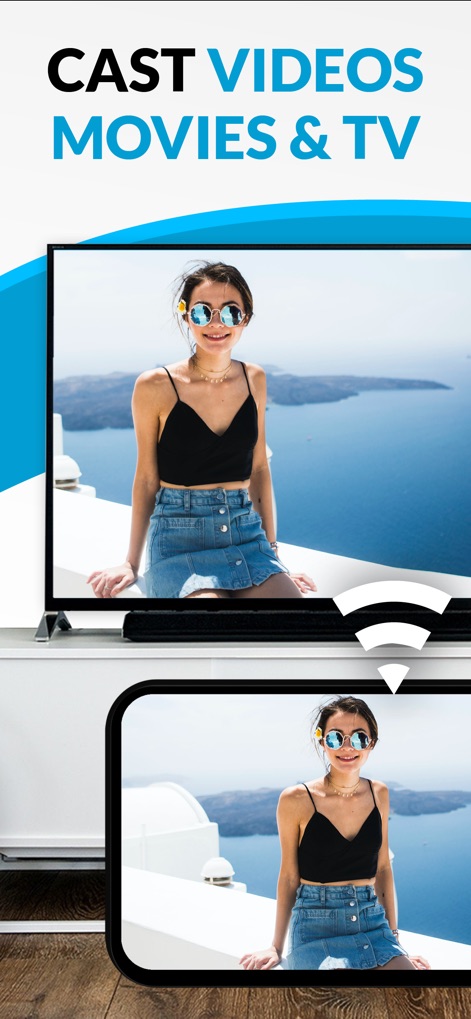
Witness the app's primary function as it effortlessly mirrors web videos from an iOS device onto an LG Smart TV, showcasing the 'CAST VIDEOS MOVIES & TV' feature.
Seamless Video Streaming

Observe the app's versatility in broadcasting various media, from personal photos on the phone screen to larger display on the LG TV, highlighting its 'CAST PHOTOS FILES & MUSIC' capability.
Extended Media Support
Description
Download
More Like This
Apps with similar features and user experience

Video Lite
Video Lite, Inc.

TV Cast Pro for Chromecast
Kraus und Karnath GbR 2Kit Consulting

TV Cast Pro for Google Cast
Kraus und Karnath GbR 2Kit Consulting

Chromecaster: Get Streaming TV
TV Cast Pte. Ltd.

Castify : Screen Mirroring App
PIRON APPS

TV Cast Pro for Samsung TV
Kraus und Karnath GbR 2Kit Consulting

TV Cast Pro for LG webOS
Kraus und Karnath GbR 2Kit Consulting

TV Cast Pro for Sony TV
Kraus und Karnath GbR 2Kit Consulting

Smart View - Cast Device to TV
EXTREME SOLUTIONS APPS SL
This page is not an official page of the app or its developer, but an independent editorial publication created for informational and commentary purposes. Unless expressly stated otherwise, neither the app nor its developer is affiliated with, endorsed by, sponsored by, authorized by, or otherwise officially connected with MWM, Apple, Google Play, the app publisher, or the app's developer, and nothing on this page implies that the app was developed using MWM's services. Any trademarks, logos, screenshots, and other content remain the property of their respective owners.