
This page is not an official page of the app or its developer, but an independent editorial publication created for informational and commentary purposes. Unless expressly stated otherwise, neither the app nor its developer is affiliated with, endorsed by, sponsored by, authorized by, or otherwise officially connected with MWM, Apple, Google Play, the app publisher, or the app's developer, and nothing on this page implies that the app was developed using MWM's services. Any trademarks, logos, screenshots, and other content remain the property of their respective owners.


uBlock Origin Lite
Experience a cleaner, faster web with the efficient content blocker designed to protect your privacy without draining your battery or CPU.
Downloads
285K+User Rating
Total Ratings
1K+Publisher
Category
UtilitiesLocales
1Latest Version
2026.111.1925Size
35.4 MBFirst Released
Aug 4, 2025Experience a Cleaner, Faster Web
uBlock Origin Lite brings professional-grade, high-performance content blocking to Safari, protecting your privacy and your device's battery life.
Zero-Impact Performance
Our declarative engine blocks content without consuming CPU or memory resources, keeping your device fast and extending battery life.
Privacy Without Compromise
Built-in protection against trackers and invasive scripts using industry-leading filter lists like EasyPrivacy and Peter Lowe's servers.
Frequently Asked Questions
Everything you need to know about uBlock Origin Lite
What is uBlock Origin Lite (uBOL)?
uBlock Origin Lite (uBOL) is an efficient content blocker. It operates without a permanent process, allowing the browser to perform CSS/JS injection-based content filtering directly, saving CPU and memory resources.
What default filter lists does uBlock Origin Lite use?
uBlock Origin Lite (uBOL) includes uBlock Origin's built-in lists, EasyList, EasyPrivacy, and Peter Lowe’s Ad and tracking server list by default. These are pre-enabled for immediate content blocking.
Can users enable more rulesets in uBlock Origin Lite?
Yes, users can enable more rulesets in uBlock Origin Lite (uBOL) via the options page. Access it by clicking the 'Cogs' icon located in the extension's popup panel.
How does uBlock Origin Lite avoid consuming CPU and memory?
uBlock Origin Lite (uBOL) is declarative. The browser itself handles content filtering, eliminating the need for a permanent uBOL process. This design minimizes CPU and memory consumption.
How do I remove an element from a webpage with uBlock Origin Lite?
To remove an element with uBlock Origin Lite, open its popup panel. Then, select the 'Remove an element' option. This action enables specific, targeted content removal.
Can I create a custom filter in uBlock Origin Lite?
Yes, uBlock Origin Lite allows creating custom filters. This function is available directly from the extension's popup panel by selecting 'Create a custom filter.'
How do I report an issue in uBlock Origin Lite?
Users can report issues in uBlock Origin Lite by accessing the popup panel and selecting 'Report an issue.' This option facilitates direct feedback to the developers.
Does uBlock Origin Lite automatically reload pages after filtering changes?
Yes, uBlock Origin Lite features a setting to 'Automatically reload page when changing filtering mode.' This ensures that filtering adjustments are applied instantly.
Can uBlock Origin Lite show blocked requests on its icon?
Yes, uBlock Origin Lite can display the count of blocked requests on its toolbar icon. Enable the 'Show the number of blocked requests on the toolbar icon' setting.
What is the Basic filtering mode in uBlock Origin Lite?
The Basic filtering mode in uBlock Origin Lite offers network filtering from selected lists. It operates without requiring permission to read or modify website data.
What is the Optimal filtering mode in uBlock Origin Lite?
The Optimal filtering mode in uBlock Origin Lite dynamically adjusts filtering for each website. It works best according to the site's characteristics and available filters.
Does uBlock Origin Lite include malware protection filter lists?
Yes, uBlock Origin Lite includes 'uBlock filters - Badware risks' under its malware protection and security section. Users can enable this filter list via the Filter lists tab.
Can uBlock Origin Lite block mobile ads?
Yes, uBlock Origin Lite can block mobile ads. The app includes an 'AdGuard - Mobile Ads' filter list, which users can enable in the Filter lists settings.
The following screenshots and description are sourced directly from the app's official store listing and are the property of the app developer.
App Store
Screenshots
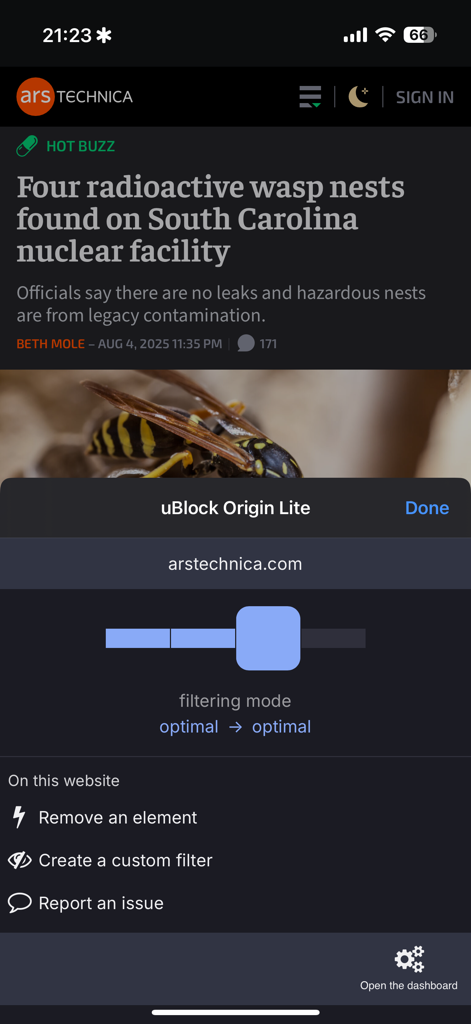
uBlock Origin Lite extension popup on an iPhone showing filtering modes and tools for a news website
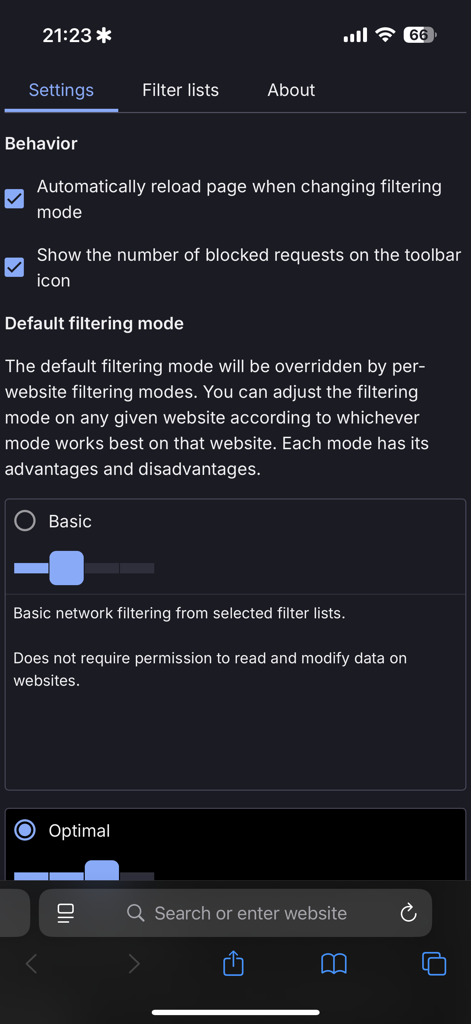
Settings screen of uBlock Origin Lite on iOS showing filtering mode options and behavior settings
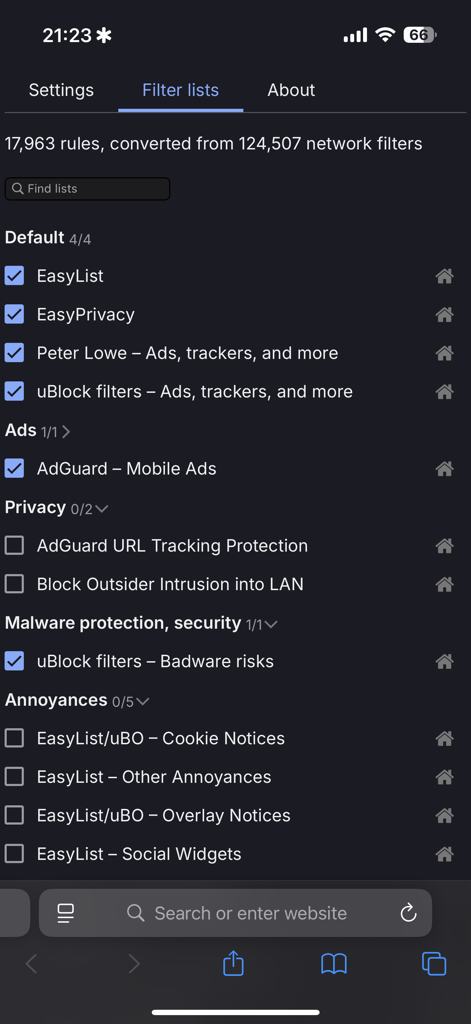
uBlock Origin Lite filter lists settings screen showing active rules for ads and privacy
Description
Download
More Like This
Apps with similar features and user experience

SkyBlue Ad Blocker for Safari
Circo, Inc.

Wipr 2
Kaylee Calderolla
Ad Blocker ·
Anish Modan

AdLock: Ads Blocker & Privacy
Hankuper s.r.o.
Adblock Plus for Safari (ABP)
Eyeo GmbH

1Blocker: Ad Blocker
1Blocker LLC

AdSpamBlock -adblocker
MISOSIL, INC.

AdBlock
AdBlock Labs Sp. z o. o.

Wipr
Kaylee Calderolla
This page is not an official page of the app or its developer, but an independent editorial publication created for informational and commentary purposes. Unless expressly stated otherwise, neither the app nor its developer is affiliated with, endorsed by, sponsored by, authorized by, or otherwise officially connected with MWM, Apple, Google Play, the app publisher, or the app's developer, and nothing on this page implies that the app was developed using MWM's services. Any trademarks, logos, screenshots, and other content remain the property of their respective owners.