Unity Intercom

Unity Intercom

Download on App Store
Logo of Unity Intercom

Unity Intercom: Professional-Grade IP Intercom for Live Production and Teams

Experience crystal-clear, low-latency communication over Wi-Fi or Cellular. Scale your coordination with 128 channels and integrated tally support on the devices you already own.

Download on App Store

Publisher

Audivero LLC

Category

Productivity

Downloads

0

User Rating

4.1/5

Total Ratings

0

Locales

1

Your Command Center

Discover the interface used by 0 users.
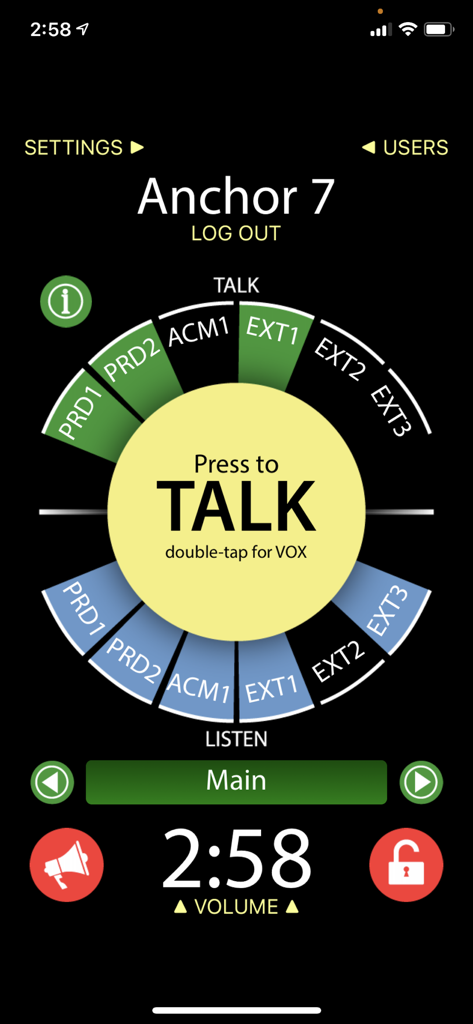
Unity Intercom mobile app interface featuring the central press to talk button and multiple communication channels

Unity Intercom mobile app interface featuring the central press to talk button and multiple communication channels

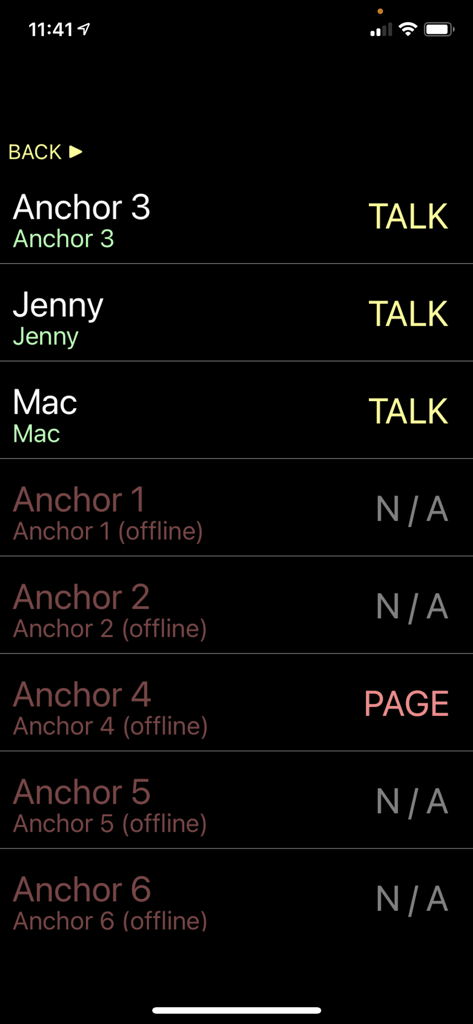
Unity Intercom app interface showing a list of team members with active talk status

Unity Intercom app interface showing a list of team members with active talk status

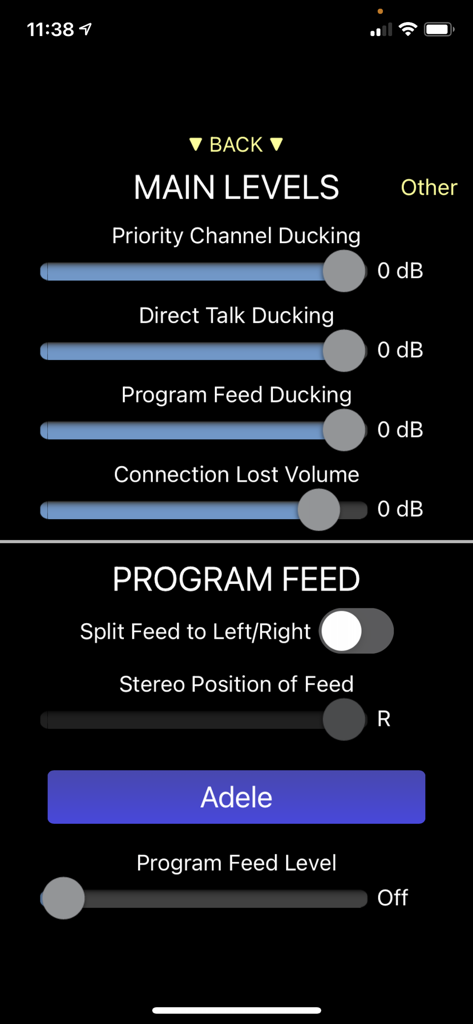
Unity Intercom app interface displaying audio mixing settings and program feed controls

Unity Intercom app interface displaying audio mixing settings and program feed controls

Professional Comms for Every Production

The tools that make this app stand out, trusted by 0 users.

🎧

Crystal-Clear, Low Latency

Experience broadcast-quality audio that outperforms traditional cell calls, ensuring your crew stays perfectly synced in real-time.

🔴

Integrated Tally Lights

Transform your iPhone into a professional tally light. Sync preview and on-air status directly with your video switcher for flawless production.

🌐

Global Team Connectivity

Break the range limits of traditional radios. Coordinate up to 128 channels across Wi-Fi or Cellular, whether your team is on-site or remote.

About the app

Everything you need to know about Unity Intercom.

Description

Unity Intercom is a next generation network-based full-duplex intercom system that is incredibly simple to use, yet is as powerful as traditional systems costing many times more! The Unity Intercom app works in conjunction with Unity Intercom Server Unity Intercom can be used for a variety of applications • Multi-camera live video production (including Tally!) • Fleet/delivery management • Hotel staff • Hospitality personnel • Construction/installation crews • And many, many more Works over any IP based network • Unity Intercom works using either Wi-Fi or Cellular data. Users can be within the same network as the Unity server, or travelling around the world communicating over the internet. Amazingly clear, low-latency audio • Unity audio is significantly higher quality than regular cell phone communications, with no additional latency External program feed • Unity server comes with a built-in, sample program feed, but can be upgraded for a custom Program Feed. Supports up to 128 channels in groups of 6, with a standard limit of 63 users • Users can be restricted to access any or all of the 128 channels for talk/listen, listen only, or no access. • Additional users can be purchased, up to a total of 63 simultaneous users on the Unity system. Unlimited user counts are also available through server upgrades. Integrates with external audio I/O • Upgrade Unity to allow audio to be routed to and from an external Com system, effectively creating wireless com stations that work with a traditional hard-wired intercom over any existing network. External tally support • The Unity server can be upgraded to accept tally information from a variety of video switching systems, and can send this information to remote Unity app users. Unity iOS devices become actual tally lights, showing both preview and on-air talent tally functionality. • Great for production environments!

Latest Version

3.0.32

Size

20.2 MB

First Released

Jul 26, 2014

Ready to Sync Your Entire Crew?

Ditch the expensive, bulky hardware. Download Unity Intercom today and experience professional-grade, low-latency communication on the devices you already own.

Download on App Store

App information, icons, screenshots, and descriptions displayed on this page are sourced from the Apple App Store and are the property of their respective developers. Download estimates and rankings are based on MWM's proprietary models and may not reflect actual figures. This page is provided for informational and analytical purposes only.

Believe this page infringes your intellectual property? File a dispute