
This page is not an official page of the app or its developer, but an independent editorial publication created for informational and commentary purposes. Unless expressly stated otherwise, neither the app nor its developer is affiliated with, endorsed by, sponsored by, authorized by, or otherwise officially connected with MWM, Apple, Google Play, the app publisher, or the app's developer, and nothing on this page implies that the app was developed using MWM's services. Any trademarks, logos, screenshots, and other content remain the property of their respective owners.


Vault - Hide photos & videos
No more digital skeletons in the closet. The app hands users ironclad control over their visual data, making prying eyes a non-issue.
Downloads
2.5M+User Rating
Total Ratings
25.3KPublisher
Category
ProductivityLocales
6Latest Version
4.6.36Size
53.0 MBFirst Released
Jul 17, 2012An Analytical Overview for Privacy-Conscious Users
Vault - Hide photos & videos: Key Security & Privacy Features
Private Cloud Backup
The app provides a private cloud space, automatically backing up all users' sensitive photos and videos to ensure data is protected from loss and always accessible.
Intruder Selfie & Break-in Alerts
This tool captures a photo of anyone attempting to access the vault with an incorrect password, providing a crucial layer of security and identifying potential intruders.
App Disguise & Camouflage
The app disguises itself as a different application, such as a camera interface, enhancing discretion and making it difficult for unauthorized individuals to detect its presence.
Secure Password/PIN Access
It allows users to secure access to the application with a personal digital password, forming the fundamental barrier against unauthorized entry to private media.
Biometric Unlock (Touch ID)
The app supports biometric authentication, such as Touch ID, offering a convenient and rapid way for authorized users to unlock their vault securely.
Panic Switch / Face-Down Exit
This tool features a panic switch, allowing the app to instantly exit and launch another application when the device is faced down, ensuring immediate privacy.
Immediate Encryption for New Photos
It ensures that newly taken photos are immediately encrypted and saved directly into the vault, preventing them from appearing in the standard photo album.
Bulk Media Import & Management
The app facilitates bulk import of photos and videos, along with intelligent folder management, which helps users organize their secure media efficiently.
Frequently Asked Questions
Everything you need to know about Vault - Hide photos & videos
How does Vault hide photos and videos?
Vault secures photos and videos by encrypting them and requiring a personal digital password or Touch ID for access. It supports bulk import and intelligent folder management for organization.
Is Vault - Hide photos & videos safe for private data?
Yes, Vault ensures privacy through password protection, Touch ID, immediate encryption of new photos, and professional mobile security services. It also backs up data to a private cloud.
Does Vault detect intruders?
Yes, Vault detects intruders. If an incorrect password attempt occurs, the app automatically takes a photo of the intruder's face and records the incident.
Can Vault disguise itself as another app?
Yes, Vault can disguise itself as a camera interface, providing a secret login. This feature enhances privacy by making the app appear less conspicuous.
How do I quickly exit Vault?
You quickly exit Vault by facing your phone screen down. The application automatically closes and launches another pre-selected app for discretion.
Does Vault offer cloud backup for hidden media?
Yes, Vault provides private cloud backup. All your hidden photos and videos are automatically and securely backed up to your personal Cloud Space for protection.
How can I input photos and videos into Vault from my PC?
You can input photos and videos into Vault from your PC directly via Wi-Fi. Both devices must be on the same network; then access the provided web service URL.
What is the pricing for Vault Pro subscriptions?
Vault Pro subscriptions cost $2.99 for 1 month, $7.99 for 3 months, and $19.99 for 12 months in the U.S. Pricing varies internationally.
Do Vault Pro subscriptions auto-renew?
Yes, Vault Pro subscriptions automatically renew 24 hours before the term ends, unless disabled. The renewal cost is identical to the original subscription.
How do I turn off auto-renewal for Vault Pro?
You turn off Vault Pro auto-renewal by accessing your iTunes Account Settings after purchase. Refunds are not provided for any unused portion of the subscription term.
Can the password for photos and videos in Vault be removed?
Yes, the password protecting your photos and videos within Vault can be cancelled at any time based on your preference.
The following screenshots and description are sourced directly from the app's official store listing and are the property of the app developer.
App Store
Screenshots

This screenshot highlights the app's core function: discreetly locking private photos and videos, showcased through a modern design and clear textual prompt.
Secure Your Media

The app offers robust access control, allowing users to secure content with a personal passcode and conveniently unlock with Touch ID.
Advanced Access Control

This visual demonstrates the app's capability to hide photos and videos, symbolized by a secure digital vault and integrated with various content sources.
Digital Content Vault

Users can create private albums within the app, effectively organizing media and securing access with a visible encryption password interface.
Organize Encrypted Albums

This screenshot showcases the app's personalized locker, allowing users to select various backgrounds for their passcode entry interface while maintaining secure access.
Customizable Lock Screen

The app provides seamless cloud backup for user data, including diverse media and personal information, ensuring content is protected and accessible.
Secure Cloud Backup

This feature allows users to input media directly from a PC via Wi-Fi, simplifying content transfer with clear on-screen instructions.
Wireless Data Transfer
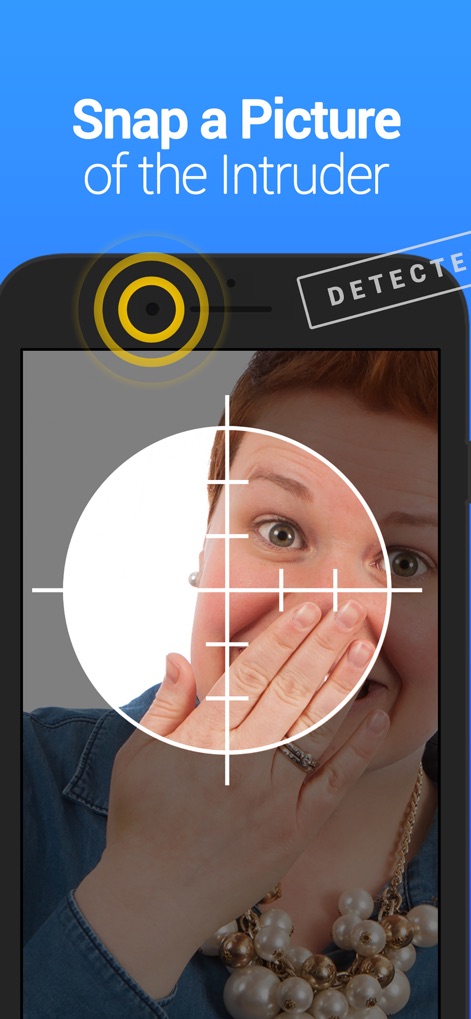
The app enhances security with intruder detection, automatically snapping a picture of anyone attempting unauthorized access, visible through a camera viewfinder.
Intruder Detection Security

This innovative feature allows users to instantly hide the app by simply flipping their phone, a quick-action security measure that operates from the main interface.
Instant Disguise Feature

The app offers a discreet login experience, featuring a cleverly disguised keyboard that mimics a camera interface, indicating a premium security offering.
Discreet Login Method
Description
Download
More Like This
Apps with similar features and user experience

Private Photo Vault - Pic Safe
Legendary Software Labs LLC

PBox-Private Photo Vault
宇 刘

Safe Lock - Hidden Photo Vault
Katerina Akhlebinina

SV - Private Photo Vault PRO
Legendary Software Labs LLC

PV - Secret Photo Album
Haibin Jiao

Converter: Hidden Photo Vault
Dmitry Petrov

Calculator Lock - Secure Vault
MacyMind

Secret Photo Vault: Keepsafe
KeepSafe Software, Inc

Digiposte: secure storage
la poste
This page is not an official page of the app or its developer, but an independent editorial publication created for informational and commentary purposes. Unless expressly stated otherwise, neither the app nor its developer is affiliated with, endorsed by, sponsored by, authorized by, or otherwise officially connected with MWM, Apple, Google Play, the app publisher, or the app's developer, and nothing on this page implies that the app was developed using MWM's services. Any trademarks, logos, screenshots, and other content remain the property of their respective owners.